Introduction
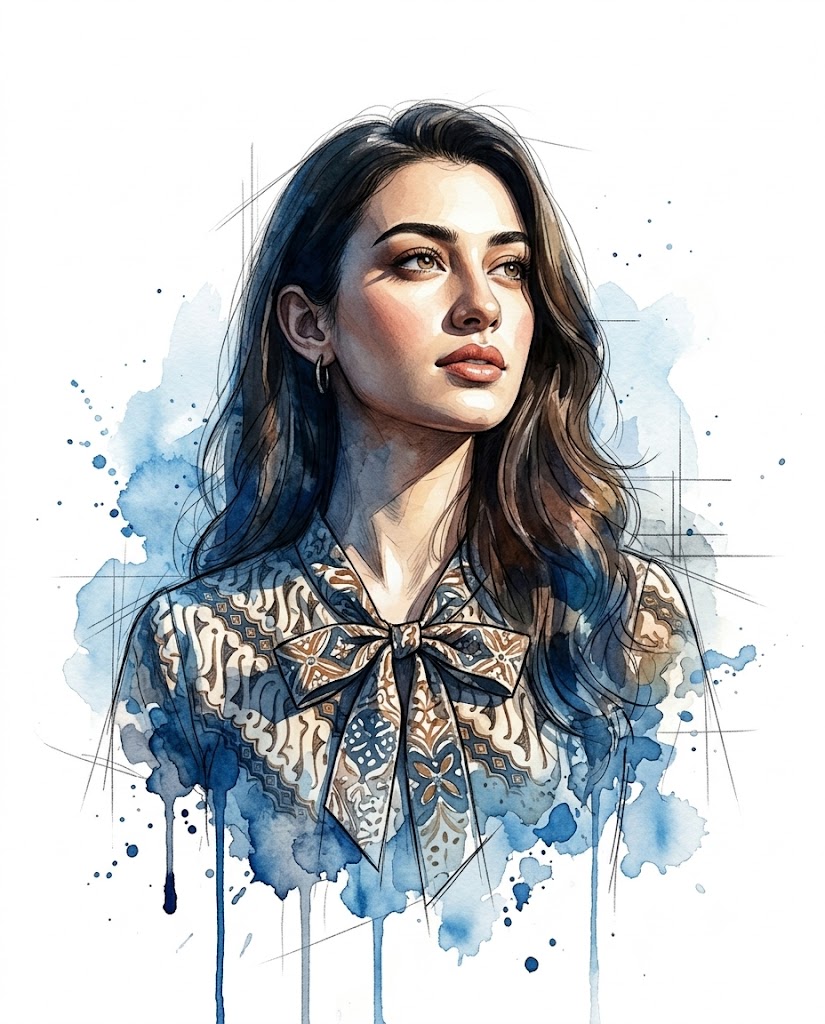
Digital portrait art has evolved dramatically over the last decade, blending traditional artistic techniques with modern technology to create stunning visual masterpieces. Among the most captivating styles is the Watercolor Sketch Portrait Illustration, a unique artistic approach that combines photorealistic facial rendering with expressive watercolor splashes, architectural sketch lines, ink effects, and painterly textures. This style merges realism with creativity, producing portraits that feel both sophisticated and emotionally engaging.
"Watercolor Sketch Portrait Illustration Prompt"
Create an 8K ultra-high-resolution mixed-media portrait illustration that blends photorealistic character rendering with expressive watercolor and architectural sketch techniques. Face Matching & Identity Accuracy: Match the exact facial structure from the reference image — same jawline definition, haircut length, skin tone, eye shape, and nose proportions. Subject & Expression: A confident individual with sharp, realistic facial features, detailed skin texture, and defined cheekbones. The expression is serious, focused, and contemplative, with a subtle furrow in the brow. The gaze is directed upward and off-camera, suggesting determination and forward vision. Pose: Chest-up portrait. The torso is angled slightly toward the viewer’s left while the head turns upward toward the right side of the frame. This twist in the shoulders and neck creates a dynamic, heroic stance. Outfit: She wears a short-puff-sleeve top with a brown and cream geometric batik-style pattern and a small decorative bow at the neckline. The Outfit is rendered with painterly shading and sketch-style cross-hatching that gradually dissolves into watercolor textures toward the lower part of the portrait. Composition & Camera Angle: Medium close-up (chest-up). Slight low-angle "hero shot" perspective that emphasizes the jawline and gives the subject a powerful presence. The subject is placed slightly off-center, leaving negative space around the head and shoulders. Lighting: Dramatic directional lighting from the upper-left side. The light highlights the forehead, nose bridge, and cheekbones while casting deeper shadows along the opposite side of the face and neck, creating strong contrast and depth. Background & Artistic Style: Clean white background with no physical environment. Behind the subject are expressive blue watercolor splashes, ink drips, and paint blooms forming an energetic halo. Thin architectural pencil construction lines and sketch marks intersect across the composition, adding structure and motion. Artistic Medium & Texture: A hybrid style combining photorealistic digital painting, loose watercolor washes, ink splatter effects, and raw sketch linework. The face remains highly detailed and realistic while the shoulders and lower areas transition into unfinished painterly strokes and abstract watercolor textures. Color Palette: Natural warm skin tones contrasted with a vibrant watercolor hues of blue against a bright white canvas. Technical Details: Ultra-detailed digital illustration, 8K resolution, sharp facial focus, painterly brush textures, watercolor bloom effects, ink splashes, architectural sketch lines, soft fade-out edges. Aspect Ratio: 4:5.
Unlike traditional portraits that focus entirely on realism, watercolor sketch portraits introduce an artistic narrative through abstract paint blooms, dynamic brushwork, and unfinished sketch elements. The result is a visually striking composition that balances structure and spontaneity. The face remains highly detailed and realistic while the surrounding artwork dissolves into expressive textures and watercolor effects.
One of the defining features of this portrait style is identity preservation. The uploaded reference image is used strictly for facial matching, ensuring that the final artwork accurately reflects the subject's natural facial features, skin tone, hairstyle, jawline, eye shape, and proportions. This combination of realism and artistic interpretation creates a portrait that feels personal, premium, and visually memorable.
The use of dramatic lighting, upward gaze, and heroic composition further enhances the emotional impact. The subject appears determined, thoughtful, and visionary, making this style ideal for personal branding, creative portfolios, social media content, book covers, editorial illustrations, and artistic wall art.
Whether you are a designer, photographer, content creator, or digital artist, the Watercolor Sketch Portrait Illustration Prompt offers an exceptional way to transform ordinary portraits into gallery-worthy artwork.
How To Use Photo Editing?
Photo editing plays a crucial role in refining watercolor sketch portraits and achieving a professional final result. While AI image generators can create impressive artwork, thoughtful editing helps improve realism, strengthen artistic effects, and enhance overall composition.
The first step is verifying facial accuracy. Compare the generated image with the original reference photograph to ensure facial proportions, skin texture, hairstyle, and expression remain authentic.
Once identity accuracy is confirmed, focus on improving artistic elements.
Important editing areas include:
- Facial detail refinement
- Skin texture preservation
- Watercolor enhancement
- Ink splash adjustment
- Sketch line cleanup
- Contrast balancing
- Lighting enhancement
- Color harmony
The key challenge with this style is maintaining a balance between realism and artistic abstraction. The face should remain sharp and realistic while the surrounding watercolor textures appear loose, expressive, and organic.
Avoid excessive sharpening or over-processing. Artistic imperfections often contribute to the beauty of watercolor illustration.
A successful watercolor portrait feels handcrafted rather than digitally manufactured.
Tools You Can Use For Prompt Copy and Create Photo
1. ChatGPT
ChatGPT is an excellent tool for creating detailed prompts that accurately describe artistic styles, lighting, composition, and portrait characteristics.
2. Midjourney
Midjourney is highly popular for generating watercolor illustrations, artistic portraits, and mixed-media artwork.
3. Flux AI
Flux AI provides impressive facial identity preservation while maintaining realistic textures and painterly details.
4. Leonardo AI
Leonardo AI offers strong control over illustration styles, character design, and creative rendering.
5. Adobe Photoshop
Photoshop remains one of the most powerful tools for editing watercolor-style portraits.
Useful features include:
- Layer masking
- Brush effects
- Texture overlays
- Color grading
- Artistic enhancements
6. Adobe Lightroom
Lightroom helps improve:
- Exposure balance
- Contrast
- Color harmony
- Highlight recovery
- Tonal adjustments
7. Procreate
Procreate is widely used by digital artists for creating hand-painted watercolor effects and sketch illustrations.
8. Topaz Photo AI
Topaz Photo AI enhances image resolution and detail while preserving realistic textures.
Combining multiple tools often produces the highest-quality artistic result.
How To Edit Photo?
Step 1: Generate the Base Portrait
Begin by generating the portrait using your preferred AI platform.
Review:
- Face accuracy
- Expression quality
- Pose alignment
- Watercolor effects
- Background composition
Step 2: Verify Facial Identity
Compare the generated image with the reference photograph.
Check:
- Jawline shape
- Eye structure
- Nose proportions
- Hairline
- Skin tone
Maintaining identity accuracy should always remain the top priority.
Step 3: Enhance Skin Realism
The face serves as the focal point of the composition.
Refine:
- Skin texture
- Pores
- Natural highlights
- Facial contours
Avoid plastic-looking skin.
Step 4: Improve Watercolor Effects
Watercolor elements create the artistic personality of the portrait.
Enhance:
- Paint splashes
- Ink drips
- Color transitions
- Brush textures
Ensure the effects remain organic and fluid.
Step 5: Refine Sketch Details
Architectural sketch lines contribute structure and movement.
Adjust:
- Pencil line clarity
- Construction marks
- Cross-hatching effects
- Edge transitions
Maintain a natural hand-drawn appearance.
Step 6: Strengthen Lighting
The dramatic lighting adds depth and emotion.
Refine:
- Forehead highlights
- Nose bridge illumination
- Cheekbone definition
- Neck shadows
Preserve realistic contrast.
Step 7: Balance Color Palette
This portrait style often uses vibrant watercolor accents against neutral skin tones.
Focus on:
- Blue watercolor harmony
- White background cleanliness
- Natural skin colors
- Tonal consistency
Avoid oversaturated colors.
Step 8: Enhance Artistic Transitions
One of the most beautiful aspects of watercolor illustration is the gradual transition between realism and abstraction.
Refine:
- Shoulder fade-outs
- Brushstroke edges
- Ink bleed effects
- Texture blending
The transition should feel seamless and intentional.
Step 9: Final Quality Enhancement
Apply selective sharpening to:
- Eyes
- Hair strands
- Facial features
- Important sketch details
Keep watercolor areas softer and more expressive.
Step 10: Export in High Resolution
Save the final artwork in:
- JPEG for social media
- PNG for maximum quality
- TIFF for professional printing
Export at 4K or 8K resolution for premium results.
Conclusion
The Watercolor Sketch Portrait Illustration Prompt offers a perfect fusion of realism and artistic creativity. By combining photorealistic facial rendering with expressive watercolor washes, architectural sketch elements, and painterly textures, this style transforms ordinary portraits into extraordinary works of art.
The upward gaze, dramatic lighting, and mixed-media composition create a sense of determination, ambition, and emotional depth. At the same time, identity preservation ensures that the portrait remains personal and authentic to the original subject.
Whether used for branding, creative portfolios, social media artwork, editorial projects, or decorative prints, this portrait style provides a sophisticated and visually compelling solution. With the right combination of AI image generation, professional editing, and artistic vision, creators can produce stunning watercolor sketch portraits that feel both modern and timeless.