Introduction
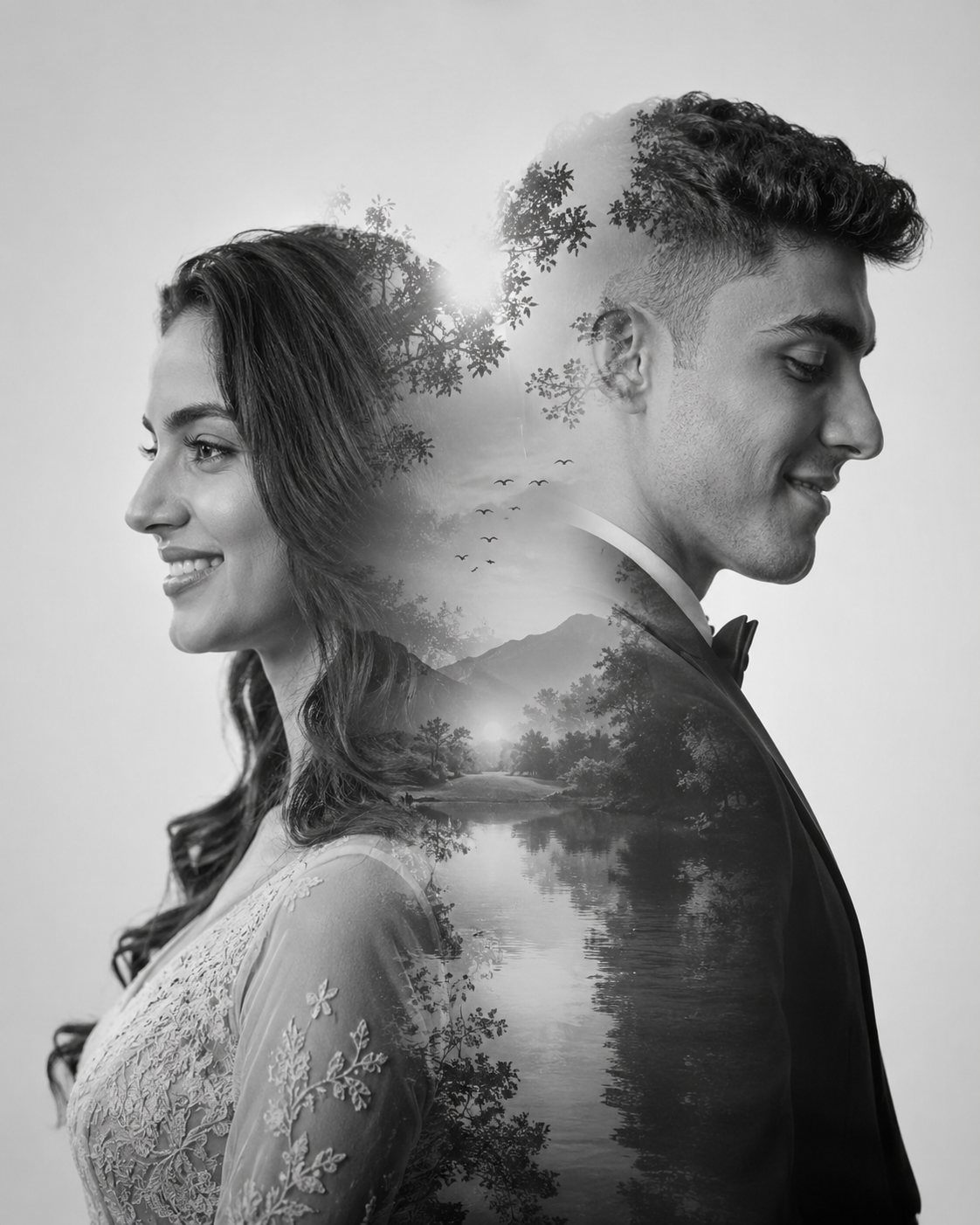
Photography is more than capturing faces—it is about telling stories, expressing emotions, and preserving memories in a visually meaningful way. One of the most artistic and emotionally captivating portrait styles gaining popularity today is the Romantic Double Exposure Merged Portrait. This technique combines two profile portraits into a single harmonious composition, creating a powerful visual representation of love, connection, and togetherness.
"Romantic Double Exposure In Merged Portraits Prompt"
Create an artistic and emotionally powerful grey-and-white prewedding photograph using a refined double exposure technique. The composition features two merged profile portraits forming a single harmonious silhouette. On the left side, the woman is shown in an elegant side profile, facing left. Her hair is styled softly with natural flow (loose waves or gently tucked behind the ear). She wears a modest, refined bridal gown with delicate fabric textures. Her expression carries a gentle, sincere smile with soft, hopeful eyes. On the right side, the man appears in a side profile facing right, with his gaze slightly lowered. His expression is calm and filled with quiet admiration and love. He is dressed in a well-tailored formal suit. Both profiles blend seamlessly into each other, creating a romantic and balanced double exposure effect. The edges should merge smoothly without harsh transitions, forming a unified silhouette. The background is clean, light gray with faint hints of natural scenery subtly visible within the exposure. Lighting is soft yet dramatic, enhancing facial contours, hair texture, and gentle shadows to emphasize depth and emotion. Style should feel like a timeless studio portrait with a modern artistic touch — highly detailed, clean, and natural, avoiding any artificial or overly processed look.--grey and white --double exposure --high detail --emotional --studio style --aspect ratio 4:5
The double exposure effect originated in traditional film photography but has evolved into a modern digital art form. By blending two portraits seamlessly into one silhouette, photographers and AI artists can create images that feel timeless, cinematic, and deeply emotional. When paired with soft monochrome tones, subtle nature elements, and elegant studio lighting, the result becomes a sophisticated pre-wedding portrait that looks both artistic and professional.
In this style, the bride and groom are typically shown in opposite side profiles, symbolizing individuality while simultaneously forming a unified composition. The gentle grayscale palette removes distractions and allows the viewer to focus entirely on emotion, facial expressions, and storytelling. This makes the Romantic Double Exposure Portrait one of the most popular choices for pre-wedding photography, engagement shoots, album covers, and social media artwork.
How To Use Photo Editing?
Creating a beautiful double exposure portrait requires more than simply placing two images together. Proper photo editing helps blend the subjects naturally while maintaining realism and emotional depth.
Step 1: Select High-Quality Portraits
Start by choosing clear, high-resolution profile photographs of both subjects. Side-profile images work best because they create strong silhouettes that blend naturally into one another.
Look for:
- Sharp facial details
- Good lighting
- Clean backgrounds
- Natural expressions
The quality of the original images greatly affects the final result.
Step 2: Remove Backgrounds
Use masking or background removal tools to isolate each portrait. A clean subject cutout makes blending significantly easier.
Pay special attention to:
- Hair edges
- Facial contours
- Clothing outlines
Accurate masking creates a more professional finish.
Step 3: Create The Double Exposure Effect
Place both portraits on separate layers and position them so their silhouettes merge naturally.
Adjust:
- Opacity
- Layer blending modes
- Mask gradients
The goal is to create a seamless transition without harsh lines or visible edits.
Step 4: Add Scenic Elements
Double exposure portraits often include subtle landscape details such as:
- Trees
- Mountains
- Rivers
- Birds
- Clouds
These elements enhance storytelling and add visual interest without overpowering the subjects.
Step 5: Convert To Monochrome
Grey-and-white color grading is a defining characteristic of this style.
Monochrome editing helps:
- Emphasize emotion
- Increase elegance
- Improve visual consistency
- Create a timeless aesthetic
Tools You Can Use For Prompt Copy and Create Photo
Several modern tools can help generate and edit double exposure portraits.
ChatGPT
ChatGPT can help create detailed prompts for AI image generation.
Benefits include:
- Prompt optimization
- Style suggestions
- Lighting descriptions
- Composition guidance
- Creative concepts
A detailed prompt often produces more accurate and professional results.
Midjourney
Midjourney is excellent for artistic portrait generation.
Features include:
- Beautiful monochrome rendering
- Cinematic lighting
- Strong emotional atmosphere
- Fine artistic details
Leonardo AI
Leonardo AI provides advanced customization for portrait artwork.
Advantages:
- Realistic facial rendering
- Flexible prompt controls
- High-resolution output
- Enhanced detail quality
Adobe Firefly
Adobe Firefly offers user-friendly AI image creation tools.
Benefits:
- Easy workflow
- Adobe integration
- Professional image quality
- Quick generation process
Stable Diffusion
Stable Diffusion is ideal for users seeking complete creative control.
Features:
- Custom models
- Fine-tuned settings
- Open-source flexibility
- Detailed editing possibilities
- Professional Editing Software
Adobe Photoshop
Photoshop remains the industry standard for double exposure artwork.
Useful for:
- Layer masking
- Blend modes
- Background removal
- Portrait retouching
- Artistic effects
Adobe Lightroom
Lightroom is ideal for final color grading and tonal adjustments.
Features:
- Exposure correction
- Contrast enhancement
- Black-and-white conversion
- Professional presets
Snapseed
A powerful mobile editing application.
Benefits:
- Easy masking tools
- Monochrome filters
- Portrait enhancement
- Mobile-friendly workflow
Canva
Perfect for beginners who want simple editing options.
Features:
- Quick background removal
- Overlay effects
- Basic blending tools
- Easy sharing options
How To Edit Photo?
Editing is what transforms a simple portrait into an emotionally powerful double exposure masterpiece.
1. Balance Exposure
Begin by correcting overall exposure.
Adjust:
- Brightness
- Contrast
- Highlights
- Shadows
Balanced exposure creates a strong foundation.
2. Refine Facial Features
Enhance important details such as:
- Eyes
- Hair texture
- Facial contours
- Clothing details
Maintain natural skin texture and avoid excessive retouching.
3. Blend Portraits Seamlessly
The most important aspect of double exposure editing is achieving smooth transitions.
Use:
- Layer masks
- Soft brushes
- Opacity adjustments
- Gradient blending
The final image should appear as one unified composition.
4. Add Emotional Depth
Subtle scenic overlays can strengthen storytelling.
Popular additions include:
- Fog
- Trees
- Water reflections
- Birds
- Mountain silhouettes
Keep these elements soft and understated.
5. Create Monochrome Harmony
Convert the image into a refined grayscale palette.
Focus on:
- Rich midtones
- Deep blacks
- Clean highlights
- Smooth tonal transitions
Avoid excessive contrast that might distract from facial details.
6. Improve Lighting
Soft studio lighting should enhance:
- Facial contours
- Hair texture
- Clothing details
Lighting should feel natural and emotionally expressive.
7. Add Depth With Vignetting
Subtle vignetting draws attention toward the center of the composition.
Darken:
- Corners
- Outer edges
- Background distractions
This creates a stronger visual focus.
8. Final Sharpening
Apply selective sharpening only to important details.
Focus on:
- Eyes
- Hair
- Clothing textures
- Facial contours
Leave scenic overlays slightly softer to maintain depth.
Conclusion
The Romantic Double Exposure In Merged Portraits Prompt is a beautiful fusion of photography, storytelling, and artistic expression. By blending two profile portraits into a unified silhouette, this style captures both individuality and connection in a single frame. The addition of monochrome tones, scenic overlays, and soft studio lighting transforms a simple portrait into an emotional work of art.
Whether you are creating a pre-wedding photograph, engagement portrait, anniversary artwork, or social media masterpiece, the double exposure technique offers endless creative possibilities. With the right prompt, proper editing tools, and attention to detail, you can create stunning portraits that feel timeless, elegant, and deeply meaningful.
The secret lies in maintaining balance—between realism and artistry, emotion and composition, simplicity and detail. When these elements come together, the Romantic Double Exposure Portrait becomes a powerful visual symbol of love and togetherness that will remain memorable for years to come.