Introduction
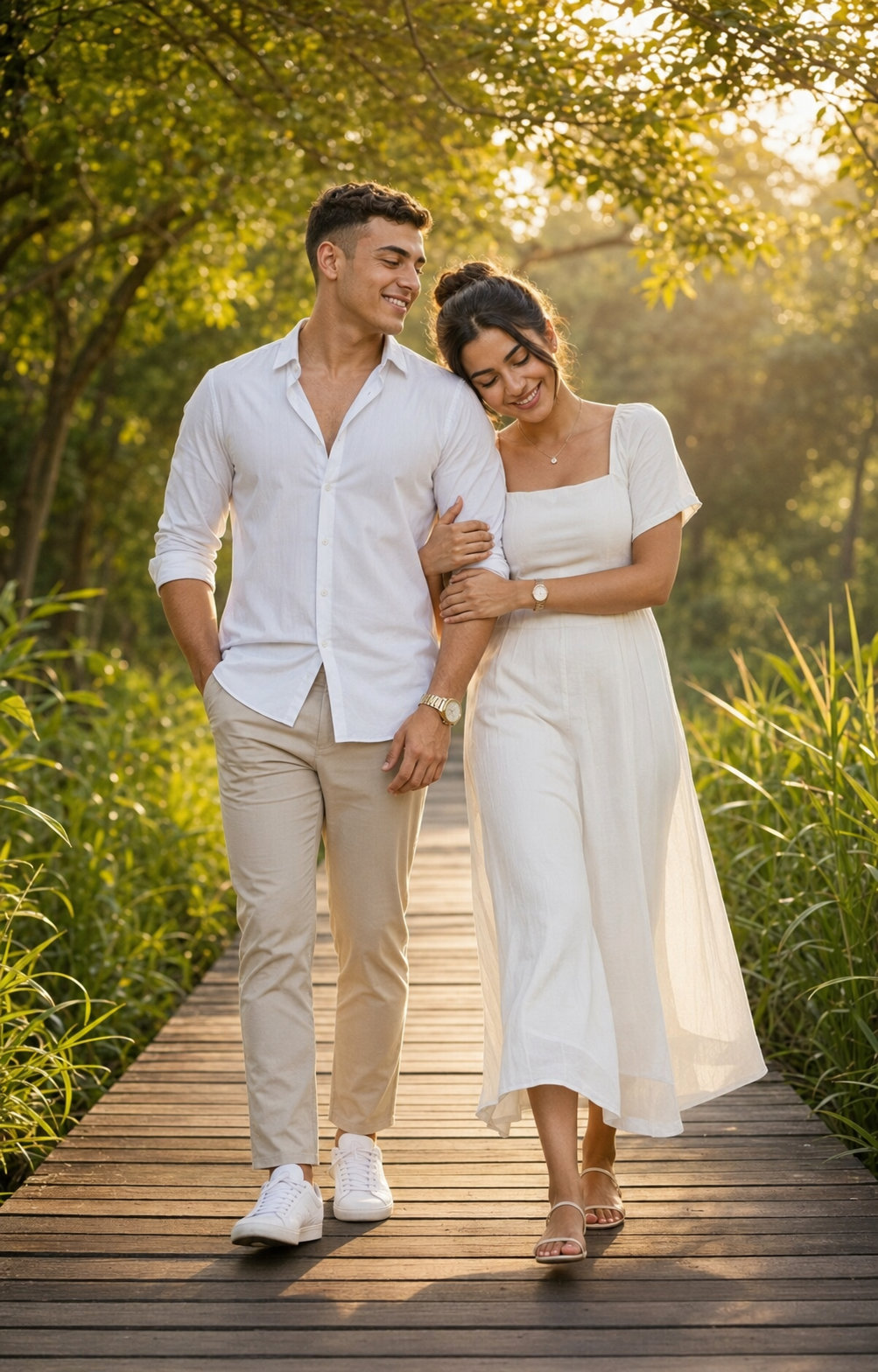
The Golden Hour Stroll In The Garden portrait style is one of the most captivating and emotionally engaging photography concepts in modern visual storytelling. Combining natural sunlight, lush greenery, romantic body language, and cinematic composition, this style creates images that feel timeless, warm, and authentic. Whether used for couple portraits, engagement photography, lifestyle campaigns, or AI-generated artwork, the golden-hour garden aesthetic delivers a sense of serenity and connection that resonates with viewers.
"Golden Hour Stroll In The Garden Prompt"
Create a hyper-realistic, ultra-detailed 8K full-body portrait photograph of a romantic couple walking naturally toward the camera on a rustic wooden boardwalk during golden hour. Use the provided reference image to replicate both subjects’ identities and facial structures accurately. Maintain precise facial proportions, bone structure, hairstyle accuracy, and consistent natural skin tone. Composition & Framing Vertical 4:5 aspect ratio Full-body framing (head to toe visible) Natural mid-step walking pose Symmetrical boardwalk perspective with strong leading lines Subjects-centred while allowing environmental depth Environment & Setting The couple walks along a serene wooden boardwalk surrounded by lush greenery. The boardwalk extends symmetrically into the distance. Dense green plants and tall grass frame both sides naturally. Arching trees create a soft canopy overhead. Sunlight filters gently through leaves. Golden hour lighting produces warm, diffused backlight with soft atmospheric haze. The background has a shallow depth of field with smooth bokeh. Foliage texture remains subtly visible (not overly blurred).Overall mood: peaceful, cinematic, romantic, naturally illuminated with warm, earthy tones. Male Subject Well-groomed man with neatly styled hair (exactly matching reference image). Crisp white button-down shirt (top buttons open). Sleeves rolled to forearms. Slim-fit light khaki trousers. Clean white full sneakers. A gold wristwatch on the left wrist. Pose & Expression: Left hand casually inside the trouser pocket. Right arm slightly bent. Soft, relaxed smile. Face turned 10–30 degrees toward the woman (not directly at the camera). Soft eye contact with a female. Natural candid intimacy. Female Subject Graceful woman with natural hair styled in a neat bun (match reference precisely). Soft white/ivory midi dress. Short sleeves, square neckline. Dress flowing naturally around the legs mid-walk. Minimal sandals. Delicate necklace. Wristwatch. Pose & Expression: Head gently resting against his shoulder. Holding his arm with both hands affectionately. Gentle smile. Eyes lowered / slightly closed. Warm, intimate body language. Mood & Emotion Romantic, serene, intimate, natural connection. Body language expresses comfort, affection, and emotional closeness. Lighting & Photography Specifications Golden hour natural backlighting Soft diffused frontal fill light for facial clarity Subtle soft key illumination on faces Slightly glossy, healthy skin finish Natural highlights on cheekbones and forehead Warm cinematic colour grading Balanced earthy browns and natural greens High dynamic range Sharp focus on subjects Shallow depth of field Soft background bokeh Professional DSLR quality 85mm lens look f/2.8 aperture Realistic fabric folds Natural walking motion captured mid-step Subtle wind movement in the dress Ultra-detailed 8K skin texture Negative Prompt Low quality, blur, motion blur on faces, overexposed highlights, underexposed shadows, harsh lighting, flat lighting, direct eye contact with the camera, excessive golden-hour saturation, overly warm colour cast, unnatural skin tones, distortion, grain, noise, washed-out colours, plastic skin texture, stiff posing.
Golden hour refers to the brief period shortly after sunrise or before sunset when sunlight becomes softer, warmer, and more flattering. During this time, natural light wraps gently around subjects, producing beautiful highlights, soft shadows, and a dreamy atmosphere. When paired with a garden setting filled with trees, flowers, wooden pathways, and rich greenery, the result is a photograph that feels both cinematic and realistic.
A well-crafted Golden Hour Stroll In The Garden prompt should include detailed descriptions of lighting, environment, wardrobe, facial expressions, and camera settings. The more precise your prompt, the more realistic and visually stunning the final image will become.
How To Use Photo Editing?
Generating a beautiful image is only the beginning. Professional photo editing helps elevate the final result by enhancing lighting, colors, textures, and overall realism.
Step 1: Select the Best Image
Generate multiple versions of your image and choose the one with:
- Natural facial expressions
- Accurate body proportions
- Balanced lighting
- Realistic environment details
Starting with a strong base image reduces editing time significantly.
Step 2: Improve Exposure
Golden-hour photographs should maintain detail in both highlights and shadows.
Adjust:
- Exposure
- Contrast
- Highlights
- Shadows
Avoid excessive brightness, which can destroy the warm mood of the scene.
Step 3: Enhance Natural Skin Tones
Healthy, realistic skin is essential for professional-looking portraits.
Focus on:
- Natural color balance
- Soft texture refinement
- Preserving skin details
- Avoiding artificial smoothing
Natural skin always looks more convincing than heavily edited skin.
Step 4: Refine Golden-Hour Lighting
The magic of this style comes from warm sunlight.
Enhance:
- Sunlit edges
- Hair highlights
- Soft facial glow
- Ambient warmth
Keep the lighting realistic and subtle.
Step 5: Strengthen Environmental Details
Gardens contain many visual elements that add depth and realism.
Improve:
- Leaf textures
- Grass details
- Tree highlights
- Wooden pathway textures
These enhancements create a richer visual experience.
Tools You Can Use For Prompt Copy and Create Photo
Several tools can help create and refine Golden Hour Stroll In The Garden portraits.
ChatGPT
ChatGPT is highly effective for generating detailed AI image prompts.
Benefits include:
- Creative prompt generation
- Scene descriptions
- Camera specifications
- Lighting suggestions
- Photography concepts
It helps transform simple ideas into professional-quality prompts.
Midjourney
Midjourney is known for creating artistic and cinematic imagery.
Advantages:
- Beautiful lighting effects
- Rich environmental details
- Strong visual storytelling
- High-resolution outputs
Adobe Firefly
Adobe Firefly provides a beginner-friendly AI image generation experience.
Features:
- Fast image creation
- Realistic results
- Integration with Adobe products
- Professional-quality outputs
Leonardo AI
Leonardo AI offers advanced control over image realism.
Benefits:
- High-detail rendering
- Facial consistency
- Environmental customization
- Cinematic quality outputs
Stable Diffusion
Stable Diffusion is ideal for advanced users who want complete creative control.
Features:
- Custom models
- Detailed prompt control
- High flexibility
- Open-source workflow
- Photo Editing Software
Adobe Photoshop
Photoshop remains the industry standard for advanced image editing.
Useful for:
- Retouching
- Lighting enhancement
- Background cleanup
- Color grading
- Detail sharpening
Adobe Lightroom
Perfect for photographers and portrait creators.
Features:
- Exposure control
- Color correction
- Tone adjustments
- Professional presets
Snapseed
An excellent mobile editing application.
Benefits:
- Free to use
- Easy adjustments
- Selective editing
- Portrait enhancement tools
Canva
Ideal for beginners and social media creators.
Features:
- Simple editing tools
- Filters
- Text overlays
- Quick exports
How To Edit Photo?
Professional editing transforms a good portrait into a breathtaking cinematic masterpiece.
1. Correct Exposure
Start by balancing the overall brightness.
Adjust:
- Exposure
- Contrast
- Highlights
- Shadows
Proper exposure creates depth and realism.
2. Enhance Facial Features
Subtle refinements can improve portrait quality.
Focus on:
- Eyes
- Eyelashes
- Lips
- Hair strands
Avoid excessive retouching that removes natural character.
3. Improve Skin Texture
Modern portrait editing emphasizes realism.
Maintain:
- Natural pores
- Soft texture
- Authentic skin tones
Avoid plastic or airbrushed appearances.
4. Add Warm Golden Tones
Golden-hour photography relies heavily on warm color grading.
Enhance:
- Amber highlights
- Warm midtones
- Soft sunlight glow
Keep the warmth balanced and believable.
5. Create Depth With Background Blur
A shallow depth of field helps separate subjects from the environment.
Refine:
- Background softness
- Bokeh quality
- Subject sharpness
This creates a professional DSLR-style appearance.
6. Sharpen Important Details
Apply selective sharpening to:
- Eyes
- Hair
- Clothing textures
- Jewelry
Avoid oversharpening foliage or distant elements.
7. Improve Environmental Realism
Strengthen garden details while preserving softness.
Enhance:
- Tree textures
- Leaves
- Wooden pathways
- Natural sunlight reflections
This increases the immersive quality of the image.
8. Apply Final Color Grading
The final color grade should unify the entire scene.
Aim for:
- Warm earthy tones
- Rich greens
- Natural skin colors
- Balanced highlights
The image should feel cinematic, romantic, and inviting.
Conclusion
The Golden Hour Stroll In The Garden Prompt is a perfect blend of natural beauty, cinematic lighting, and emotional storytelling. By combining warm golden-hour sunlight, lush greenery, realistic expressions, and professional photography techniques, you can create images that feel both elegant and authentic.
Whether you are using AI image generation tools, DSLR photography, or professional editing software, success comes from attention to detail. Focus on realistic lighting, natural body language, balanced color grading, and environmental depth to achieve the most impressive results.
With the right prompt, thoughtful editing, and creative vision, a simple garden walk can become a breathtaking work of art that captures romance, serenity, and timeless beauty.