Introduction
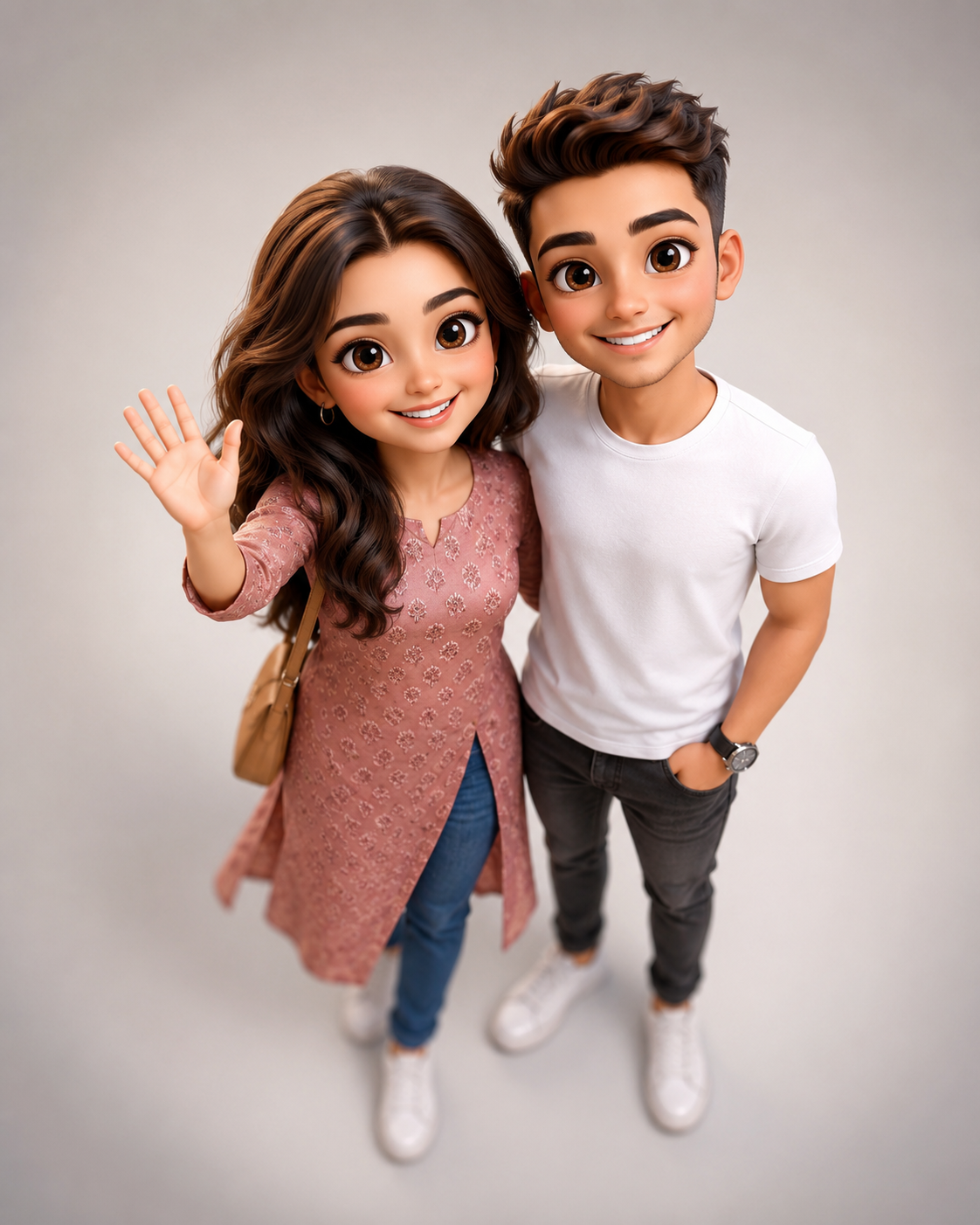
The rise of AI image generation has opened exciting possibilities for creating adorable and highly detailed character artwork. One of the most popular trends among artists, social media creators, and digital enthusiasts is the Cheerful Couple in a Cute 3D Render style. Inspired by Pixar-quality animation, modern 3D character design, and chibi aesthetics, this style transforms real people into charming cartoon versions while preserving their unique facial identity and personality.
"Cheerful Couple In A Cute 3D Render Prompt"
Create a full-body, cute chibi-style 3D cartoon illustration of a couple standing side by side, captured from a high, top-down perspective with a slight wide-angle lens effect, as if the camera is positioned directly above them and tilted downward. The view should clearly show the tops of their heads slightly while emphasizing their faces, creating a cute, slightly exaggerated perspective where the upper body and faces appear more prominent than the lower body. The characters must maintain accurate face matching to the provided reference image — preserving their exact facial structure, hairstyle, skin tone, eye shape, smile, and overall likeness while transforming them into a stylized chibi 3D version. The woman has voluminous, warm-brown hair, oversized, expressive eyes, soft cheeks, and a bright, cheerful smile. Take the outfit and accessories details from the reference image. She is waving one hand in a friendly, welcoming gesture. Her expression should convey joy, affection, and liveliness. The man stands very close beside her in a relaxed, natural pose. He has naturally styled hair, expressive eyes, and a friendly smile. Extract outfit details from the reference image. One hand rests casually inside his pocket while the other hangs naturally. Both characters should have classic chibi proportions: Oversized heads Smaller compact bodies Smooth facial features Subtle blush on cheeks Glossy, highly detailed eyes with soft reflections Soft stylized skin shading Depth of Field Adjustment: The lower body area (from the waist down toward the feet) should be slightly blurred with a soft depth-of-field effect, while the faces remain extremely sharp and in clear focus. Rendering Style: Ultra-detailed 3D Pixar-inspired character design, glossy smooth textures, hyper-clean sculpting, realistic fabric folds, subtle skin subsurface scattering, cinematic soft global illumination lighting, soft shadows beneath the characters, vibrant yet balanced color grading, and ultra-sharp clarity. Resolution & Composition: 4K Ultra HD quality, extremely sharp focus, high-detail rendering, studio-quality finish, clean minimal light gray or soft off-white background, no clutter, professional lighting setup, slightly extra empty space above the head, slightly empty space below the feet. Aspect Ratio: 4:5 (vertical composition) Mood: Cute, heartwarming, romantic, cheerful, wholesome, premium 3D render aesthetic. No plastic effects.
A successful cute 3D couple render combines oversized expressive eyes, detailed hairstyles, soft facial features, realistic clothing textures, and cinematic lighting. The goal is to create a heartwarming image that feels playful, romantic, and professionally crafted. By using accurate face matching from reference photos, AI tools can generate stylized characters that still resemble the original individuals while embracing a cute animated appearance.
Whether you are creating couple portraits, anniversary gifts, social media content, profile pictures, or digital artwork, a well-crafted prompt is essential. Elements such as camera angle, facial expressions, outfit details, lighting quality, and depth-of-field effects all contribute to the final result. The top-down perspective often used in these renders adds extra charm by emphasizing the characters’ oversized heads and expressive faces, creating a visually appealing and instantly lovable composition.
How To Use Photo Editing?
After generating your 3D render, photo editing can significantly improve the final image quality and enhance the professional appearance of the artwork.
Step 1: Generate Multiple Variations
Begin by generating several versions of the image using your chosen AI platform. Compare:
- Face accuracy
- Character proportions
- Outfit details
- Facial expressions
- Lighting quality
Choose the strongest version before beginning any editing.
Step 2: Improve Facial Details
The faces are the focal point of chibi-style artwork. Enhance:
- Eye reflections
- Eyelashes
- Smile definition
- Hair texture
- Skin smoothness
Be careful not to over-edit, as excessive retouching can reduce the natural charm of the characters.
Step 3: Refine Depth of Field
One of the most attractive features of premium 3D renders is realistic depth of field.
Ensure:
- Faces remain extremely sharp
- Upper body remains detailed
- Lower body transitions into soft blur
- Background stays clean and unobtrusive
This helps draw the viewer's attention toward the characters' expressions.
Step 4: Enhance Lighting
Use soft cinematic lighting adjustments to improve:
- Facial highlights
- Hair shine
- Clothing textures
- Skin glow
Balanced lighting increases realism and visual appeal.
Step 5: Final Color Grading
Apply warm and cheerful color grading.
Popular adjustments include:
- Soft contrast
- Vibrant but balanced colors
- Warm skin tones
- Gentle highlight enhancement
This creates a polished studio-quality finish.
Tools You Can Use For Prompt Copy and Create Photo
Modern AI tools make it easier than ever to create stunning 3D cartoon renders.
ChatGPT
ChatGPT is highly effective for creating detailed prompts tailored to specific character styles and compositions.
Benefits include:
- Prompt optimization
- Character descriptions
- Scene creation
- Camera settings
- Lighting guidance
A strong prompt is often the key to achieving premium-quality results.
Midjourney
Midjourney excels at generating artistic and stylized character illustrations.
Features:
- Beautiful lighting
- Detailed character design
- Strong visual storytelling
- High-quality rendering
Leonardo AI
Leonardo AI is especially popular for character-focused artwork.
Advantages:
- Consistent character generation
- Face matching capabilities
- Advanced customization
- Detailed textures
Adobe Firefly
Adobe Firefly offers powerful AI image generation with user-friendly controls.
Features include:
- Easy editing workflow
- High-quality outputs
- Adobe integration
- Professional-level enhancement tools
Stable Diffusion
Stable Diffusion is ideal for users seeking maximum creative flexibility.
Benefits:
- Open-source customization
- Custom character models
- Fine-tuned generation settings
- Advanced prompt control
- Professional Editing Software
Adobe Photoshop
Photoshop remains the industry standard for finishing AI-generated artwork.
Useful for:
- Facial cleanup
- Lighting adjustments
- Background refinement
- Texture enhancement
Lightroom
Lightroom works exceptionally well for:
- Color grading
- Exposure correction
- Contrast adjustments
- Tone balancing
Snapseed
Snapseed is perfect for mobile editing.
Advantages:
- Free access
- Quick workflow
- Selective editing tools
- Easy sharing options
Canva
Canva provides beginner-friendly editing features.
Benefits:
- Simple enhancements
- Easy filters
- Social media formatting
- Quick exports
How To Edit Photo?
Editing helps transform a good render into a professional-quality artwork.
1. Start With Exposure Adjustment
Correct:
- Brightness
- Highlights
- Contrast
- Shadows
Balanced exposure creates a cleaner and more polished appearance.
2. Enhance Eyes
Large expressive eyes are a defining characteristic of chibi characters.
Increase:
- Sharpness
- Reflection details
- Brightness
- Contrast
This makes the characters feel more lively and engaging.
3. Refine Hair Texture
Hair plays an important role in overall realism.
Enhance:
- Individual strands
- Shine
- Volume
- Color richness
Soft highlights can make the hairstyle appear more dynamic.
4. Improve Skin Rendering
Maintain:
- Smooth shading
- Natural blush
- Soft gradients
- Subtle highlights
Avoid plastic-looking skin textures.
5. Enhance Clothing Details
Improve:
- Fabric folds
- Stitching details
- Material textures
- Accessory visibility
Realistic clothing helps ground the stylized design.
6. Strengthen Depth of Field
The lower-body blur effect should appear natural and cinematic.
Ensure:
- Smooth transitions
- No harsh blur edges
- Strong focus on faces
This creates a professional camera effect.
7. Add Cinematic Color Grading
Use warm and cheerful tones.
Recommended adjustments:
- Slight saturation boost
- Soft contrast increase
- Balanced highlights
- Warm skin tones
The image should feel joyful and inviting.
8. Final Sharpening
Apply sharpening selectively to:
- Eyes
- Hair
- Clothing details
- Facial features
Avoid sharpening blurred areas to preserve depth.
Conclusion
The Cheerful Couple in a Cute 3D Render Prompt is a perfect blend of realism, creativity, and emotional storytelling. By combining accurate face matching, adorable chibi proportions, expressive eyes, high-quality textures, and cinematic lighting, you can create artwork that feels both playful and professional.
Whether you're designing a personalized couple portrait, social media artwork, anniversary gift, or creative digital project, this style offers a charming and visually engaging way to transform ordinary photographs into memorable 3D characters. With the right AI tools, thoughtful prompt design, and professional editing techniques, you can achieve stunning Pixar-inspired renders that capture personality, warmth, and joy in every detail.
The secret lies in balancing realism with stylization. When executed correctly, a cute 3D render becomes more than just an illustration—it becomes a delightful piece of art that celebrates connection, happiness, and creativity.