Introduction
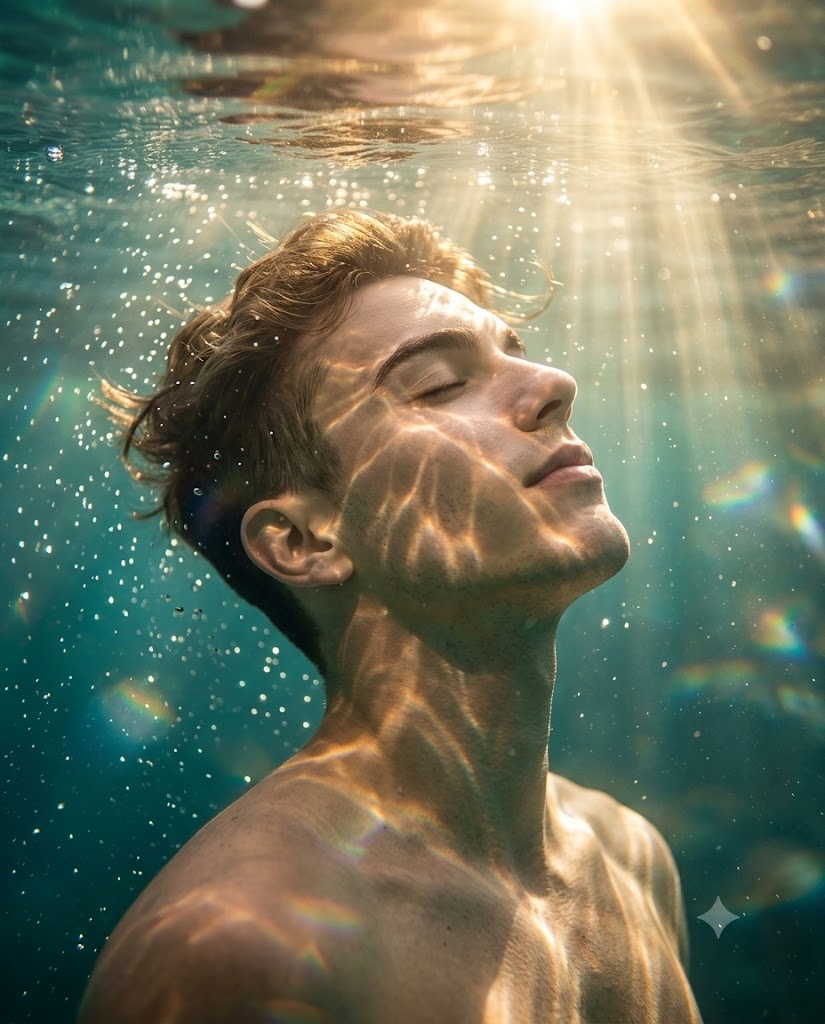
Photography has always been a medium for capturing moments, emotions, and stories, but some portrait styles transcend ordinary photography and enter the realm of visual art. One such style is the Ethereal Depths Cinematic Underwater Portrait, a breathtaking fusion of underwater photography, cinematic lighting, fine-art portraiture, and photorealistic storytelling. This artistic concept creates an image that feels both dreamlike and realistic, immersing the viewer in a magical underwater world filled with light, movement, and emotion.
"Ethereal Depths Cinematic Underwater Portrait Prompt"
Create a cinematic underwater portrait captured from a low-angle perspective looking upward. A man with wet, natural hair, his head gently tilted back, and eyes softly closed, expressing a serene, ethereal calm. Character Identity (VERY IMPORTANT): Use the provided image as the ONLY facial reference. Preserve 100% exact facial structure, proportions, skin tone and overall recognizable identity. Do NOT beautify, distort, or replace identity—maintain accurate likeness while applying stylized caricature exaggeration. Pose & Composition: Tight medium close-up (head and shoulders), slightly off-center. Body and face angled to the right, chin lifted toward the water surface. Shot from a low underwater worm’s-eye view for depth. Water surface visible at the top with subtle reflections. Subject fills ~65–75% of the frame, with bubbles and light rays adding cinematic negative space. No clothing or outfit visible — bare shoulders and upper chest only. He is submerged just below the surface, with the waterline visible above, strongly backlit. Dramatic golden sunlight pierces through the rippling surface, creating intense volumetric god rays that cascade downward. Bright caustic light patterns shimmer and dance across his face, neck, and shoulders, enhancing the contours of his features. Thousands of tiny, sparkling air bubbles rise around him, adding motion and depth. Subtle rainbow-colored light refractions and delicate lens flares enhance the dreamy, magical atmosphere. The water tones blend rich turquoise and deep emerald green hues with warm golden highlights, creating a visually immersive color harmony. Hyper-realistic skin texture with natural pores and authentic underwater light interaction. Wet hair strands are finely detailed, flowing organically with the water movement. Shot with a 50mm lens, f/1.8, shallow depth of field, maintaining sharp subject focus with a softly blurred aquatic background. Cinematic volumetric lighting, high dynamic range, and ultra-detailed rendering. Style inspired by National Geographic underwater photography fused with high-end fine art fashion editorial aesthetics. Ultra-detailed, photorealistic, 8K resolution, masterpiece quality. Aspect ratio 4:5.
What makes underwater portraits so captivating is their ability to portray a sense of peace, freedom, and weightlessness that cannot be achieved in traditional studio environments. Floating beneath the water's surface, surrounded by shimmering light rays and rising bubbles, the subject appears suspended between reality and fantasy. The combination of golden sunlight, turquoise water tones, and soft facial expressions creates an atmosphere of serenity and wonder.
The Ethereal Depths portrait style is inspired by the visual excellence of National Geographic underwater photography combined with the elegance of luxury fashion editorials. Every detail matters, from realistic skin texture and natural hair movement to volumetric god rays and underwater reflections. Whether you are creating AI-generated artwork, portfolio pieces, social media content, or professional photo manipulations, this portrait style offers a stunning visual experience that immediately captures attention.
How To Use Photo Editing?
Creating an underwater portrait requires more than generating a beautiful image. Professional photo editing helps enhance realism, improve lighting effects, and create a polished final composition.
Step 1: Generate the Base Portrait
Begin by creating several variations using your preferred AI image generation tool. Select the version with the strongest facial resemblance, best lighting direction, and most natural underwater appearance.
Focus on:
- Accurate facial structure
- Realistic water interaction
- Natural hair movement
- Strong composition
- Balanced lighting
A high-quality base image significantly improves editing results.
Step 2: Preserve Identity Accuracy
When working with a reference image, maintaining facial identity is crucial.
Check:
- Face shape
- Jawline
- Skin tone
- Eye structure
- Nose proportions
Avoid over-editing facial features, as realism depends on preserving authentic characteristics.
Step 3: Improve Water Realism
Water should feel immersive and believable.
Enhance:
- Surface reflections
- Water clarity
- Light refractions
- Bubble details
These small adjustments dramatically increase realism.
Step 4: Refine Light Rays
Volumetric sunlight is one of the most important elements in underwater photography.
Adjust:
- Light intensity
- Direction
- Softness
- Depth
God rays should appear natural and blend seamlessly with the environment.
Step 5: Apply Cinematic Color Grading
Underwater scenes benefit from carefully balanced colors.
Focus on:
- Turquoise tones
- Emerald greens
- Warm golden highlights
- Natural skin colors
The final image should feel vibrant while remaining realistic.
Tools You Can Use For Prompt Copy and Create Photo
Modern AI and photo editing tools make it easier than ever to create stunning underwater portraits.
ChatGPT
ChatGPT helps generate detailed prompts that improve image quality and consistency.
Benefits include:
- Prompt writing
- Creative scene descriptions
- Camera settings suggestions
- Lighting guidance
- Style development
A detailed prompt often produces more professional results.
Midjourney
Midjourney excels at creating cinematic and artistic imagery.
Features:
- Beautiful lighting effects
- Strong atmospheric quality
- High-detail rendering
- Artistic underwater scenes
Leonardo AI
Leonardo AI offers excellent customization options for portrait generation.
Advantages:
- Realistic face rendering
- Detailed textures
- Fine control over outputs
- High-resolution generation
Adobe Firefly
Adobe Firefly provides a simple workflow for AI image creation.
Benefits:
- Easy-to-use interface
- Fast rendering
- Professional results
- Adobe integration
Stable Diffusion
Stable Diffusion is ideal for advanced users.
Features:
- Open-source flexibility
- Custom models
- Detailed prompt control
- Professional-quality outputs
- Professional Editing Software
Adobe Photoshop
Photoshop remains the industry standard for photo manipulation.
Useful for:
- Bubble enhancement
- Light ray creation
- Skin retouching
- Color grading
- Composite editing
Adobe Lightroom
Lightroom is perfect for:
- Exposure balancing
- Contrast adjustments
- Color correction
- Final grading
Snapseed
A powerful mobile editing application.
Benefits:
- Easy adjustments
- Selective editing tools
- Portrait enhancement
- Fast workflow
Canva
Ideal for beginners creating social media content.
Features:
- Quick filters
- Background enhancement
- Color adjustments
- Easy exports
How To Edit Photo?
Professional editing transforms a good underwater portrait into an extraordinary visual masterpiece.
1. Correct Exposure
Start with overall exposure adjustments.
Balance:
- Highlights
- Shadows
- Contrast
- Brightness
Proper exposure establishes depth and atmosphere.
2. Enhance Skin Texture
Realistic underwater portraits should maintain authentic skin details.
Keep:
- Natural pores
- Skin texture
- Facial contours
Avoid excessive smoothing that creates a plastic appearance.
3. Refine Water Surface Details
The water surface is often a major focal point.
Enhance:
- Ripples
- Reflections
- Transparency
- Surface highlights
These details add realism and visual depth.
4. Improve Hair Movement
Wet hair behaves differently underwater.
Focus on:
- Flow direction
- Individual strands
- Natural movement
- Water interaction
Detailed hair significantly improves realism.
5. Enhance Bubble Effects
Thousands of tiny bubbles create depth and motion.
Adjust:
- Size variation
- Sharpness
- Brightness
- Distribution
Bubbles should appear natural rather than repetitive.
6. Strengthen Volumetric Lighting
Golden sunlight should feel immersive.
Improve:
- God rays
- Light diffusion
- Atmospheric depth
- Warm highlights
Proper volumetric lighting creates the signature cinematic effect.
7. Apply Cinematic Color Grading
Use a balanced color palette.
Combine:
- Emerald green shadows
- Turquoise water tones
- Golden highlights
- Natural skin colors
The final image should feel rich and harmonious.
8. Final Sharpening
Apply selective sharpening only where necessary.
Focus on:
- Eyes
- Hair strands
- Facial details
- Water droplets
Avoid oversharpening the background to preserve depth of field.
Conclusion
The Ethereal Depths Cinematic Underwater Portrait Prompt is a remarkable blend of realism, emotion, and visual artistry. Through underwater photography techniques, dramatic sunlight rays, realistic water interactions, and fine-art composition, this style creates portraits that feel immersive and unforgettable.
Whether you are an AI artist, photographer, content creator, or digital editor, mastering this portrait style can significantly elevate your creative portfolio. The key lies in balancing realism with artistic atmosphere, ensuring that every element—from skin texture and bubbles to sunlight and color grading—works together seamlessly.
With the right prompt, advanced tools, and professional editing techniques, you can create breathtaking underwater portraits that capture serenity, beauty, and cinematic storytelling in a single frame. The result is more than just a portrait—it is a visual journey into a world of light, water, and emotion.