Introduction
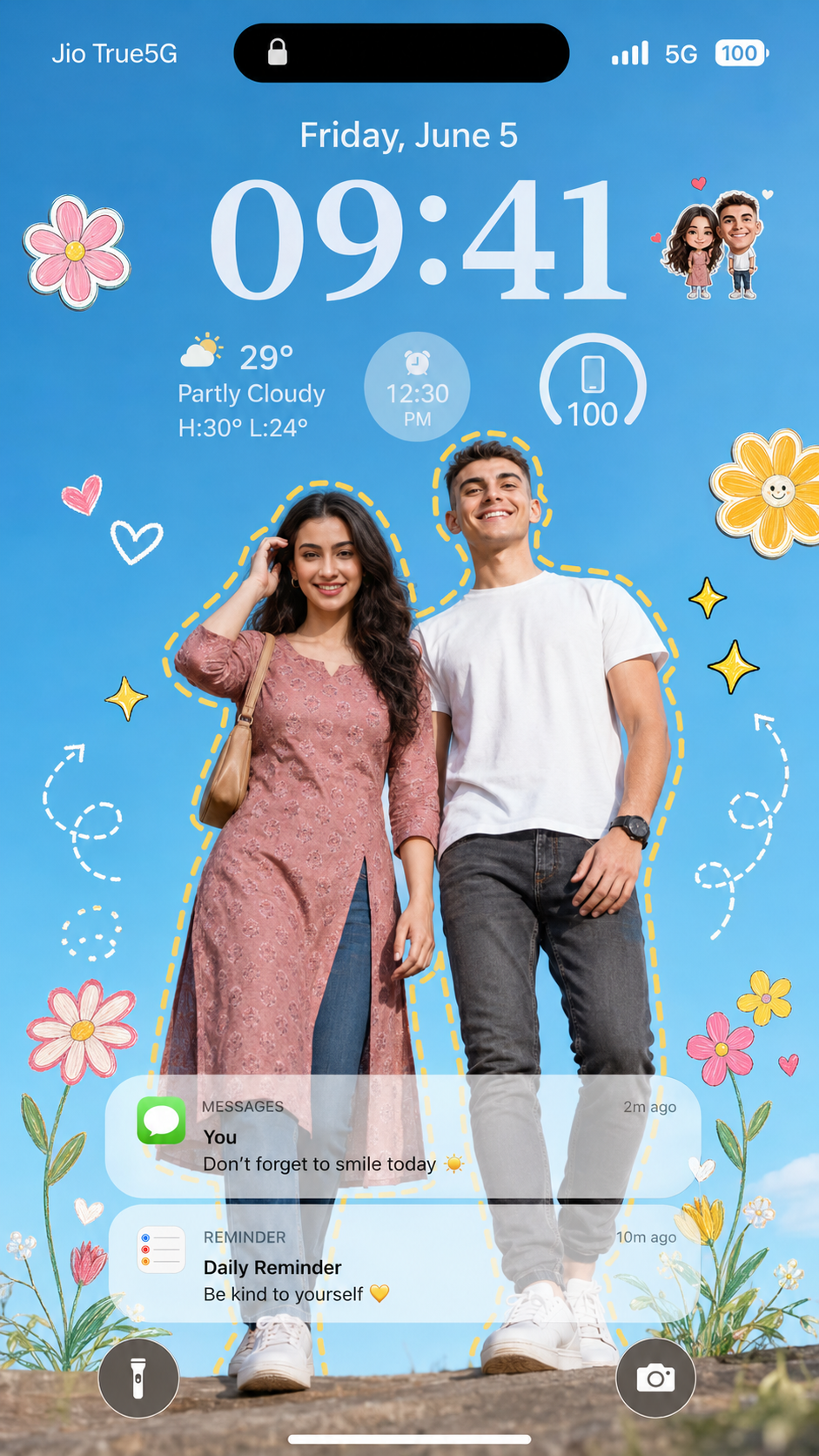
In the world of AI-generated photography and creative digital design, personalized smartphone wallpapers have become one of the most popular visual trends. Among these, the Happy Moments On A Digital Lock Screen style stands out for its unique combination of realistic portrait photography, modern smartphone interface design, playful graphic elements, and emotional storytelling. This creative concept transforms an ordinary photograph into a premium iOS-style lock screen wallpaper that feels both personal and visually stunning.
"Happy Moments On A Digital Lock Screen Prompt"
Create an ultra-realistic iOS-style lockscreen wallpaper featuring the uploaded couple as the main characters. Use the uploaded image strictly for face and identity reference. Preserve both people’s exact facial features, face shape, skin tone, hairstyle, expressions, and overall identity without changing them. Composition: trendy fashion-campaign portrait of the couple shot from an extreme low-angle ground perspective, as if the camera is placed near the floor looking upward. Both subjects stand confidently in stylish matching outfits with clean white sneakers. Keep the pose natural, confident, and premium. Background should be a bright clear blue sky with vibrant daylight and natural shadows. Add playful Pinterest-style graphic elements around the couple: colorful doodle flowers, sketch stars, sparkles, hearts, small sticker graphics, and hand-drawn accents. Add a clean yellow dashed outline surrounding both people together. Near the upper clock area, add tiny cute chibi versions of the same couple as decorative mini stickers. Overlay a realistic premium smartphone lockscreen UI: Dynamic Island at the top, small lock icon, large clean clock showing 09:41, date text Friday, June 5, battery indicator, small weather widget, and realistic soft notification cards near the lower area. Keep the UI elegant, minimal, readable, and Apple-keynote inspired. Style: luxury lifestyle photography, ultra-realistic skin texture, photorealistic lighting, vibrant colors, sharp details, premium wallpaper quality, clean high-end mobile lockscreen design. Vertical 9:16 phone wallpaper ratio, ultra-sharp, 8K detail, polished Pinterest aesthetic.
The idea behind this prompt is simple yet powerful: place a couple at the center of a luxury fashion-inspired portrait and surround them with modern Pinterest-style graphics, cute doodles, stickers, and realistic smartphone interface elements. The result is a wallpaper that looks as if it were designed by a professional Apple designer and lifestyle photographer.
This style is perfect for couples, best friends, engagement photos, anniversaries, social media content, and personalized smartphone wallpapers. The combination of vibrant daylight, clean blue skies, ultra-realistic photography, and playful design elements creates an image that feels joyful, modern, and full of personality.
A well-written prompt ensures accurate facial preservation, premium composition, realistic lighting, and polished lock screen aesthetics. Whether you are using AI image generators or professional photo editing software, this creative style offers endless possibilities for customization and storytelling.
How To Use Photo Editing?
Creating a high-quality digital lock screen wallpaper involves more than simply generating an image. Professional editing helps refine details, improve realism, and create a premium final result.
Step 1: Generate the Base Portrait
Start by generating the main portrait using your AI image creation tool. Ensure that the faces remain consistent with the reference images and that the couple appears natural and realistic.
Focus on:
- Face accuracy
- Body proportions
- Natural expressions
- Clothing details
- Proper lighting
The stronger the base image, the easier the editing process becomes.
Step 2: Enhance the Background
A bright blue sky creates a fresh and positive atmosphere.
Use editing software to:
- Increase sky clarity
- Improve color vibrancy
- Remove distractions
- Create balanced contrast
A clean background helps the subjects stand out.
Step 3: Add Lock Screen Elements
The lock screen design should feel realistic and modern.
Include:
- Dynamic Island
- Clock display
- Date information
- Weather widget
- Battery indicator
- Notification cards
Place these elements carefully so they complement the portrait without covering important details.
Step 4: Add Decorative Graphics
Pinterest-inspired doodles add personality and charm.
Popular additions include:
- Hearts
- Flowers
- Sparkles
- Stars
- Sticker illustrations
- Hand-drawn arrows
Keep the graphics playful but not overwhelming.
Step 5: Final Color Grading
Apply vibrant color grading to create a cheerful lifestyle aesthetic.
Focus on:
- Natural skin tones
- Bright daylight
- Balanced shadows
- Vibrant colors
The final image should feel polished and premium.
Tools You Can Use For Prompt Copy and Create Photo
Many AI tools and editing applications can help create this style of wallpaper.
ChatGPT
ChatGPT is an excellent tool for generating highly detailed image prompts.
Benefits include:
- Creative prompt writing
- Scene descriptions
- Camera settings
- Character styling
- Layout suggestions
It helps convert ideas into professional-quality prompts.
Midjourney
Midjourney excels at producing artistic and stylish portrait compositions.
Advantages:
- Fashion photography aesthetics
- Vibrant colors
- High-quality details
- Premium visual style
Leonardo AI
Leonardo AI offers strong control over portrait generation.
Features include:
- Face consistency
- Detailed textures
- Advanced customization
- Realistic outputs
Adobe Firefly
Adobe Firefly is ideal for creating polished lifestyle visuals.
Benefits:
- User-friendly interface
- Fast generation
- Creative flexibility
- Adobe ecosystem support
Stable Diffusion
Stable Diffusion is perfect for advanced users.
Advantages:
- Open-source customization
- Fine-tuned models
- High-resolution outputs
- Detailed prompt control
- Photo Editing Software
Adobe Photoshop
Photoshop remains the most powerful editing platform.
Useful for:
- UI overlays
- Face enhancement
- Background editing
- Doodle placement
- Notification design
Adobe Lightroom
Excellent for color grading and exposure correction.
Features:
- White balance adjustments
- Contrast control
- Skin tone refinement
- Professional presets
Canva
Perfect for adding lock screen graphics.
Benefits:
- Easy drag-and-drop tools
- Sticker collections
- Typography options
- Mobile-friendly workflow
Snapseed
A great mobile editing app.
Features:
- Quick corrections
- Portrait enhancement
- Selective adjustments
- Easy export options
How To Edit Photo?
Professional editing transforms a simple wallpaper into a visually engaging digital artwork.
1. Improve Facial Details
The faces should remain the focal point of the wallpaper.
Enhance:
- Eyes
- Hair texture
- Skin clarity
- Natural expressions
Avoid excessive retouching to preserve realism.
2. Refine Subject Separation
Use masking tools to create clear separation between the couple and the background.
This improves:
- Depth
- Focus
- Professional appearance
3. Add Doodle Graphics Carefully
Decorative graphics should complement the image.
Maintain:
- Empty spaces
- Background areas
- Subject outlines
Avoid covering important facial features.
4. Create a Premium Lock Screen Layout
Arrange UI elements thoughtfully.
Maintain:
- Readability
- Symmetry
- Visual balance
- Clean spacing
The wallpaper should resemble a real smartphone interface.
5. Enhance Colors
Increase vibrancy without oversaturation.
Focus on:
- Blue sky tones
- Clothing details
- Graphic elements
- Skin colors
Balanced colors improve visual appeal.
6. Add Realistic Shadows
Shadows help blend all design elements naturally.
Ensure:
- Notification cards cast subtle shadows
- Stickers integrate realistically
- Subjects appear grounded
This increases overall realism.
7. Apply Final Sharpening
Sharpen only key areas such as:
- Faces
- Eyes
- Clothing textures
- Important UI elements
Keep the background slightly softer for depth.
8. Export in High Resolution
For best results:
- Use 9:16 aspect ratio
- Export in 4K or 8K quality
- Preserve maximum detail
This ensures crisp display on modern smartphones.
Conclusion
The Happy Moments On A Digital Lock Screen Prompt combines modern smartphone design, realistic portrait photography, and playful creative graphics into a single visually engaging artwork. By blending premium lifestyle photography with Apple-inspired interface elements and Pinterest-style decorations, creators can transform ordinary images into personalized lock screen masterpieces.
Whether you are designing a romantic couple wallpaper, a friendship-themed lock screen, or a social media showcase, this style offers a perfect balance of realism, creativity, and emotional connection. With the right prompt, professional editing techniques, and attention to detail, you can create stunning wallpapers that feel modern, joyful, and truly unforgettable.
The secret lies in preserving facial authenticity, maintaining clean composition, using vibrant daylight colors, and carefully integrating decorative graphics and lock screen elements. When all these components come together, the result is a premium digital wallpaper that captures happy moments in a beautifully creative way.