Introduction
Photography has always been a powerful way to capture emotions, relationships, and timeless memories. Among the most visually captivating styles in portrait photography is the Golden Hour Love In Traditional Attire aesthetic. This style combines the romance of golden-hour sunlight with the elegance of traditional clothing, creating images that feel cinematic, nostalgic, and emotionally rich. Whether used for engagement shoots, pre-wedding photography, festive portraits, or AI-generated artwork, this aesthetic celebrates both cultural beauty and romantic storytelling.
"Golden Hour Love In Traditional Attire Prompt"
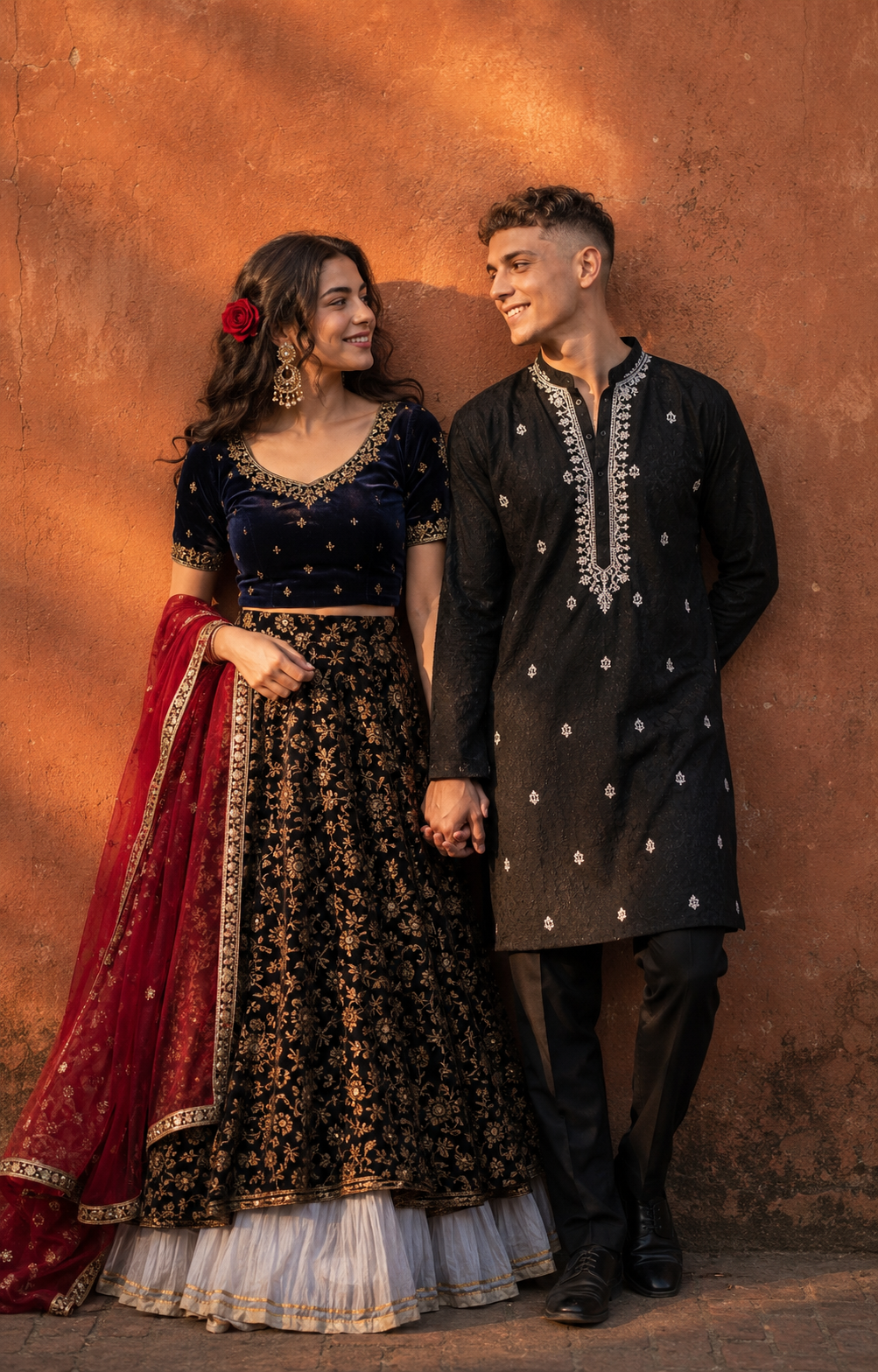
Use the uploaded image strictly as the ONLY face and identity reference. Create a cinematic 8K portrait of a couple standing side-by-side against a textured rustic terracotta wall, illuminated by warm golden hour sunlight that casts soft shadows and enhances skin tones. Composition & Framing: Medium full shot (knee to slightly above head), vertical 4:5 aspect ratio. Subjects centered with balanced negative space. Clean background with subtle wall texture, no distractions. Pose & Interaction: The couple stands close together, gently holding hands. Both bodies slightly angled toward each other. They share a soft, affectionate gaze, creating an intimate and nostalgic mood. Expression: Natural, calm, and warm expressions with slight smiles. Eyes focused on each other, conveying romantic connection. Outfit Details: Woman: Navy-blue velvet blouse with intricate gold embroidery, paired with a black lehenga featuring rich gold floral patterns. A visible layered white underskirt adds depth. She wears a flowing red dupatta with gold border detailing draped elegantly. Accessories include large traditional gold earrings and a red rose tucked into her hair. Man: Black embroidered Chikan kurta with detailed white threadwork on the neckline, paired with tailored black trousers. Hair & Styling: Natural, well-groomed hair. Soft, realistic texture with subtle movement. No artificial shine. Lighting: Warm golden hour sunlight from the side, creating soft highlights on faces and gentle shadows on the wall. Natural light falloff for cinematic depth. Background: Minimal rustic terracotta wall with slight imperfections and texture. No people or distractions in the background. Style & Mood: Cinematic, nostalgic 90s Bollywood print-photo aesthetic. Slight film grain, soft contrast, warm color grading, and subtle vignette for vintage realism. Technical Details: Ultra-realistic, 8K resolution, shallow depth of field (light background softness), sharp focus on subjects, natural skin texture (visible pores), no plastic or CGI look.
The charm of this style comes from the warm golden sunlight that softly illuminates the couple while enhancing skin tones, clothing textures, and emotional expressions. Traditional attire such as lehengas, sarees, kurtas, sherwanis, and embroidered ethnic outfits add richness and authenticity to the composition. When combined with cinematic color grading, realistic skin textures, and a rustic background, the final result resembles a classic Bollywood print photograph with a timeless appeal.
A well-crafted prompt is essential for generating realistic and visually stunning images. Details such as clothing design, lighting direction, expressions, body language, and background elements play a significant role in achieving professional-quality results. By carefully combining these elements, creators can produce breathtaking portraits that capture love, warmth, and cultural elegance in a single frame.
How To Use Photo Editing?
Even after generating an image, photo editing is crucial for enhancing realism and improving overall visual quality. Professional editing can transform a good portrait into an unforgettable masterpiece.
Step 1: Choose the Best Base Image
Generate multiple versions using your AI image tool and select the image with:
- Natural facial expressions
- Proper lighting
- Accurate clothing details
- Strong composition
Starting with a high-quality image reduces editing time significantly.
Step 2: Enhance Golden Hour Lighting
Golden-hour portraits should have warm and soft lighting.
Adjust:
- Highlights
- Exposure
- Warmth
- Glow effects
This creates a natural sunset ambiance without making the image look overly edited.
Step 3: Improve Traditional Outfit Details
Traditional clothing often contains intricate embroidery and decorative patterns.
Enhance:
- Fabric texture
- Gold threadwork
- Jewelry reflections
- Color richness
This makes the attire stand out beautifully.
Step 4: Refine Skin Tones
Natural skin tones are essential for realism.
Avoid:
- Excessive skin smoothing
- Unrealistic whitening
- Artificial filters
Maintain authentic skin texture and visible details.
Step 5: Add Cinematic Atmosphere
Subtle enhancements such as:
- Soft shadows
- Light film grain
- Background blur
- Warm color grading
can dramatically improve the overall mood of the portrait.
Tools You Can Use For Prompt Copy and Create Photo
Several AI and editing tools can help you create stunning Golden Hour Love portraits.
ChatGPT
ChatGPT is an excellent tool for generating detailed prompts.
Benefits include:
- Prompt customization
- Scene descriptions
- Outfit suggestions
- Lighting guidance
- Photography styling ideas
It helps creators transform simple ideas into professional prompts.
Midjourney
Midjourney is widely used for artistic and cinematic portrait generation.
Advantages:
- Beautiful color grading
- Strong emotional atmosphere
- High-detail clothing textures
- Excellent lighting effects
Leonardo AI
Leonardo AI provides powerful control over portrait generation.
Features:
- Detailed face rendering
- Traditional clothing accuracy
- High-resolution outputs
- Realistic textures
Adobe Firefly
Adobe Firefly combines creativity with professional editing workflows.
Benefits:
- Easy-to-use interface
- Realistic portrait generation
- Adobe integration
- Fast processing
Stable Diffusion
Stable Diffusion is ideal for users who want complete customization.
Advantages:
- Open-source flexibility
- Fine-tuning capabilities
- Advanced prompt control
- Custom model support
- Photo Editing Software
Adobe Photoshop
Photoshop remains the leading software for portrait enhancement.
Useful for:
- Skin retouching
- Lighting adjustments
- Clothing enhancement
- Background cleanup
- Color grading
Adobe Lightroom
Lightroom is perfect for refining overall image quality.
Features:
- Exposure control
- White balance adjustments
- Highlight recovery
- Cinematic presets
Snapseed
An excellent mobile editing application.
Benefits:
- Free to use
- Professional editing tools
- Selective adjustments
- Easy workflow
Canva
Great for beginners and social media creators.
Features:
- Quick filters
- Background editing
- Color adjustments
- Easy export options
How To Edit Photo?
Editing is the final stage that brings your portrait to life. Follow these professional steps for the best results.
1. Correct Exposure
Begin by adjusting:
- Brightness
- Contrast
- Highlights
- Shadows
Balanced exposure creates depth and clarity.
2. Enhance Facial Features
Focus on:
Eyes
Eyebrows
Lips
Hair strands
Selective sharpening improves realism while maintaining a natural appearance.
3. Refine Traditional Clothing
Traditional outfits often contain beautiful craftsmanship.
Increase:
- Fabric detail
- Embroidery visibility
- Texture sharpness
- Color vibrancy
This helps showcase the richness of the attire.
4. Improve Jewelry Highlights
Traditional portraits often feature jewelry as a key visual element.
Enhance:
- Gold shine
- Gem reflections
- Fine detailing
Avoid making the jewelry appear overly bright or unrealistic.
5. Add Background Depth
Use shallow depth-of-field effects to separate subjects from the background.
This creates:
- Better focus
- Professional composition
- Cinematic appearance
6. Apply Warm Color Grading
Golden-hour portraits benefit from warm tones.
Popular adjustments include:
- Amber highlights
- Soft orange hues
- Warm shadows
- Reduced harsh contrast
This creates a romantic and nostalgic atmosphere.
7. Add Subtle Film Grain
A slight amount of grain can replicate the look of classic print photography.
Benefits:
- Vintage feel
- Cinematic texture
- Organic appearance
Use sparingly to avoid reducing image quality.
8. Final Sharpening
Apply selective sharpening to:
- Faces
- Clothing details
- Jewelry
- Eyes
Avoid sharpening the background to maintain depth.
Conclusion
The Golden Hour Love In Traditional Attire Prompt is a perfect combination of romance, culture, and cinematic storytelling. Warm golden sunlight, elegant traditional clothing, realistic skin textures, and heartfelt expressions come together to create images that feel timeless and emotionally powerful.
Whether you are using AI image generators, DSLR photography, or professional editing software, mastering this style can elevate your portraits to a new level. The key lies in balancing lighting, composition, realism, and emotional connection. By using detailed prompts, high-quality tools, and thoughtful editing techniques, you can create stunning images that capture the beauty of love and tradition in a truly unforgettable way.
With the right approach, every portrait becomes more than just a photograph—it becomes a lasting memory filled with warmth, elegance, and cinematic charm.