Introduction
Portrait photography has evolved dramatically with the rise of AI image generation and advanced photo editing technologies. One of the most visually striking styles gaining popularity among photographers, digital artists, and content creators is the Golden Halo Serenity Cinematic Studio Portrait. This portrait style combines minimalist composition, dramatic single-source lighting, warm monochromatic tones, and a calm emotional expression to create a timeless editorial-quality image.
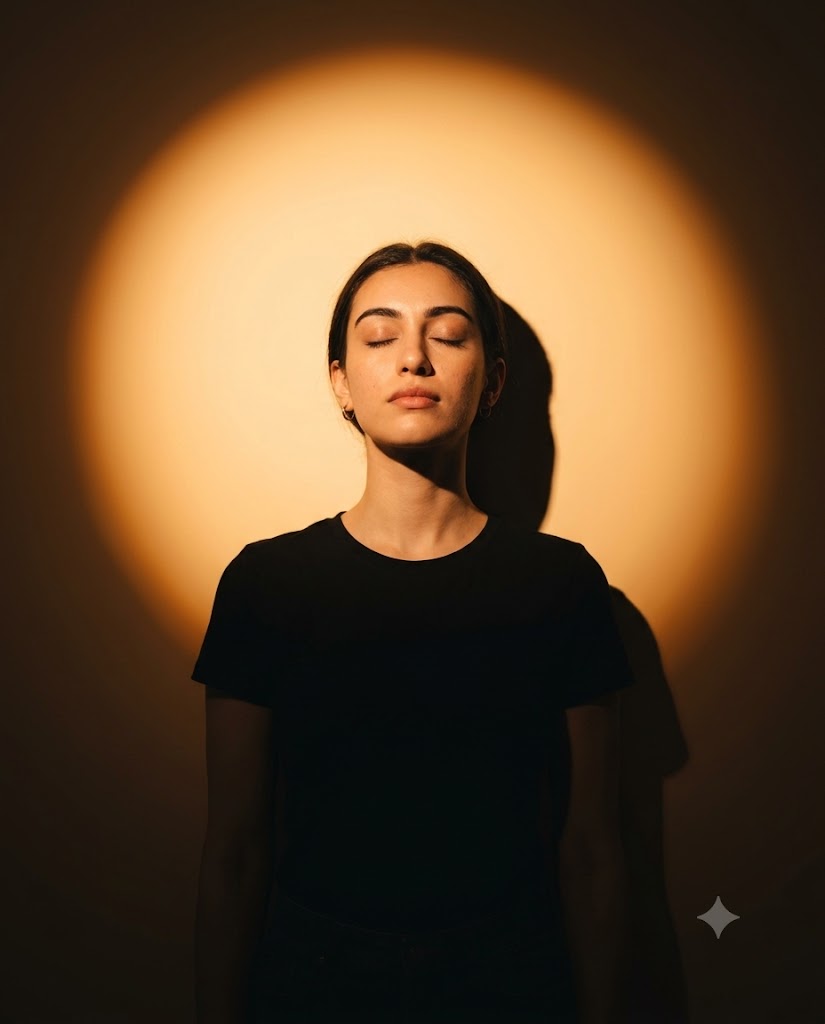
"Golden Halo Serenity Cinematic Studio Portrait Prompt"
Use the uploaded image as the ONLY face & identity reference. Create a moody cinematic studio mid-chest up portrait (framed from below chest to head, no crop at shoulders or top of head), perfectly centered with symmetrical composition and Balanced negative space on both sides. Composition & Framing: Mid-chest up portrait (from below chest to head), full head visible with clean headroom. No crop at head, chin, or waist. Pose & Body Position: The subject is standing upright and slightly leaning back against a flat wall. Upper back and shoulders gently touching the wall, creating a natural relaxed posture. Shoulders slightly dropped, body centered and aligned with the camera. Head & Expression: Eyes closed, chin subtly lifted upward. Calm, introspective, peaceful expression with relaxed facial muscles. Lighting: A single strong golden-orange spotlight is positioned directly behind the subject’s head, aimed toward the wall, creating a perfectly centered circular halo. This is the ONLY light source in the scene, with no additional fill lights, and it naturally spills forward to softly illuminate the face through bounce and reflection. The halo is brightest at the center behind the head, with a smooth radial falloff into deep amber/orange tones, while the outer edges transition into darker shadows forming a natural vignette. The face is lit only by indirect bounce light, producing a soft and realistic falloff across facial features without any artificial front lighting. A sharp, well-defined shadow of the head and shoulders falls to the right side of the wall, fully consistent with single-light physics. The lower torso gradually fades into darkness due to natural light falloff. Outfit: Simple matte black t-shirt, visible down to the waist, no patterns or distractions. Background: Clean, smooth studio wall with a warm gradient. The circular halo must be soft-edged, evenly diffused, and perfectly round. Camera & Technical Details: Eye-level camera angle 50mm lens, f/2 Shallow depth of field with crisp facial focus Cinematic color grading with warm amber tones 8K resolution Aspect ratio 4:5 Face Realism Fix: Ensure the face blends seamlessly with the lighting and environment — match warm color temperature, realistic shadow gradients, natural skin texture with visible pores, and avoid any artificial, plastic, or composited look. Style: Minimalist cinematic portrait, chiaroscuro-inspired lighting, warm monochromatic palette, editorial photography quality
The defining feature of this portrait is the perfectly centered circular golden halo positioned behind the subject's head. Inspired by classic chiaroscuro lighting techniques and modern fashion editorials, the golden halo creates a powerful visual focus while maintaining elegance and simplicity. The warm amber glow, combined with realistic skin textures, soft shadows, and cinematic color grading, produces an image that feels both artistic and professional.
Whether you are using AI image generators, DSLR photography, or photo editing software, a well-crafted Golden Halo Serenity prompt can help you achieve stunning studio portraits with a premium editorial aesthetic.
How To Use Photo Editing?
Generating an image is only the first step. Professional photo editing helps refine lighting, improve realism, and create a polished final result.
Step 1: Generate the Base Portrait
Begin by using your preferred AI image generation platform. Paste your Golden Halo Serenity prompt and generate several variations. Select the version with the best facial structure, lighting balance, and halo placement.
Step 2: Check Face Consistency
If using a face reference image, ensure the generated portrait maintains:
- Facial proportions
- Eye shape
- Nose structure
- Jawline
- Skin tone
- Natural facial details
Accurate identity preservation is essential for realism.
Step 3: Refine the Golden Halo
The circular halo should remain:
- Perfectly centered
- Soft-edged
- Evenly diffused
- Symmetrical
Use masking tools if necessary to enhance the halo's shape and brightness while keeping it natural.
Step 4: Improve Lighting Realism
Since the portrait relies on a single back spotlight, make sure:
- The face receives realistic bounce lighting
- Shadows remain physically accurate
- Light falloff appears gradual
- No artificial fill lighting is visible
Natural lighting behavior significantly improves cinematic quality.
Step 5: Apply Color Grading
Warm amber color grading is a signature feature of this style.
Adjust:
- Highlights
- Midtones
- Shadows
- Color temperature
The goal is to create a rich golden atmosphere without oversaturation.
Tools You Can Use For Prompt Copy and Create Photo
Various tools are available for generating and enhancing cinematic portraits.
ChatGPT
ChatGPT is an excellent tool for creating detailed portrait prompts.
Benefits include:
- Custom prompt writing
- Scene enhancement
- Lighting descriptions
- Camera specifications
- Creative styling ideas
It helps transform simple concepts into highly detailed image-generation prompts.
Midjourney
Midjourney is popular for producing artistic and editorial-style portraits.
Advantages:
- Beautiful lighting effects
- Strong cinematic atmosphere
- High-detail outputs
- Excellent color grading
Adobe Firefly
Adobe Firefly combines AI generation with professional editing capabilities.
Features:
- User-friendly interface
- Fast image creation
- Realistic portrait generation
- Seamless Adobe integration
Leonardo AI
Leonardo AI provides advanced control over portrait realism.
Benefits:
- Detailed facial rendering
- Enhanced textures
- Flexible customization
- High-resolution outputs
Stable Diffusion
Stable Diffusion is ideal for users who want full creative control.
Features:
- Open-source flexibility
- Custom models
- Fine-tuned portrait generation
- Advanced prompt control
- Professional Photo Editing Software
Adobe Photoshop
Photoshop remains the industry standard for portrait retouching.
Useful for:
- Halo enhancement
- Skin refinement
- Light shaping
- Shadow adjustments
- Background cleanup
Adobe Lightroom
Lightroom is ideal for color grading and exposure correction.
Features:
- White balance control
- Contrast adjustments
- Highlight recovery
- Cinematic presets
Snapseed
A powerful mobile editing application.
Benefits:
- Easy-to-use interface
- Portrait enhancement tools
- Selective adjustments
- Quick editing workflow
Canva
Perfect for beginners and social media creators.
Features:
- Simple filters
- Background editing
- Color correction
- Quick export options
How To Edit Photo?
Professional editing is what transforms a good portrait into a truly cinematic masterpiece.
1. Adjust Exposure
Begin with exposure correction.
Fine-tune:
- Brightness
- Contrast
- Highlights
- Blacks
Proper exposure helps establish depth and mood.
2. Enhance Skin Texture
Modern editorial portraits should maintain realistic skin detail.
Avoid:
- Over-smoothing
- Plastic-looking skin
- Excessive filters
Keep natural pores and subtle imperfections visible.
3. Perfect the Halo Effect
The golden halo should be the focal point of the composition.
Enhance:
- Circular symmetry
- Soft transitions
- Glow intensity
- Gradient smoothness
Avoid harsh edges or unnatural brightness.
4. Improve Shadow Accuracy
The portrait relies on realistic single-light physics.
Ensure:
- Shadows match light direction
- Edge softness remains natural
- Facial contours appear dimensional
- Wall shadow placement is realistic
Accurate shadows dramatically increase realism.
5. Refine Facial Details
Focus on:
- Eyes
- Eyelashes
- Lips
- Eyebrows
- Hair strands
Subtle sharpening helps the face stand out while preserving authenticity.
6. Add Cinematic Color Grading
Warm monochromatic tones are essential.
Use:
- Amber highlights
- Deep brown shadows
- Soft orange gradients
- Controlled saturation
The final image should feel rich and elegant.
7. Create Depth Through Vignetting
Natural vignetting enhances focus.
Darken:
- Outer corners
- Background edges
- Lower frame areas
This draws attention toward the illuminated face and halo.
8. Final Sharpening
Apply selective sharpening only where needed.
Focus on:
- Eyes
- Hair
- Facial texture
- Clothing details
Avoid sharpening the background to preserve depth of field.
Conclusion
The Golden Halo Serenity Cinematic Studio Portrait Prompt is a perfect blend of simplicity, emotion, and professional lighting design. By combining a centered amber halo, realistic facial rendering, dramatic shadow placement, and cinematic color grading, this portrait style creates a striking editorial-quality image that immediately captures attention.
Whether you are an AI artist, photographer, content creator, or photo editor, mastering this portrait style can significantly elevate the quality of your visual work. With the right prompt, professional editing techniques, and attention to lighting realism, you can create portraits that feel artistic, luxurious, and emotionally powerful.
The key elements are balance, symmetry, warm lighting, realistic textures, and subtle emotional expression. When executed correctly, the Golden Halo Serenity portrait becomes more than just an image—it becomes a cinematic work of art.