Introduction
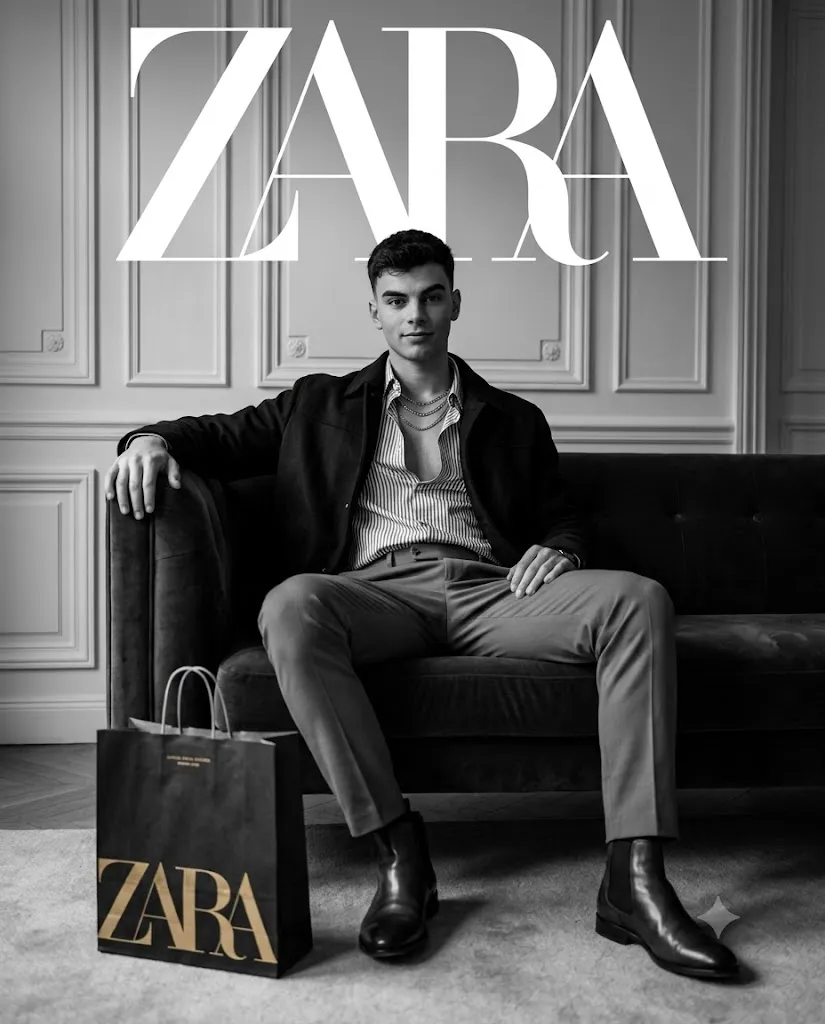
A ZARA-inspired luxury black & white editorial portrait is one of the most stylish and premium AI photography trends today. Characterized by cinematic lighting, monochrome color grading, elegant fashion styling, and high-end editorial composition, this style creates images that resemble luxury fashion campaigns and magazine covers. Rather than focusing on bright colors, the emphasis is placed on dramatic contrast, facial details, premium fabrics, and sophisticated posing.
"ZARA-Inspired Luxury Black & White Editorial Portrait Prompt"
Use the uploaded face strictly as the facial identity reference without changing facial proportions or expression. Create a hyper-realistic cinematic black-and-white editorial portrait of a stylish young man seated confidently on a luxurious dark velvet sofa inside an elegant European-inspired apartment. He wears a striped button-down shirt with the top buttons open, layered metallic necklaces, a dark casual jacket, tailored slim trousers, and polished leather ankle boots. The subject sits in a relaxed yet confident editorial pose with one arm stretched across the sofa, the other resting naturally on his thigh, maintaining direct eye contact with the camera. Decorative wall panels create a premium symmetrical background while the lighting features soft cinematic key light, dramatic shadows, HDR contrast, and shallow depth of field. A black shopping bag with elegant metallic gold lettering sits beside the subject, while clean magazine-style typography appears above. Ultra-realistic textures, premium fabric detail, monochrome cinematic grading, DSLR realism, luxury fashion campaign atmosphere, ultra-sharp focus, masterpiece quality, 8K realism, aspect ratio 4:5.
Using AI image generators together with detailed prompts allows photographers, digital artists, content creators, and bloggers to recreate this luxurious aesthetic in just a few minutes. The key to achieving realistic results is writing a prompt that clearly describes the subject, clothing, lighting, camera angle, environment, and mood.
A strong editorial prompt should include realistic facial details, a confident pose, premium wardrobe styling, cinematic shadows, shallow depth of field, HDR lighting, and an upscale interior. Combining these elements helps create a portrait that feels timeless, elegant, and suitable for professional portfolios, fashion editorials, or creative social media content.
This guide explains how to use AI photo editing, the best tools for generating editorial portraits, an example prompt, and the complete editing workflow for producing stunning 4K luxury black-and-white portraits.
How To Use Photo Editing?
Photo editing is an essential step in transforming an ordinary portrait into a premium editorial masterpiece. AI image generators can create the foundation, while editing software enhances realism, sharpness, and overall visual impact.
Follow these simple steps:
Step 1: Choose a High-Quality Portrait
Start with a clear, high-resolution portrait featuring good lighting and visible facial details. The better the original photo, the better the AI output.
Step 2: Copy a Detailed Prompt
Use a professionally written editorial portrait prompt that specifies clothing, pose, lighting, background, camera settings, and artistic style.
Step 3: Upload Your Photo
Upload the reference image into an AI image generation platform that supports image-to-image editing or face reference.
Step 4: Paste the Prompt
Insert your copied prompt and adjust settings such as aspect ratio, image quality, and creativity level.
Step 5: Generate the Image
Allow the AI to create multiple versions. Compare the results and choose the image with the best lighting, facial accuracy, and composition.
Step 6: Edit the Final Portrait
Use professional editing software to refine lighting, improve textures, sharpen facial details, and complete the editorial finish.
Tools You Can Use For Prompt Copy and Create Photo
Creating premium editorial portraits becomes easier when you use the right AI and editing tools.
ChatGPT
Generate highly detailed prompts with professional descriptions for lighting, wardrobe, poses, and camera settings.
Midjourney
Ideal for artistic luxury portraits featuring cinematic compositions and premium fashion aesthetics.
Flux AI
Produces realistic human faces with impressive skin texture and natural lighting while preserving identity.
Stable Diffusion
Offers advanced customization through image-to-image editing, ControlNet, and prompt refinement.
GPT Image
Excellent for generating realistic editorial portraits directly from descriptive prompts.
Adobe Photoshop
Perfect for skin retouching, object removal, sharpening, frequency separation, and advanced color correction.
Adobe Lightroom
Enhances exposure, shadows, highlights, clarity, texture, and monochrome color grading.
Canva
Useful for designing magazine covers, thumbnails, posters, and social media graphics using the finished portrait.
Using AI image generation together with professional editing software delivers polished, publication-quality results.
How To Edit Photo?
Once the AI-generated image is complete, editing is the final step that elevates it to professional quality.
Clean the Image
Remove unwanted imperfections, distractions, or artifacts while maintaining realistic skin texture.
Improve Lighting
Balance highlights and shadows to emphasize facial features and create depth.
Increase Contrast
A luxury black-and-white portrait relies on strong contrast to separate the subject from the background.
Enhance Sharpness
Sharpen the eyes, eyebrows, lips, clothing textures, jewelry, and leather boots without making them appear artificial.
Refine the Background
Keep the interior clean, elegant, and uncluttered to maintain the premium editorial look.
Apply Cinematic Black-and-White Grading
Adjust luminance and grayscale tones to produce a rich monochrome appearance with smooth transitions between highlights and shadows.
Final Export
Save the completed portrait in 4K or higher resolution using maximum quality settings for websites, portfolios, prints, and social media.
Conclusion
Luxury black-and-white editorial portraits remain one of the most timeless styles in AI-generated photography. By combining a carefully written prompt, a high-quality reference image, and professional editing techniques, you can create striking portraits that capture confidence, elegance, and modern fashion.
The secret to exceptional results lies in detailed prompt writing, realistic lighting descriptions, premium wardrobe styling, balanced composition, and subtle post-processing. Whether you are building an AI prompt collection, creating fashion-inspired artwork, or designing premium visual content, mastering this editorial style will help your images stand out with sophistication and realism.
Experiment with different poses, luxury interiors, dramatic lighting setups, and monochrome color grading to develop your own signature look. With practice and creative refinement, you can consistently produce ultra-realistic editorial portraits that feel worthy of the cover of a world-class fashion magazine while expressing your own artistic vision.