Introduction
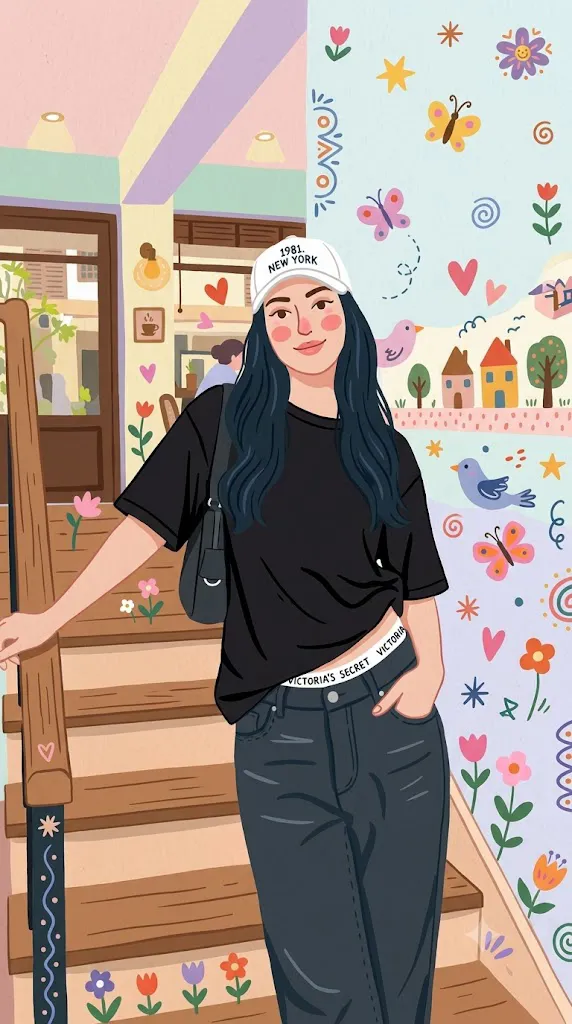
The Whimsical Folk Flat Illustration Portrait style is a delightful blend of traditional folk art, modern flat illustration, and playful doodle design. Inspired by handmade storybooks, children's illustrations, and decorative folk paintings, this artistic approach transforms an ordinary portrait into a colorful, cheerful piece of digital art while preserving the original composition and personality of the subject. Instead of focusing on photorealism, this style emphasizes simplified shapes, bold outlines, pastel color palettes, and charming decorative details.
"Whimsical Folk Flat Illustration Portrait Prompt"
Transform the uploaded portrait into a whimsical folk flat illustration while preserving the original composition, facial identity, hairstyle, and characters. Simplify all realistic details into clean colorful flat shapes with smooth rounded proportions and a handcrafted childlike aesthetic. Use a harmonious palette of pastel and vibrant colors, rosy cheeks, expressive eyes, playful line art, bold outlines, and soft geometric forms. Decorate the scene with flowers, butterflies, birds, leaves, stars, hearts, swirls, tiny houses, cozy streets, trees, and charming urban details that enhance the storytelling without distracting from the main subject. Apply soft diffused lighting, balanced color harmony, smooth shading, crisp illustration quality, clean background composition, storybook-inspired charm, high-resolution artwork, ultra-detailed flat illustration, and premium digital art quality.
One of the defining features of this illustration style is its handcrafted appearance. Characters are drawn with rounded shapes, rosy cheeks, expressive eyes, and clean geometric forms. Decorative elements such as flowers, butterflies, birds, leaves, stars, hearts, swirls, and whimsical patterns add warmth and personality to the artwork. Cozy urban backgrounds featuring houses, windows, trees, bicycles, and charming streets complete the scene without overwhelming the main subject.
AI image generators make it easier than ever to create these illustrations from a single reference photo. By writing a detailed prompt, you can guide the AI to preserve facial identity while transforming realistic details into a playful flat-art design. Whether you're creating profile pictures, greeting cards, posters, children's book artwork, stickers, or social media content, mastering this illustration style opens up countless creative possibilities.
This guide explains how to use AI photo editing, the best tools for generating whimsical folk illustrations, a sample prompt structure, and professional editing techniques that will help you produce vibrant, high-quality artwork.
How To Use Photo Editing?
Although AI generates the main illustration, photo editing helps refine the final image and gives it a polished professional appearance.
Step 1: Select a High-Quality Photo
Start with a clear portrait that has good lighting and visible facial features. A high-resolution reference photo helps the AI preserve the person's identity while simplifying the artwork into flat illustration.
Step 2: Copy a Detailed Prompt
Use a descriptive prompt that specifies the illustration style, decorative elements, color palette, facial expression, background, and overall mood.
Step 3: Upload the Reference Image
Import your photo into an AI image generator that supports reference-image guidance or image-to-image transformation.
Step 4: Generate Multiple Variations
Create several versions to compare composition, facial resemblance, decorative details, and color harmony.
Step 5: Choose the Best Illustration
Select the image that best balances the original portrait with the handcrafted folk-art aesthetic.
Step 6: Apply Final Editing
Use editing software to improve colors, sharpen line art, adjust contrast, and clean any unwanted imperfections.
By combining AI generation with professional editing, you can create illustrations that feel polished while retaining their handmade charm.
Tools You Can Use For Prompt Copy and Create Photo
The following tools work exceptionally well for creating whimsical folk flat illustrations.
ChatGPT
Perfect for generating detailed prompts that describe illustration styles, decorative elements, colors, lighting, and composition.
Midjourney
Excellent for producing colorful artistic illustrations with strong storytelling and beautifully balanced compositions.
Flux AI
Creates clean illustrations while maintaining accurate facial identity and expressive character features.
Stable Diffusion
Offers advanced customization through image-to-image workflows, style models, and prompt refinement.
GPT Image
Useful for transforming portraits into creative flat illustrations with consistent artistic quality.
Adobe Photoshop
Ideal for refining outlines, cleaning imperfections, adjusting colors, and improving the overall presentation.
Adobe Illustrator
Perfect for enhancing vector-like shapes, smoothing edges, and creating scalable flat artwork.
Canva
Excellent for designing posters, greeting cards, social media posts, book covers, and printable artwork using the completed illustration.
Using AI generation together with editing software produces artwork that looks both professional and artistically unique.
How To Edit Photo?
Professional editing gives the finished illustration a cleaner and more vibrant appearance.
Clean the Artwork
Remove unwanted artifacts, jagged edges, or distracting details while preserving the handmade style.
Improve Color Balance
Enhance pastel tones and vibrant accents to create a cheerful, harmonious palette.
Sharpen Line Art
Refine outlines so that decorative doodles, facial features, and floral elements remain crisp without appearing harsh.
Enhance Decorative Details
Increase clarity for flowers, birds, butterflies, leaves, and other playful symbols to improve visual richness.
Refine the Background
Keep the cozy urban environment simple, balanced, and supportive of the main character rather than overly complex.
Adjust Lighting
Maintain soft, even illumination that complements the gentle handcrafted look of the illustration.
Export in High Resolution
Save the final artwork in 4K resolution or higher to ensure excellent quality for digital use, printing, posters, greeting cards, or social media.
Conclusion
The Whimsical Folk Flat Illustration Portrait style combines traditional folk-art charm with modern AI creativity, resulting in artwork that feels playful, colorful, and full of personality. By using a carefully written prompt, a high-quality reference photo, and thoughtful editing techniques, you can transform everyday portraits into delightful illustrations suitable for storybooks, gifts, branding, and social media.
The secret to achieving beautiful results lies in balancing simplified shapes with recognizable facial features while enhancing the artwork with decorative doodles, warm color palettes, and cozy backgrounds. AI handles the creative transformation, while professional editing adds the finishing touches that make the illustration look polished and visually engaging.
As AI illustration tools continue to evolve, experimenting with different folk-art influences, seasonal themes, decorative motifs, and color combinations will help you develop a distinctive artistic style. With practice, you can consistently create charming flat illustrations that celebrate imagination, craftsmanship, and the timeless appeal of handmade-inspired design.