Introduction
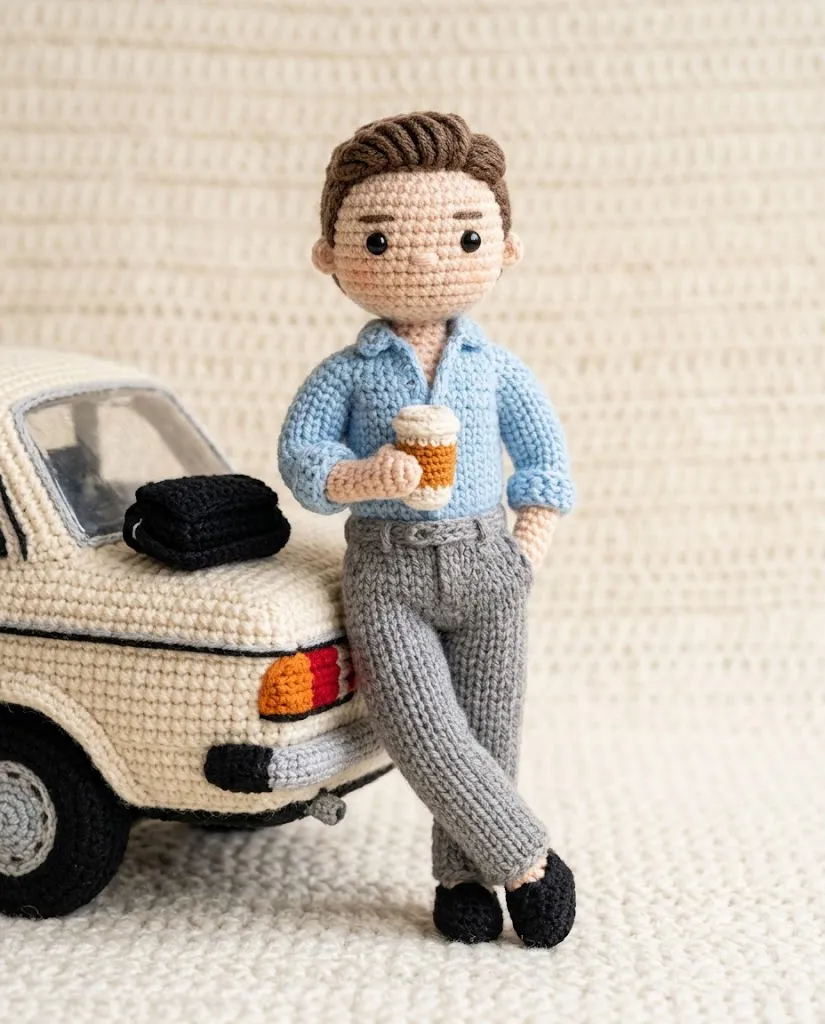
The Ultra-Detailed Knitted Yarn Doll Portrait style has become one of the most charming trends in AI-generated artwork. Inspired by handmade crochet dolls, amigurumi toys, and knitted plush figures, this creative style transforms an ordinary portrait into a soft, cozy yarn character while preserving the person's recognizable facial features. Every element—from the woven fibers and stitched seams to the rounded body proportions—creates the appearance of a handcrafted collectible toy.
"Ultra-Detailed Knitted Yarn Doll Portrait Prompt"
Using the uploaded photo as the facial identity and hairstyle reference, create a hyper-realistic handmade knitted yarn doll portrait. Preserve the subject's facial structure while transforming the entire appearance into a soft crochet-style plush character. The doll should feature interwoven wool fibers, realistic knitted fabric, visible stitching, embroidered details, rounded body proportions, handcrafted toy aesthetics, soft plush texture, cozy expression, gentle smile, and warm personality. Match the color palette to the original photo while maintaining realistic yarn shading and fabric depth. Use soft diffused lighting with subtle shadows, a clean minimalist background, DSLR-quality detail, ultra-sharp fiber texture, premium handcrafted appearance, highly realistic wool material, shallow depth of field, and 4K ultra-detailed quality.
Unlike standard cartoon filters, a knitted yarn doll prompt focuses on realistic textile details. The AI recreates interwoven yarn fibers, visible knitting patterns, embroidered stitching, soft wool textures, and handcrafted imperfections that make the final image look like a real handmade doll. Combined with gentle lighting and a clean background, the result is both realistic and heartwarming.
This style is perfect for social media profile pictures, personalized gifts, digital art collections, children's illustrations, greeting cards, and creative AI projects. Whether you are an AI artist, content creator, designer, or hobbyist, learning how to write a detailed knitted yarn prompt will help you generate professional-quality images with remarkable realism.
In this guide, you'll learn how to use AI photo editing, discover the best tools for generating knitted portraits, explore a sample prompt structure, and understand the editing workflow that produces beautiful, ultra-detailed yarn doll artwork.
How To Use Photo Editing?
Photo editing plays an important role in creating realistic knitted yarn portraits. AI generates the initial toy design, while editing software enhances textures, lighting, colors, and overall presentation.
Step 1: Choose a Clear Portrait
Select a high-resolution portrait with good lighting and visible facial details. A sharp reference image helps AI preserve the person's identity while transforming the portrait into a knitted doll.
Step 2: Copy a Detailed Prompt
Use a well-written prompt that clearly describes yarn texture, stitched details, facial proportions, lighting, mood, and background.
Step 3: Upload the Reference Photo
Import your portrait into an AI image generator that supports image-to-image editing or reference-image guidance.
Step 4: Generate Multiple Versions
Create several variations and compare facial accuracy, knitting quality, yarn texture, and overall appearance.
Step 5: Select the Best Result
Choose the image with the most realistic fiber texture, natural facial resemblance, and balanced composition.
Step 6: Enhance the Artwork
Use professional editing software to sharpen the knitted details, improve lighting, and produce a polished final image.
Combining AI image generation with thoughtful photo editing delivers a handcrafted look that feels both realistic and artistic.
Tools You Can Use For Prompt Copy and Create Photo
The following tools are excellent for creating knitted yarn doll portraits.
ChatGPT
Ideal for writing detailed AI prompts that describe yarn texture, stitching, facial features, lighting, and artistic style.
Midjourney
Produces highly artistic knitted toy illustrations with beautiful color harmony and realistic textile effects.
Flux AI
Generates realistic facial identity while maintaining convincing wool textures and handcrafted details.
Stable Diffusion
Provides extensive control over image generation through image-to-image workflows, ControlNet, and prompt customization.
GPT Image
Useful for creating high-quality knitted toy portraits directly from descriptive prompts while maintaining visual consistency.
Adobe Photoshop
Perfect for enhancing yarn texture, cleaning small imperfections, sharpening stitches, and refining overall quality.
Adobe Lightroom
Improves brightness, contrast, color balance, softness, and overall image presentation while maintaining the cozy aesthetic.
Canva
Excellent for creating greeting cards, social media graphics, posters, profile pictures, and printable artwork using the finished portrait.
Using AI together with professional editing software ensures your knitted doll portrait looks polished and realistic.
How To Edit Photo?
Professional editing adds the finishing touches that make the knitted portrait appear like a genuine handcrafted collectible.
Clean the Image
Remove any unwanted AI artifacts while preserving the woven texture and stitched appearance.
Enhance Yarn Texture
Increase clarity carefully to highlight individual fibers, knitted loops, and embroidery without making the material appear overly sharp.
Improve Lighting
Adjust highlights and shadows to create soft, cozy illumination that complements the handmade aesthetic.
Refine Colors
Balance the colors so the yarn remains vibrant yet natural. Maintain consistency with the tones from the original reference photo.
Sharpen Important Details
Enhance the eyes, facial embroidery, stitched edges, clothing texture, and plush fabric while preserving softness.
Improve the Background
Keep the background simple and uncluttered to ensure the knitted character remains the primary focus.
Export in High Resolution
Save the final image in 4K resolution or higher for printing, social media, digital artwork, or personalized gifts.
Conclusion
The Ultra-Detailed Knitted Yarn Doll Portrait style beautifully combines AI creativity with the timeless charm of handmade crafts. By using a detailed prompt, a high-quality reference image, and professional editing techniques, you can transform ordinary portraits into delightful knitted characters that feel warm, friendly, and handcrafted.
This style is ideal for personalized gifts, children's artwork, profile pictures, creative branding, and decorative digital illustrations. Success comes from carefully describing yarn fibers, knitted patterns, stitched details, lighting, facial preservation, and overall mood within the prompt.
As AI image generation continues to evolve, mastering detailed prompt writing and subtle photo editing will help you create increasingly realistic knitted portraits. Experiment with different yarn colors, crochet styles, accessories, seasonal themes, and backgrounds to develop your own unique collection of handcrafted-inspired AI artwork. With practice, you can consistently produce ultra-detailed knitted doll portraits that capture both personality and the comforting beauty of handmade craftsmanship.