Introduction
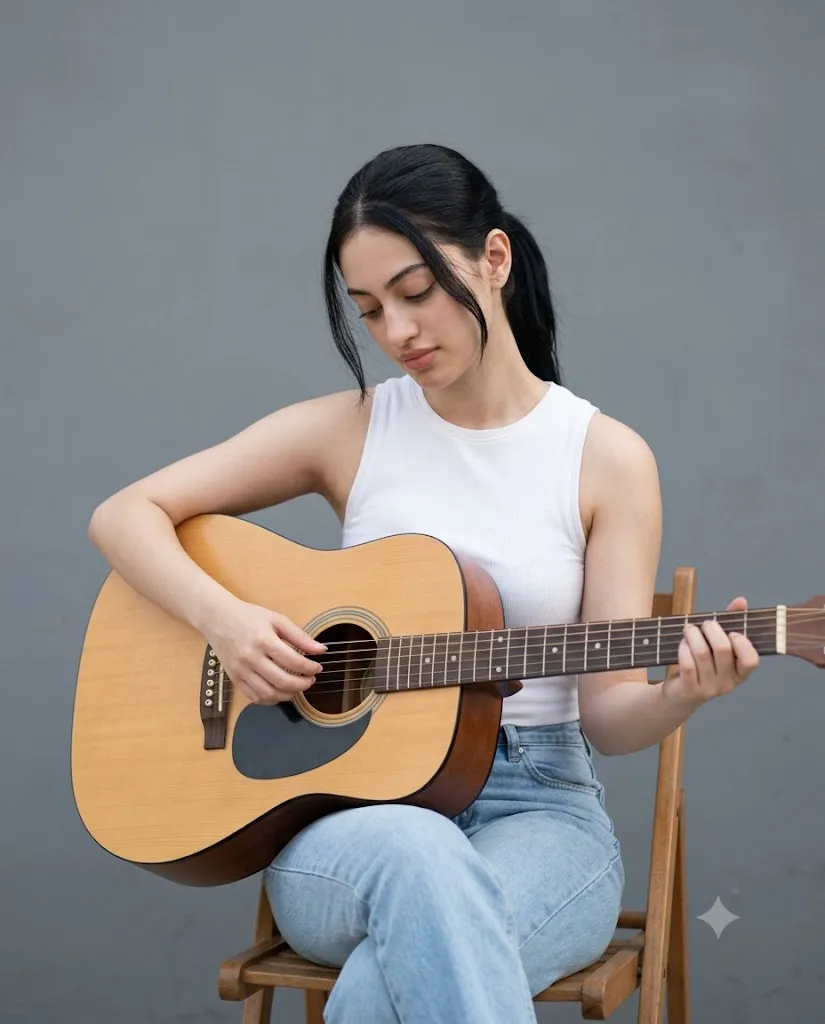
The Soft Acoustic Guitar Portrait is a natural and realistic AI photo editing style that combines lifestyle photography, emotional storytelling, and minimal artistic composition. This style focuses on creating peaceful, authentic portraits that capture a quiet musical moment with a warm and natural atmosphere.
"Soft Acoustic Guitar Portrait Prompt"
Create a soft, natural, photorealistic outdoor portrait of a person seated on a simple wooden chair while gently playing an acoustic guitar in daylight. The subject is positioned slightly right of center with the body angled subtly toward the left. The head is tilted downward with eyes focused on the guitar strings, creating a calm, introspective, and peaceful mood. The subject wears a clean minimal white sleeveless ribbed top paired with fitted light blue jeans, creating a simple modern aesthetic. Hair is tied back in a neat low ponytail with a few soft strands framing the face. The expression is serene and focused with a relaxed natural feeling. The acoustic guitar has warm natural wood tones with visible grain texture. One hand forms chords on the fretboard while the other gently strums near the sound hole. The background is a neutral gray wall with a smooth matte finish and no plants, greenery, or extra objects. Use soft natural daylight, gentle highlights, mild shadows, eye-level camera angle, slight downward perspective, medium shot framing, 50mm lens look, f/2.8 aperture, shallow depth of field, realistic skin texture, natural color grading, soft contrast, crisp focus, lifestyle photography style, ultra-realistic high-resolution quality, and 4:5 aspect ratio.
Unlike heavily edited or dramatic images, this aesthetic highlights simplicity, calm emotions, and real-life beauty. The main focus is the connection between the person and the acoustic guitar, creating a visual story of creativity, relaxation, and personal expression.
This portrait style usually features a person sitting comfortably while playing an acoustic guitar in soft daylight. The composition is clean and balanced, with a simple background that keeps attention on the subject. Natural expressions, realistic clothing textures, and gentle lighting create a professional lifestyle photography appearance.
The beauty of this style comes from its minimal approach. A neutral background, soft shadows, natural colors, and a relaxed pose make the image feel genuine and timeless. The acoustic guitar adds warmth and personality, turning a simple portrait into a meaningful artistic moment.
Modern AI image generation tools make it easy to create this type of realistic portrait. By using a detailed prompt and a good reference image, AI can preserve facial identity, body position, clothing, and emotional expression while improving the overall cinematic quality.
This guide explains how to use photo editing, the best tools for creating soft acoustic guitar portraits, an example prompt, and the editing techniques needed to achieve a professional natural photography style.
How To Use Photo Editing?
Creating a Soft Acoustic Guitar Portrait begins with selecting the right reference image. A clear photo with visible facial details and natural lighting provides the best foundation for AI transformation.
The purpose of editing is not to create an artificial image but to enhance the natural feeling, mood, and photography quality.
Step 1: Choose A Clear Reference Photo
Select a high-resolution portrait where the subject’s face, hairstyle, clothing, and pose are visible. A natural expression works best for this style.
Step 2: Copy A Detailed Prompt
A detailed prompt helps the AI understand the complete visual direction. Include details such as:
- Acoustic guitar
- Natural daylight
- Minimal outfit
- Calm emotional expression
- Soft background
- Lifestyle photography style
- Realistic skin texture
- Cinematic depth of field
The more specific the prompt, the better the final result.
Step 3: Upload The Image
Upload the reference image into an AI photo editor that supports image transformation. The AI will analyze the image and apply the requested realistic style.
Step 4: Generate Multiple Results
Create different variations and compare facial accuracy, lighting, composition, and overall natural appearance.
Step 5: Select The Best Version
Choose the image that maintains the original personality while achieving a soft professional photography look.
Step 6: Final Enhancement
Use editing software to improve color balance, sharpness, contrast, and background softness.
Combining AI generation with final adjustments creates a polished and realistic acoustic guitar portrait.
Tools You Can Use For Prompt Copy and Create Photo
Several AI and editing tools can help create realistic music-inspired portraits.
ChatGPT
Useful for creating detailed prompts that describe pose, lighting, environment, outfit, and photography style.
Midjourney
Creates artistic portraits with beautiful lighting, realistic environments, and cinematic compositions.
Flux AI
Generates realistic image transformations while maintaining facial structure and natural details.
Stable Diffusion
Provides advanced image-to-image workflows with detailed customization options.
GPT Image
Helpful for creating realistic AI portraits with specific instructions for mood, style, and composition.
Adobe Photoshop
A professional editing tool for improving AI-generated portraits. It helps with:
- Skin refinement
- Lighting adjustments
- Background editing
- Color correction
- Detail enhancement
- Adobe Lightroom
Useful for creating soft natural color grading, adjusting exposure, and improving the overall photography style.
Canva
Great for creating social media designs, music posters, profile images, and creative layouts.
Using AI generation with professional editing tools produces a realistic and premium lifestyle portrait.
How To Edit Photo?
Editing improves the final portrait while keeping the realistic and peaceful feeling.
Enhance Natural Lighting
Adjust brightness and exposure to create a soft daylight appearance. Avoid harsh highlights because this style depends on gentle lighting.
Improve Skin Texture
Keep realistic skin details while making small adjustments for a clean professional photography look.
Adjust Colors
Use natural colors with soft contrast. Avoid heavy filters because the goal is a realistic lifestyle portrait.
Create Background Blur
Apply a subtle depth-of-field effect to separate the subject from the background while keeping the environment natural.
Improve Guitar Details
Enhance the wood texture, strings, and small details of the guitar to make it look realistic.
Balance Composition
Keep the subject as the main focus. Maintain negative space and a clean background for a professional editorial feel.
Add Cinematic Softness
A slight warm tone and gentle shadow adjustment can create a more emotional and premium appearance.
Export High Quality
Save the final image in high resolution for social media, portfolios, creative projects, or printing.
Conclusion
The Soft Acoustic Guitar Portrait style combines realistic photography, peaceful emotions, and artistic simplicity. It transforms ordinary images into beautiful lifestyle portraits that feel natural, authentic, and emotionally meaningful.
The strength of this aesthetic comes from its minimal approach. A simple chair, acoustic guitar, soft daylight, and calm expression are enough to create a powerful visual story. Instead of using dramatic effects, this style focuses on genuine moments and natural beauty.
Creating the perfect result requires a detailed prompt, a suitable reference image, and careful editing. AI tools make the transformation easier, while professional editing helps refine lighting, texture, and overall quality.
Whether you are creating music-related artwork, social media portraits, personal branding images, or creative photography projects, the Soft Acoustic Guitar Portrait style offers a timeless and elegant visual approach.
With the right prompt and editing techniques, anyone can create realistic portraits that capture creativity, calmness, and the beauty of a quiet musical moment.