Introduction
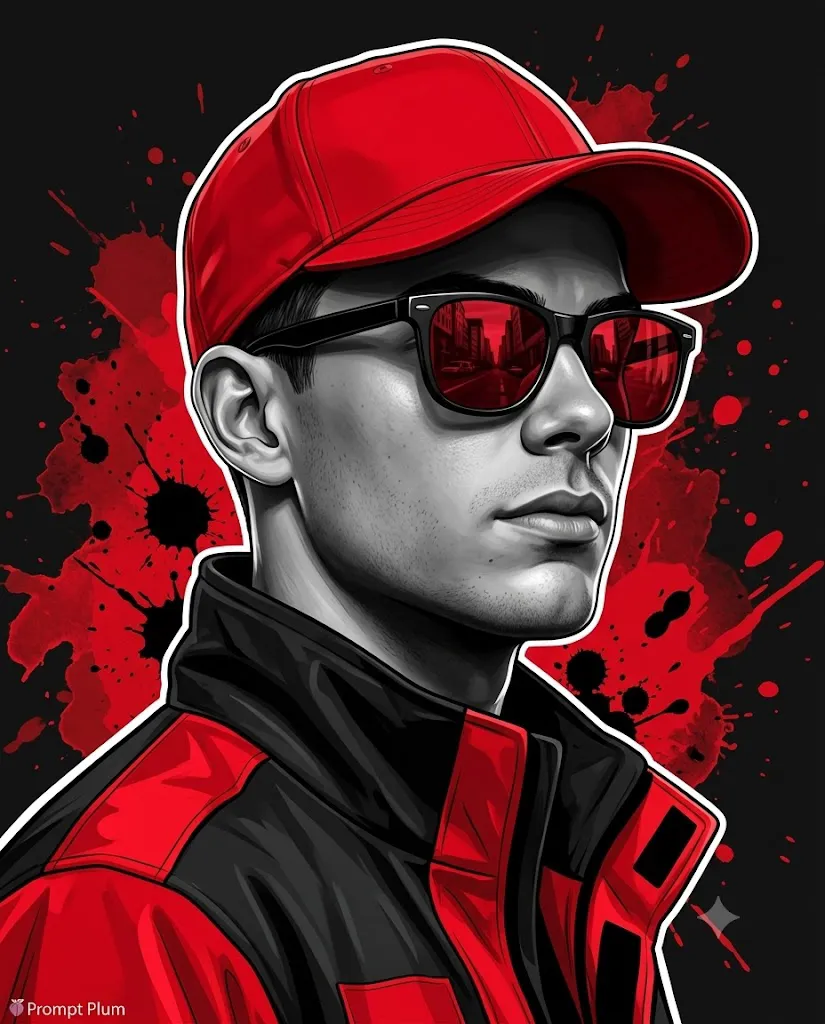
The Red Noir Streetwear Portrait is a powerful AI photo editing style that combines urban fashion, cinematic lighting, graphic design, and realistic digital illustration. Inspired by streetwear culture, modern poster art, graphic novels, and high-contrast editorial photography, this style transforms ordinary portraits into bold and dramatic visual artworks.
"Red Noir Streetwear Portrait Prompt"
Transform the uploaded image into a premium Red Noir Streetwear portrait while preserving 100% of the facial identity. Do not change facial structure, proportions, skin texture, beard details, jawline, nose shape, lips, ears, or hairstyle. Keep the exact identity locked.Create a high-contrast semi-realistic digital illustration portrait of a young man in a three-quarter view with a calm, confident expression. The face should remain clearly visible with balanced details of both eyes, nose, lips, and jawline.The subject wears a vivid red baseball cap with realistic stitching and fabric texture. Add black sunglasses with deep red reflective lenses showing a realistic urban street reflection. The outfit includes a dark black streetwear jacket with bold red panels, structured folds, and premium material details.Apply a clean outline effect with subtle rim lighting around the cap, sunglasses, face contour, shoulders, and jacket. Use a black, white, and bright red color palette only. Add a dark background with abstract red paint splashes, ink textures, and street-art elements.Create cinematic lighting, realistic skin texture, visible pores, sharp hair details, professional DSLR realism, graphic novel style, ultra-realistic digital illustration, vertical 4:5 composition, high detail, premium poster design.
This aesthetic focuses on creating a strong personality-driven image where identity, fashion, and atmosphere work together. The main idea is to preserve the subject’s facial identity while enhancing the overall visual impact through a black, white, and red color palette. The result is a premium street-style portrait with a cinematic and rebellious feeling.
Unlike traditional portraits, Red Noir artwork uses sharp contrast, bold colors, and graphic elements. The subject is usually separated from the background using clean outlines, rim lighting, and subtle glow effects. Red accents create energy and intensity, while deep black tones provide a mysterious and powerful mood.
The style often includes modern streetwear clothing, red accessories, reflective sunglasses, urban backgrounds, paint splashes, and editorial poster layouts. These details create a fashion campaign appearance that feels professional and artistic.
AI image generation tools make this transformation easier by allowing creators to convert normal photos into high-quality digital illustrations. With a detailed prompt and a reference image, AI can preserve facial structure, skin details, hairstyle, and expression while applying a bold graphic style.
This guide explains how to use photo editing, the best tools for creating Red Noir Streetwear portraits, an example prompt, and the editing process required to achieve a premium final result.
How To Use Photo Editing?
Creating a Red Noir Streetwear Portrait starts with choosing the right reference image. A clear photo with visible facial details gives the best results because the AI needs accurate information to maintain identity.
The goal of this style is not to change the person but to enhance their appearance with cinematic streetwear aesthetics.
Step 1: Choose A High-Quality Reference Photo
Select an image where the face is clearly visible. Good lighting, sharp details, and a natural expression help AI maintain accurate facial features.
Important details include:
- Face shape
- Skin texture
- Hair style
- Beard details
- Jawline
- Eye shape
- Natural expression
Step 2: Copy A Detailed Prompt
A detailed prompt helps AI understand the complete design. The prompt should describe:
- Identity preservation
- Streetwear fashion
- Red and black color palette
- Cinematic lighting
- Graphic illustration style
- Urban atmosphere
The more specific the description, the more accurate the final portrait becomes.
Step 3: Upload The Image
Upload the reference image into an AI image editor that supports image transformation. The AI will analyze the photo and apply the requested style.
Step 4: Generate Multiple Versions
Create multiple results and compare facial accuracy, clothing details, lighting, and overall design quality.
Step 5: Select The Best Artwork
Choose the version that keeps the original identity while creating a powerful streetwear poster effect.
Step 6: Final Adjustments
Use editing tools to improve contrast, colors, sharpness, and graphic details.
Combining AI generation with final editing creates a professional Red Noir portrait.
Tools You Can Use For Prompt Copy and Create Photo
Many AI and editing tools can help create Red Noir Streetwear artwork.
ChatGPT
Useful for writing detailed prompts that explain identity preservation, lighting, clothing, colors, and artistic style.
Midjourney
Creates cinematic portraits with strong visual impact, creative compositions, and graphic illustration effects.
Flux AI
Generates realistic AI transformations while maintaining facial structure and realistic details.
Stable Diffusion
Provides advanced customization through image-to-image generation, control tools, and style adjustments.
GPT Image
Helpful for creating AI portraits with detailed instructions for fashion, composition, and digital art style.
Adobe Photoshop
A professional editing tool for refining the final portrait. It helps with:
- Color grading
- Red tone enhancement
- Background effects
- Texture overlays
- Typography
- Poster design
- Adobe Lightroom
Useful for adjusting exposure, shadows, contrast, and creating a dramatic cinematic color tone.
Canva
Great for creating social media posters, profile images, banners, and editorial designs.
Using AI generation together with professional editing software helps create a premium streetwear portrait.
How To Edit Photo?
Editing helps improve the final Red Noir portrait and makes the artwork look more professional.
Preserve Facial Identity
Keep the original facial structure unchanged. The strongest part of this style is maintaining a realistic connection with the original person.
Improve Contrast
Increase contrast between dark shadows and bright highlights to create a dramatic cinematic effect.
Enhance Red Accents
Use strong red tones only in selected areas like clothing, accessories, reflections, and graphic elements.
Add Clean Outlines
Create a subtle outline around the subject to separate the portrait from the background.
Improve Lighting
Use dramatic side lighting and rim light effects to create depth and a premium poster appearance.
Add Background Elements
Include red paint splashes, urban textures, and abstract graphic details without distracting from the subject.
Add Texture
Apply subtle grain, digital noise, and surface texture to create a realistic printed artwork feeling.
Export High Quality
Save the final design in high resolution for posters, social media, wallpapers, or creative projects.
Conclusion
The Red Noir Streetwear Portrait style combines fashion, technology, and digital art to create bold and unforgettable visuals. By mixing realistic facial details with strong graphic elements, this style transforms ordinary photos into premium editorial portraits.
The most important part of this aesthetic is identity preservation. A successful result keeps the person recognizable while adding cinematic lighting, streetwear fashion, and a powerful red-black visual theme.
With detailed prompts and modern AI tools, creators can easily produce professional-looking portraits that feel like luxury fashion campaigns or graphic novel covers.
Whether you are creating profile pictures, social media artwork, posters, or personal branding designs, the Red Noir Streetwear style offers a unique way to showcase personality and creativity.
By combining accurate facial details, dramatic colors, and artistic editing techniques, you can create a portrait that looks modern, powerful, and visually memorable.