Introduction
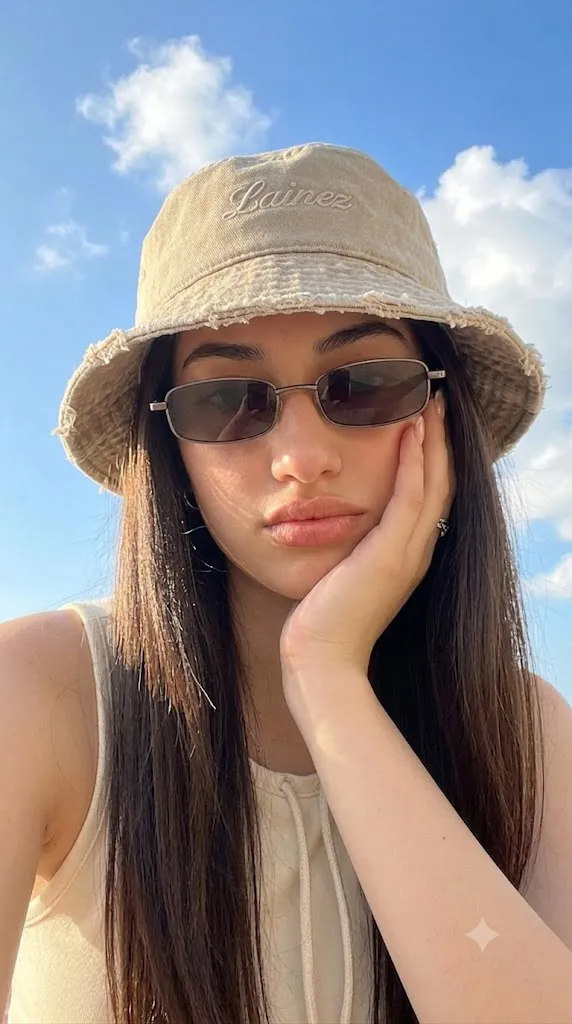
The Sunlit Blue Sky Natural Summer Fashion Portrait is a popular AI photo editing style that combines natural outdoor photography, modern fashion aesthetics, and bright summer vibes. This style focuses on creating realistic portraits with warm sunlight, soft colors, and a fresh lifestyle atmosphere.
"Sunlit Blue Sky Natural Summer Fashion Portrait Prompt"
Create an ultra-realistic close-up outdoor portrait of a young woman captured from a slightly low angle under a bright blue sky with soft white fluffy clouds. Use natural sunlight with warm sunbeams creating a soft glow on her face and strong highlights in her dark brown hair.Preserve the exact facial identity, facial proportions, and natural features without changing the face. The subject has long straight dark brown hair flowing naturally around her face. She is wearing a light beige bucket hat with a distressed brim and subtle embroidery text. Add slim rectangular sunglasses with dark lenses for a stylish summer fashion look.The subject rests her right hand gently against her chin and cheek in a relaxed thoughtful pose. Fingertips are softly visible near the upper cheek with natural nails and a minimal ring accessory. Her makeup is subtle with matte terracotta lipstick, soft cheek contour, and a natural beauty appearance.She wears a cream or beige summer outfit with minimal styling details. Create a bright outdoor atmosphere with realistic sunlight, soft shadows, natural color grading, cinematic depth of field, high-resolution photography, 50mm lens look, realistic skin texture, fashion editorial style, and 4:5 aspect ratio.
Unlike heavily edited or dramatic portraits, this aesthetic celebrates simplicity and natural beauty. The main goal is to create a photograph that feels like a real summer moment captured with a professional camera. Clear blue skies, soft clouds, natural lighting, and minimal fashion elements create a relaxed yet stylish appearance.
This portrait style usually features a close-up composition with a slightly low camera angle, allowing the sky and sunlight to become an important part of the image. The warm sunlight creates glowing highlights on the face and hair, giving the portrait a bright and cinematic feel.
The fashion style is simple and elegant, often including casual outfits, bucket hats, sunglasses, and minimal accessories. These details create a modern summer editorial look while keeping the overall image natural and realistic.
AI image generation tools make it easier to create this style by transforming ordinary photos into professional outdoor fashion portraits. With a detailed prompt and a good reference image, AI can maintain facial identity, expression, and personal style while improving the lighting, background, and overall photography quality.
This guide explains how to use photo editing, the best tools for creating summer fashion portraits, an example prompt, and the editing techniques required to achieve a premium natural outdoor aesthetic.
How To Use Photo Editing?
Creating a Sunlit Blue Sky Natural Summer Portrait starts with selecting the right reference image. A clear portrait with visible facial details helps AI maintain the person’s identity while applying the summer fashion style.
The purpose of editing is to enhance the natural appearance, not to completely change the subject. The final result should look like a professional lifestyle photograph captured outdoors.
Step 1: Choose A High-Quality Photo
Select a high-resolution image where the face, hairstyle, and expression are clearly visible. Photos with natural poses and good lighting create better results.
Step 2: Copy A Detailed Prompt
A detailed prompt helps AI understand the desired look. Include details such as:
- Bright blue sky background
- Natural sunlight
- Soft cloud details
- Fashion accessories
- Realistic skin texture
- Summer outdoor mood
- Cinematic photography style
The more specific the prompt, the more accurate the final image becomes.
Step 3: Upload The Reference Image
Upload your photo into an AI image editor that supports image transformation. The AI will analyze the image and apply the requested summer aesthetic.
Step 4: Generate Multiple Results
Create several versions and compare facial accuracy, lighting, hairstyle, and overall composition.
Step 5: Select The Best Image
Choose the version that maintains your original features while achieving a natural and stylish summer portrait.
Step 6: Final Adjustments
Use editing software to improve brightness, colors, sharpness, and background details.
Combining AI generation with professional editing creates a realistic and premium fashion portrait.
Tools You Can Use For Prompt Copy and Create Photo
Many AI and photo editing tools can help create realistic summer fashion portraits.
ChatGPT
Useful for creating detailed prompts that describe lighting, poses, outfits, environments, and photography style.
Midjourney
Creates artistic portraits with beautiful lighting, realistic environments, and fashion-inspired compositions.
Flux AI
Generates realistic transformations while preserving facial structure and natural image details.
Stable Diffusion
Provides advanced image-to-image editing with customization options and style control.
GPT Image
Helpful for creating realistic AI portraits with specific instructions for mood, background, and visual style.
Adobe Photoshop
A professional editing tool for improving AI-generated portraits. It helps with:
- Color correction
- Background editing
- Skin refinement
- Light adjustments
- Image enhancement
- Adobe Lightroom
Perfect for creating bright summer color grading, adjusting exposure, and enhancing natural sunlight effects.
Canva
Useful for creating social media posts, fashion graphics, profile images, and creative layouts.
Using AI tools with professional editing software allows creators to achieve high-quality outdoor portraits.
How To Edit Photo?
Editing helps improve the final portrait while keeping the realistic outdoor photography feeling.
Enhance Natural Lighting
Increase brightness slightly and add warm highlights to create a sunny summer atmosphere. Avoid excessive glow because natural lighting should remain realistic.
Improve Skin Texture
Maintain realistic skin details while making small adjustments for a clean professional photography look.
Adjust Colors
Use fresh summer tones such as soft blues, warm beige, and natural skin colors. Keep the color grading balanced and avoid over-saturation.
Improve Background
Enhance the blue sky and cloud details while keeping the focus on the subject. A slightly blurred background creates depth.
Add Cinematic Depth
Apply a soft depth-of-field effect to separate the subject from the background and create a professional camera look.
Refine Fashion Details
Enhance accessories such as sunglasses, hats, jewelry, and clothing textures to create a polished editorial appearance.
Balance Contrast
Adjust shadows and highlights carefully so the image remains bright but natural.
Export High Quality
Save the final image in high resolution for social media, fashion projects, wallpapers, or professional portfolios.
Conclusion
The Sunlit Blue Sky Natural Summer Fashion Portrait style combines realistic photography, modern fashion, and natural outdoor beauty. It creates images that feel fresh, stylish, and authentic while capturing the warmth of a perfect summer moment.
The success of this style depends on using a detailed prompt that explains facial identity, lighting, background, accessories, and overall mood. AI tools make the transformation simple, while editing software helps refine the final image quality.
Whether you are creating a personal portrait, fashion content, social media image, or creative photography project, this aesthetic provides a timeless and elegant approach. The combination of blue skies, soft sunlight, minimal fashion, and realistic details creates portraits that feel professional and naturally beautiful.
With the right prompt and editing techniques, anyone can transform ordinary photos into stunning summer portraits with a premium editorial feel.