Introduction
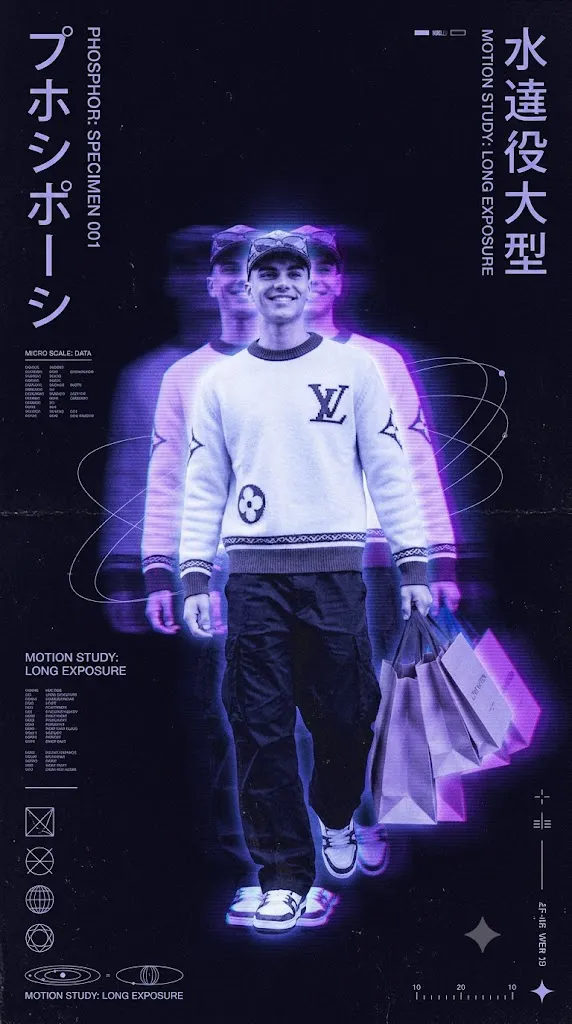
The Retro Phosphor Motion Poster Japanese CRT VHS Aesthetic is a unique AI photo editing style inspired by late 1990s and early 2000s Japanese graphic design, experimental music posters, analog technology, and vintage digital art. This creative style transforms ordinary images into futuristic yet nostalgic poster designs that feel like lost artwork from an old Japanese design archive.
"Retro Phosphor Motion Poster Japanese CRT VHS Aesthetic Prompt"
Transform the uploaded image into a premium retro phosphor-motion poster. Do not create a normal photograph. Convert the subject into a luminous phosphor figure floating in darkness with a Japanese experimental graphic design style inspired by the late 1990s and early 2000s.Create soft motion-smear trails extending from the subject with translucent exposure echoes and layered ghost images inspired by long-exposure photography. Keep the main subject recognizable while adding glowing energy traces and motion study effects.Use a deep black background with near-black indigo shadows, soft ultraviolet blue, cool phosphor lavender, faint electric violet, and pale bluish-white highlights. Add CRT phosphor bloom, glowing edge emission, screen-burn highlights, radiant halos, and soft energy haze.Apply heavy analog film grain, CRT scanlines, VHS noise, dust particles, scratches, aged poster texture, matte paper grain, and archive print imperfections. Add minimal technical labels, micro typography, geometric icons, orbital diagrams, scientific markings, small data blocks, and experimental Japanese poster elements.Create a museum-quality editorial poster layout with large negative space, clean composition, luxury print aesthetics, cinematic lighting, and 4:5 or 9:16 poster ratio.
Unlike modern clean digital graphics, this aesthetic focuses on imperfections, analog textures, and emotional atmosphere. It combines CRT monitor glow, VHS degradation, long-exposure photography, scanline effects, film grain, and experimental editorial layouts to create a visually powerful result.
The main idea behind this style is to transform the subject into a glowing phosphor-like figure floating in darkness. The portrait appears frozen while leaving behind motion trails, ghost images, and energy-like light traces. These effects create the feeling of movement, time, and memory captured in a single frame.
The color palette usually includes deep black backgrounds, indigo shadows, ultraviolet blue, soft lavender glow, and pale white highlights. Instead of bright modern colors, the design uses muted phosphor lighting to create a mysterious and cinematic atmosphere.
This style is popular for music posters, album covers, digital artwork, fashion campaigns, creative photography, and social media visuals. With AI image generation tools, creators can easily transform a normal portrait into a premium experimental poster that looks like a scanned artifact from an old futuristic world.
This guide explains how to use AI photo editing, the best tools for creating CRT VHS-inspired posters, an example prompt, and the editing process to achieve a professional retro analog effect.
How To Use Photo Editing?
Creating a Retro Phosphor Motion Poster begins with selecting the right reference image. A clear portrait with visible details works best because the AI needs to understand the subject before applying the analog transformation.
The goal is not to create a normal photograph but to convert the image into an experimental graphic poster with motion, glow, and vintage technology-inspired textures.
Step 1: Choose A High-Quality Image
Select a portrait with good composition and clear subject details. Images with strong shapes and recognizable outlines create better motion effects.
Step 2: Copy A Detailed Prompt
A detailed prompt helps the AI understand the complete visual direction. The prompt should describe:
- CRT phosphor glow
- VHS distortion
- Long exposure motion trails
- Ghost exposure layers
- Scanline texture
- Analog film grain
- Dark background
- Experimental poster design
- Japanese graphic style
The more specific the prompt, the more accurate and artistic the result becomes.
Step 3: Upload The Reference Image
Upload your photo into an AI image editor that supports image transformation. The AI will analyze the image and apply the requested retro analog style.
Step 4: Generate Multiple Variations
Create different versions to compare motion trails, glow intensity, texture quality, and poster composition.
Step 5: Select The Best Result
Choose the design that maintains the original subject while achieving the desired CRT VHS atmosphere.
Step 6: Final Improvements
Use editing software to enhance grain, contrast, typography, and analog imperfections for a realistic printed poster appearance.
Combining AI generation with final editing creates a more authentic retro experimental design.
Tools You Can Use For Prompt Copy and Create Photo
Many AI and editing tools can help create Retro Phosphor Motion Posters.
ChatGPT
Useful for creating detailed AI prompts that describe visual style, motion effects, colors, and poster composition.
Midjourney
Creates artistic images with strong atmosphere, experimental layouts, and cinematic lighting effects.
Flux AI
Generates realistic transformations while maintaining subject identity and detailed textures.
Stable Diffusion
Provides advanced customization through image-to-image generation, control methods, and style adjustments.
GPT Image
Helpful for creating detailed AI artwork with specific instructions for analog effects and poster design.
Adobe Photoshop
A professional tool for refining the final artwork. It helps with:
- CRT effects
- Color grading
- Texture overlays
- Typography
- Poster layouts
- Grain enhancement
- Adobe Lightroom
Useful for adjusting exposure, shadows, contrast, and creating a dark cinematic color style.
Canva
Great for adding poster elements, layouts, text, and preparing designs for social media.
Using AI tools with professional editing software helps achieve a realistic vintage analog appearance.
How To Edit Photo?
Editing helps improve the final poster and makes the analog effect look more realistic.
Add CRT Glow
Increase soft glow around bright areas to simulate old monitor phosphor lighting. Avoid making the glow too sharp because CRT effects are naturally diffused.
Create Motion Trails
Add duplicate layers of the subject with slight movement offsets. Reduce opacity to create ghost-like exposure echoes.
Apply VHS Effects
Add horizontal scanlines, signal distortion, tracking errors, and subtle color separation to create an authentic VHS appearance.
Increase Film Grain
Apply heavy grain across the entire image. The texture should appear in shadows, highlights, and empty background areas.
Improve Colors
Use dark blue, violet, and muted tones. Avoid modern saturated colors because the retro aesthetic depends on soft analog lighting.
Add Poster Details
Include small technical markings, minimal typography, geometric symbols, and archive-style elements to enhance the experimental design.
Create Print Texture
Add paper grain, scratches, dust, ink imperfections, and scanned document effects so the final image feels physically printed.
Export High Quality
Save the final poster in high resolution for digital artwork, album covers, wallpapers, or professional printing.
Conclusion
The Retro Phosphor Motion Poster Japanese CRT VHS Aesthetic combines vintage technology, experimental design, and cinematic photography to create a unique visual experience. This style transforms ordinary images into futuristic retro artworks filled with emotion, texture, and atmosphere.
The key to creating a successful result is using a detailed prompt that explains every element, from phosphor glow and motion trails to scanlines and print imperfections. AI tools make the transformation easier, while editing software helps refine the final poster quality.
Whether you are creating music artwork, social media graphics, digital posters, or creative photography projects, this aesthetic provides endless possibilities. The combination of CRT visuals, VHS degradation, and Japanese-inspired graphic design creates artwork that feels nostalgic, mysterious, and timeless.
With the right prompt and editing techniques, anyone can create a premium experimental poster that looks like a forgotten piece of analog design history.