Introduction
Nature portraits with a peaceful solitude aesthetic have become one of the most loved trends in cinematic photography and AI image generation. This style focuses on calm emotions, open landscapes, minimal distractions, and the quiet beauty of being alone in nature. Unlike highly dramatic portraits, peaceful solitude photography creates emotional depth through silence, simplicity, and atmosphere.
In modern visual storytelling, solitude is no longer shown as loneliness. Instead, it represents peace, self-reflection, emotional balance, and connection with nature. A person sitting quietly in a green field while reading a book, listening to music, or simply enjoying the fresh air creates a calming cinematic mood that feels realistic and deeply emotional.
This style has become popular on Instagram, Pinterest, and AI photography communities because it combines realism with artistic storytelling. Long-shot photography, blurred foreground elements, soft natural lighting, cinematic framing, and large open spaces help create a peaceful visual experience that feels almost like a movie scene.
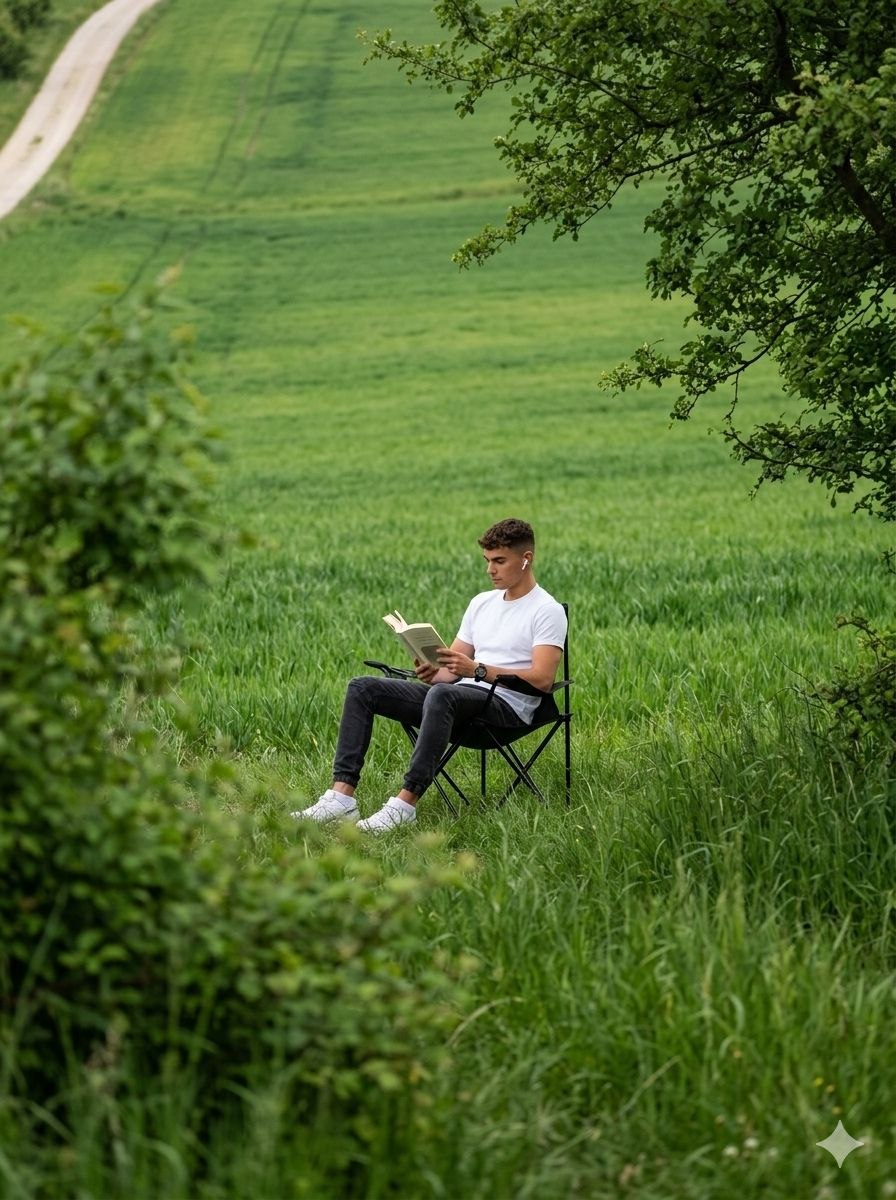
The beauty of this aesthetic comes from balance. The human subject appears small compared to the wide natural environment, which highlights the calmness and openness of the landscape. Soft green tones, smooth hills, tree branches, and gentle daylight together create a relaxing and refreshing atmosphere.
Today, AI image generation tools and editing apps make it possible for anyone to create cinematic solitude portraits without professional cameras or expensive outdoor shoots. Whether you are a beginner or an experienced editor, you can create ultra-realistic peaceful nature portraits using detailed prompts and cinematic editing techniques.
In this article, you will learn how to use photo editing effectively, discover the best tools for prompt-based image creation, understand peaceful cinematic aesthetics, and learn step-by-step editing methods to create stunning nature solitude portraits.
How To Use Photo Editing?
Photo editing is the process of improving an image by adjusting lighting, colors, shadows, textures, and overall visual atmosphere. Cinematic editing focuses more on mood, realism, and storytelling instead of heavy filters or unrealistic effects.
To create a Peaceful Solitude in Nature Portrait, focus on the following important elements:
1. Natural Composition
The subject should feel naturally placed inside the environment instead of dominating the frame. Wide landscapes create emotional depth and visual calmness.
2. Soft Lighting
Cloudy daylight or soft afternoon light works best for peaceful portraits. Harsh sunlight and strong shadows can break the calm atmosphere.
3. Green Color Palette
Fresh green grass, soft natural tones, and earthy colors help create a refreshing and relaxing mood.
4. Cinematic Framing
Foreground blur, tree branches, and natural framing techniques make the image feel cinematic and realistic.
5. Realistic Texture
Natural skin tones, realistic hair movement, fabric textures, and smooth grass details help maintain realism.
6. Emotional Simplicity
The subject should appear relaxed, focused, and calm. Simple actions like reading a book or listening to music help create emotional storytelling.
Tools You Can Use For Prompt Copy And Create Photo
Modern AI tools and editing apps allow users to create ultra-realistic cinematic portraits using detailed prompts. These tools are beginner-friendly and powerful enough for professional-quality editing.
1. ChatGPT
ChatGPT is one of the best tools for generating detailed cinematic AI prompts. You can describe clothing, lighting, environment, camera angle, mood, and composition to create highly realistic prompts.
Example Prompt Elements:
Peaceful grassy field
Cinematic long-shot photography
Soft natural lighting
Calm emotional atmosphere
Green landscape aesthetic
Realistic portrait details
Detailed prompts help AI understand the exact visual style you want.
2. Gemini AI
Gemini AI is popular for realistic cinematic image generation. It understands long descriptive prompts and creates emotional nature portraits with impressive detail.
Best Uses:
Outdoor cinematic portraits
Peaceful lifestyle photography
Nature aesthetics
Solitude storytelling scenes
3. Midjourney
Midjourney is famous for artistic cinematic visuals and emotional storytelling compositions.
Features:
Beautiful landscape depth
Dreamy cinematic atmosphere
Natural environmental textures
Editorial visual quality
4. Adobe Lightroom
Lightroom is excellent for cinematic color grading and natural portrait enhancement.
Useful Features:
Soft green tones
Natural contrast control
Skin tone balancing
Warm cinematic lighting
HDR adjustments
5. Snapseed
Snapseed is a free mobile editing app with powerful cinematic editing tools.
Useful Features:
Selective lighting
Blur effects
HDR filters
Warmth adjustment
Portrait enhancement
6. Adobe Photoshop
Photoshop helps create advanced cinematic depth and environmental enhancements.
You can use it to:
Add foreground blur
Improve landscape composition
Enhance lighting balance
Add cinematic grain
Refine natural framing
How To Edit Photo?
Creating a Peaceful Solitude in Nature Portrait requires careful balance between realism and cinematic atmosphere. Follow these steps carefully for professional results.
Step 1: Choose a High-Quality Photo
Start with a clear portrait image that has:
Sharp focus
Natural expression
Balanced exposure
Visible outfit details
High-quality source images always produce better cinematic edits.
Step 2: Use a Detailed AI Prompt
A strong prompt is the key to realistic AI-generated portraits.
Example Prompt:
“Create a peaceful cinematic portrait of a young man sitting alone on a black folding camping chair in the middle of a grassy field. He is reading an open novel while wearing white Bluetooth earphones. The environment feels calm and emotional with soft natural daylight and smooth green hills in the background. The image is captured using a long-shot photography technique from behind blurred grass and bushes, creating a large green bokeh foreground. Tree branches frame the upper corner naturally. The subject appears small compared to the wide landscape, highlighting peaceful solitude and emotional calmness. Realistic skin texture, cinematic depth of field, natural colors, soft lighting, ultra-detailed DSLR photography, realistic outdoor atmosphere.”
A detailed prompt helps AI understand:
Landscape atmosphere
Emotional mood
Lighting
Camera composition
Natural framing
Cinematic storytelling
Step 3: Adjust Lighting
In Lightroom or Snapseed:
Reduce harsh brightness
Add soft natural highlights
Maintain even exposure
Keep shadows gentle
Lighting should feel calm and realistic.
Step 4: Apply Cinematic Color Grading
Use:
Fresh green tones
Soft earthy shadows
Warm natural highlights
Slight matte finish
Balanced colors create a peaceful cinematic atmosphere.
Step 5: Enhance Realism Naturally
Do not over-edit the image.
Instead:
Maintain realistic skin texture
Keep natural hair movement
Preserve fabric details
Maintain smooth grass texture
This creates an authentic cinematic look.
Step 6: Add Depth and Framing
Use Photoshop or Snapseed to:
Add soft foreground blur
Improve tree framing
Enhance bokeh naturally
Maintain environmental depth
These elements help create a movie-like composition.
Step 7: Final Adjustments
Before exporting:
Balance contrast carefully
Sharpen details softly
Maintain calm atmosphere
Avoid oversaturation
Export the image in high resolution for the best visual quality.
Conclusion
Peaceful Solitude in Nature Portraits beautifully combine cinematic storytelling, emotional calmness, and natural outdoor beauty into one visually powerful style. With the help of AI prompts, editing apps, and cinematic lighting techniques, anyone can create premium-quality portraits that feel relaxing, emotional, and realistic.
The secret behind cinematic solitude editing is balanced lighting, realistic textures, natural landscapes, and emotional simplicity instead of excessive effects. Whether you use ChatGPT for prompt writing, Gemini AI for image generation, Lightroom for cinematic color grading, or Photoshop for advanced composition editing, the key is maintaining realism and peaceful visual harmony.
As AI photography continues to evolve, peaceful nature portraits are becoming more creative and accessible every day. By learning proper prompt writing and editing techniques, you can transform ordinary outdoor photos into stunning cinematic masterpieces filled with calmness, beauty, and emotional depth.