Introduction
Fashion-inspired collage portraits have become one of the biggest trends in AI photo editing and digital art. These creative portrait designs combine cinematic black-and-white frames with colorful fashion photography to create a premium magazine-style look. Whether you are creating content for Instagram, Pinterest, YouTube thumbnails, or personal branding, this editing style instantly gives your photos a luxury editorial aesthetic.
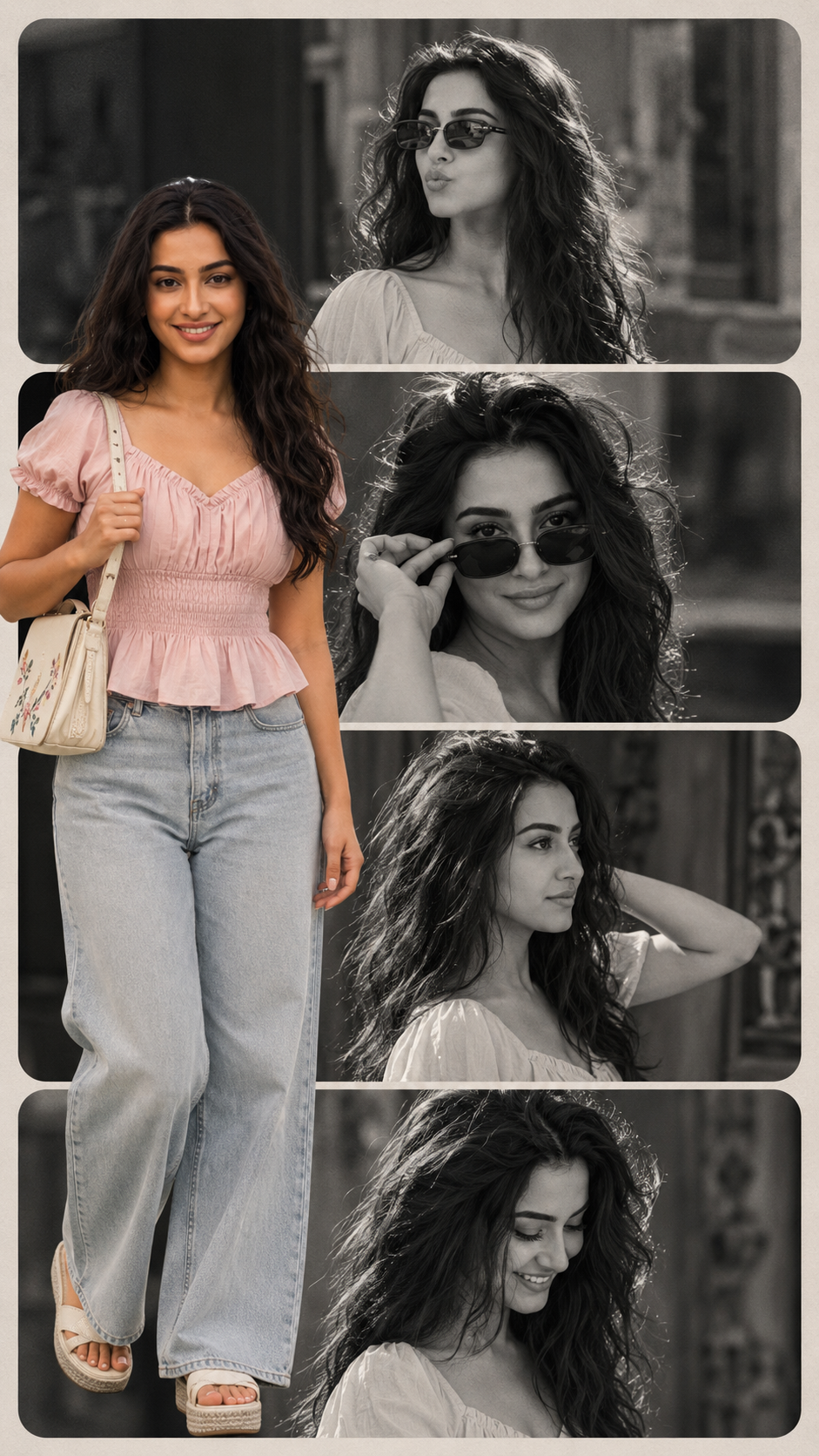
"Fashionable Film-Inspired Collage Portrait Pink Short Prompt"
Aesthetic collage prompt (It A vertical collage design. The background consists of four stacked horizontal rounded rectangles. 165Inside these panels are black-and-white cinematic shots of a young woman (use the uploaded image for 100% facial accuracy), featuring her with dark, slightly messy hair and stylish sunglasses in various expressive poses.Superimposed in the foreground on the left side is a full-color, high-quality cutout of the same woman. She is wearing a light pink, short-sleeved peasant-style top with a sweetheart neckline and a softly ruffled peplum hem, along with puffed sleeves. She is paired with light-wash, high-waisted, wide-leg denim jeans. On her feet, she wears white platform sandals with a thick textured sole.She carries a small off-white rectangular shoulder bag with delicate floral or embroidered detailing, slung over her right shoulder.no earrings, no necklace, no bangles, no bindi. Her hair is open loose natural hair.The composition should follow a clean 9:16 aspect ratio, maintaining a balanced editorial fashion aesthetic with strong contrast between the monochrome.
A fashionable film-inspired collage portrait usually includes multiple layered frames, monochrome cinematic shots, stylish typography, and one bold full-color subject placed in the foreground. The combination of vintage cinema vibes and modern fashion styling creates an eye-catching visual that feels both artistic and professional.
In this particular collage concept, the background features stacked horizontal rounded rectangles filled with black-and-white cinematic portraits. The foreground contains a high-quality cutout of the same woman wearing a stylish black peasant-style top, wide-leg denim jeans, white platform sandals, and a fashionable shoulder bag. The contrast between the monochrome frames and the vibrant color portrait gives the image a premium editorial appearance.
AI image generation tools now make it easier than ever to create these collage portraits without advanced graphic design skills. With the right prompt and editing workflow, anyone can create professional-quality fashion posters in minutes.
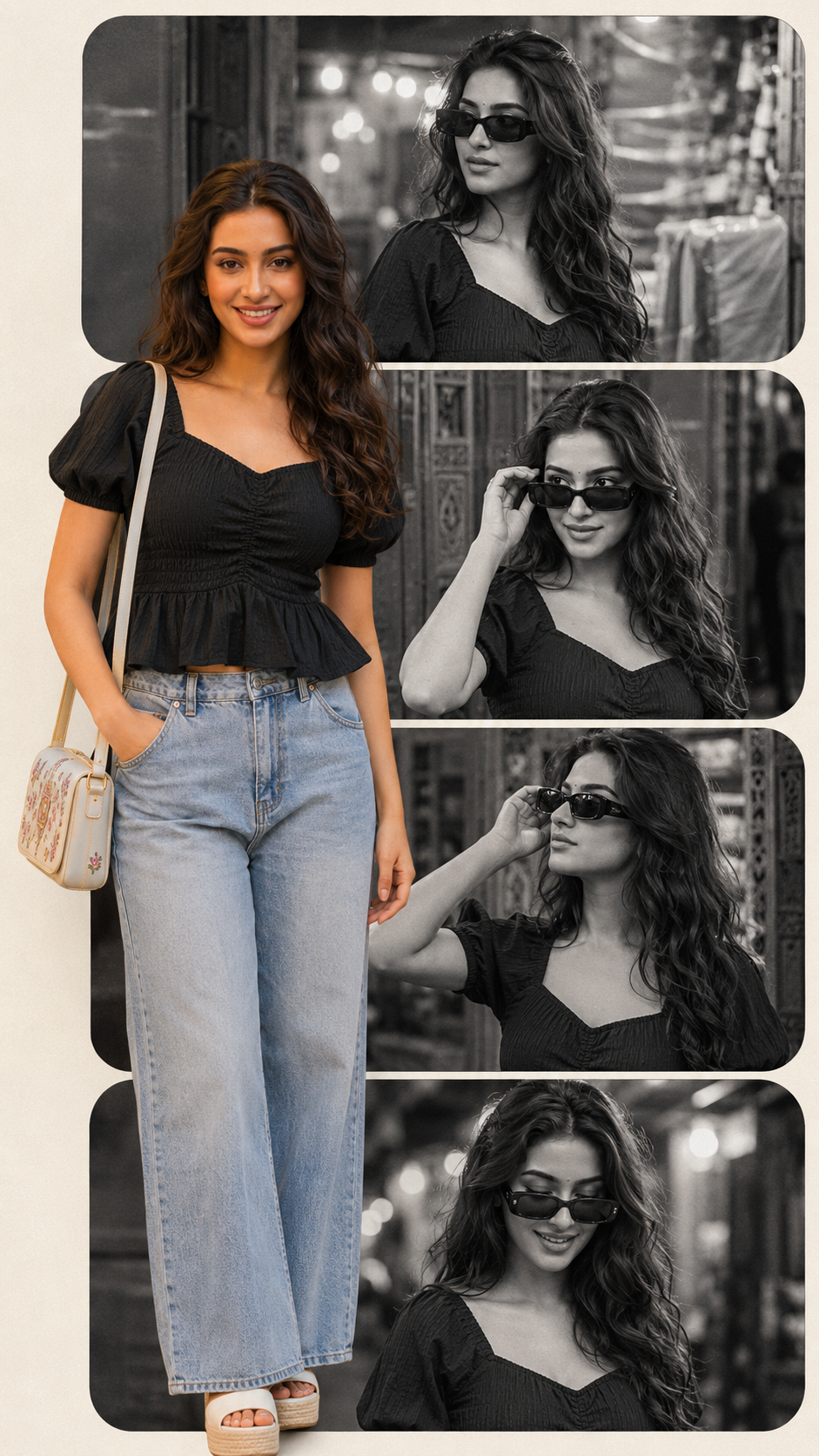
"Fashionable Film-Inspired Collage Portrait Black Short Prompt"
Aesthetic collage prompt (It A vertical collage design. The background consists of four stacked horizontal rounded rectangles. 165Inside these panels are black-and-white cinematic shots of a young woman (use the uploaded image for 100% facial accuracy), featuring her with dark, slightly messy hair and stylish sunglasses in various expressive poses.Superimposed in the foreground on the left side is a full-color, high-quality cutout of the same woman. She is wearing a light black , short-sleeved peasant-style top with a sweetheart neckline and a softly ruffled peplum hem, along with puffed sleeves. She is paired with light-wash, high-waisted, wide-leg denim jeans. On her feet, she wears white platform sandals with a thick textured sole.She carries a small off-black rectangular shoulder bag with delicate floral or embroidered detailing, slung over her right shoulder.no earrings, no necklace, no bangles, no bindi. Her hair is open loose natural hair.The composition should follow a clean 9:16 aspect ratio, maintaining a balanced editorial fashion aesthetic with strong contrast between the monochrome.
How To Use Photo Editing?
Photo editing is the process of enhancing, modifying, and transforming images into creative visual artworks. In AI-based editing, prompts are extremely important because they guide the AI model about composition, fashion styling, lighting, mood, camera angle, and cinematic effects.
To create a fashionable film-inspired collage portrait, you need three main things:
A clear reference image
A detailed AI prompt
Editing software or AI tools
The reference image helps maintain facial accuracy. This is especially important when you want the final portrait to look exactly like the uploaded subject. High-resolution images with proper lighting usually produce the best results.
The next step is writing a detailed prompt. A good prompt should include:
Outfit description
Hairstyle
Accessories
Background layout
Lighting style
Camera composition
Color grading
Aspect ratio
For example, a collage prompt may describe:
Four stacked rounded rectangles
Black-and-white cinematic portraits
Stylish sunglasses
Open loose hair
Editorial fashion look
9:16 aspect ratio
Strong monochrome contrast
The more detailed your prompt is, the more accurate and cinematic the AI-generated result becomes.
Another important part of editing is maintaining balance in the composition. The foreground subject should remain visually dominant while the monochrome collage frames support the overall storytelling. This creates depth and gives the image a premium magazine-cover appearance.
Tools You Can Use For Prompt Copy And Create Photo
There are many excellent AI tools and editing applications available for creating cinematic collage portraits. Some are beginner-friendly while others provide advanced professional controls.
1. Canva
Canva is one of the easiest tools for beginners. It offers collage templates, typography options, layered editing, background removal, and poster layouts. You can upload AI-generated images and arrange them into stylish editorial compositions.
Features:
Drag-and-drop editing
Fashion collage templates
Text overlays
Social media export
Mobile and desktop support
2. Adobe Photoshop
Photoshop is the industry-standard software for professional photo editing and collage creation. It gives full control over masking, blending, shadows, cinematic color grading, and layering.
Features:
Professional retouching
AI generative fill
Advanced layer control
High-end poster design
Cinematic color correction
3. PicsArt
PicsArt is a popular mobile editing app for aesthetic collages and social media posters. It includes stickers, filters, effects, and AI editing tools.
Features:
Mobile-friendly editing
AI background generation
Collage maker
Trendy filters
Fashion overlays
4. Leonardo AI
Leonardo AI is excellent for cinematic AI-generated portraits and editorial artwork. You can paste detailed prompts to generate ultra-realistic fashion compositions.
Features:
Cinematic portrait generation
High-detail rendering
Fashion aesthetics
AI prompt enhancement
Realistic lighting effects
5. Midjourney
Midjourney is widely used for artistic and luxury editorial image generation. It creates highly detailed fashion imagery with dramatic cinematic vibes.
Features:
Luxury fashion rendering
Editorial compositions
Artistic monochrome effects
High-resolution outputs
Creative cinematic lighting
6. ChatGPT Image Generator
AI image generation inside ChatGPT can help users create detailed collage portraits using advanced prompts. You can upload a reference image and generate stylish fashion posters with accurate facial details.
Features:
Prompt-based editing
Face reference support
Cinematic collage generation
Editorial poster styling
Fast AI rendering
How To Edit Photo?
Creating a fashionable film-inspired collage portrait is simple if you follow the right workflow.
Step 1: Choose a High-Quality Reference Image
Select a clear portrait photo with good lighting and visible facial details. Front-facing images work best for maintaining accurate facial identity.
Step 2: Write a Detailed Prompt
Your prompt should include:
Facial accuracy instructions
Outfit styling
Hair description
Background structure
Black-and-white cinematic panels
Editorial mood
Aspect ratio
Accessories
Example structure:
Vertical collage design
Four rounded rectangle panels
Black-and-white cinematic portraits
Stylish sunglasses
Full-color foreground subject
Wide-leg denim jeans
Editorial fashion aesthetic
9:16 composition
Detailed prompts help AI tools understand the artistic direction clearly.
Step 3: Generate the Base Image
Use an AI image generator to create the collage. Adjust prompt wording if necessary until the layout, fashion styling, and cinematic feel match your vision.
Always focus on:
Lighting consistency
Sharp facial details
Balanced framing
Proper contrast
Step 4: Remove Background (Optional)
If you want a cleaner collage, remove the subject background using:
Canva Background Remover
Photoshop Remove Tool
AI Cutout Tools
This allows you to place the foreground subject naturally over the monochrome collage frames.
Step 5: Add Typography
Fashion posters often include:
Handwritten quotes
Editorial headlines
Minimal text overlays
Luxury typography
Use stylish fonts with soft spacing to maintain a premium cinematic appearance.
Step 6: Apply Cinematic Color Grading
Use warm highlights, muted shadows, and soft contrast to achieve a luxury editorial finish.
Recommended effects:
Film grain
Soft glow
Vintage monochrome
Warm beige tones
Slight vignette
These adjustments help the collage feel like a movie poster or fashion magazine cover.
Step 7: Export in High Resolution
Export your final design in:
PNG for high quality
JPG for social media
1080×1920 for Instagram Reels and Stories
A vertical 9:16 aspect ratio works best for modern social media platforms.
Conclusion
Fashionable film-inspired collage portraits are a perfect blend of cinematic storytelling and modern editorial fashion. They transform ordinary portraits into luxury visual artworks using monochrome frames, stylish outfits, layered compositions, and premium color grading.
With AI image generation and modern editing tools, creating these collage posters has become faster and more accessible than ever. Whether you are a beginner or a professional designer, you can create stunning cinematic portraits using detailed prompts and creative editing techniques.
By combining high-quality reference images, powerful AI tools, and thoughtful composition, you can produce eye-catching fashion collages that stand out on social media and digital portfolios. The key is maintaining balance between cinematic mood, fashion styling, and clean editorial aesthetics.
Experiment with different poses, layouts, and monochrome effects to develop your own unique collage style and create truly unforgettable fashion-inspired artwork.