Introduction
Photography and digital art have evolved far beyond simple portraits. Today, creative edits allow artists to transform ordinary images into magical visual stories filled with emotion, imagination, and cinematic beauty. One such trending concept is the “Miniature Mei” portrait style — a heartwarming composition where an adult woman stands beside her adorable miniature version, creating a dreamy mother-daughter inspired artwork.
This style combines ultra-realistic portrait photography with cartoon-inspired fantasy elements. The larger subject represents elegance and maturity, while the smaller “miniature” version adds innocence, charm, and playful storytelling. Together, they create a visually captivating scene that feels cinematic, emotional, and artistic at the same time.
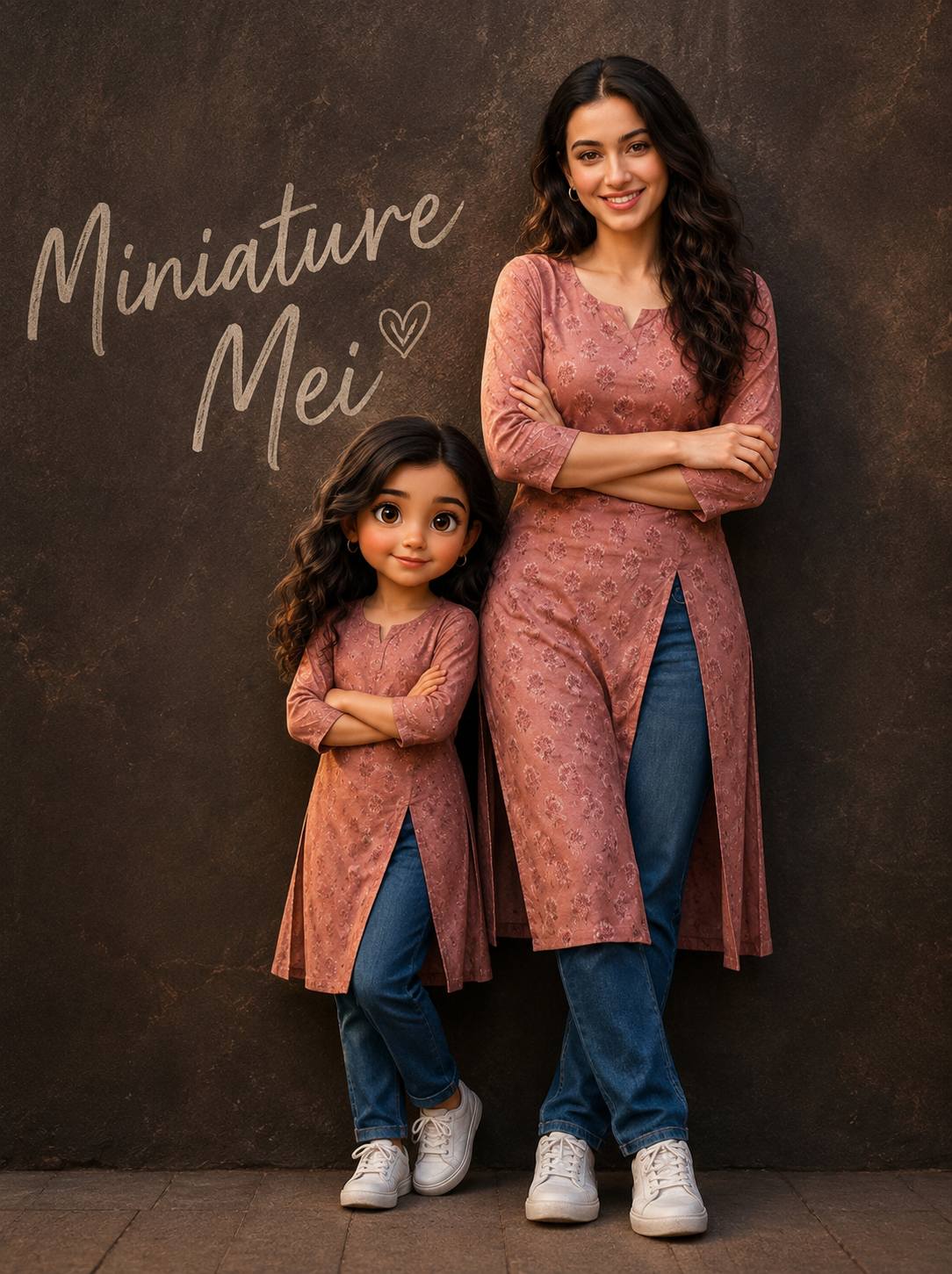
The portrait shown here features warm studio lighting, textured dark walls, matching dresses, folded-arm poses, and handwritten typography that enhances the editorial look. The child character has oversized expressive eyes and smooth animated-style features, while the adult portrait remains realistic with detailed skin texture and natural beauty.
The popularity of this editing style comes from social media trends, AI-generated art, and cinematic digital compositions. Many creators use these edits for Instagram reels, profile posts, digital posters, and personalized gifts. With the help of AI tools and modern editing software, anyone can create stunning portraits like this without requiring expensive photography equipment.
In this article, you will learn how to create a “Miniature Mei” portrait step-by-step, discover the best editing tools, understand prompt creation techniques, and master the complete editing workflow.
"Miniature Mei: A Mother-Daughter Portrait"
CINEMATIC PORTRAIT ABOVE GIRL AS HER MINIATURE VERSION.SIDE BY SIDE AGAINST TEXTURED DARK WALL, HANDWRITTEN “MINIATURE MEI” TEXT. BOTH IN MATCHING DRESSES HANDS ARE FOLDING.WOMEN LEANS WITH SOFT SMILE; CHILD HAS CARTOON-STYLE FACE, LARGE EXPRESSIVE EYES.ULTRA-REALISTIC SKIN TEXTURE, WARM SOFT LIGHTING, SHALLOW DEPTH OF FIELD, SHARP FOCUS STUDIO QUALITY.
How To Use Photo Editing?
Photo editing is the process of enhancing, transforming, or creatively manipulating images using software or AI tools. In cinematic portrait editing, the goal is not just improving the image quality but also creating a visual mood and storytelling atmosphere.
For a “Miniature Mei” portrait, editing involves combining realism with stylized fantasy. The process usually includes:
Background enhancement
Lighting adjustments
Skin retouching
Character duplication
Miniature transformation
Cartoon-style face editing
Typography design
Color grading
Depth and shadow effects
The first step is choosing a high-quality reference image. A clear portrait with good lighting helps achieve better results. The pose should be natural and expressive because the editing style focuses heavily on emotional connection.
After selecting the image, the editor creates two versions of the same person:
The realistic adult portrait
The miniature child-like version
The smaller version is designed using AI stylization or manual digital painting techniques. Large expressive eyes, softer facial proportions, and animated textures create the fantasy effect.
The background also plays an important role. Dark textured studio walls help highlight the subjects while maintaining cinematic depth. Warm lighting adds emotional softness and makes the image feel professional.
Typography such as handwritten titles (“Miniature Mei”) adds branding and artistic personality to the portrait. Most creators use elegant brush fonts or handwritten text overlays for this effect.
Professional photo editing combines creativity and technical precision. Even small adjustments like shadows, highlights, and skin texture can completely change the mood of the final image.
Tools You Can Use For Prompt Copy And Create Photo
There are many editing and AI tools available for creating cinematic miniature portraits. Some tools are beginner-friendly, while others are designed for advanced professional editing.
1. Adobe Photoshop
Adobe Photoshop is one of the best tools for professional photo manipulation and cinematic editing.
Features:
Layer editing
Object masking
Skin retouching
Color grading
Shadow creation
Background replacement
Typography design
Photoshop is ideal for detailed manual editing and realistic blending.
2. Lightroom
Lightroom is mainly used for color correction and cinematic tone adjustments.
You can use it for:
Warm cinematic color grading
Skin tone enhancement
Contrast balancing
Highlight control
Sharpening details
Most creators first edit the colors in Lightroom before final editing in Photoshop.
3. Canva
Canva is beginner-friendly and useful for adding:
Text overlays
Graphic elements
Poster layouts
Social media formatting
It is easy to use for quick cinematic posters.
4. Midjourney
Midjourney is an AI art generation tool capable of creating fantasy-style portraits using prompts.
You can generate:
Miniature characters
Cartoon-style faces
Cinematic lighting
Stylized environments
A detailed prompt gives highly realistic results.
5. DALL·E
DALL·E can generate AI-assisted portrait concepts and stylized edits.
Useful for:
Creative fantasy compositions
Character duplication
Artistic transformations
Cartoon-realism blending
6. PicsArt
PicsArt is popular for mobile editing.
Features include:
AI effects
Background blur
Cartoon filters
Beauty retouching
Sticker overlays
Great for beginners creating edits directly on smartphones.
7. Remini
Remini enhances image quality and sharpness using AI.
Useful for:
Face enhancement
Skin detail improvement
Portrait sharpening
HD upscaling
How To Edit Photo?
Creating a “Miniature Mei” portrait requires both imagination and proper editing workflow. Follow these steps carefully for professional results.
Step 1: Select A High-Quality Portrait
Choose a clear portrait with:
Good lighting
Sharp face details
Natural pose
Clean background
Soft natural lighting works best for cinematic edits.
Step 2: Remove Background
Use Photoshop or AI background remover tools to isolate the subject.
Recommended tools:
Remove.bg
Photoshop Select Subject
Canva Background Remover
After removing the background, place the subject onto a dark textured wall backdrop.
Step 3: Duplicate The Subject
Create a second copy of the same person for the miniature version.
Resize the duplicate smaller and place it beside the original subject.
Maintain proper proportions for realism.
Step 4: Create Cartoon-Style Face
Transform the miniature version into a stylized character by:
Enlarging eyes slightly
Softening facial structure
Adding smoother skin
Increasing eye shine
Enhancing hair texture
AI stylization tools can help achieve this look quickly.
Step 5: Match The Outfit
Keep both subjects wearing matching clothes to create visual harmony.
Matching outfits strengthen the mother-daughter storytelling effect and make the image aesthetically pleasing.
Step 6: Add Cinematic Lighting
Use warm soft lighting effects.
Adjust:
Highlights
Shadows
Glow effects
Skin reflections
The lighting should feel soft, emotional, and studio-quality.
Step 7: Add Depth Of Field
Blur the background slightly to create shallow depth of field.
This makes the subjects stand out and gives a professional DSLR-like appearance.
Step 8: Add Typography
Use handwritten text such as:
“Miniature Mei”
“Mini Me”
“Little Version Of Me”
Brush fonts work best for cinematic poster designs.
Place the text carefully so it balances the composition.
Step 9: Final Color Grading
Apply cinematic warm tones:
Brown shadows
Orange highlights
Soft contrast
Film-style colors
This step gives the portrait its final premium look.
Step 10: Export In High Resolution
Export the final image in:
PNG format for quality
JPG for social media sharing
4K or 8K resolution if possible
High resolution keeps the portrait sharp and professional.
Conclusion
The “Miniature Mei” portrait style is a beautiful fusion of realism, fantasy, and emotional storytelling. It transforms a simple portrait into a cinematic visual experience that feels artistic and memorable. The combination of a realistic adult figure and a cartoon-inspired miniature version creates a unique mother-daughter inspired composition filled with warmth and creativity.
With modern AI tools and editing software, creating these portraits has become easier than ever. Whether you use Photoshop for professional editing or AI tools for quick generation, the key is understanding lighting, composition, color grading, and storytelling.
The most important element in this style is emotion. Soft smiles, matching outfits, warm lighting, and expressive eyes all work together to create a magical portrait that instantly captures attention.
If you enjoy creative photo editing, cinematic artwork, or AI-generated fantasy portraits, the “Miniature Mei” trend is a perfect style to explore. With practice, creativity, and the right tools, you can turn ordinary portraits into stunning works of digital art that look straight out of a movie poster.