Introduction
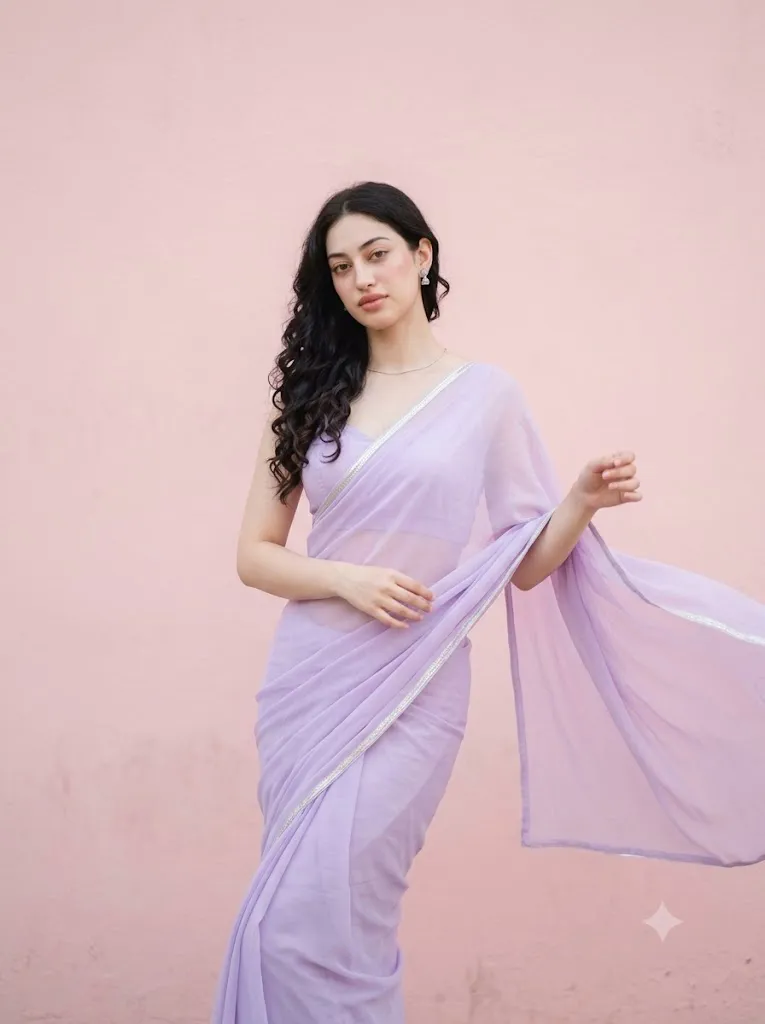
The Graceful Elegance in Lavender Saree Prompt is a beautiful blend of modern fashion photography and timeless traditional styling. This AI portrait style captures the softness of pastel colors, elegant saree draping, natural beauty, and cinematic lighting to create magazine-quality portraits with a luxurious editorial feel. Inspired by contemporary fashion campaigns and Pinterest aesthetics, this prompt emphasizes minimalism, authenticity, and graceful posing rather than excessive visual effects.
"Graceful Elegance In Lavender Saree Prompt"
Using the uploaded image strictly as the facial identity and hairstyle reference, create a hyper-realistic fashion portrait of a graceful young woman standing against a plain pastel pink wall with a soft uneven texture. Every facial detail, skin texture, expression, and proportion should remain consistent with the reference image. She wears a pastel lavender chiffon saree featuring a delicate silver border, paired with a sleeveless cropped blouse and minimal silver jewelry including small stud earrings and a thin chain. Her loose curls rest naturally over one shoulder while a gentle breeze softly lifts the edge of her flowing dupatta. Her body is turned slightly to one side with one leg positioned naturally forward, creating an elegant candid pose as she gazes just beyond the camera. Captured using a Nikon Z9 with a 70mm f/1.4 lens, featuring DSLR-quality sharpness, shallow depth of field, natural skin texture, cinematic daylight, soft pastel color grading, premium magazine styling, Pinterest-inspired minimalism, realistic fabric movement, ultra-detailed clothing texture, luxurious editorial composition, and a vertical 3:4 aspect ratio.
A pastel lavender chiffon saree paired with a simple sleeveless blouse creates a sophisticated look that feels light, feminine, and elegant. Combined with a soft pastel pink textured wall, airy color grading, and natural daylight, the portrait delivers a clean and premium appearance suitable for fashion portfolios, social media content, wedding inspiration, lifestyle photography, and AI-generated artwork.
Unlike ordinary AI portrait prompts, this style carefully balances realistic facial identity, natural skin texture, subtle makeup, flowing fabric movement, and professional camera settings. Every detail—from the silver border on the saree to the gentle breeze lifting the dupatta—helps create an image that looks like it was photographed by a professional fashion photographer.
Whether you are an AI artist, photographer, blogger, content creator, or prompt designer, mastering this elegant portrait style will help you create visually stunning images that feel modern, luxurious, and naturally beautiful.
How To Use Photo Editing?
Photo editing plays an important role in transforming an AI-generated portrait into a professional editorial photograph. While AI generates the overall composition, editing software refines the final image by improving lighting, color balance, texture, and realism.
Follow these simple steps to achieve the best results.
Step 1: Select a High-Quality Reference Image
Choose a portrait with a clear face, natural lighting, and high resolution. A detailed reference image helps preserve facial identity and produces more realistic results.
Step 2: Copy the Prompt
Use a professionally written prompt describing the clothing, hairstyle, facial expression, background, lighting, camera settings, and overall mood.
Step 3: Upload the Reference Image
Upload the image into your preferred AI image generator that supports face reference or image-to-image generation.
Step 4: Generate Multiple Versions
Create several variations to compare facial accuracy, fabric details, lighting, and overall composition before choosing the strongest result.
Step 5: Final Editing
Import the selected image into professional editing software to enhance colors, sharpen important details, and create a polished editorial finish.
Combining AI generation with manual editing produces significantly more realistic and visually appealing portraits.
Tools You Can Use For Prompt Copy and Create Photo
Several AI platforms and editing applications can help you create premium fashion portraits.
ChatGPT
Perfect for generating detailed prompts with realistic descriptions of clothing, lighting, poses, backgrounds, and camera settings.
Midjourney
Produces artistic fashion portraits with elegant compositions and premium editorial styling.
Flux AI
Excellent for maintaining facial identity while creating realistic skin textures and natural lighting.
Stable Diffusion
Provides advanced customization using image-to-image workflows, ControlNet, and prompt editing for experienced users.
GPT Image
Useful for creating realistic portraits directly from descriptive prompts while maintaining consistent visual quality.
Adobe Photoshop
Ideal for retouching skin, removing distractions, sharpening facial features, and enhancing fine details.
Adobe Lightroom
Best for adjusting exposure, highlights, contrast, shadows, color grading, and achieving a soft editorial appearance.
Canva
Useful for creating magazine covers, Instagram posts, Pinterest graphics, YouTube thumbnails, and promotional designs using the finished portrait.
Using both AI image generation tools and professional editing software ensures the highest-quality final result.
How To Edit Photo?
After generating the portrait, professional editing helps create an even more polished and luxurious appearance.
Remove Small Imperfections
Clean unwanted artifacts while preserving natural skin texture and realistic facial details.
Improve Lighting
Adjust exposure, highlights, and shadows to create soft cinematic lighting that wraps naturally around the subject.
Enhance Fabric Details
Increase texture and clarity slightly to showcase the chiffon material and delicate silver border without making the fabric appear artificial.
Refine Colors
Maintain soft pastel tones by carefully balancing saturation, vibrance, and white balance to preserve the airy aesthetic.
Sharpen Important Features
Enhance the eyes, eyelashes, lips, hair strands, and jewelry while maintaining a realistic appearance.
Background Cleanup
Keep the pastel wall clean and distraction-free to emphasize the subject and maintain the premium editorial style.
Export in High Resolution
Save the completed portrait in 4K or higher resolution using maximum image quality for websites, print projects, portfolios, or social media.
Conclusion
The Graceful Elegance in Lavender Saree Prompt perfectly combines timeless traditional fashion with contemporary editorial photography. Its soft pastel palette, flowing chiffon fabric, minimal styling, natural beauty, and cinematic lighting create portraits that feel sophisticated, elegant, and effortlessly modern.
Success with this style comes from writing a detailed prompt, using a high-quality reference image, selecting the right AI generation tools, and completing the workflow with professional photo editing. Together, these steps produce portraits with realistic skin texture, authentic clothing details, graceful posing, and premium visual quality.
Whether you are designing AI fashion artwork, building a prompt collection, creating social media content, or producing portfolio images, this elegant lavender saree style offers a timeless aesthetic that remains stylish across every platform. Continue experimenting with different pastel colors, elegant locations, natural lighting conditions, and subtle fashion accessories to develop your own signature editorial look while maintaining the beauty and simplicity that define this graceful portrait style.