Introduction
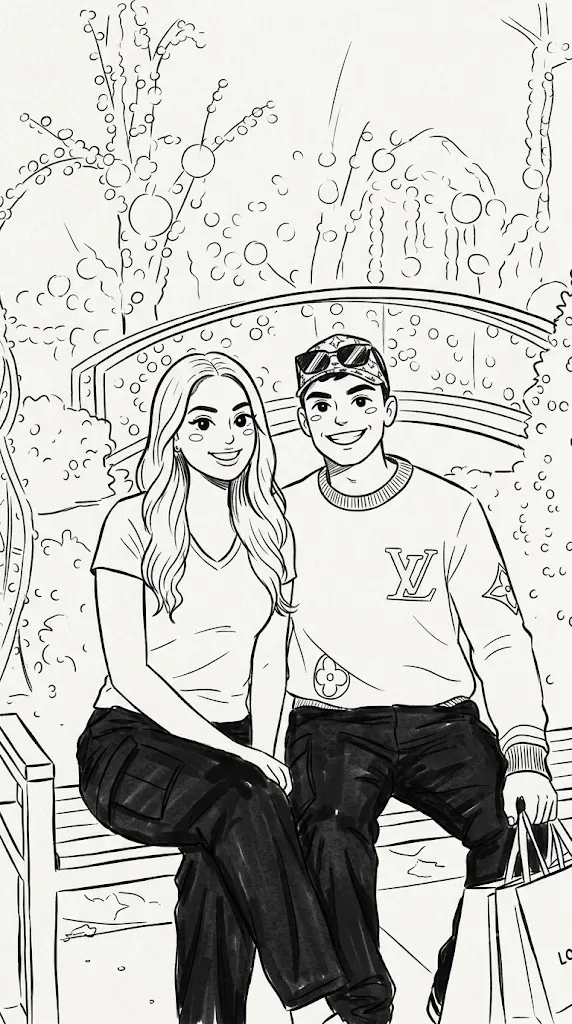
The Cute Black & White Hand-Drawn Doodle Portrait style is one of the most popular AI illustration trends for turning ordinary photos into charming, minimalist artwork. Inspired by marker sketches, notebook doodles, manga-inspired chibi characters, and simple line art, this creative style transforms real people into adorable cartoon versions while preserving the original composition, pose, clothing, and facial expressions.
"Cute Black & White Hand-Drawn Doodle Portrait Prompt"
Convert the uploaded portrait into a cute black-and-white hand-drawn doodle illustration in the style of a minimalist marker sketch. Preserve the original composition, camera angle, pose, clothing, facial expressions, and positioning of every subject while transforming them into adorable chibi characters with oversized expressive eyes, rounded faces, simplified facial features, smooth proportions, and bold clean outlines. Use crisp black marker-style line art with minimal shading, playful sketch details, soft curves, charming handwritten aesthetics, balanced white background, friendly personality, notebook doodle appearance, ultra-clean illustration quality, high-resolution digital artwork, premium hand-drawn style, and 4K ultra-detailed output.
Unlike realistic digital paintings, doodle portraits focus on simplicity. Bold black outlines, rounded facial features, oversized expressive eyes, and playful proportions give each character a warm and friendly appearance. The clean marker-sketch style creates the impression of an illustration drawn by hand, making it perfect for profile pictures, social media posts, stickers, greeting cards, journals, T-shirts, and personalized gifts.
Modern AI image generators make this transformation remarkably easy. With a detailed prompt and a high-quality reference photo, the AI can preserve the subject's identity while simplifying realistic features into a cute chibi illustration. The result is a balanced combination of recognizable facial characteristics and artistic creativity.
Whether you are an AI artist, digital creator, blogger, designer, or hobbyist, learning how to write detailed doodle prompts can help you consistently generate attractive illustrations with professional quality. This guide explains how to use AI photo editing, the best tools for creating doodle portraits, an example prompt, and the editing process that transforms ordinary images into delightful hand-drawn artwork.
How To Use Photo Editing?
Although AI creates the initial illustration, photo editing helps improve quality and gives the finished artwork a cleaner appearance.
Step 1: Choose a Clear Reference Photo
Select a portrait with good lighting, visible facial features, and high resolution. A clear image allows AI to preserve the person's identity while creating the simplified doodle illustration.
Step 2: Copy a Detailed Prompt
Use a prompt that describes the desired sketch style, line thickness, facial proportions, expression, composition, and artistic mood.
Step 3: Upload the Image
Import the reference photo into an AI image generator that supports image-to-image transformation or reference-image guidance.
Step 4: Generate Multiple Versions
Create several variations and compare facial resemblance, line quality, proportions, and overall artistic balance.
Step 5: Select the Best Result
Choose the version that best captures the original personality while maintaining the cute hand-drawn aesthetic.
Step 6: Apply Final Enhancements
Use professional editing software to sharpen outlines, remove unwanted artifacts, improve contrast, and prepare the illustration for sharing or printing.
Combining AI generation with light editing creates polished illustrations while preserving the handmade sketch appearance.
Tools You Can Use For Prompt Copy and Create Photo
The following AI and editing tools are excellent for creating cute doodle portraits.
ChatGPT
Generate highly descriptive prompts covering illustration style, line art, facial features, expressions, and composition.
Midjourney
Produces artistic cartoon illustrations with beautiful line quality and creative visual storytelling.
Flux AI
Creates accurate facial identity while simplifying the subject into adorable cartoon characters.
Stable Diffusion
Offers advanced customization through image-to-image workflows, ControlNet, and prompt refinement.
GPT Image
Useful for generating high-quality minimalist illustrations while maintaining clean outlines and consistent character design.
Adobe Photoshop
Perfect for cleaning unwanted artifacts, improving line sharpness, adjusting contrast, and refining details.
Adobe Illustrator
Excellent for smoothing outlines, converting artwork into vector graphics, and producing scalable illustrations.
Canva
Ideal for designing profile pictures, social media graphics, posters, greeting cards, notebooks, and printable artwork using the completed illustration.
Using AI image generation together with editing software produces professional-quality doodle portraits with minimal effort.
How To Edit Photo?
Professional editing enhances the final doodle portrait without losing its charming handmade appearance.
Clean the Artwork
Remove unwanted AI artifacts while keeping the sketch natural and uncluttered.
Improve Line Quality
Sharpen the outlines slightly so the marker strokes remain crisp and easy to read.
Balance Contrast
Adjust brightness and contrast to create clean black lines against a bright white background.
Refine Facial Features
Ensure the oversized eyes, rounded cheeks, and expressive smile remain the main focus of the illustration.
Maintain Simplicity
Avoid adding excessive shading or unnecessary details. Minimalism is one of the defining characteristics of doodle artwork.
Prepare for Different Uses
Export square versions for profile pictures, transparent backgrounds for stickers, and high-resolution files for posters or printing.
Save in High Resolution
Export the final artwork in 4K or higher resolution to ensure sharp quality across digital and printed formats.
Conclusion
The Cute Black & White Hand-Drawn Doodle Portrait style combines the simplicity of traditional marker sketches with the creative power of AI image generation. By preserving the original pose and personality while transforming realistic features into charming chibi characters, this illustration style creates artwork that is playful, memorable, and suitable for many creative projects.
Success depends on writing a detailed prompt that clearly describes facial proportions, line quality, composition, and artistic style. Professional editing then refines the outlines, improves contrast, and removes imperfections while preserving the handmade look.
Whether you're creating personalized gifts, social media avatars, printable stickers, children's illustrations, or digital artwork, this minimalist doodle style offers endless creative possibilities. With practice, thoughtful prompt writing, and careful editing, you can consistently create adorable hand-drawn portraits that capture both personality and artistic charm in a timeless black-and-white sketch aesthetic.