Introduction
The Cinematic Winter Romance Couple Portrait Prompt is designed for creators who want to generate breathtaking romantic portraits that capture warmth, intimacy, and timeless love against a snowy winter backdrop. Inspired by premium fashion editorials, luxury engagement photography, and cinematic romance films, this prompt combines photorealistic portraiture with emotional storytelling. The result is an image that feels authentic, elegant, and worthy of the cover of a luxury lifestyle magazine.
"Cinematic Winter Romance Couple Portrait Prompt"
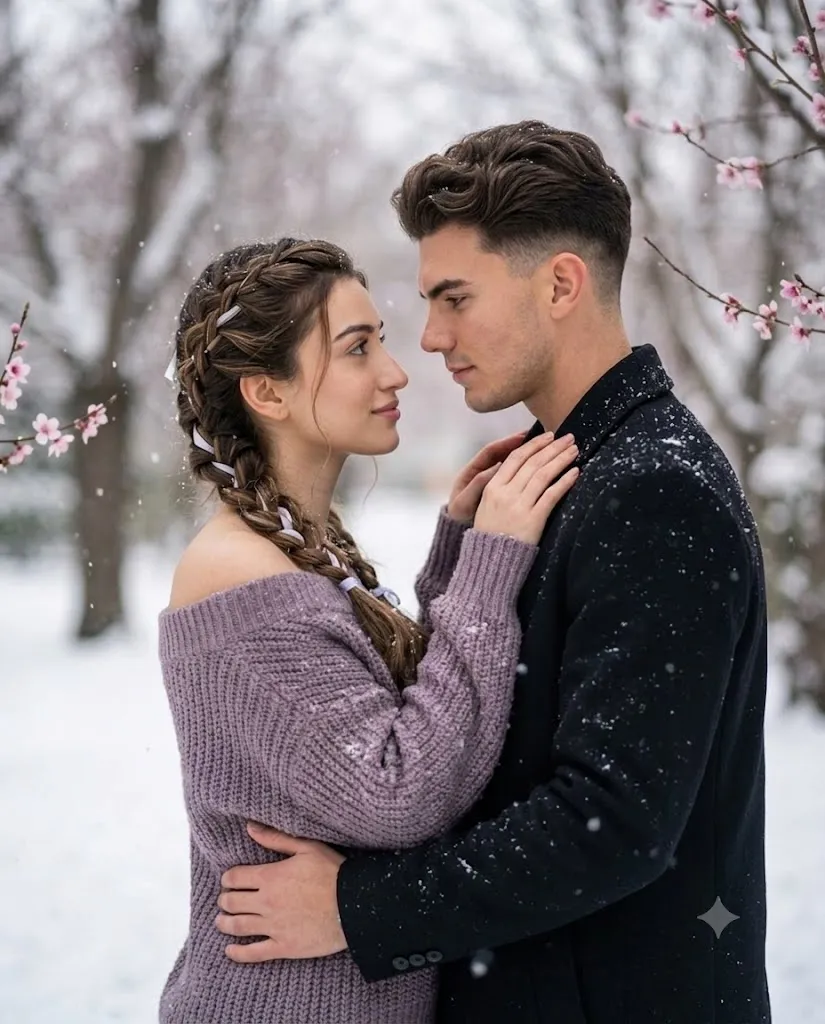
Create a photorealistic cinematic winter romance portrait using two uploaded reference images. Preserve both faces exactly, including facial structure, eyes, eyebrows, nose, lips, jawline, complexion, hairstyle, beard (if applicable), and natural expressions without beautification. Place the couple outdoors during gentle snowfall surrounded by snow-covered ground and bare trees with delicate pink blossoms. Dress the man in a black winter coat dusted with snow and the woman in a muted lavender chunky knit off-shoulder sweater. Capture a quiet romantic moment where they softly gaze into each other's eyes while embracing naturally. Use an 85mm prime lens at f/1.8, realistic skin pores, fine fabric texture, cinematic winter lighting, creamy background bokeh, subtle Kodak-inspired color grading, and ultra-detailed 8K quality.watermark.
The most important aspect of this prompt is accurate facial identity preservation. When generating the portrait, both the male and female faces should remain completely faithful to their uploaded reference images. Every facial detail—including the bone structure, jawline, eyes, eyebrows, nose, lips, complexion, hairstyle, beard (if present), and natural facial expression—must remain unchanged. The AI should never beautify or redesign their appearance. Instead, it should simply place them naturally into the romantic winter environment.
Because this prompt features two people, you must upload two separate reference images if you have not already done so—one clear image for the man and one for the woman. High-quality reference photos greatly improve facial consistency and realism.
The winter environment creates a peaceful atmosphere. Fresh snow covers the ground while gentle snowflakes drift through the air. Bare winter trees frame the background, softened by creamy bokeh produced by an 85mm lens. Delicate pink blossoms growing on nearby branches add subtle color contrast, symbolizing hope, romance, and the transition between winter and spring.
The couple's interaction feels sincere rather than staged. They stand close together, maintaining soft eye contact filled with warmth and trust. The man gently embraces the woman around her waist in a protective posture, while the woman rests her hands lightly on his shoulders and near his neck. They are not kissing; instead, they share a quiet emotional connection that feels timeless and genuine.
The wardrobe reinforces the elegant mood. The man wears a black winter coat lightly dusted with snow, while the woman wears a muted lavender off-shoulder chunky knit sweater featuring detailed knitted texture and softly resting snowflakes. Together, the clothing complements the cool winter palette while adding warmth through natural skin tones.
Photographed as though using a professional full-frame camera with an 85mm prime lens at f/1.8, the portrait features beautiful subject separation, realistic skin pores, detailed hair strands, textured clothing, soft natural lighting, and cinematic depth suitable for premium editorial publications.
How To Use Photo Editing?
Professional editing enhances realism while preserving the emotional atmosphere.
Begin by balancing exposure carefully. Snow often causes overexposure, so protect highlight detail while maintaining realistic brightness.
Adjust white balance to keep the snow neutral while preserving warm natural skin tones.
Retouch the skin minimally by removing temporary imperfections while maintaining realistic pores and texture.
Enhance individual hair strands, knitted fabric textures, and snowflake details without creating an artificial appearance.
Increase clarity around facial features while leaving the background beautifully soft.
Apply cinematic color grading using cool winter blues balanced with warm skin highlights.
Complete the image using subtle analog-inspired film grain for a premium editorial finish.
Tools You Can Use For Prompt Copy and Create Photo
Several AI generators and editing applications perform exceptionally well for romantic editorial portraits.
AI Image Generation Tools
ChatGPT
Perfect for writing highly descriptive prompts covering identity preservation, wardrobe, emotion, environment, lighting, and camera settings.
Midjourney
Excellent for artistic cinematic compositions and luxury editorial styling.
Leonardo AI
Produces highly realistic portraits with detailed facial consistency.
Ideogram
Suitable for elegant fashion concepts and romantic portrait layouts.
Adobe Firefly
Provides AI-powered image generation integrated with Adobe Creative Cloud.
Professional Editing Software
Adobe Photoshop
Ideal for portrait refinement, snow cleanup, and final polishing.
Adobe Lightroom
Excellent for cinematic color grading and exposure balancing.
Capture One
Provides exceptional color accuracy and realistic skin tone rendering.
Affinity Photo
Offers advanced portrait editing features.
Snapseed
Convenient mobile editing for warmth, contrast, clarity, and film grain.
How To Edit Photo?
Step 1: Upload Both Reference Images
Upload one high-quality portrait for the man and one for the woman.
Step 2: Generate the Base Portrait
Create the winter composition while preserving both faces exactly.
Step 3: Balance Exposure
Protect detail within bright snow while maintaining realistic facial illumination.
Step 4: Preserve Natural Skin
Maintain realistic pores and subtle skin texture instead of excessive smoothing.
Step 5: Refine Hair
Enhance natural hair strands interacting with the winter breeze.
Step 6: Improve Clothing Detail
Increase definition in the knitted sweater and winter coat while preserving natural softness.
Step 7: Enhance Snow
Refine falling snowflakes and accumulated snow without making them appear artificial.
Step 8: Apply Cinematic Color Grading
Blend cool winter blues with warm skin tones and soft pink blossom accents.
Step 9: Add Fine Film Grain
Introduce subtle analog grain to reinforce the editorial photography style.
Step 10: Verify Facial Consistency
Compare both generated faces carefully with their uploaded reference images.
Step 11: Final Refinements
Remove unwanted artifacts while preserving realistic lighting, shadows, and environmental depth.
Step 12: Export in High Resolution
Save the completed portrait as PNG or TIFF for engagement photography, magazine covers, luxury portfolios, or premium printing.
Conclusion
The Cinematic Winter Romance Couple Portrait Prompt combines luxury editorial photography with heartfelt storytelling. Snow-covered landscapes, delicate blossoms, elegant winter clothing, and natural emotional interaction create a portrait that feels cinematic while remaining deeply personal.
Every visual element—from complete facial identity preservation and realistic skin texture to softly falling snow, knitted clothing detail, cinematic lighting, creamy background bokeh, and balanced winter color grading—contributes to a refined magazine-quality image. Instead of relying on exaggerated effects, the prompt achieves beauty through realism, subtle emotion, and careful composition.
Although AI can produce remarkably realistic romantic portraits, the best results come from detailed prompt writing and thoughtful editing. Maintaining facial accuracy, refining lighting, balancing colors, preserving textures, and enhancing emotional authenticity all help transform a generated image into a convincing editorial photograph.
Finally, remember that this prompt requires two uploaded reference images—one for the man and one for the woman. Providing both allows the AI to accurately preserve each person's appearance while placing them naturally into this intimate winter romance scene.
Whether you're creating engagement portraits, anniversary artwork, romantic social media content, wedding inspiration, or luxury editorial photography, the Cinematic Winter Romance Couple Portrait Prompt provides a timeless foundation for producing elegant, photorealistic, and emotionally meaningful imagery.