Introduction
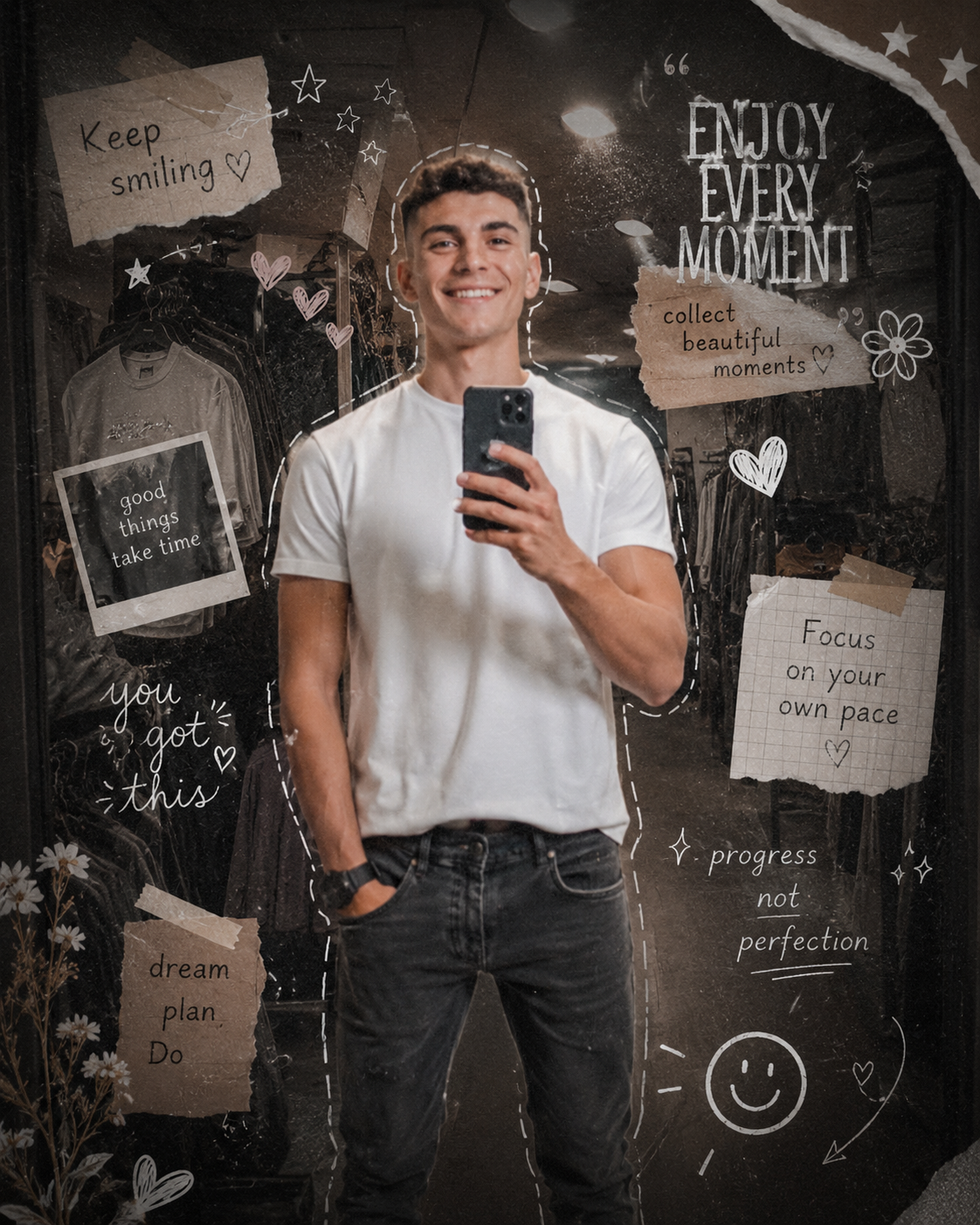
Cinematic scrapbook selfie portraits have become one of the most creative and visually expressive trends in modern AI photo editing and digital photography. This aesthetic combines realistic mirror selfies, dreamy cinematic lighting, hand-drawn doodles, vintage scrapbook elements, film grain textures, and soft grunge vibes to create highly artistic lifestyle portraits. The final result feels personal, emotional, stylish, and visually rich like a page from a modern digital diary.
This editing style is extremely popular on Instagram, Pinterest, Tumblr, and AI photography communities because it combines fashion photography with creative storytelling. Mirror selfies are no longer simple photos; they have evolved into aesthetic compositions filled with textures, layered elements, handwritten notes, stickers, chalk doodles, and cinematic lighting effects that create a premium artistic appearance.
The scrapbook portrait aesthetic is inspired by vintage journals, Y2K photography, indie fashion culture, and cinematic lifestyle editorials. Soft shadows, muted colors, blurred backgrounds, film grain, and hand-drawn graphics together create a nostalgic and emotional atmosphere that feels authentic and creative.
Today, AI image generation tools and editing apps make it easier than ever to create professional scrapbook-style portraits without expensive cameras or advanced design skills. Whether you are a beginner or an experienced editor, you can create stunning cinematic mirror selfie portraits using detailed prompts and modern editing techniques.
In this article, you will learn how to use photo editing effectively, discover the best tools for AI prompt creation, understand scrapbook portrait aesthetics, and learn step-by-step methods to create ultra-realistic cinematic scrapbook selfies.
How To Use Photo Editing?
Photo editing is the process of improving and transforming an image by adjusting lighting, textures, colors, composition, and overall atmosphere. Cinematic editing focuses more on storytelling and emotional mood rather than heavy filters or unrealistic effects.
To create a Cinematic Scrapbook Selfie Portrait, focus on the following important elements:
1. Mirror Selfie Composition
Mirror selfies create a casual and authentic lifestyle appearance. Natural poses and relaxed expressions help the image feel realistic and personal.
2. Scrapbook Elements
Handwritten notes, stickers, doodles, torn paper textures, stars, hearts, arrows, and chalk-style graphics create the scrapbook aesthetic.
3. Soft Grunge Atmosphere
Muted tones, dark shadows, film grain, and subtle vignette effects create a soft grunge mood that feels artistic and emotional.
4. Cinematic Lighting
Warm moody lighting combined with gentle shadows helps create cinematic depth and realism.
5. Realistic Skin Texture
Avoid excessive smoothing. Natural skin details and realistic textures make the portrait feel authentic and premium.
6. Background Styling
Darkened and slightly desaturated backgrounds help focus attention on the subject while maintaining visual depth.
Tools You Can Use For Prompt Copy And Create Photo
Modern AI tools and editing apps allow users to create ultra-realistic cinematic portraits using detailed prompts. These tools are beginner-friendly and powerful enough for professional-quality editing.
1. ChatGPT
ChatGPT is one of the best tools for generating detailed cinematic AI prompts. You can describe outfits, lighting, scrapbook elements, textures, camera style, and artistic mood to create realistic prompts.
Example Prompt Elements:
Mirror selfie aesthetic
Scrapbook collage elements
Soft grunge atmosphere
Film grain texture
Cinematic lighting
Hand-drawn doodles
Detailed prompts help AI understand the exact visual style you want.
2. Gemini AI
Gemini AI is popular for realistic cinematic image generation. It understands long prompts and creates emotional editorial portraits with impressive detail.
Best Uses:
Scrapbook portraits
Artistic mirror selfies
Cinematic lifestyle photography
Fashion aesthetic visuals
3. Midjourney
Midjourney is famous for artistic cinematic visuals and editorial storytelling compositions.
Features:
Dreamy aesthetic lighting
Cinematic mood
Artistic collage design
Premium visual depth
4. Adobe Photoshop
Photoshop is one of the best tools for creating scrapbook-style compositions manually.
You can use it to:
Add doodles and stickers
Create torn-paper effects
Add film grain
Blend overlays
Create layered collage designs
5. Adobe Lightroom
Lightroom is excellent for cinematic color grading and portrait enhancement.
Useful Features:
Warm cinematic tones
Shadow adjustments
Grain effects
Vignette creation
Skin tone balancing
6. PicsArt
PicsArt is perfect for beginners who want quick scrapbook-style edits.
Useful Features:
Stickers and doodles
Artistic overlays
Handwritten fonts
Collage elements
Creative aesthetic filters
How To Edit Photo?
Creating a Cinematic Scrapbook Selfie Portrait requires artistic balance and attention to detail. Follow these steps carefully for professional results.
Step 1: Choose a High-Quality Selfie
Start with a clear mirror selfie that has:
Sharp focus
Natural expression
Good lighting
Visible outfit details
High-quality source images always produce better cinematic edits.
Step 2: Use a Detailed AI Prompt
A strong prompt is the secret behind realistic AI-generated portraits.
Example Prompt:
“Transform this image into a detailed aesthetic mirror-selfie artwork with a soft grunge and dreamy scrapbook vibe. Keep the subject exactly the same with realistic facial details, natural skin texture, original pose, hairstyle, and outfit. Darken and slightly desaturate the background while keeping store details visible. Add cinematic depth with subtle vignette and film grain applied only to the background. Surround the subject with layered hand-drawn chalk doodles, scrapbook paper textures, stars, hearts, arrows, handwritten notes, aesthetic stickers, and soft vintage overlays. Warm cinematic lighting, realistic shadows, dreamy indie aesthetic, editorial mirror selfie composition, ultra-detailed realistic portrait.”
A detailed prompt helps AI understand:
Scrapbook aesthetic
Lighting
Background mood
Doodle placement
Cinematic atmosphere
Artistic composition
Step 3: Adjust Lighting
In Lightroom or Snapseed:
Reduce harsh brightness
Add soft warm highlights
Deepen shadows slightly
Maintain realistic exposure
Lighting should feel cinematic and emotional.
Step 4: Apply Cinematic Color Grading
Use:
Muted brown shadows
Warm beige highlights
Soft grey tones
Slight matte finish
Balanced colors create a premium scrapbook look.
Step 5: Add Film Grain and Vignette
Film grain adds realism and vintage texture.
Use vignette carefully to darken the edges and increase cinematic focus.
Step 6: Add Scrapbook Elements
In Photoshop or PicsArt:
Add hand-drawn doodles
Use torn paper textures
Add stars, arrows, and hearts
Include handwritten quotes
Layer aesthetic stickers
These elements create the scrapbook diary effect.
Step 7: Final Adjustments
Before exporting:
Balance contrast
Improve skin tones
Sharpen eyes softly
Keep the overall mood dreamy and cinematic
Export the image in high resolution for the best visual quality.
Conclusion
Cinematic Scrapbook Selfie Portraits beautifully combine fashion photography, artistic storytelling, dreamy aesthetics, and personal creativity into one stunning visual style. With the help of AI prompts, editing apps, and cinematic lighting techniques, anyone can create premium-quality portraits that feel emotional, stylish, and professional.
The secret behind cinematic scrapbook editing is balanced lighting, realistic textures, soft grunge atmosphere, and layered artistic composition instead of excessive filters. Whether you use ChatGPT for prompt writing, Gemini AI for image generation, Photoshop for collage editing, or Lightroom for cinematic color grading, the key is maintaining realism and emotional depth.
As AI photography continues to evolve, scrapbook-style portraits are becoming more creative and accessible every day. By learning proper prompt writing and editing techniques, you can transform ordinary mirror selfies into stunning cinematic scrapbook masterpieces with luxury editorial aesthetics.