Introduction
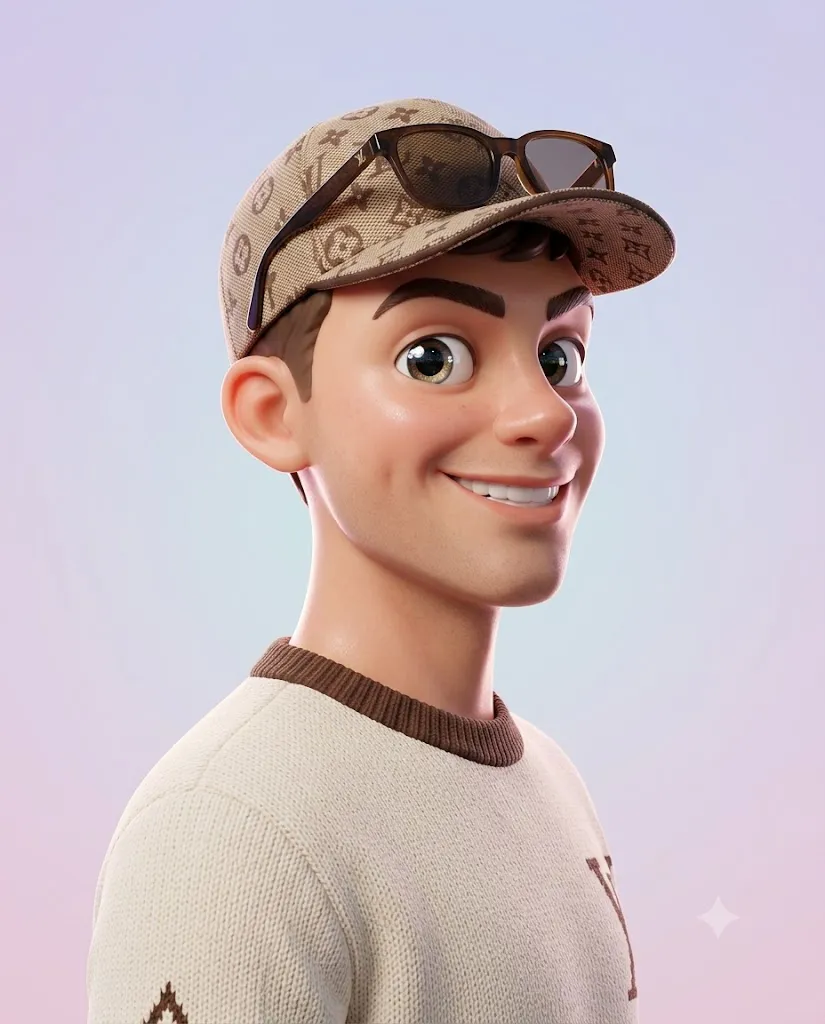
The Pixar-Style 3D Side Profile Character Portrait Prompt is a modern AI art style that transforms ordinary portraits into charming, high-quality 3D characters inspired by animated movies and collectible designer toys. This style combines expressive facial features, soft cinematic lighting, and premium 3D rendering techniques to create portraits that feel playful, polished, and emotionally engaging.
"Pixar-Style 3D Side Profile Character Portrait Prompt"
Generate a side profile portrait based on the uploaded reference image while preserving the subject's identity, facial proportions, hairstyle, and key facial features. Transform the portrait into a premium Pixar-style 3D stylized character with a cute and playful personality. The character should have a gentle head tilt, slightly puffed cheeks, a wide friendly smile, large sparkling expressive eyes, soft glossy skin with realistic subsurface scattering, and semi-realistic anatomy enhanced with subtle cartoon-style exaggeration inspired by animated films and collectible designer toys. Illuminate the character using soft cinematic studio lighting with elegant rim lighting that separates the subject from a clean pastel gradient background. Render the portrait using Octane Render and Unreal Engine 5 quality with hyper-detailed textures, realistic materials, smooth lighting transitions, HDR color grading, masterpiece-quality rendering, ultra-high detail, 8K resolution, and a 4:5 aspect ratio. Avoid distorted facial features, extra fingers, bad anatomy, harsh shadows, image noise, realistic human rendering, uncanny valley effects, horror elements, and low-resolution artifacts.
Unlike realistic portraits, this aesthetic focuses on stylized character design while preserving the person's identity. AI keeps important facial characteristics such as face shape, hairstyle, eye placement, nose structure, and smile while adding subtle cartoon-inspired proportions. The result is a character that looks recognizable but belongs in a high-end animated film or designer toy collection.
One of the most distinctive features of this style is the side profile composition. Instead of looking directly at the camera, the character is viewed from the side with a slight head tilt and a cheerful expression. Large sparkling eyes, soft rounded cheeks, glossy skin, and a wide smile create a friendly personality that feels both cute and sophisticated.
Professional rendering techniques such as soft studio lighting, rim lighting, subsurface skin scattering, Octane Render quality, Unreal Engine 5 realism, and shallow depth of field help produce premium-looking artwork. Combined with a clean pastel gradient background, the portrait becomes suitable for profile pictures, digital collectibles, branding, posters, wallpapers, and creative social media content.
Modern AI image generation tools make this transformation incredibly simple. With a detailed prompt and a high-resolution reference image, AI can generate an ultra-detailed stylized portrait while maintaining facial identity and creating a polished 3D appearance.
This guide explains how to use AI photo editing, the best tools for generating stylized 3D portraits, an example prompt, and professional editing techniques for achieving a production-quality result.
How To Use Photo Editing?
Creating a Pixar-style 3D character portrait begins with selecting a clear, high-resolution reference image. The quality of the original photo directly affects the realism and facial accuracy of the final stylized character.
Step 1: Select a High-Quality Portrait
Choose an image with good lighting, clear facial details, and a natural expression. The face should be fully visible so the AI can accurately preserve identity while applying the stylized transformation.
Step 2: Write a Detailed Prompt
A successful AI prompt should describe every important detail, including:
- Side profile composition
- Stylized 3D character design
- Large expressive eyes
- Friendly facial expression
- Soft glossy skin
- Studio lighting
- Pastel background
- High-end rendering engine
- Animation-inspired proportions
Detailed prompts produce more consistent and professional results.
Step 3: Upload the Reference Image
Upload your portrait into an AI image generator that supports image-to-image generation or reference image guidance. This allows AI to retain facial identity while changing the artistic style.
Step 4: Generate Multiple Variations
Generate several versions and compare facial resemblance, expression, lighting, proportions, and rendering quality.
Step 5: Choose the Best Version
Select the portrait that best balances recognizable facial identity with stylized animation aesthetics.
Step 6: Refine the Final Image
Use professional editing software to improve sharpness, color grading, lighting, and overall presentation.
Combining AI generation with careful editing produces a premium-quality stylized character portrait.
Tools You Can Use For Prompt Copy and Create Photo
Several AI platforms and editing applications are suitable for creating Pixar-style 3D portraits.
ChatGPT
Useful for generating detailed prompts that describe character design, lighting, facial expressions, rendering quality, and artistic style.
Midjourney
Creates highly artistic 3D illustrations with cinematic lighting, beautiful compositions, and premium visual quality.
Flux AI
Excellent for maintaining facial identity while generating realistic stylized character portraits.
Stable Diffusion
Offers advanced image-to-image workflows, ControlNet support, and prompt customization for highly controlled results.
GPT Image
Ideal for producing premium stylized portraits with consistent facial details and animation-inspired rendering.
Adobe Photoshop
Perfect for refining skin highlights, background gradients, lighting, sharpness, and overall composition.
Adobe Lightroom
Useful for improving exposure, color balance, contrast, highlights, and creating soft cinematic tones.
Canva
Great for creating profile pictures, banners, wallpapers, posters, social media graphics, and presentation designs using the completed portrait.
Using AI image generation together with professional editing software helps produce polished artwork suitable for personal and commercial creative projects.
How To Edit Photo?
Professional editing enhances the final AI-generated portrait without losing its stylized animated appearance.
Preserve Facial Identity
Ensure important facial details remain recognizable while allowing the stylized proportions to create a playful look.
Enhance Lighting
Refine soft highlights and rim lighting to increase depth and separate the character from the background.
Improve Skin Material
Maintain smooth glossy skin with subtle texture while avoiding an overly plastic appearance.
Refine Color Grading
Use soft pastel tones and balanced colors that complement the friendly animated style.
Sharpen Key Features
Slightly enhance the eyes, smile, hair strands, and clothing details to improve visual clarity.
Clean the Background
Keep the pastel gradient simple and distraction-free so the focus remains on the character.
Export in High Resolution
Save the final artwork in 8K or the highest available resolution for avatars, wallpapers, posters, social media, or print-quality projects.
Conclusion
The Pixar-Style 3D Side Profile Character Portrait Prompt combines the creativity of animated storytelling with the precision of modern AI image generation. By preserving facial identity while introducing expressive cartoon-inspired features, this style creates portraits that are charming, memorable, and visually impressive.
The secret to achieving professional results is writing a detailed prompt that clearly defines character design, lighting, rendering quality, composition, and artistic style. AI provides an excellent starting point, while professional editing enhances realism, polish, and presentation.
Whether you are creating profile pictures, digital collectibles, branding assets, social media content, wallpapers, or creative artwork, this stylized portrait style offers endless possibilities. With thoughtful prompt writing and careful post-processing, you can consistently generate high-end 3D character portraits that look playful, cinematic, and worthy of a premium animated production.