Introduction
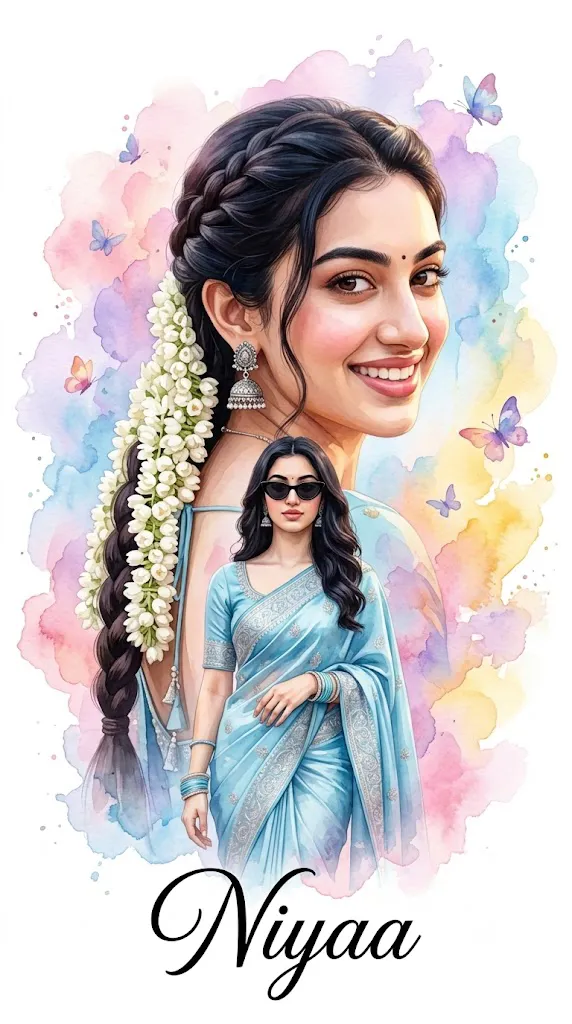
The Dreamy Portrait in Vibrant Watercolor style is one of the most artistic and visually captivating trends in AI image generation. Inspired by traditional watercolor paintings and modern digital illustration, this style transforms an ordinary portrait into an elegant work of art filled with soft brush strokes, vibrant pastel colors, flowing paint splashes, and cinematic lighting. The result is a portrait that feels emotional, imaginative, and handcrafted while preserving the subject's identity.
"Dreamy Portrait in Vibrant Watercolor Portrait Prompt"
Transform the uploaded portrait into a dreamy digital watercolor illustration while preserving the subject's facial identity and hairstyle. Create a beautiful double-exposure composition featuring a large close-up portrait in the background and a full-body portrait in the foreground. Use flowing watercolor brush strokes, soft paint splashes, and harmonious blends of pastel pink, lavender, sky blue, golden yellow, and subtle purple tones. Add elegant butterflies, delicate floral accents, and abstract watercolor textures that create depth and movement. Dress the subject in graceful traditional attire with refined accessories while maintaining realistic facial details. Use soft cinematic lighting, clean white negative space, ultra-detailed watercolor textures, artistic paper effects, smooth color transitions, elegant typography placement, premium poster composition, high-resolution digital painting quality, and 8K ultra-detailed output.
Unlike standard AI portraits that focus on photorealism, watercolor portrait prompts emphasize artistic expression. Colors blend naturally into one another, edges appear soft and fluid, and backgrounds feature abstract paint textures that create depth without distracting from the main subject. Elements such as butterflies, flowers, flowing pigments, elegant typography, and dreamy lighting add personality and storytelling to the final artwork.
One of the most popular variations of this style is the double-exposure watercolor portrait, where a close-up portrait blends harmoniously with a full-body composition. This layered design creates an elegant magazine-style poster that combines realism with artistic creativity. Whether used for personal portraits, digital artwork, greeting cards, social media graphics, or wall décor, watercolor portraits remain timeless and visually appealing.
In this guide, you'll learn how to use AI photo editing, discover the best tools for creating watercolor portraits, explore an example prompt, and understand the editing techniques needed to produce beautiful 4K and 8K digital watercolor artwork.
How To Use Photo Editing?
Photo editing helps transform an AI-generated watercolor portrait into a polished digital masterpiece. Although AI creates the initial artwork, editing software improves colors, textures, lighting, and overall presentation.
Step 1: Choose a High-Resolution Portrait
Select a clear reference photo with natural lighting and visible facial features. High-quality images help the AI preserve facial identity while applying artistic watercolor effects.
Step 2: Copy a Detailed Prompt
Use a carefully written prompt describing the watercolor style, subject, clothing, colors, composition, lighting, decorative elements, and artistic mood.
Step 3: Upload the Reference Photo
Import the portrait into an AI image generation platform that supports image-to-image transformation or facial reference guidance.
Step 4: Generate Multiple Versions
Create several variations and compare color harmony, facial resemblance, composition, and artistic quality before selecting the best result.
Step 5: Enhance the Final Artwork
Use professional editing software to refine watercolor textures, balance colors, sharpen important details, and complete the poster design.
This combination of AI generation and traditional editing produces artwork that appears both professional and artistically handcrafted.
Tools You Can Use For Prompt Copy and Create Photo
Several AI platforms and editing applications work exceptionally well for creating watercolor portrait artwork.
ChatGPT
Ideal for writing detailed prompts that describe watercolor textures, color palettes, lighting, composition, and artistic styles.
Midjourney
Produces stunning painterly illustrations with beautiful color blending and premium artistic composition.
Flux AI
Excellent for preserving facial identity while applying realistic watercolor effects and natural artistic textures.
Stable Diffusion
Offers advanced customization using image-to-image generation, ControlNet, and style models for greater creative flexibility.
GPT Image
Creates detailed watercolor-style portraits directly from descriptive prompts while maintaining visual consistency.
Adobe Photoshop
Perfect for enhancing paint textures, refining details, removing imperfections, and improving the overall composition.
Adobe Lightroom
Useful for adjusting exposure, color balance, contrast, vibrance, and achieving soft cinematic tones.
Canva
Excellent for creating posters, greeting cards, invitations, social media graphics, and printable artwork using the completed watercolor portrait.
Using AI together with professional editing software ensures the highest level of artistic quality and realism
How To Edit Photo?
Professional editing gives the final artwork a polished gallery-quality appearance.
Clean the Composition
Remove unwanted artifacts while preserving the natural watercolor texture and painterly brush effects.
Improve Color Harmony
Enhance pastel colors and maintain smooth transitions between different watercolor shades without oversaturating the image.
Refine Watercolor Textures
Increase clarity carefully to make brush strokes, paper textures, and paint splashes more visible while preserving their soft appearance.
Sharpen Important Details
Lightly sharpen the eyes, facial features, clothing, and accessories without reducing the artistic watercolor effect.
Enhance Decorative Elements
Improve the appearance of butterflies, flowers, paint splashes, and abstract shapes to create a richer storytelling composition.
Balance the Lighting
Maintain soft, diffused lighting that complements the dreamy watercolor atmosphere and creates gentle depth throughout the artwork.
Export in High Resolution
Save the finished portrait in 4K or 8K resolution using maximum quality settings for printing, posters, portfolios, social media, or digital galleries.
Conclusion
The Dreamy Portrait in Vibrant Watercolor style beautifully combines traditional painting techniques with modern AI creativity. Through detailed prompt writing, high-quality reference images, and professional editing, you can transform simple portraits into elegant works of digital art filled with emotion, color, and imagination.
This artistic style is ideal for personalized gifts, social media content, greeting cards, digital portfolios, posters, and decorative wall art. Its flowing watercolor textures, soft lighting, abstract backgrounds, and expressive compositions create a timeless aesthetic that appeals to both artists and photography enthusiasts.
As AI image generation technology continues to advance, experimenting with different watercolor palettes, double-exposure layouts, floral decorations, typography, and lighting techniques will help you develop your own creative signature. With practice and careful refinement, you can consistently produce breathtaking watercolor portraits that combine artistic beauty with professional-quality craftsmanship, making every image feel like a hand-painted masterpiece.