Introduction
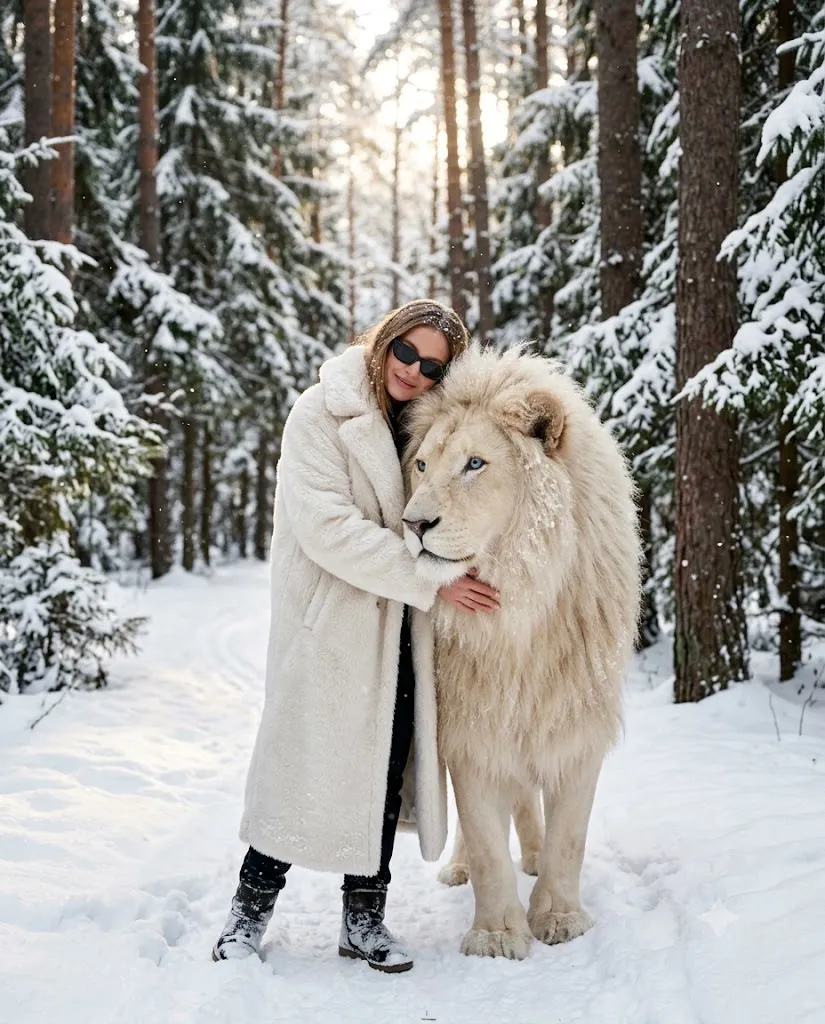
The Winter White Lion Fashion Editorial Portrait style is a breathtaking combination of luxury fashion photography, wildlife-inspired storytelling, and cinematic winter landscapes. This unique AI art concept captures the elegance of a fashion editorial while introducing the majestic presence of a white lion to symbolize confidence, strength, serenity, and trust. Set within a peaceful snow-covered forest, the composition creates a powerful emotional connection between the subject and the animal, resulting in an image that feels both dramatic and timeless.
"Winter White Lion Fashion Editorial Portrait Prompt"
Create an ultra-realistic cinematic winter editorial portrait of a stylish individual standing in a peaceful snow-covered forest while gently embracing a majestic white lion with striking blue eyes. Preserve accurate facial identity from the reference image. The subject wears a luxurious long white fur coat layered over a dark outfit with elegant black sunglasses. Their cheek rests softly against the lion's head while one hand gently touches its flowing mane, expressing trust, calmness, and quiet confidence. Surround the scene with tall snow-covered pine trees, untouched white snow, soft falling snowflakes, and warm golden sunlight filtering through the forest to create beautiful rim lighting. Use shallow depth of field, cinematic HDR lighting, natural winter colors, realistic fur textures, authentic skin tones, DSLR-quality sharpness, ultra-detailed snow particles, premium editorial composition, masterpiece quality, 8K realism, and a 4:5 aspect ratio.
Unlike ordinary AI portrait prompts, this editorial style focuses on realistic textures, premium styling, natural winter lighting, and emotional storytelling. Every detail—from the soft snowflakes resting on clothing to the intricate texture of the lion's fur and the warm sunlight filtering through the pine trees—contributes to an ultra-realistic cinematic atmosphere.
One of the defining features of this style is the balance between luxury fashion and nature. The subject wears an elegant white fur coat layered over a darker outfit, complemented by sleek sunglasses and subtle accessories. The snowy forest provides a clean, minimalist backdrop while shallow depth of field keeps the attention on the subject and the lion. Together, these elements create an image worthy of a premium fashion campaign or magazine cover.
Whether you are an AI artist, photographer, digital creator, blogger, or designer, mastering this prompt style will help you produce visually striking images suitable for portfolios, advertisements, social media, and creative projects.
How To Use Photo Editing?
AI image generation provides the foundation, while professional photo editing refines the final portrait into a realistic editorial masterpiece.
Step 1: Select a High-Quality Reference Photo
Choose a clear portrait with excellent lighting and visible facial details. A high-resolution reference image helps maintain accurate facial identity.
Step 2: Copy a Detailed Prompt
Use a professionally written prompt that clearly describes the winter environment, subject pose, fashion styling, lighting, camera settings, wildlife interaction, and cinematic mood.
Step 3: Upload the Reference Image
Import the portrait into an AI image generator that supports image-to-image editing or face-reference technology.
Step 4: Generate Multiple Variations
Create several versions to compare facial accuracy, lighting, snow effects, and the natural interaction between the subject and the white lion.
Step 5: Choose the Best Composition
Select the image with balanced composition, realistic fur texture, natural body posture, and authentic winter atmosphere.
Step 6: Apply Professional Editing
Enhance lighting, sharpen details, refine colors, and improve textures using professional editing software for the final polished result.
Combining AI generation with careful editing produces cinematic portraits that feel authentic and visually captivating.
Tools You Can Use For Prompt Copy and Create Photo
The following tools are highly recommended for creating premium winter fashion editorial portraits.
ChatGPT
Perfect for generating detailed AI prompts that describe clothing, lighting, camera settings, poses, environments, and artistic direction.
Midjourney
Excellent for cinematic editorial artwork with dramatic lighting, elegant fashion styling, and beautiful environmental compositions.
Flux AI
Produces highly realistic portraits while preserving facial identity and delivering natural skin textures.
Stable Diffusion
Provides advanced image customization through image-to-image workflows, ControlNet, and prompt refinement.
GPT Image
Useful for creating high-quality editorial-style portraits directly from detailed prompts with consistent visual quality.
Adobe Photoshop
Ideal for advanced retouching, snow enhancement, background refinement, object cleanup, sharpening, and final compositing.
Adobe Lightroom
Perfect for adjusting exposure, contrast, white balance, cinematic color grading, and subtle winter tones.
Canva
Helpful for creating posters, magazine covers, social media posts, banners, and promotional graphics using the completed portrait.
Using AI image generation together with professional editing software ensures realistic and publication-quality results.
How To Edit Photo?
Professional editing is the final step that transforms an AI-generated image into a premium editorial portrait.
Clean the Image
Remove unwanted artifacts while preserving realistic snow textures, skin details, and the lion's fur.
Improve Lighting
Enhance highlights and shadows to strengthen the cinematic atmosphere while maintaining natural-looking illumination.
Refine Snow Effects
Increase the visibility of snowflakes and subtle winter haze without making the image appear artificial.
Sharpen Important Details
Enhance the subject's eyes, hair, coat texture, sunglasses, and the lion's fur to emphasize realism.
Color Grade the Scene
Apply balanced winter tones with slightly cool whites and subtle warm sunlight to achieve a cinematic editorial appearance.
Enhance the Background
Maintain a softly blurred snowy forest while preserving recognizable pine trees and environmental depth.
Export in 4K
Save the final portrait at 3840 × 2160 resolution or higher using maximum quality settings for print, digital portfolios, websites, or social media.
Conclusion
The Winter White Lion Fashion Editorial Portrait style beautifully combines luxury fashion, wildlife symbolism, and cinematic winter photography into a single artistic vision. By using a carefully crafted prompt, a high-quality reference image, and professional editing techniques, you can create extraordinary portraits that capture elegance, emotion, and realism.
The secret to achieving exceptional results lies in balancing detailed prompt writing with thoughtful post-processing. Realistic lighting, premium fashion styling, lifelike animal textures, natural snowfall, and emotional storytelling all contribute to an image that feels worthy of a luxury magazine cover.
As AI image generation technology continues to evolve, experimenting with different winter environments, fashion styles, wildlife companions, and lighting techniques will help you develop your own creative signature. With consistent practice, you can produce ultra-realistic editorial portraits that combine artistic imagination with professional-quality execution, making every image memorable, visually powerful, and uniquely inspiring.