Introduction
Vintage-inspired portrait photography has experienced a remarkable resurgence in recent years. While modern photography often emphasizes ultra-clean perfection, many creators are rediscovering the emotional depth and timeless charm of classic film aesthetics. The Vintage Wildflower Suit Portrait Prompt combines nostalgic 90s cinema, elegant fashion styling, and warm golden-hour lighting to create a portrait that feels like a treasured frame from an old movie.
"Vintage Wildflower Suit Portrait Prompt"
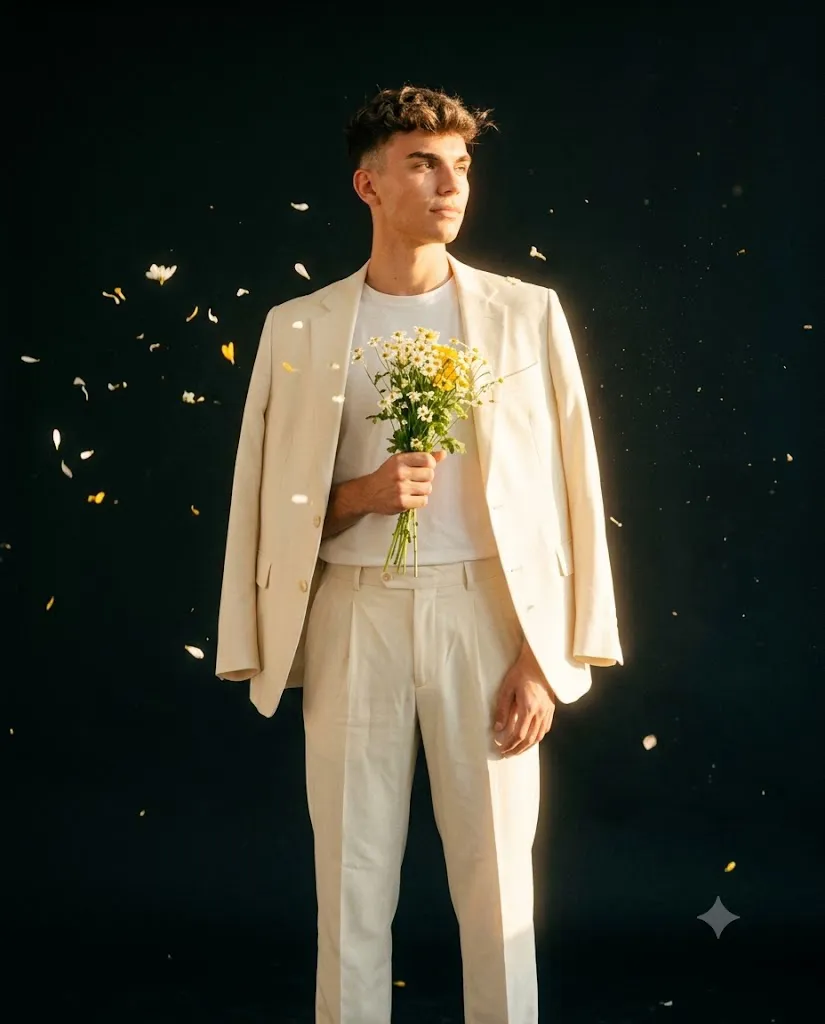
Create a vintage-inspired cinematic portrait of a stylish person wearing an ivory tailored suit with a blazer draped over the shoulders and a white t-shirt. Subject stands relaxed holding a bouquet of white and yellow wildflowers at chest level. Warm golden-hour sunlight illuminates the face and clothing. Matte black background with floating petals and subtle particles. Soft wind movement in hair. Vintage 90s film aesthetic, subtle grain, slight overexposure, soft contrast, warm tones, shallow depth of field, cinematic color grading, ultra-realistic photography, 85mm lens, aspect ratio 4:5.
This portrait concept features a stylish subject dressed in an ivory or cream-colored tailored suit paired with a simple white t-shirt. The outfit represents understated sophistication, often associated with retro European fashion and classic editorial photography. The blazer casually draped over the shoulders adds effortless elegance while maintaining a relaxed and approachable appearance.
A defining element of this portrait is the bouquet of delicate white and yellow wildflowers held at chest level. Wildflowers symbolize simplicity, freedom, and natural beauty, creating a beautiful contrast against the refined structure of the tailored suit. This combination produces a visual balance between sophistication and softness.
The lighting plays an equally important role. Warm golden-hour sunlight gently illuminates the face and clothing, producing glowing highlights and soft shadows that enhance the nostalgic atmosphere. Combined with subtle film grain, slight overexposure, and muted contrast, the image captures the dreamy quality often associated with classic 90s cinema.
The background introduces a modern artistic twist. A matte black studio environment provides dramatic contrast while floating petals and gentle particles add movement and visual storytelling. The result is a portrait that feels cinematic, emotional, and highly memorable.
With today's AI image-generation technology, photographers, designers, and content creators can recreate this aesthetic with extraordinary realism. By pairing a detailed prompt with thoughtful editing techniques, anyone can create portraits that resemble professional magazine editorials or scenes from timeless films.
This article explores how to use photo editing effectively, the best tools for creating vintage-inspired portraits, and a complete workflow for achieving a professional final image.
How To Use Photo Editing?
Photo editing is essential for transforming a generated image into a polished cinematic portrait. Although AI can create impressive results, careful refinement helps elevate the image from good to exceptional.
The first step is exposure balancing. Vintage portraits often feature bright highlights and soft shadows, but details should remain visible throughout the frame. Slight overexposure can contribute to the nostalgic look, but excessive brightness should be avoided.
Color correction is equally important. Warm golden-hour tones should enhance the subject while maintaining realistic skin colors. The ivory suit should retain subtle cream tones without becoming overly yellow.
Film aesthetics rely heavily on color grading. Gentle fading, reduced contrast, and warm tonal adjustments help recreate the appearance of traditional analog photography. Soft highlights and slightly lifted shadows contribute to the characteristic 90s cinematic feel.
Skin retouching should remain minimal. Authentic skin texture, natural pores, and subtle imperfections create realism and preserve emotional depth. Excessive smoothing can make the portrait feel artificial.
Hair refinement helps improve visual quality. Individual strands should remain visible while maintaining soft movement created by the gentle breeze.
The bouquet also deserves attention. Enhancing flower details and color balance ensures they remain an attractive focal point without overpowering the composition.
Film grain is another crucial element. A subtle layer of grain adds texture and authenticity, helping the image resemble scanned film rather than digital photography.
Finally, selective sharpening should focus on key areas such as the eyes, facial features, flowers, and clothing details while allowing the image edges to remain softly diffused.
Tools You Can Use For Prompt Copy and Create Photo
Choosing the right tools can significantly improve the quality and efficiency of your creative process.
AI Image Generation Tools
ChatGPT
ChatGPT helps creators write detailed prompts that accurately describe lighting, composition, mood, fashion styling, and environmental elements.
Midjourney
Midjourney excels at generating cinematic portraits with artistic depth and visually rich storytelling.
Leonardo AI
Leonardo AI offers excellent realism controls and high-quality portrait rendering.
Ideogram
Ideogram provides strong prompt accuracy and realistic visual outputs.
Adobe Firefly
Adobe Firefly integrates smoothly into professional workflows and produces commercially usable imagery.
Professional Editing Software
Adobe Photoshop
Photoshop is ideal for detailed retouching, compositing, and advanced creative adjustments.
Adobe Lightroom
Lightroom specializes in exposure correction, color grading, and film-style processing.
Capture One
Capture One provides industry-leading color management and professional editing capabilities.
Snapseed
Snapseed is an excellent mobile editing solution for creators who work on smartphones.
PicsArt
PicsArt offers user-friendly editing tools and creative enhancements suitable for social media content.
How To Edit Photo?
Follow these steps after generating your image.
Step 1: Import the Image
Open the image in Photoshop, Lightroom, Capture One, or your preferred editing application.
Step 2: Adjust Exposure
Fine-tune highlights and shadows to achieve balanced brightness while maintaining detail.
Step 3: Refine White Balance
Enhance warm golden-hour tones without affecting natural skin colors.
Step 4: Improve Skin Texture
Apply subtle texture enhancements while preserving realism.
Step 5: Enhance Hair Details
Increase clarity in individual strands and wind movement.
Step 6: Refine Flower Details
Boost color accuracy and texture within the bouquet.
Step 7: Create Film Aesthetics
Reduce contrast slightly and introduce gentle highlight blooming.
Step 8: Add Film Grain
Apply subtle grain for an authentic analog appearance.
Step 9: Improve Background Atmosphere
Enhance floating particles and petals while maintaining a soft, cinematic feel.
Step 10: Apply Final Color Grading
Use warm highlights, soft shadows, and nostalgic tonal adjustments.
Step 11: Export
Save the final image in high resolution. PNG format is recommended for preserving quality.
Conclusion
The Vintage Wildflower Suit Portrait Prompt is a beautiful fusion of classic fashion, cinematic lighting, and nostalgic storytelling. The combination of an elegant ivory suit, delicate wildflowers, golden-hour sunlight, and subtle film grain creates a portrait that feels timeless, emotional, and sophisticated.
This aesthetic appeals to photographers, designers, influencers, and digital artists because it captures both elegance and authenticity. The portrait does not rely on extravagant effects; instead, it celebrates simplicity, natural beauty, and emotional atmosphere.
Modern AI tools make it easier than ever to recreate this style with remarkable realism. However, the most successful results come from thoughtful prompt design, careful editing, and attention to detail. By preserving natural textures, enhancing cinematic lighting, and applying subtle film-inspired adjustments, creators can produce portraits that resemble scenes from cherished 90s films.
Whether you are building a professional portfolio, creating social media content, designing editorial artwork, or exploring cinematic photography styles, the Vintage Wildflower Suit Portrait Prompt offers a timeless creative direction. With the right tools and techniques, you can transform a simple concept into a stunning visual story filled with warmth, nostalgia, and lasting emotional impact.