Introduction
Outdoor portrait photography has always been one of the most captivating forms of visual storytelling. When combined with dramatic natural landscapes, cinematic lighting, and realistic styling, a portrait can transform into a powerful editorial image that feels both adventurous and luxurious. One of the most striking concepts in modern AI photography is the Cinematic Waterfall Explorer Portrait, a style that blends fashion, travel, and nature into a single breathtaking frame.
"Cinematic Waterfall Explorer Portrait Prompt"
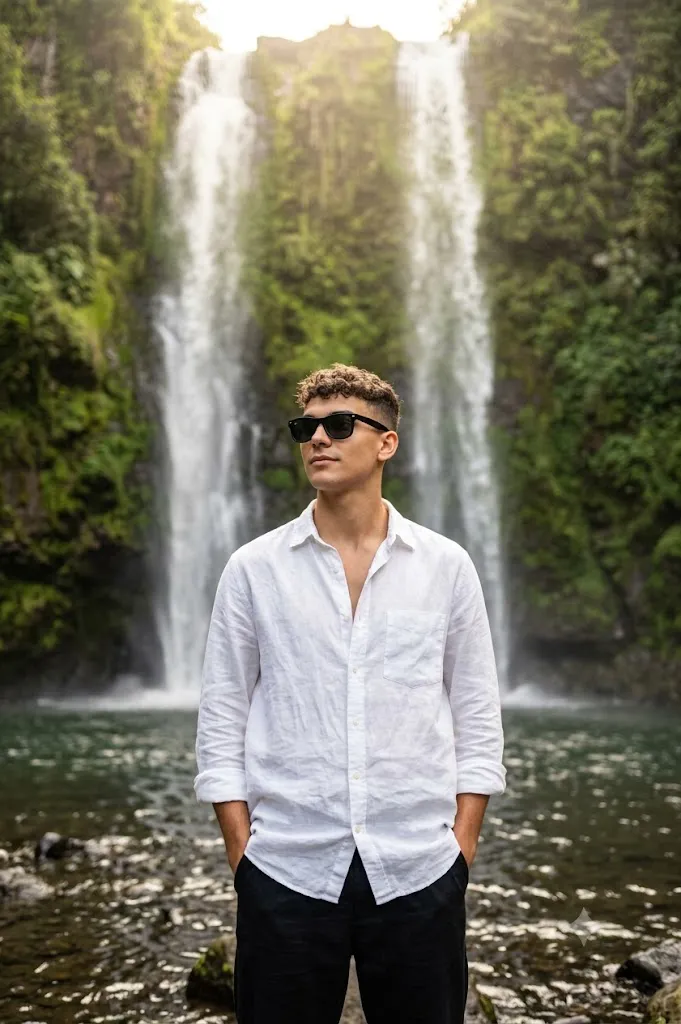
Use the uploaded image strictly as the facial identity reference. Preserve the exact face, hairstyle, beard, skin tone, and expression. Create an ultra-realistic cinematic outdoor portrait of a young man standing confidently in front of a tall twin waterfall surrounded by lush green cliffs and moss-covered rocks. Relaxed masculine stance, both hands in trouser pockets, body facing forward, head slightly turned left. White oversized linen button-down shirt with natural wrinkles and rolled sleeves, black baggy trousers, black classic sunglasses. Rocky river pool at the base of the waterfall with visible stones and gentle ripples. Dense green vegetation covering cliffs. Water mist softly glowing around the subject. Natural dreamy sunlight, warm highlights, cinematic atmosphere, DSLR photography, shallow depth of field, highly detailed textures, 85mm lens, photorealistic 8K resolution.
This portrait concept features a confident young man standing before a majestic twin waterfall surrounded by lush green cliffs, moss-covered rocks, and flowing water. The environment creates a sense of scale and wonder, while the subject remains the focal point through thoughtful composition, wardrobe selection, and cinematic lighting. The contrast between the crisp white linen shirt and the rich greens of the landscape creates a visually balanced image that immediately captures attention.
What makes this style especially appealing is its combination of realism and storytelling. The subject appears effortlessly stylish, yet deeply connected to the natural surroundings. The relaxed pose, hands in pockets, and calm expression communicate confidence without feeling staged. Soft mist from the waterfall catches the sunlight, creating subtle highlights and a dreamy atmosphere that enhances the overall cinematic quality.
In recent years, AI image generation tools have made it possible to create professional-quality travel and fashion portraits with remarkable realism. However, achieving truly exceptional results requires more than simply entering a short description. Successful prompts must include details about lighting, camera settings, clothing textures, environmental elements, composition, and mood.
The Cinematic Waterfall Explorer Portrait Prompt is particularly effective for creating social media content, travel editorials, fashion campaigns, portfolio work, and personal branding imagery. The natural scenery provides a premium backdrop, while the styling maintains a modern and sophisticated aesthetic.
In this article, you will learn how to use photo editing techniques to enhance waterfall portraits, discover the best tools for generating and refining images, and follow a step-by-step workflow to achieve a polished editorial result. Whether you are an AI artist, photographer, content creator, or digital designer, this guide will help you create stunning cinematic portraits inspired by the beauty of nature.
How To Use Photo Editing?
Photo editing is an essential step in transforming a generated image into a professional-quality portrait. Even the most realistic AI-generated images can benefit from careful refinement to enhance realism, mood, and visual impact.
The first area to focus on is exposure and contrast. Waterfall scenes often contain bright highlights from water reflections and darker shadows within cliffs and vegetation. Proper exposure balancing ensures details remain visible throughout the image while maintaining a cinematic appearance.
Color grading is another critical component. Since this portrait style emphasizes lush greenery and natural sunlight, subtle adjustments to greens, yellows, and warm highlights can significantly improve the final result. The goal is to create a vibrant yet natural-looking color palette.
Texture enhancement is especially important for outdoor portraits. Details such as shirt fabric wrinkles, rock surfaces, water droplets, and hair strands contribute to realism. Selective sharpening can bring these elements forward while preserving smooth transitions in skin tones.
Mist and atmospheric effects should also be refined carefully. Waterfall spray naturally creates a soft glow when illuminated by sunlight. Enhancing these effects slightly can add depth and cinematic character without appearing artificial.
Skin retouching should remain minimal. Modern editorial photography values realistic skin texture rather than excessive smoothing. Maintaining natural pores and subtle imperfections helps preserve authenticity.
Background depth can be improved through selective blur adjustments. A shallow depth of field creates separation between the subject and the waterfall while maintaining enough environmental detail to tell the story.
Finally, subtle vignettes and cinematic tonal adjustments can guide the viewer’s eye toward the subject and strengthen the overall composition.
Tools You Can Use For Prompt Copy and Create Photo
Creating a cinematic waterfall portrait becomes much easier when using the right AI generation and editing tools.
AI Image Generation Tools
ChatGPT
ChatGPT is excellent for creating detailed and professional prompts that include lighting, styling, camera settings, and environmental descriptions.
Midjourney
Midjourney produces visually stunning cinematic imagery with rich atmosphere and dramatic landscapes.
Leonardo AI
Leonardo AI offers exceptional realism and fine detail control, making it ideal for fashion and travel portraits.
Ideogram
Ideogram provides strong prompt interpretation and realistic environmental rendering.
Adobe Firefly
Adobe Firefly integrates well into professional workflows and generates high-quality commercial-style images.
Professional Editing Software
Adobe Photoshop
Photoshop allows advanced retouching, compositing, texture refinement, and detailed adjustments.
Adobe Lightroom
Lightroom is perfect for color grading, exposure correction, and overall image enhancement.
Capture One
Capture One provides professional color management and superior image quality control.
Snapseed
Snapseed offers powerful mobile editing capabilities for quick enhancements.
PicsArt
PicsArt includes creative editing features suitable for social media content creation.
How To Edit Photo?
Step 1: Import the Image
Open your generated image in Photoshop, Lightroom, Capture One, or another professional editing application.
Step 2: Adjust Exposure
Balance highlights and shadows to maintain detail in the waterfall, vegetation, and clothing.
Step 3: Enhance Waterfall Details
Increase clarity selectively on water streams while preserving natural softness in mist areas.
Step 4: Improve Clothing Texture
Enhance the wrinkles and fabric texture of the linen shirt for added realism.
Step 5: Refine Skin Details
Maintain natural skin texture while removing minor distractions if necessary.
Step 6: Enhance Green Tones
Carefully increase vibrancy in foliage while avoiding oversaturation.
Step 7: Add Atmospheric Depth
Refine mist and light rays to create a more cinematic outdoor environment.
Step 8: Improve Subject Separation
Use subtle background blur adjustments to draw attention toward the subject.
Step 9: Apply Cinematic Color Grading
Introduce warm highlights and balanced contrast for a premium editorial look.
Step 10: Fine-Tune Contrast
Strengthen shadows slightly while preserving detail throughout the frame.
Step 11: Add Final Sharpening
Sharpen facial features, sunglasses, clothing edges, and important landscape elements.
Step 12: Export in High Resolution
Save the final image in PNG, TIFF, or maximum-quality JPEG format for professional use.
Conclusion
The Cinematic Waterfall Explorer Portrait Prompt is a perfect combination of nature, fashion, and storytelling. By placing a stylish subject within a breathtaking waterfall landscape, this concept creates images that feel adventurous, luxurious, and emotionally engaging.
The contrast between the clean white linen shirt and the vibrant natural surroundings establishes visual balance, while the waterfall provides a dramatic backdrop that instantly captures attention. Soft mist, warm sunlight, and cinematic color grading contribute to an atmosphere that feels both realistic and dreamlike.
Whether used for travel campaigns, fashion editorials, social media content, personal branding, or portfolio projects, this portrait style offers exceptional versatility and visual appeal. It allows creators to showcase confidence, elegance, and connection with nature in a single frame.
With the help of modern AI image-generation tools and professional editing techniques, producing high-quality cinematic portraits has become more accessible than ever. By carefully crafting prompts, refining lighting, enhancing textures, and applying thoughtful color grading, you can create images that rival the quality of professional editorial photography.
Mastering the Cinematic Waterfall Explorer Portrait Prompt will help you produce unforgettable visuals that blend the beauty of the natural world with the sophistication of contemporary fashion photography, resulting in timeless images that stand out across any platform.