Introduction
Romantic portraits have always been one of the most popular styles in photography and AI image generation. A well-crafted romantic portrait captures emotion, connection, and timeless beauty in a single frame. The Romantic Windswept Love Story Portrait Prompt is inspired by classic 90s romance films, where gentle wind, expressive emotions, cinematic lighting, and vintage fashion create an unforgettable atmosphere.
"Romantic Windswept love Story Portrait Prompt"
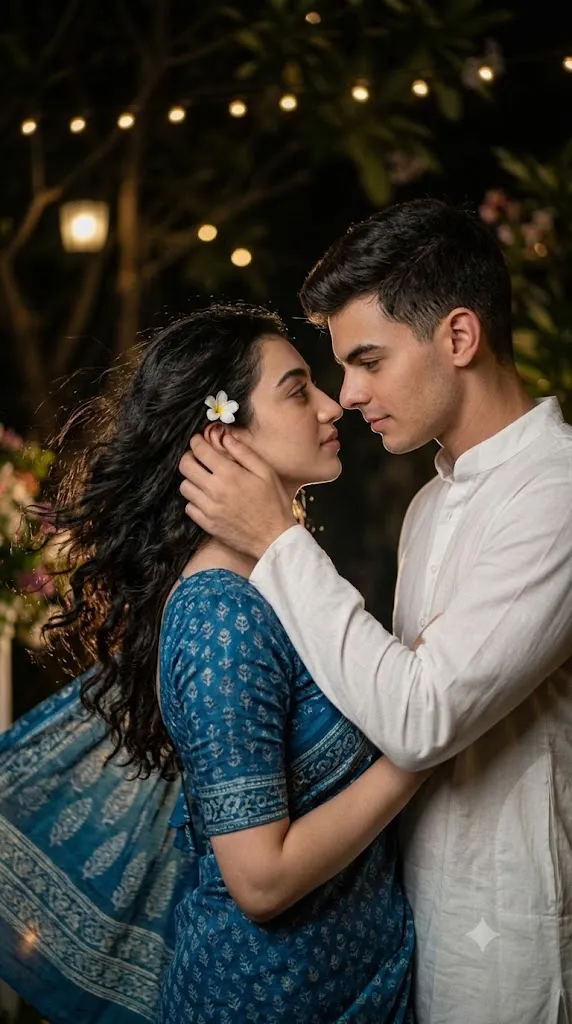
Generate a moody retro-inspired close-up portrait with cinematic film grain and soft brightness. A beautiful young woman wears a blue vintage saree with naturally flowing wavy curls moving gently in the wind, accented by a small flower tucked into her hair. A handsome young man dressed in a crisp white Chinese-collar kurta gently tucks a loose strand of her hair behind her ear while gazing lovingly into her eyes. Their emotional expressions convey deep affection and timeless romance. The atmosphere is inspired by classic 90s romantic cinema, featuring warm color grading, subtle vintage tones, dramatic deep shadows, soft natural backlighting, shallow depth of field, realistic skin texture, authentic film grain, emotional storytelling, ultra-detailed cinematic composition, and high-resolution editorial photography.
This prompt features a beautiful girl wearing a blue retro saree with soft wavy curls flowing in the wind and a delicate flower pinned in her hair. Beside her stands a young man dressed in a traditional white Chinese-collar kurta, gently tucking a loose strand of her hair behind her ear while looking deeply into her eyes. Their expressions reflect love, trust, and affection, making the scene feel like a memorable moment from an old romantic movie.
The combination of cinematic grain, soft brightness, warm tones, deep shadows, and natural wind transforms this portrait into a nostalgic masterpiece. Whether you are using AI image generators or editing an existing photograph, this prompt helps create an elegant and emotional visual that feels both realistic and artistic.
How To Use Photo Editing?
If you've generated an image using an AI prompt, photo editing can make it look even more professional. Editing allows you to improve colors, lighting, skin texture, sharpness, and overall mood while maintaining a natural appearance.
Start by adjusting the exposure to create soft brightness without overexposing the image. Increase contrast slightly so the shadows become deeper while preserving facial details. Apply warm color grading to recreate the nostalgic appearance of classic 90s films.
Adding subtle cinematic grain is one of the most important steps because it gives the image a vintage film look. You can also reduce digital sharpness slightly to make the portrait feel more natural.
Use selective adjustments to brighten the faces while keeping the background darker. This creates dramatic depth and naturally draws attention toward the couple.
Enhance the wind effect by emphasizing loose hair strands and the flowing saree fabric. If necessary, add a soft vignette around the edges to strengthen the cinematic composition.
Finally, perform gentle skin retouching without removing natural textures. The goal is realism, not an overly smooth artificial appearance.
Tools You Can Use For Prompt Copy and Create Photo
Many AI image generators can transform this prompt into a stunning cinematic portrait. Here are some of the best tools available today.
1. ChatGPT Image Generation
ChatGPT can generate highly detailed cinematic portraits from descriptive prompts. It understands emotions, lighting, clothing, composition, and storytelling, making it an excellent option for romantic portrait creation.
2. Google Gemini
Google Gemini supports AI image generation with impressive realism and detailed prompt interpretation. It is suitable for creating artistic couple portraits with cinematic lighting.
3. Midjourney
Midjourney is widely known for producing artistic, highly detailed images. It performs exceptionally well with cinematic scenes, dramatic lighting, and vintage aesthetics.
4. Flux AI
Flux AI generates highly realistic portraits with accurate facial details, natural lighting, and excellent texture quality. It works well for fashion and editorial photography.
5. Leonardo AI
Leonardo AI offers advanced prompt controls, allowing creators to refine poses, lighting, clothing, and artistic styles. It is particularly useful for realistic romantic portraits.
6. Adobe Firefly
Adobe Firefly integrates AI-powered image generation with Adobe Creative Cloud, making it a great option for creators who also use Photoshop.
7. Ideogram AI
Ideogram AI creates clean, realistic images with strong prompt understanding and is becoming increasingly popular among AI artists.
How To Edit Photo?
Creating a beautiful Romantic Windswept Love Story Portrait is simple when you follow these steps:
Step 1: Copy the Prompt
Copy the complete AI prompt and paste it into your preferred AI image generator, such as ChatGPT, Midjourney, Flux AI, Leonardo AI, or Google Gemini.
Step 2: Generate the Image
Choose a high-quality output (preferably HD or 4K) and generate the portrait. If needed, regenerate the image until you achieve the desired facial expressions, lighting, and composition.
Step 3: Download the Image
Once you are satisfied with the result, download the image in the highest available resolution to preserve maximum quality for editing.
Step 4: Open in a Photo Editing App
Import the image into your favorite editing software, such as Adobe Lightroom, Adobe Photoshop, Snapseed, PicsArt, or Canva.
Step 5: Adjust Lighting and Colors
Increase the exposure slightly, reduce highlights, raise shadows, and add a little contrast. Apply warm color grading to recreate the nostalgic 90s cinematic look.
Step 6: Add Cinematic Effects
Apply subtle film grain, a soft vignette, and a shallow depth-of-field effect. These adjustments give the portrait a realistic vintage movie appearance.
Step 7: Enhance Facial Details
Retouch the skin gently while preserving natural texture. Sharpen the eyes and hair slightly, and enhance the flowing saree and wind-blown curls for a more dramatic effect.
Step 8: Export the Final Image
After completing all adjustments, export the image in high-quality JPG or PNG format. Your Romantic Windswept Love Story Portrait is now ready to share on social media, use in your portfolio, or publish on your website.
Conclusion
The Romantic Windswept Love Story Portrait Prompt beautifully combines timeless romance with cinematic storytelling. Inspired by nostalgic 90s films, it captures genuine emotions through elegant fashion, gentle wind, dramatic lighting, and artistic composition.
Whether you are an AI artist, digital creator, photographer, or content designer, this prompt offers an excellent foundation for producing emotionally engaging portraits. Pairing a high-quality AI image generator with thoughtful post-processing can transform a simple prompt into a breathtaking visual masterpiece.
Experiment with different lighting conditions, camera angles, color grading styles, and vintage effects to make each portrait unique. The more attention you give to emotional expression and cinematic detail, the more memorable your final artwork will become.