Introduction
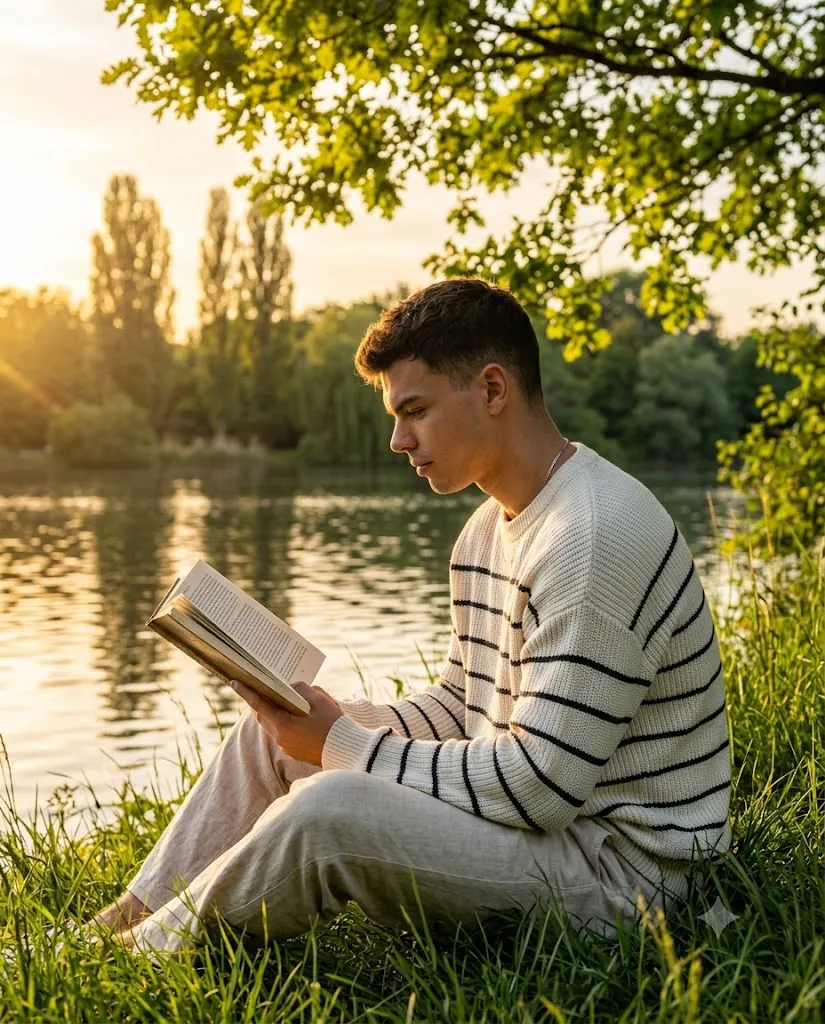
Photography is more than just capturing a person in front of a camera—it is about telling a story through light, emotion, and composition. The Golden Hour Lakeside Reading Portrait Prompt is designed to create a peaceful, cinematic portrait that combines the beauty of nature with the calmness of reading. Inspired by editorial lifestyle photography, this prompt features a handsome man sitting in lush green grass beside a tranquil lake during the magical golden hour. The warm sunlight gently illuminates his face while creating a soft rim light around his hair and clothing, producing a dreamy and photorealistic atmosphere.
"Golden Hour Lakeside Reading Portrait Prompt"
Create a hyper-realistic, highly detailed golden hour photograph of a handsome man sitting in lush green grass beside a peaceful lake. He is shown in a medium profile shot wearing an oversized off-white knit sweater with thin black stripes, light beige trousers, and a subtle silver chain necklace. He calmly reads an open book while warm golden sunlight creates a beautiful rim light around his hair and clothing. The background features a tranquil lake with gentle reflections, tall poplar trees, dense greenery, and soft dreamy bokeh. Captured using a 50mm lens at f/1.8 with cinematic lighting, shallow depth of field, realistic skin texture, editorial composition, natural colors, ultra-detailed photorealism, and 8K resolution. Aspect Ratio: 4:5.
The subject wears a cozy off-white knit sweater with thin black stripes and light beige trousers, giving the portrait a timeless and elegant appearance. Holding an open book, he appears completely immersed in reading, creating a scene that reflects peace, focus, and self-reflection. The calm lake, distant poplar trees, and softly blurred background add depth to the composition, while the shallow depth of field keeps the viewer's attention on the subject.
Whether you are an AI artist, photographer, content creator, or social media enthusiast, this prompt is ideal for generating realistic editorial portraits with cinematic quality. It works exceptionally well for blogs, portfolios, wallpapers, Pinterest posts, Instagram content, and digital artwork. By combining natural lighting, realistic textures, and thoughtful composition, this prompt produces an image that feels like a still frame from a beautifully directed movie.
How To Use Photo Editing?
After generating your AI portrait, photo editing helps refine the final image and enhances its overall visual impact. Start by importing the image into your favorite editing software. Adjust the exposure slightly to brighten the image while preserving the natural golden sunlight. Increase the contrast just enough to add depth without losing detail in the shadows.
Fine-tune the white balance by adding warm golden tones that complement the sunset lighting. Enhance the greens in the grass carefully so they remain vibrant but realistic. Reduce unnecessary saturation to maintain a natural editorial look.
Use selective masking to brighten the subject's face while leaving the background softly lit. Increase texture slightly on the sweater to highlight the knit fabric while keeping skin soft and realistic. Apply a subtle vignette around the edges to naturally draw attention toward the subject.
Finally, add a small amount of cinematic grain to give the portrait a professional film-inspired appearance. Keep the editing balanced so the image looks authentic rather than over-processed.
Tools You Can Use For Prompt Copy and Create Photo
Several AI image generators can transform this prompt into a stunning photorealistic portrait. Here are some of the best options:
1. ChatGPT Image Generation
ChatGPT creates detailed, cinematic AI portraits with accurate lighting, realistic expressions, and natural storytelling. It is an excellent choice for editorial and lifestyle photography prompts.
2. Midjourney
Midjourney excels at producing artistic and highly detailed cinematic portraits with beautiful lighting and exceptional environmental details.
3. Flux AI
Flux AI is known for generating realistic human portraits with excellent skin textures, accurate clothing details, and natural lighting.
4. Leonardo AI
Leonardo AI provides advanced prompt customization and produces high-quality portraits suitable for professional creative projects.
5. Google Gemini
Google Gemini generates realistic AI images with impressive prompt understanding, making it ideal for nature-inspired portrait photography.
6. Adobe Firefly
Adobe Firefly combines AI-powered image generation with Adobe's professional editing ecosystem, allowing seamless creative workflows.
7. Ideogram AI
Ideogram AI creates realistic images with excellent composition and visual clarity, making it another reliable choice for portrait creation.
How To Edit Photo?
Step 1: Copy the Prompt
Copy the complete AI prompt and paste it into your preferred AI image generator such as ChatGPT, Midjourney, Flux AI, Leonardo AI, or Google Gemini.
Step 2: Generate the Image
Select the highest quality output available (HD or 4K) and generate the portrait. If necessary, regenerate the image until the lighting, facial expression, and composition perfectly match your vision.
Step 3: Download the Image
Save the generated image in the highest available resolution to ensure maximum detail for editing.
Step 4: Open in a Photo Editing App
Import the image into Adobe Lightroom, Adobe Photoshop, Snapseed, PicsArt, or Canva for professional adjustments.
Step 5: Adjust Lighting
Increase the exposure slightly, reduce highlights, raise shadows, and fine-tune the contrast to create a balanced golden hour look while preserving natural details.
Step 6: Enhance Colors
Apply warm golden color grading to the highlights, improve the green tones of the grass, and maintain realistic skin colors for an editorial appearance.
Step 7: Add Cinematic Effects
Apply subtle film grain, a soft vignette, and enhance the background blur to create a dreamy cinematic atmosphere.
Step 8: Sharpen Key Details
Increase sharpness on the face, eyes, hair, sweater texture, and the open book while keeping the background smooth and softly blurred.
Step 9: Export the Final Image
Export the finished portrait in high-quality JPG or PNG format at maximum resolution. Your Golden Hour Lakeside Reading Portrait is now ready for social media, websites, blogs, or professional portfolios.
Conclusion
The Golden Hour Lakeside Reading Portrait Prompt is a perfect blend of cinematic lighting, natural scenery, and peaceful storytelling. It transforms a simple reading moment into an elegant editorial masterpiece by combining warm golden hour sunlight, realistic textures, and thoughtful composition.
Whether you are creating content for Instagram, Pinterest, your personal portfolio, or an AI prompt website, this prompt delivers professional-quality results with minimal effort. Pairing it with careful photo editing further enhances the realism and emotional depth of the image.
Experiment with different poses, lighting variations, and color grading styles to make each portrait unique. With the right AI tool and thoughtful editing, you can create breathtaking portraits that capture the beauty of nature, relaxation, and timeless storytelling.