Introduction
Fashion photography continues to evolve, blending classic elegance with innovative visual storytelling techniques. One of the most captivating trends in modern editorial photography is the Quiet Luxury Clone Effect Fashion Portrait. This concept combines sophisticated menswear styling, dramatic studio lighting, and a unique multi-subject composition to create a powerful image that feels both artistic and luxurious.
"Quiet Luxury Clone Effect Fashion Portrait Prompt"
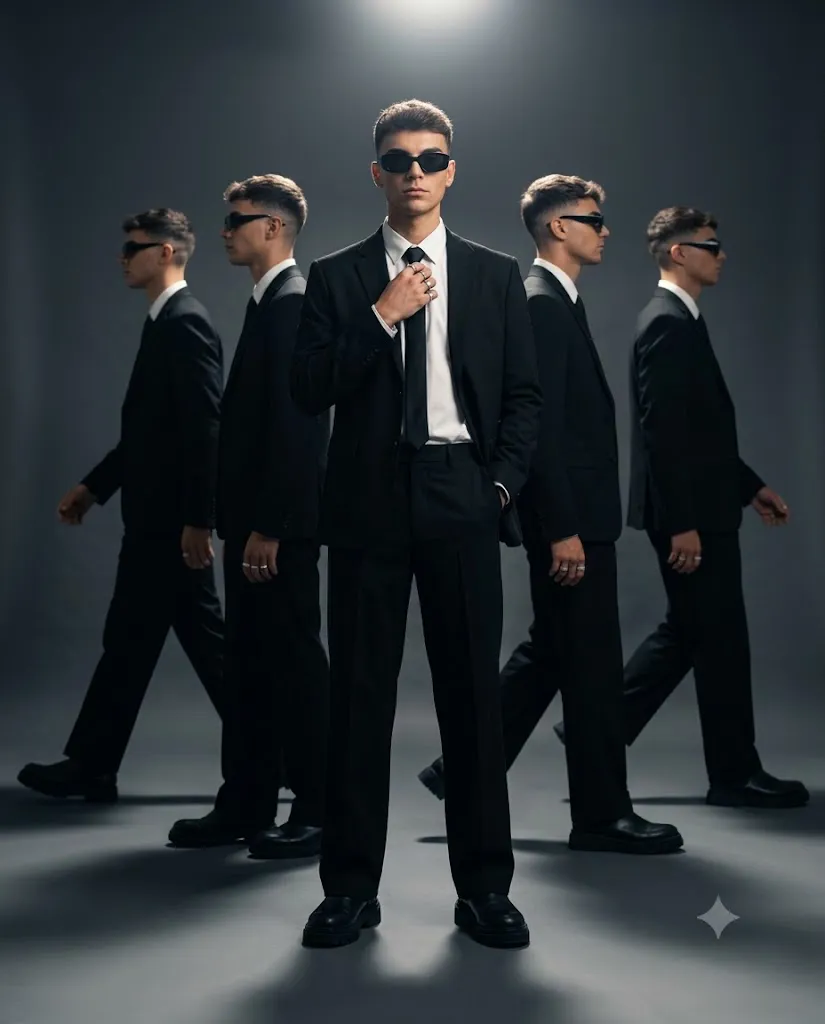
Create an ultra-realistic 8K full-body fashion editorial portrait of a confident man standing in a charcoal-gray studio. He wears a black tailored blazer over a white dress shirt with a slim black tie, wide-leg black trousers, and chunky leather boots. One hand adjusts his tie while the other rests inside his pocket. Behind him, four identical versions of himself appear in symmetrical positions, captured mid-stride and slightly out of focus. Dramatic overhead spotlight creates rim lighting, deep shadows, and a cinematic atmosphere. High contrast, luxury editorial styling, realistic skin texture, premium fashion photography, shallow depth of field, 4:5 aspect ratio.
The quiet luxury aesthetic has become increasingly popular because it focuses on refinement rather than flashy branding. Tailored clothing, premium fabrics, clean silhouettes, and understated confidence define this style. Instead of relying on obvious logos or extravagant accessories, quiet luxury communicates status through quality, craftsmanship, and timeless design.
The clone effect introduces an additional layer of visual interest. By placing multiple versions of the same subject within a single frame, photographers create a sense of movement, identity, and presence. The central figure remains the primary focus, while the surrounding clones contribute to the narrative and atmosphere. This technique is often seen in high-end fashion campaigns, luxury editorials, and conceptual portrait photography.
A charcoal-gray studio backdrop serves as the perfect environment for this style. Minimal distractions allow the viewer to focus entirely on the subject, clothing, lighting, and composition. Dramatic overhead lighting adds depth and mood, emphasizing facial structure, tailoring details, and strong shadows.
The fashion styling itself plays a critical role. A black tailored blazer, crisp white dress shirt, slim black tie, wide-leg trousers, and leather boots create a commanding and elegant appearance. Accessories such as silver rings and dark rectangular sunglasses further enhance the luxury aesthetic.
With modern AI image generation technology, creators can now produce ultra-realistic editorial portraits that rival professional fashion campaigns. By combining detailed prompts with thoughtful editing, it is possible to achieve magazine-quality results suitable for portfolios, social media, branding projects, or commercial concepts.
This guide explains how to use photo editing effectively, introduces useful tools for generating clone-effect portraits, and outlines the editing process needed to create a premium editorial masterpiece.
How To Use Photo Editing?
Photo editing is one of the most important stages in creating a professional fashion portrait. Even highly realistic AI-generated images benefit from refinement and enhancement.
The first step is exposure balancing. Low-key studio photography often contains deep shadows and bright highlights. Proper adjustments ensure that details remain visible while preserving dramatic contrast.
Color grading helps establish mood and consistency. Quiet luxury portraits typically feature neutral tones, deep blacks, crisp whites, and subtle contrast. Avoid oversaturated colors that might distract from the sophisticated aesthetic.
Skin retouching should remain natural. Luxury fashion editorials prioritize authenticity, preserving skin texture, pores, and natural contours. Remove minor distractions while maintaining realism.
Clothing details deserve special attention. Enhance the texture of the blazer, shirt, tie, trousers, and boots. Selective sharpening helps emphasize tailoring quality and fabric richness.
The clone effect may require additional refinement. Ensure that each figure appears natural, properly aligned, and consistent with the lighting direction. Subtle blur on background figures helps establish depth without introducing ghosting artifacts.
Lighting adjustments are equally important. Overhead spotlights should create soft gradients, clean rim lighting, and realistic shadows that enhance the subject’s authority and presence.
Finally, cinematic color grading ties the image together by balancing contrast, shadow depth, and highlight control.
Tools You Can Use For Prompt Copy And Create Photo
Creating a luxury clone-effect portrait requires a combination of AI image-generation platforms and professional editing software.
AI Image Generation Tools
ChatGPT Image Generation
ChatGPT can generate highly detailed prompts that accurately describe clothing, lighting, poses, and composition.
Midjourney
Midjourney excels at producing cinematic fashion editorials with dramatic atmosphere and artistic quality.
Leonardo AI
Leonardo AI offers advanced realism controls and exceptional detail rendering for portraits and fashion photography.
Ideogram
Ideogram provides strong prompt interpretation and realistic visual output.
Adobe Firefly
Adobe Firefly integrates seamlessly into professional design workflows and produces commercial-quality imagery.
Photo Editing Software
Adobe Photoshop
Photoshop remains the industry standard for advanced retouching, compositing, and editorial enhancement.
Adobe Lightroom
Lightroom is ideal for exposure adjustments, cinematic grading, and overall image refinement.
Capture One
Capture One is widely used by professional photographers for superior color accuracy and detail retention.
Snapseed
A powerful mobile editing application capable of producing high-quality portrait enhancements.
PicsArt
Useful for creative effects, graphic elements, and social-media-ready editing.
How To Edit Photo?
After generating the portrait, follow these steps to achieve a professional editorial finish.
Step 1: Import The Image
Open the portrait in Photoshop, Lightroom, Capture One, or another professional editing application.
Step 2: Balance Exposure
Adjust highlights and shadows while preserving the dramatic studio mood.
Step 3: Refine White Balance
Maintain neutral tones and realistic skin colors while enhancing luxury aesthetics.
Step 4: Enhance Skin Texture
Apply subtle retouching while preserving pores and natural facial characteristics.
Step 5: Sharpen Clothing Details
Increase clarity on tailoring, fabric textures, boots, and accessories.
Step 6: Refine Clone Placement
Ensure all background figures appear consistent, natural, and properly aligned.
Step 7: Improve Lighting
Enhance rim lights, spotlight effects, and shadow transitions for a more cinematic appearance.
Step 8: Apply Cinematic Color Grading
Use deep blacks, controlled highlights, and balanced contrast for a premium editorial finish.
Step 9: Add Final Touches
Introduce slight sharpening and minimal grain for a realistic professional photography feel.
Step 10: Export
Save the final image in high resolution. PNG format is recommended to preserve detail and image quality.
Conclusion
The Quiet Luxury Clone Effect Fashion Portrait is a striking combination of modern editorial photography, luxury menswear styling, and creative visual storytelling. Through sophisticated clothing, dramatic lighting, minimalist environments, and multiple-subject compositions, this portrait style creates imagery that feels powerful, refined, and unforgettable.
Modern AI image-generation tools and editing software make it possible to recreate this premium aesthetic without requiring large production budgets or complex studio setups. By focusing on realistic textures, strong composition, professional lighting, and thoughtful color grading, creators can produce images that rival luxury fashion campaigns and magazine editorials.
Whether you are developing a fashion portfolio, building a personal brand, creating social media content, or exploring advanced portrait concepts, mastering the quiet luxury clone-effect style can help you create visually compelling images that communicate confidence, sophistication, and timeless elegance.