Introduction
Photography has the power to capture emotions that words often cannot express. Among the most heartwarming portrait styles is the combination of natural sunlight, elegant traditional fashion, and a gentle connection between humans and animals. The Golden Sunlight Rabbit Portrait Prompt is designed to create an ultra-realistic, emotionally rich portrait that blends warmth, serenity, and timeless beauty into a single frame.
"Golden Sunlight Rabbit Portrait Prompt"
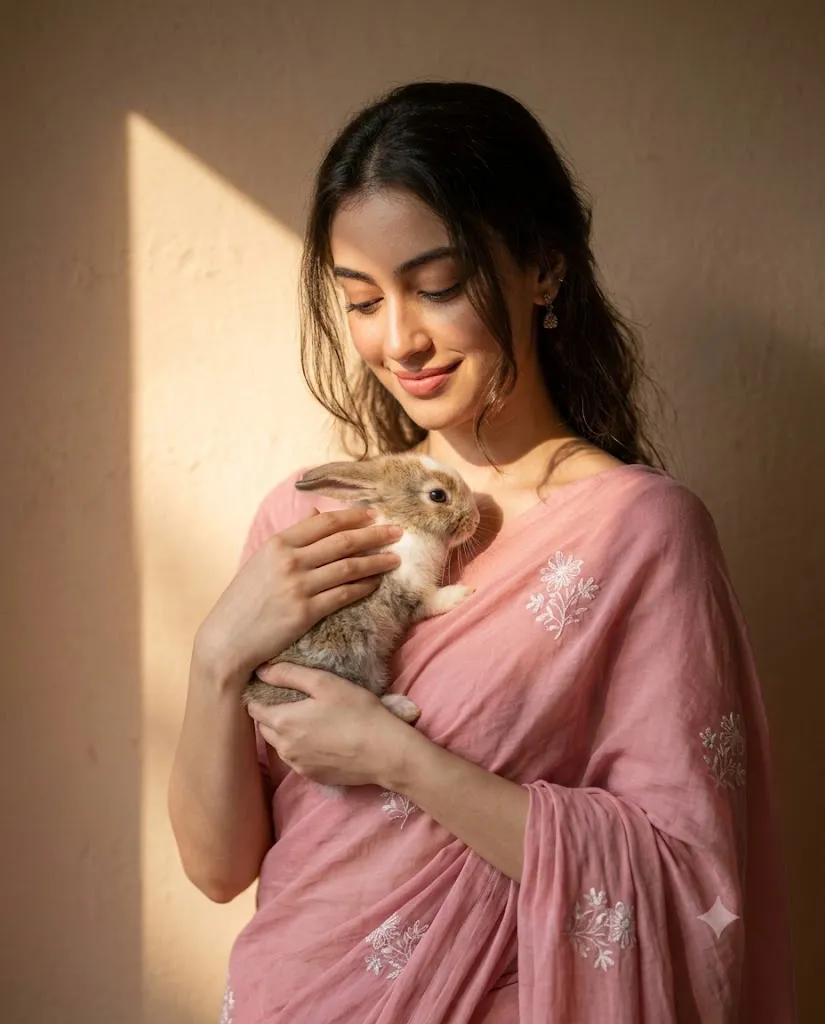
Create a soft, sunlit ultra-realistic portrait using the uploaded image strictly as the ONLY face reference (maintain 100% facial identity, no alteration). The subject wears a plain soft pink saree with delicate white floral embroidery, draped naturally with elegant folds. She gently holds a small rabbit close to her chest with both hands, expressing a calm, affectionate connection. Her head is slightly tilted downward, eyes softly gazing at the rabbit with a peaceful, tender smile. Composition & Framing: Medium close-up portrait (mid-torso to head), clean headroom, centered composition with balanced negative space. lighting: Warm natural sunlight enters from the side, creating a distinct triangular patch of light on a textured wall. Soft golden light illuminates her face and saree, with natural shadows falling on the wall for depth and artistic contrast. Background: Minimal textured wall with warm tones, featuring a sharp geometric sunlight shape and soft shadow gradients. Hair & Details: Loose natural hair with soft strands around the face, subtle movement. Minimal jewelry (small earrings), natural skin texture, no smoothing. Mood & Style: Serene, poetic, romantic, and intimate atmosphere. Dreamy golden glow with soft contrast, realistic skin tones, no overexposure. Technical Details: 85mm lens, shallow depth of field, ultra-sharp focus on face and rabbit, 8K resolution, photorealistic, natural color grading. Aspect Ratio: 4:5
This portrait concept features a woman dressed in a delicate soft pink saree adorned with subtle white floral embroidery. She lovingly holds a small rabbit close to her chest while gazing down at it with affection and tenderness. The scene feels peaceful and intimate, creating an atmosphere that instantly connects with viewers on an emotional level.
One of the defining characteristics of this portrait is the use of natural sunlight. A geometric patch of warm sunlight falling across a textured wall introduces a striking visual element while maintaining simplicity. The contrast between illuminated areas and gentle shadows adds depth and artistic sophistication to the composition.
The rabbit serves as more than a simple prop. It symbolizes innocence, comfort, gentleness, and companionship. Combined with the subject's soft smile and calm expression, the portrait communicates warmth and emotional authenticity.
Modern AI image generation technology allows artists and photographers to recreate such beautiful scenes with incredible realism. By combining detailed prompts with professional editing techniques, creators can achieve results that rival high-end commercial photography. This portrait style is ideal for social media content, portfolio projects, editorial publications, personal branding, and artistic storytelling.
In this article, you will learn how to use photo editing effectively, discover useful tools for generating realistic portraits, and follow a complete editing workflow to create a professional Golden Sunlight Rabbit Portrait.
How To Use Photo Editing?
Photo editing plays a critical role in transforming a generated image into a polished masterpiece. Even when AI produces an excellent base image, careful refinement helps enhance realism and emotional impact.
The first step is identity preservation. If a reference image is used, ensure that facial features remain accurate throughout the editing process. Eye shape, nose structure, lips, skin tone, and facial proportions should remain unchanged to maintain authenticity.
Exposure correction is equally important. Golden sunlight portraits depend heavily on balanced lighting. The highlights should feel warm and luminous without becoming overexposed. Skin tones should remain natural and realistic.
Color grading helps establish mood. Warm golden tones can be enhanced slightly to emphasize the sunlight while maintaining realistic colors in the saree, skin, and rabbit fur.
Skin retouching should remain subtle. Avoid excessive smoothing or artificial beauty filters. Authentic skin texture, visible pores, and natural imperfections contribute significantly to realism.
Hair enhancement adds another layer of detail. Soft strands around the face should appear natural and delicate, creating movement and visual interest.
The rabbit's fur should also receive attention. Enhancing texture and detail makes the animal appear lifelike and increases the emotional connection within the portrait.
Background refinement is essential. The textured wall and sunlight pattern should remain sharp enough to support the composition while staying secondary to the subject.
Finally, selective sharpening should be applied to key focal points such as the eyes, rabbit fur, embroidery details, and facial features.
Tools You Can Use For Prompt Copy and Create Photo
Creating a professional-quality Golden Sunlight Rabbit Portrait becomes easier when using the right combination of AI generation tools and editing software.
AI Image Generation Platforms
ChatGPT
ChatGPT is useful for developing detailed portrait prompts that accurately describe facial identity, lighting conditions, clothing, composition, and emotional expressions.
Midjourney
Midjourney excels at producing artistic and cinematic imagery with beautiful lighting and environmental storytelling.
Leonardo AI
Leonardo AI offers strong realism controls and detailed rendering capabilities for portrait photography.
Ideogram
Ideogram provides excellent prompt interpretation and can generate highly realistic compositions.
Adobe Firefly
Adobe Firefly integrates seamlessly into professional creative workflows and produces commercial-quality visuals.
Professional Editing Software
Adobe Photoshop
Photoshop remains the industry standard for detailed retouching, compositing, and precision editing.
Adobe Lightroom
Lightroom is ideal for exposure adjustments, color grading, and tonal refinement.
Capture One
Capture One delivers exceptional image quality and advanced color control favored by professional photographers.
Snapseed
Snapseed offers powerful editing tools for mobile users who want professional results.
PicsArt
PicsArt provides creative enhancement options suitable for social media creators.
How To Edit Photo?
After generating the image, follow these editing steps to achieve a professional final result.
Step 1: Import the Image
Open the portrait in Photoshop, Lightroom, Capture One, or your preferred editing application.
Step 2: Verify Facial Accuracy
Compare the generated portrait with the reference image and confirm that identity remains unchanged.
Step 3: Adjust Exposure
Balance highlights and shadows carefully to preserve detail throughout the image.
Step 4: Refine White Balance
Enhance warm golden tones while maintaining natural skin color accuracy.
Step 5: Improve Skin Texture
Apply subtle texture enhancements without over-smoothing.
Step 6: Enhance Hair Details
Increase clarity in loose strands and natural highlights around the face.
Step 7: Refine Rabbit Fur
Boost detail and texture to create realistic, soft-looking fur.
Step 8: Enhance Saree Details
Sharpen embroidery patterns and fabric folds while preserving softness.
Step 9: Improve Background Depth
Refine shadows and gradients around the textured wall to strengthen dimensionality.
Step 10: Add Cinematic Finishing Touches
Apply subtle color grading, gentle contrast, and final sharpening.
Step 11: Export
Save the final image in PNG format for maximum quality and detail retention.
Conclusion
The Golden Sunlight Rabbit Portrait Prompt combines elegant traditional styling, emotional storytelling, and beautiful natural lighting to create a portrait filled with warmth and authenticity. The soft pink saree, affectionate interaction with the rabbit, and carefully controlled sunlight work together to produce an image that feels both intimate and visually sophisticated.
By using modern AI image-generation tools alongside professional editing techniques, creators can achieve stunning results that rival commercial fashion and lifestyle photography. The key lies in maintaining realistic facial identity, preserving natural textures, and carefully balancing light and shadow.
Whether you are creating social media content, editorial imagery, personal art projects, or portfolio work, this portrait style offers a timeless and emotionally engaging aesthetic. With thoughtful prompt design, precise editing, and attention to detail, you can transform a simple concept into a breathtaking visual story that captures beauty, tenderness, and serenity in a single frame.