Introduction
Portrait photography has evolved dramatically with the rise of AI image generation and advanced photo editing tools. One of the most popular aesthetics today is the warm and dreamy "Golden Hour Glow" style. This visual trend combines soft sunlight, cozy indoor environments, cinematic shadows, and natural beauty to create emotionally appealing portraits.
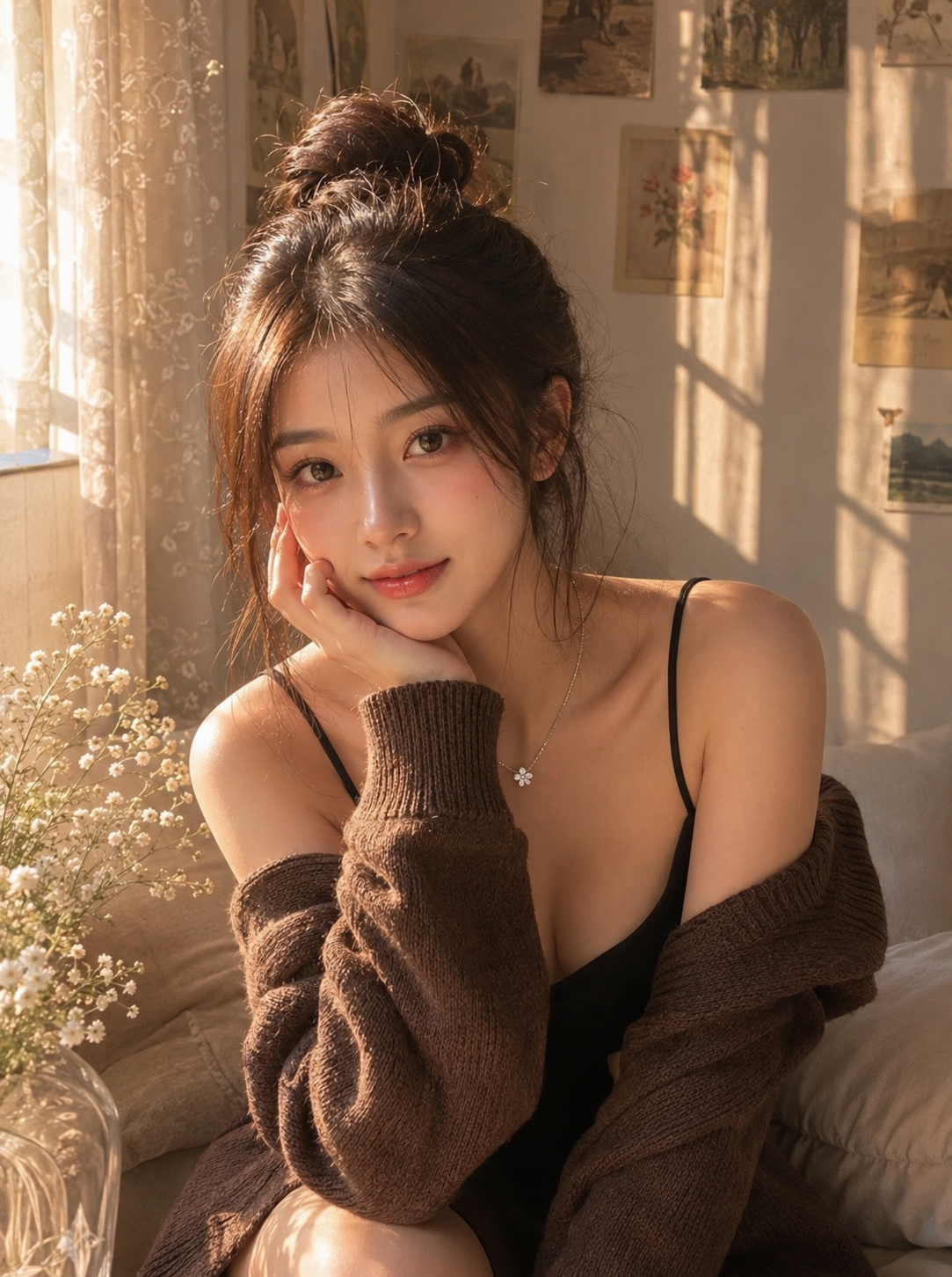
An ultra-realistic portrait of a young Asian woman sitting indoors by a large window during golden hour, gazing directly into the camera with a soft, serene, and slightly shy expression. Warm, cinematic sunlight shines through the sheer curtains, creating dramatic window shadow patterns on the wall, sofa, and part of her body. A cozy and aesthetic bedroom corner, with minimalist cream-colored walls adorned with small vintage art prints and postcards, and delicate white baby's breath flowers by the window. Appearance: youthful Asian beauty, small V-shaped face, soft feminine features, a delicate jawline, smooth porcelain skin, a natural glass skin texture, flawless skin, a slender neck, elegant collarbones, ash brown hair in a high, slightly messy bun with wispy bangs framing her face, and a few soft strands of hair around her cheeks. Douyin Makeup Look: Flawless, glass-like semi-matte skin, a radiant under-eye area, soft peach-pink blush concentrated on the cheeks and lightly along the bridge of the nose, delicate contouring, soft, straight eyebrows, large, doe-like eyes with natural brown contact lenses, a soft glitter sheen on the eyelids, subtle aegyo enhancement, thin eyeliner with slightly elongated outer corners, curled eyelashes, delicate lower lash details, a prominent bridge of the nose and tip, glossy peach-rose gradient lips for a full effect, a dreamy and youthful Douyin beauty aesthetic. Outfit: Black spaghetti-strap camisole dress, oversized dark brown knit cardigan draped loosely around the shoulders, comfortable casual style, delicate small silver flower pendant necklace. Pose: Sitting on a beige sofa, body slightly tilted, one hand gently touching her cheek, shoulders relaxed, making direct eye contact with the camera, an elegant and feminine posture. Lighting: Warm sunlight during golden hour, strong directional side lighting from the left window, soft shadows, realistic falloff, cinematic contrast, warm amber tones, natural highlights on skin and hair, atmospheric indoor photography. Photography: Ultra-realistic, DSLR photography, 85mm f/1.8 lens, shallow depth of field, soft background blur, highly detailed skin texture, realistic shadows, natural color gradation, premium portrait photography, Korean ulzzang aesthetic, comfortable moody atmosphere, masterpiece, 8K, HDR, photorealistic.* Negative Messages: Low quality, blurry, overexposed, heavily edited skin, plastic skin, extra fingers, extra limbs, distorted face, crossed eyes, poor anatomy, cartoon, anime, CGI, 3D rendering, watermark, text, logo, harsh flash, oversaturated colors, heavy makeup, aged appearance, masculine features. Don't change original face.
The "Golden Hour Glow In Cozy Calm" prompt is designed to generate an ultra-realistic portrait featuring warm sunlight streaming through a window, creating beautiful shadow patterns across the room and subject. The atmosphere feels peaceful, intimate, and elegant, making it ideal for social media content, digital art projects, photography inspiration, and creative portfolios.
What makes this style so attractive is its balance between realism and artistic storytelling. The warm amber lighting enhances skin tones, while soft background blur and carefully crafted details create a luxurious editorial appearance. Whether you are an AI artist, content creator, photographer, or photo editing enthusiast, this prompt can help you achieve professional-quality results with minimal effort.
In this article, you'll learn how to use the prompt effectively, the best tools available for creating similar images, and step-by-step instructions for editing your own photos into this stunning golden-hour aesthetic.
How To Use Photo Editing?
Photo editing is the process of enhancing or transforming an image to achieve a desired look. When working with the Golden Hour Glow style, the goal is to create warmth, softness, and natural beauty while maintaining realistic details.
Start by selecting a high-quality portrait image. The photo should have good facial visibility and balanced exposure. Natural expressions work best because they complement the calm and cozy atmosphere.
Next, focus on lighting adjustments. Increase the warmth slightly to mimic golden-hour sunlight. Enhance highlights while maintaining detail in the skin. Avoid overexposure because the beauty of this style lies in its realistic light falloff.
Shadows also play a crucial role. Soft shadows create depth and cinematic mood. Window shadow patterns can be added manually or generated using overlays to replicate sunlight filtering through curtains.
Skin retouching should remain subtle. Instead of excessive smoothing, preserve natural skin texture while reducing minor imperfections. This creates the popular glass-skin effect without making the portrait appear artificial.
Color grading is another important step. Warm amber tones, soft beige colors, and muted earthy shades contribute to the cozy aesthetic. Keep saturation balanced to maintain realism.
Finally, apply a slight depth-of-field effect to blur the background and draw attention to the subject. This replicates the appearance of professional DSLR photography captured with an 85mm portrait lens.
Tools You Can Use For Prompt Copy And Create Photo
There are many powerful tools available for creating Golden Hour Glow portraits using AI prompts and photo editing techniques.
1. ChatGPT + AI Image Generator
ChatGPT can help create detailed prompts that describe lighting, atmosphere, makeup, clothing, and photography settings. These prompts can then be used in AI image generators to produce highly realistic results.
2. Midjourney
Midjourney is known for producing artistic and cinematic images. It excels at warm lighting, emotional storytelling, and dreamy portrait aesthetics. The Golden Hour Glow prompt works particularly well with Midjourney's rendering style.
3. DALL·E
DALL·E can generate realistic portraits with detailed environments and natural lighting. It is ideal for users who want accurate prompt interpretation and visually appealing compositions.
4. Adobe Photoshop
Photoshop remains the industry standard for photo editing. You can add sunlight effects, improve skin texture, adjust color grading, and create realistic shadow patterns using advanced editing tools.
5. Lightroom
Adobe Lightroom is perfect for color correction and lighting enhancement. Presets can quickly transform ordinary portraits into warm golden-hour masterpieces.
6. Canva
Canva offers beginner-friendly editing features and creative templates. It is useful for social media content and simple portrait enhancements.
7. Snapseed
Snapseed is a powerful mobile editing application that provides professional-level adjustments for lighting, color balance, and skin enhancement.
8. Remini
Remini uses AI technology to improve image quality and facial details, making it useful for enhancing portrait clarity before further editing.
These tools can be used individually or combined to achieve the best results.
How To Edit Photo?
Creating the Golden Hour Glow effect requires a combination of lighting adjustments, color grading, and portrait refinement.
Step 1: Select The Best Image
Choose a high-resolution portrait with a clear face and balanced lighting. Images with natural expressions usually deliver the most appealing results.
Step 2: Adjust Exposure
Increase brightness slightly while protecting highlights. The image should feel warm and luminous without losing detail.
Step 3: Add Warm Tones
Adjust the white balance toward warmer temperatures. Golden-hour portraits often feature soft amber, peach, and cream tones.
Step 4: Enhance Shadows
Create subtle contrast by deepening shadows while keeping transitions smooth. This adds dimension and cinematic depth.
Step 5: Improve Skin Texture
Use gentle skin retouching techniques. Remove distractions but preserve pores and natural texture for realism.
Step 6: Add Window Light Effect
Overlay realistic window shadows or use masking techniques to simulate sunlight passing through curtains.
Step 7: Refine Facial Features
Enhance eyes, lips, and facial contours carefully. Avoid excessive sharpening or unrealistic beauty filters.
Step 8: Create Background Blur
Apply a shallow depth-of-field effect to separate the subject from the background and produce a professional portrait look.
Step 9: Apply Final Color Grading
Use warm highlights and soft shadows to achieve the signature cozy golden-hour aesthetic.
Step 10: Export In High Quality
Save the image in high resolution to preserve details and ensure professional presentation.
Conclusion
The Golden Hour Glow In Cozy Calm Prompt is a perfect blend of warmth, elegance, and realism. Its combination of cinematic sunlight, cozy interiors, soft shadows, and natural beauty creates portraits that feel timeless and emotionally engaging.
Whether you're using AI image generators, professional editing software, or mobile applications, this aesthetic can be recreated with the right techniques and tools. By understanding lighting, color grading, skin enhancement, and composition, you can transform ordinary portraits into stunning works of art.
As AI-generated photography continues to grow in popularity, mastering prompts like Golden Hour Glow In Cozy Calm will help creators produce captivating images that stand out across social media, blogs, portfolios, and digital art platforms. With practice and creativity, you can achieve professional-quality results that capture the warmth and serenity of golden-hour magic.