Introduction
Fashion portrait collages have become one of the most popular styles in modern AI photography and digital art. They combine multiple elegant poses into a single premium-looking layout, creating a magazine-style visual that feels professional and luxurious. Inspired by Vogue editorials, K-pop idol photoshoots, and high-end fashion campaigns, portrait collages allow creators to showcase different expressions, poses, and fashion details in one image.
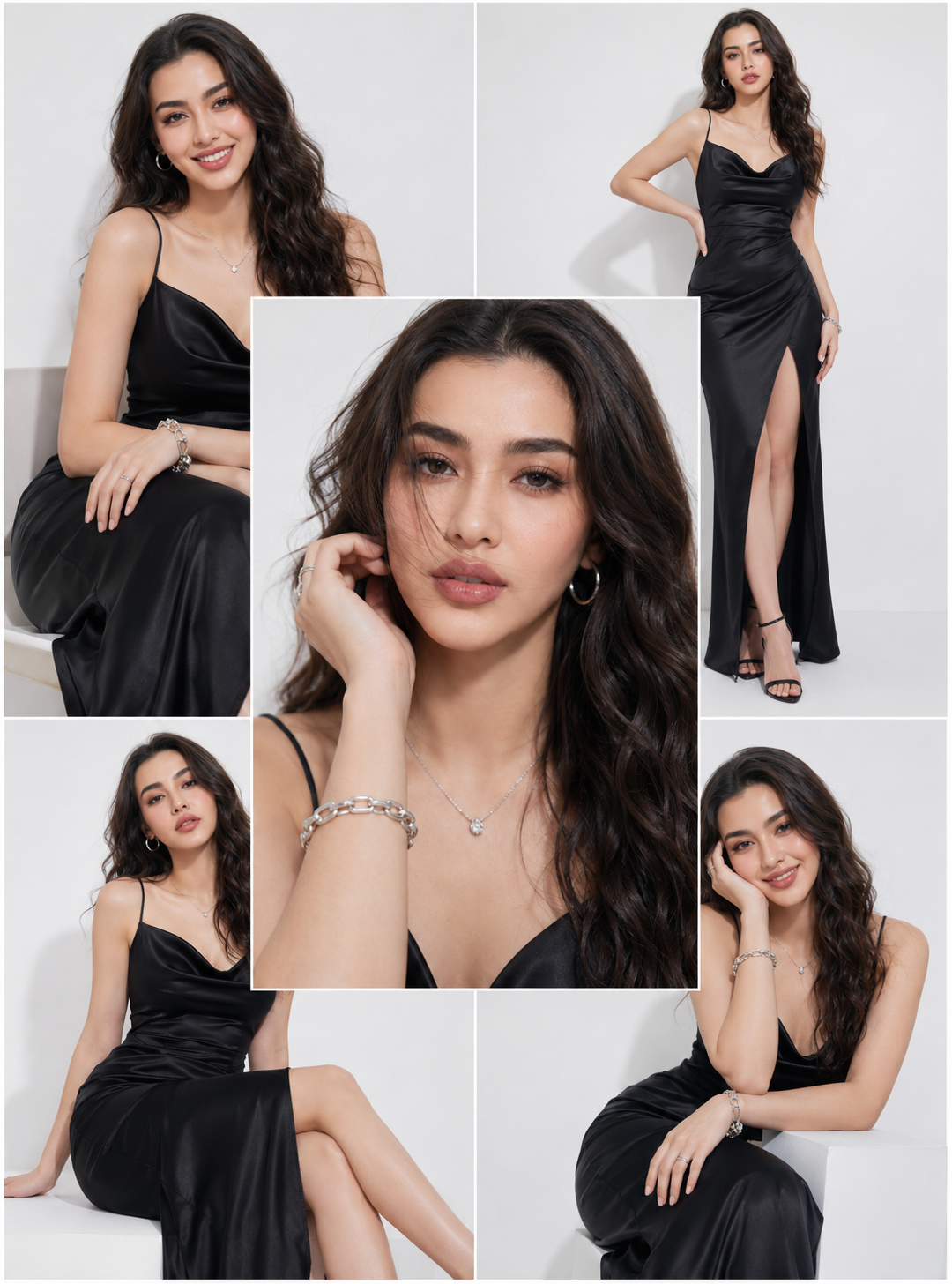
The "Elegant Fashion Portrait Collage" concept focuses on beauty, confidence, sophistication, and style. Instead of displaying only one photograph, the collage format presents several carefully arranged images together. A large central portrait usually highlights facial beauty and makeup, while surrounding panels showcase standing and seated poses that reveal the outfit and overall styling.
With the rise of AI image generators and advanced photo editing tools, anyone can create stunning fashion collages without expensive studio equipment. Whether you are a content creator, influencer, photographer, designer, or fashion enthusiast, this prompt can help you generate luxurious editorial-style portraits with professional quality.
Prompt
A high-fashion studio editorial featuring a K-pop idol in a multi-panel clean grid. One bold central close-up surrounded by elegant seated and standing poses. Outfit: sleek black satin dress with silver accessories, soft glam makeup, glossy wavy hair styling. Minimal white studio background, soft diffused lighting, luxury fashion photography, Vogue-style premium editorial concept, ultra-realistic details, professional studio quality, cinematic composition, fashion magazine cover aesthetics, 8K resolution.
How To Use Photo Editing?
Creating a fashion portrait collage begins with selecting a suitable portrait image. The better the original image quality, the more realistic and professional the final result will appear.
Start by uploading a clear image with good lighting and visible facial details. AI tools work best when facial features, hair texture, and expressions are clearly visible. Once uploaded, copy the prompt and paste it into your chosen AI image generation platform.
The AI will analyze the facial structure and transform the subject into a luxury fashion editorial model while maintaining recognizable features. The generated collage often includes:
- Central close-up portrait
- Elegant seated pose
- Full-body standing pose
- Soft glamour makeup
- Studio lighting effects
- Fashion magazine layout
After generation, you can further refine the image using editing software. Adjust brightness, contrast, skin tones, sharpness, and color balance to enhance the overall visual appeal.
For social media creators, portrait collages are especially useful because they attract attention and present multiple perspectives within a single image. This makes them ideal for Instagram posts, Pinterest boards, portfolio presentations, and fashion blogs.
Tools You Can Use For Prompt Copy And Create Photo
There are many AI image generation and editing tools available today. Here are some of the most popular options:
1. ChatGPT Image Generation
ChatGPT can help create detailed prompts and generate stunning editorial-style images. It is perfect for users who want premium-quality results with simple instructions.
2. Midjourney
Midjourney is known for producing artistic and highly realistic fashion photography. It excels at creating luxury editorial aesthetics and cinematic lighting.
3. Leonardo AI
Leonardo AI offers excellent customization options for portrait generation. It is popular among creators who want detailed control over image styling.
4. Adobe Firefly
Adobe Firefly integrates AI image generation with professional editing capabilities. It is useful for photographers and graphic designers.
5. Canva AI
Canva provides beginner-friendly AI tools and editing features. Users can create collages, add text, and design social media posts easily.
6. Photoshop
Adobe Photoshop remains one of the most powerful tools for refining AI-generated images. It allows advanced retouching and professional adjustments.
7. Remini
Remini is excellent for enhancing image quality, sharpening facial details, and improving overall resolution.
Using a combination of these tools can help you achieve truly professional fashion-editorial results.
How To Edit Photo?
Editing is the final step that transforms a good image into an exceptional one. Follow these simple steps:
Step 1: Upload Your Photo
Choose a high-resolution image with clear facial features and balanced lighting.
Step 2: Generate The Portrait Collage
Paste the fashion collage prompt into your preferred AI image generator and create the image.
Step 3: Select The Best Result
Review multiple generated versions and choose the one with the best composition, facial accuracy, and fashion styling.
Step 4: Enhance Lighting
Increase brightness slightly and improve highlights to create a premium studio look.
Step 5: Improve Skin Tone
Use portrait enhancement tools carefully to maintain natural skin texture while achieving a polished appearance.
Step 6: Adjust Colors
Increase color balance and vibrancy subtly. Avoid excessive saturation that may make the image appear unrealistic.
Step 7: Sharpen Details
Enhance facial details, hair strands, clothing textures, and accessories for a professional finish.
Step 8: Add Magazine Feel
You can add minimal text, logos, or editorial titles to create a genuine fashion-magazine appearance.
Step 9: Crop Properly
Maintain balanced spacing around the collage panels so the composition remains clean and elegant.
Step 10: Export In High Resolution
Save the image in high-quality PNG or JPEG format for the best presentation across websites and social media platforms.
Conclusion
The Elegant Fashion Portrait Collage Prompt is a perfect choice for anyone who wants to create luxury editorial-style portraits inspired by modern fashion magazines and K-pop idol photography. Its multi-panel composition highlights beauty, style, personality, and fashion details in a visually captivating format.
By combining AI image generation with professional photo editing techniques, creators can produce stunning studio-quality portraits without expensive equipment or elaborate photoshoots. Whether you are building a personal portfolio, enhancing social media content, creating promotional material, or simply exploring creative photography, this prompt provides an excellent foundation for premium results.
With the right tools, a strong prompt, and thoughtful editing, you can transform ordinary portraits into sophisticated fashion editorials that look worthy of a magazine cover.