Introduction
Portrait photography is one of the most beautiful forms of visual storytelling. Among the countless portrait styles that have become popular in recent years, the Golden Hour Floral Saree Garden Portrait stands out for its elegance, warmth, and timeless appeal. This style combines traditional Indian fashion with modern cinematic photography techniques to create images that feel romantic, graceful, and emotionally engaging.
"Golden Hour Floral Saree Garden Portrait Prompt"
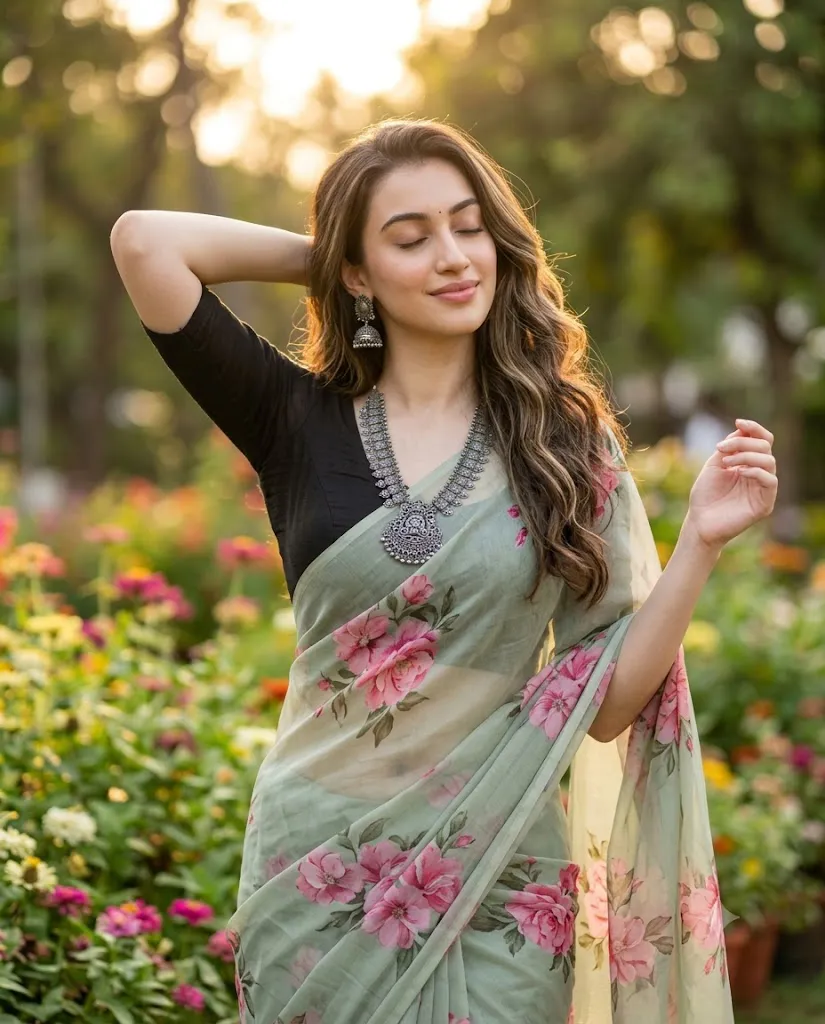
Create a soft, ultra-realistic 8K cinematic portrait of a woman wearing a light sage-green sheer saree with large pink floral prints draped elegantly over a fitted black blouse. She wears intricate oxidized silver jewelry including a statement necklace and matching jhumka earrings. Her long wavy hair flows naturally with soft highlights. The subject stands slightly off-center with one arm behind her head and eyes gently closed. A lush garden filled with colorful flowers and greenery forms the background, rendered with creamy bokeh. Warm golden-hour sunlight creates a dreamy glow with natural shadows. Shot on an 85mm lens with shallow depth of field, cinematic color grading, realistic skin texture, HDR quality, luxury editorial photography style.
The beauty of a floral saree portrait lies in its ability to showcase both personality and culture. A flowing saree adorned with floral patterns, paired with traditional jewelry and natural outdoor lighting, creates an image that feels luxurious without appearing overly staged. When photographed during golden hour—the short period after sunrise or before sunset—the warm sunlight adds a magical glow that enhances skin tones, textures, and colors.
A lush garden environment further elevates the visual experience. Vibrant flowers, green foliage, and creamy background bokeh create a dreamy atmosphere that complements the elegance of the subject. Combined with soft facial expressions and graceful poses, the final image appears cinematic and magazine-worthy.
Modern AI image generators now allow creators to produce highly realistic golden-hour portraits with extraordinary detail. Whether you are creating content for social media, photography portfolios, fashion campaigns, wedding inspiration, or personal projects, a well-written prompt can help achieve professional-quality results.
This guide explains how to use photo editing effectively, the best tools for generating these portraits, and the editing techniques needed to create a stunning floral saree garden portrait with a premium editorial finish.
How To Use Photo Editing?
Photo editing plays a critical role in transforming a good portrait into an exceptional one. Even when an AI generator produces a realistic image, editing helps refine details, improve color harmony, and strengthen the cinematic atmosphere.
The first step is exposure adjustment. Golden-hour portraits should feel warm and luminous without becoming overexposed. Highlights should remain soft and natural, while shadows retain detail and depth.
Color correction is essential for maintaining visual balance. The warm sunlight should enhance skin tones while preserving the natural colors of flowers, greenery, and clothing. Avoid oversaturation, as excessive color intensity can reduce realism.
Skin retouching should be subtle. Modern editorial photography values authentic skin texture. Preserve pores, natural contours, and realistic facial details while removing only minor distractions.
Hair refinement can significantly improve image quality. Enhancing individual strands and soft highlights creates depth and realism, especially when golden-hour lighting interacts with flowing hair.
Jewelry should also receive attention during editing. Oxidized silver necklaces and jhumka earrings should display realistic metallic textures and subtle reflections without appearing overly shiny.
The background should remain softly blurred while preserving enough detail to communicate the garden setting. A shallow depth of field helps separate the subject from the environment and strengthens the cinematic look.
Finally, color grading ties everything together. Warm golden highlights, balanced shadows, and natural contrast create a polished editorial appearance that feels both luxurious and timeless.
Tools You Can Use For Prompt Copy And Create Photo
A variety of AI image generators and editing applications can help create ultra-realistic golden-hour saree portraits.
AI Image Generation Tools
ChatGPT Image Generation
ChatGPT can generate highly detailed prompts and realistic portrait concepts with cinematic styling.
Midjourney
Midjourney is known for producing visually stunning portraits with artistic lighting and elegant compositions.
Leonardo AI
Leonardo AI offers powerful customization options and excellent photorealistic rendering capabilities.
Ideogram
Ideogram provides strong prompt accuracy and high-quality portrait generation.
Adobe Firefly
Adobe Firefly integrates with professional design workflows and generates commercial-quality visuals.
Photo Editing Software
Adobe Photoshop
Photoshop remains the industry standard for advanced retouching, compositing, and image enhancement.
Adobe Lightroom
Lightroom excels at color grading, exposure correction, and cinematic tone adjustments.
Snapseed
A mobile-friendly editing app that offers professional-quality tools for quick enhancements.
PicsArt
Popular for creative effects, overlays, and social-media-ready editing.
Canva
Canva is useful for creating presentation layouts, posters, and promotional graphics featuring portrait photography.
How To Edit Photo?
Once the portrait has been generated, follow these steps to achieve a professional-quality finish.
Step 1: Import The Image
Open the image in Photoshop, Lightroom, Snapseed, or your preferred editing software.
Step 2: Balance Exposure
Adjust highlights and shadows to create a soft and natural golden-hour appearance.
Step 3: Refine White Balance
Enhance warm tones while maintaining realistic skin colors and natural environmental hues.
Step 4: Improve Skin Texture
Apply gentle retouching while preserving natural pores and facial contours.
Step 5: Enhance Hair Details
Increase clarity around individual strands and highlight natural shine.
Step 6: Sharpen Jewelry
Bring out texture and detail in the oxidized silver necklace and earrings.
Step 7: Refine Background Blur
Ensure flowers and greenery remain soft and dreamy without distracting from the subject.
Step 8: Apply Cinematic Color Grading
Use warm highlights, soft contrast, and subtle shadow depth to create an editorial look.
Step 9: Add Final Touches
Introduce light sharpening and minimal grain if desired for a natural photographic feel.
Step 10: Export
Save the final image in high resolution. PNG format is recommended for preserving maximum detail and quality.
Conclusion
The Golden Hour Floral Saree Garden Portrait is a perfect blend of traditional elegance and modern cinematic photography. Through the combination of graceful styling, natural expressions, warm sunlight, and vibrant garden environments, this portrait style creates imagery that feels romantic, timeless, and visually captivating.
Thanks to modern AI image generators and professional editing tools, anyone can create luxury-quality portraits without requiring expensive equipment or elaborate locations. Careful attention to lighting, composition, color harmony, and realistic details can transform a simple concept into a breathtaking editorial masterpiece.
Whether you are designing social media content, fashion campaigns, wedding inspiration boards, portfolio projects, or personal keepsakes, mastering this portrait style can help you create memorable images that celebrate beauty, culture, and artistic storytelling in the most elegant way possible.