Introduction
Photography is often at its most magical when it captures simple moments of wonder. The Golden Hour Bubble Wonder Portrait Prompt is designed to create exactly that feeling—a dreamy, cinematic portrait of a woman mesmerized by floating soap bubbles during the warm glow of sunset. This style combines the emotional storytelling of lifestyle photography with the technical beauty of professional portrait work.
"Golden Hour Bubble Wonder Portrait Prompt"
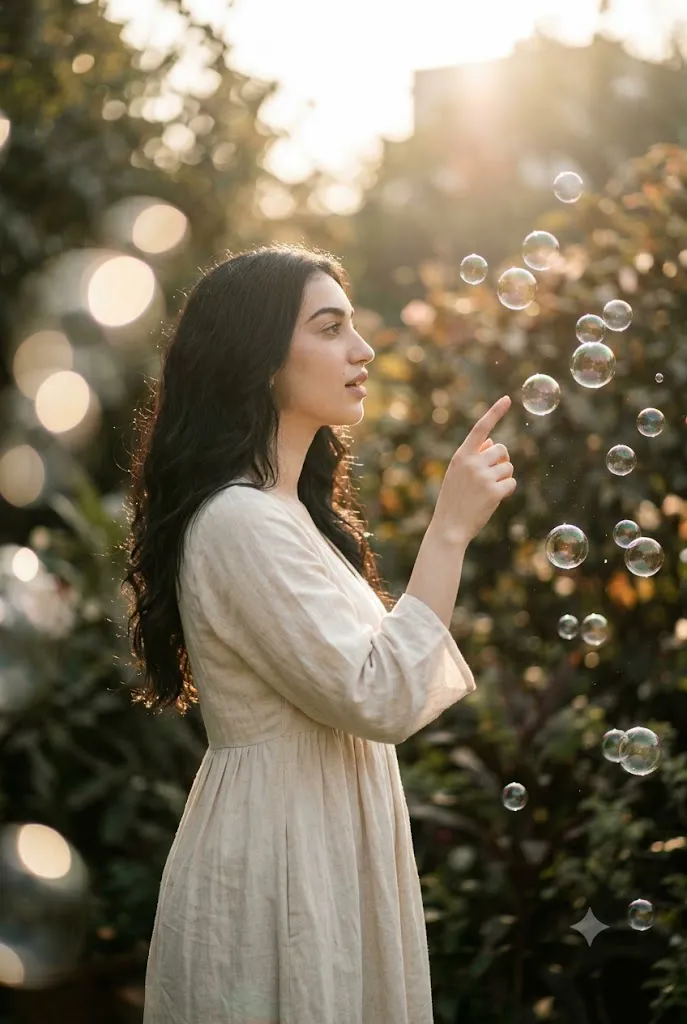
Cinematic portrait photograph shot on an 85mm lens at f/1.8. A woman using the uploaded face reference maintains exact facial identity and hairstyle. She stands in profile, gently pointing toward floating soap bubbles with a look of wonder and curiosity. Ethereal dreamy mood. Soft golden-hour sunlight backlights the subject, creating warm rim lighting and subtle lens flare. Muted cinematic color grading. Ultra-realistic skin texture, natural facial details, sharp focus on the face. Creamy bokeh background with softly blurred foliage. Delicate soap bubbles catching warm sunlight reflections. Romantic atmosphere, professional photography, high-end editorial portrait, 8K resolution, natural lighting, photorealistic detail, aspect ratio 2:3
The concept focuses on a profile-view portrait where the subject points toward delicate soap bubbles drifting through the air. The expression conveys curiosity, joy, and childlike wonder. Combined with golden-hour backlighting, creamy background bokeh, and soft lens flare, the result feels like a scene from a romantic film.
One of the strongest visual elements of this portrait style is the use of natural sunlight. During golden hour, the sun sits low on the horizon, creating warm tones that flatter skin and add depth to the image. When positioned behind the subject, this light produces a beautiful rim glow around the hair and shoulders, enhancing the ethereal atmosphere.
The 85mm lens plays a major role in achieving the cinematic look. This focal length creates natural facial proportions while producing a shallow depth of field that separates the subject from the background. The result is sharp focus on the face while foliage and scenery melt into creamy bokeh.
Modern AI image generators can recreate this look with incredible realism when paired with a well-written prompt. By combining thoughtful composition, natural lighting, emotional expression, and professional editing, creators can generate stunning portraits that feel both artistic and authentic.
This guide will explain how to use photo editing, which tools work best, how to generate the image, and how to edit it into a professional-quality portrait.
How To Use Photo Editing?
Photo editing transforms a good portrait into an exceptional one. Even after generating a realistic image, refining color, lighting, and atmosphere can dramatically improve the final result.
The first area to focus on is color grading. Golden-hour portraits benefit from warm highlights and soft contrast. Increasing subtle golden tones in the highlights while maintaining natural skin colors creates a rich cinematic appearance.
Exposure balancing is equally important. The face should remain properly exposed while preserving the glowing sunlight behind the subject. Avoid overexposing bright areas and maintain detail in both highlights and shadows.
Lens flare can enhance the dreamy atmosphere. A subtle flare introduced by backlighting helps replicate the look of professional outdoor photography. However, moderation is key; excessive flare may distract from the subject.
Soap bubbles should remain delicate and translucent. Enhancing their reflections and rainbow highlights helps make them stand out without appearing artificial.
Background blur can also be refined. Softening distant foliage creates the creamy bokeh associated with premium portrait photography. The subject should remain tack-sharp while the background gently fades away.
Skin retouching should remain natural. Preserve pores, fine details, and realistic textures. Over-smoothing can make the image appear artificial and reduce the emotional impact of the portrait.
Finally, subtle vignette adjustments can help direct the viewer’s attention toward the subject while maintaining the airy mood.
Tools You Can Use For Prompt Copy and Create Photo
Using the right tools can significantly improve both image generation and post-production quality.
AI Image Generation Tools
ChatGPT
ChatGPT helps create highly detailed prompts that describe lighting, composition, mood, and styling accurately.
Midjourney
Midjourney excels at producing cinematic portraits with beautiful atmosphere and artistic depth.
Leonardo AI
Leonardo AI is excellent for realistic facial details, natural lighting, and photorealistic portrait generation.
Ideogram
Ideogram offers strong prompt interpretation and creative image composition.
Adobe Firefly
Adobe Firefly integrates AI image creation into professional creative workflows.
Photo Editing Software
Adobe Photoshop
Photoshop is ideal for retouching, color grading, lens flare enhancement, and compositing.
Adobe Lightroom
Lightroom provides professional control over exposure, colors, highlights, and contrast.
Capture One
Capture One offers exceptional color management and high-end portrait editing tools.
Snapseed
Snapseed is a powerful mobile editor suitable for quick cinematic enhancements.
PicsArt
PicsArt combines creative effects with traditional editing capabilities.
How To Edit Photo?
Step 1: Generate the Base Portrait
Use an AI image-generation platform to create the initial portrait according to the prompt.
Step 2: Adjust Exposure
Balance highlights and shadows to preserve detail while emphasizing the golden-hour glow.
Step 3: Enhance Warm Tones
Increase subtle gold and amber hues in the highlights while maintaining realistic skin colors.
Step 4: Refine Skin Texture
Keep natural pores and facial detail while removing only distracting imperfections.
Step 5: Improve Bubble Visibility
Enhance reflections and soft rainbow effects within the soap bubbles.
Step 6: Create Cinematic Bokeh
Soften the background while preserving natural depth.
Step 7: Add Gentle Lens Flare
Introduce subtle flare from the backlit sun to increase realism.
Step 8: Enhance Rim Lighting
Strengthen the soft glow around hair and shoulders.
Step 9: Apply Color Grading
Use muted tones with warm highlights and balanced contrast.
Step 10: Fine-Tune Composition
Ensure the subject and bubbles create a balanced visual flow.
Step 11: Add Subtle Vignette
Darken edges slightly to focus attention on the subject.
Step 12: Export High Resolution
Save the final image in PNG, TIFF, or high-quality JPEG format for maximum quality.
Conclusion
The Golden Hour Bubble Wonder Portrait Prompt combines emotional storytelling with professional portrait photography techniques. By capturing a moment of curiosity and wonder, it creates an image that feels both timeless and cinematic.
The warm glow of golden-hour sunlight, the delicate beauty of floating soap bubbles, and the natural expression of the subject work together to create a visually captivating scene. Combined with an 85mm lens perspective and shallow depth of field, the result is a portrait that feels intimate, elegant, and dreamlike.
Modern AI tools make it possible to recreate this aesthetic with extraordinary realism, but achieving the best results requires careful prompt writing and thoughtful editing. Lighting, color grading, composition, and subtle enhancements all contribute to the final image.
Whether you are a photographer, digital artist, content creator, or AI image enthusiast, the Golden Hour Bubble Wonder Portrait offers an excellent opportunity to create imagery filled with warmth, emotion, and cinematic beauty. By mastering this style, you can produce portraits that feel like treasured memories captured during a magical moment at sunset.