Introduction
Modern cinematic portrait photography often thrives on contrast. One of the most visually compelling contrasts is the relationship between stillness and movement. The Cinematic Subway Motion Blur Portrait Prompt captures this idea perfectly by placing a calm, confident subject within a fast-moving urban environment.
"Cinematic Subway Motion Blur Portrait Prompt"
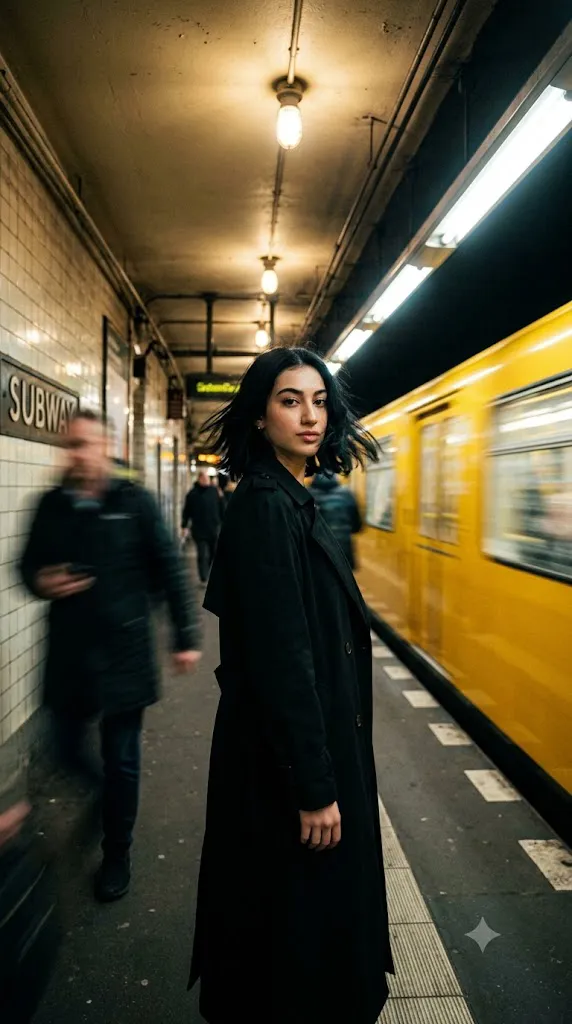
Hyperrealistic cinematic photograph captured on an 85mm lens. A stunning young Asian woman stands perfectly still on a dimly lit underground subway platform. Windswept short black hair frames her face as she gazes confidently and directly into the camera. She wears an elegant long black coat that moves subtly with the underground airflow. Behind her, a vibrant yellow subway train rushes past at high speed, creating dramatic streaks of motion blur while remaining recognizable. Moody cinematic lighting, cool urban shadows, warm train reflections, shallow depth of field, sharp focus on the subject's eyes and facial features, atmospheric subway environment, subtle film grain, professional editorial photography, luxury fashion campaign aesthetic, ultra-realistic detail, 8K resolution.
In this concept, a young woman stands motionless on a dimly lit underground subway platform while a bright yellow train rushes past behind her. The train transforms into streaks of motion blur, emphasizing speed and energy, while the subject remains sharp, focused, and grounded. This contrast instantly creates visual tension and storytelling.
The image feels like a frame extracted from a feature film. The underground station provides mood, atmosphere, and architectural depth. The warm yellow train introduces a striking color accent against the cooler tones of the platform. Combined with cinematic lighting, shallow depth of field, and professional composition, the result is a portrait that feels modern, emotional, and editorial.
One of the strongest aspects of this style is its ability to communicate a narrative without words. The viewer immediately wonders: Where is she going? What is she thinking? Why is she standing still while the world rushes around her? These unanswered questions create emotional engagement.
Professional fashion campaigns, magazine editorials, movie posters, and luxury advertising often use this visual technique because it creates sophistication while maintaining realism. With today's AI image-generation tools, photographers and creators can recreate this cinematic aesthetic with incredible accuracy.
This guide explains how to generate, edit, and refine a Cinematic Subway Motion Blur Portrait into a professional-quality masterpiece.
How To Use Photo Editing?
Photo editing is essential for transforming a good subway portrait into a truly cinematic image. While AI can generate impressive results, careful post-processing adds realism, atmosphere, and visual polish.
The first area to adjust is exposure. Subway environments naturally contain darker shadows and selective lighting. The subject's face should remain properly illuminated while maintaining the moody atmosphere of the station.
Color grading is particularly important. A cinematic subway portrait typically uses cool blue-gray shadows contrasted with warm highlights from artificial lights and the yellow train. This complementary color relationship creates visual impact.
Motion blur refinement can significantly improve realism. The train should appear fast enough to create dynamic streaks while maintaining enough structure to remain recognizable as a train.
Contrast adjustments help separate the subject from the environment. The woman should feel crisp and sharp while the background retains softness and movement.
Skin retouching should remain natural. Preserve pores, texture, and authentic facial details. Avoid over-smoothing or artificial beauty filters that reduce realism.
The station atmosphere can be enhanced with subtle haze, environmental shadows, and cinematic glow around light sources. These elements help recreate the visual language of modern film cinematography.
Finally, sharpening should focus only on the subject. The train and background should remain slightly softer to reinforce the contrast between stillness and motion.
Tools You Can Use For Prompt Copy and Create Photo
The right tools can dramatically improve both image generation and editing quality.
AI Image Generation Tools
ChatGPT
ChatGPT helps create detailed prompts that describe lighting, composition, motion blur, mood, and cinematic storytelling.
Midjourney
Midjourney excels at cinematic imagery, urban environments, and fashion-editorial aesthetics.
Leonardo AI
Leonardo AI offers excellent photorealism and detailed environmental rendering.
Ideogram
Ideogram works well for highly stylized editorial compositions.
Adobe Firefly
Adobe Firefly integrates AI-generated visuals into professional creative workflows.
Photo Editing Software
Adobe Photoshop
Photoshop remains the gold standard for motion blur refinement, retouching, compositing, and cinematic color grading.
Adobe Lightroom
Lightroom provides professional exposure control and advanced color grading.
Capture One
Capture One offers industry-leading color management and portrait editing.
Affinity Photo
Affinity Photo is a powerful alternative for professional editing.
Snapseed
Snapseed provides excellent mobile editing tools for cinematic enhancements.
How To Edit Photo?
Step 1: Generate the Base Image
Create the initial image using your preferred AI image-generation platform.
Step 2: Balance Exposure
Ensure the subject remains properly exposed while preserving the darker subway atmosphere.
Step 3: Refine Motion Blur
Enhance train motion while maintaining recognizable train details.
Step 4: Improve Subject Sharpness
Increase clarity around the face, eyes, and coat textures.
Step 5: Apply Cinematic Color Grading
Use cool blue-gray shadows and warm yellow highlights.
Step 6: Enhance Environmental Depth
Add subtle haze and atmospheric perspective to the platform.
Step 7: Adjust Contrast
Separate the subject from the moving background.
Step 8: Refine Skin Texture
Maintain natural pores and realistic facial detail.
Step 9: Add Filmic Characteristics
Introduce subtle grain and cinematic softness.
Step 10: Enhance Lighting
Strengthen practical light sources while preserving realism.
Step 11: Fine-Tune Composition
Ensure visual balance between the subject and moving train.
Step 12: Export High Resolution
Save the final image in PNG, TIFF, or high-quality JPEG format for maximum quality.
Conclusion
The Cinematic Subway Motion Blur Portrait Prompt is a powerful example of how motion and stillness can work together to create visual storytelling. By placing a calm, composed subject within a fast-moving urban environment, the image immediately captures attention and evokes emotion.
The rushing yellow train symbolizes movement, change, and energy, while the subject represents confidence, focus, and presence. This contrast transforms a simple portrait into a cinematic narrative that feels sophisticated and memorable.
Modern AI image-generation tools make it easier than ever to create such imagery, but the strongest results still depend on thoughtful prompt writing and careful editing. Lighting, motion blur, color grading, and composition all play critical roles in achieving a professional editorial appearance.
Whether used for fashion campaigns, portfolio projects, social media content, magazine covers, or creative artwork, this portrait style delivers a timeless cinematic quality. By mastering these techniques, creators can produce images that feel emotionally engaging, visually dynamic, and worthy of high-end commercial publication.
The combination of sharp subject focus, dramatic motion blur, underground atmosphere, and cinematic lighting ensures that the Cinematic Subway Motion Blur Portrait remains one of the most striking and modern portrait concepts available today.