Introduction
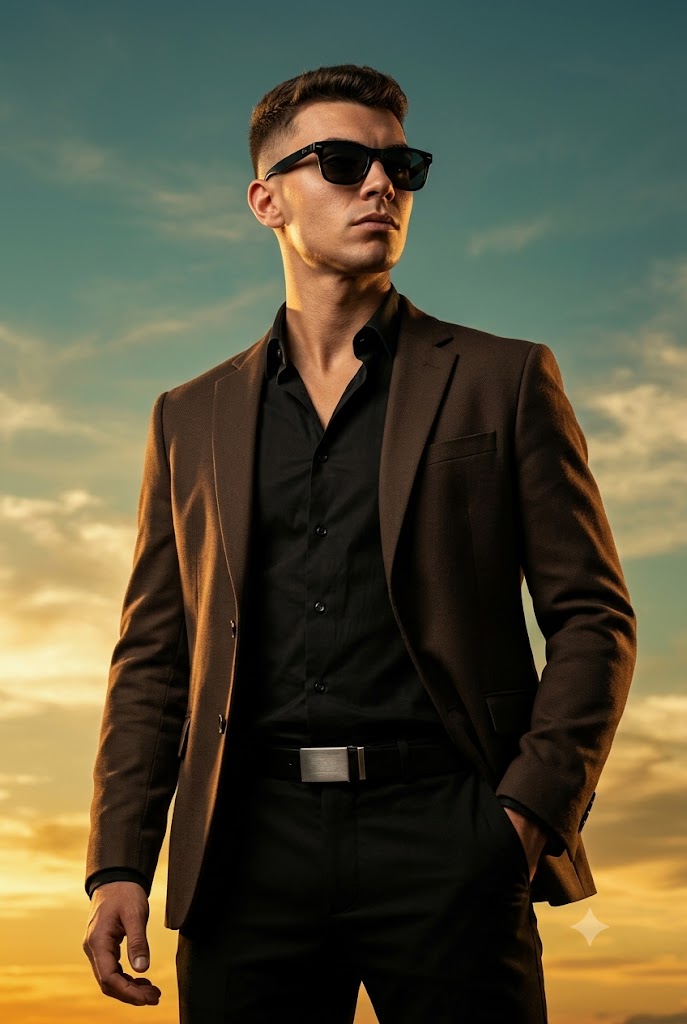
Movie poster photography is one of the most powerful visual styles in modern digital art and portrait creation. Inspired by blockbuster films, premium fashion campaigns, and Hollywood promotional posters, cinematic portrait photography transforms an ordinary image into a larger-than-life representation of confidence, strength, and storytelling. The Cinematic Movie Poster Portrait Prompt is designed to create an ultra-realistic hero-style portrait that captures the commanding presence of a leading character standing against a dramatic sky backdrop.
"Cinematic Movie Poster Portrait Prompt"
Create a 2:3 aspect ratio, ultra-realistic cinematic movie poster portrait of a powerful male lead, using the provided reference image of the subject. Perfect face blending with realistic human skin texture, natural pores, and natural highlights. The man has thick, voluminous dark hair, styled high with a clean fade on the sides, sharp and well-groomed. He has a neatly trimmed beard and moustache, masculine and defined. Note: If the reference male has facial hair, keep it naturally; if he is clean-shaven, do not add a beard. Wardrobe & Styling: He is wearing a sharp dark brown formal blazer with a structured fit, layered over a black open-collar shirt (top buttons undone for a bold, confident look). The outfit is completed with tailored black trousers and a bold silver belt buckle that subtly catches the light. Accessories include black luxury sunglasses with a sleek frame, adding mystery and authority. Pose & Expression: Upright, confident stance with squared shoulders and a relaxed yet commanding posture. One hand is casually placed inside the trouser pocket, while the other arm rests naturally by his side. His torso is slightly turned, creating a strong three-quarter body angle. Head is held high with a subtle upward tilt, emphasizing dominance. He maintains an intense side gaze looking off-frame, calm and focused, projecting power, authority, and composure. Facial expression remains serious, controlled, and heroic. Camera & Composition: Low-angle shot to emphasize strength and dominance. Medium-to-upper body framing with strong visual presence. Cinematic composition with clear subject separation from the background. Lighting: Professional cinematic lighting with warm golden highlights from one side and subtle shadows on the other, enhancing facial contours, jacket texture, and depth. Natural rim light outlining the shoulders and hair for dramatic separation. Atmosphere: soft front lighting ensures the subject's face and physique are clearly visible. Background: Dramatic open sky with subtle clouds, sunset tones of warm gold and deep teal, soft atmospheric depth. Background remains slightly blurred to maintain focus on the subject while enhancing the cinematic scale. Overall Style: Ultra-realistic, high-contrast, cinematic movie poster aesthetic. Sharp focus, premium color grading, dramatic mood, heroic tone. No text, no logos, no watermarks.
This style focuses on strong composition, cinematic lighting, powerful expressions, luxury styling, and professional color grading. The subject becomes the center of attention, presented as a confident protagonist ready to lead a story. Every detail—from wardrobe selection and facial expression to lighting direction and camera angle—contributes to the overall cinematic atmosphere.
One of the most important elements of this prompt is identity preservation. The uploaded reference image is used strictly for facial recognition and likeness, ensuring that the generated portrait remains true to the original subject. Realistic skin texture, natural facial features, and authentic proportions are maintained while elevating the image through professional movie-poster aesthetics.
The combination of a structured dark blazer, open-collar black shirt, luxury sunglasses, dramatic sunset sky, and low-angle perspective creates a visually striking portrait that resembles a premium film advertisement. Whether used for social media branding, personal portfolios, AI-generated artwork, promotional campaigns, or creative storytelling projects, this prompt delivers a bold and unforgettable visual impact.
How To Use Photo Editing?
Photo editing plays a crucial role in transforming a generated image into a true cinematic masterpiece. Even when AI produces impressive results, professional editing helps refine details, improve realism, and strengthen the overall movie-poster effect.
The first step is verifying facial identity accuracy. The generated face should closely match the uploaded reference image while preserving natural skin texture, facial proportions, and hair details.
Once identity accuracy is confirmed, focus on enhancing the cinematic elements of the portrait.
Important editing areas include:
- Facial detail enhancement
- Skin texture preservation
- Hair refinement
- Wardrobe texture enhancement
- Color grading
- Contrast control
- Shadow refinement
- Background atmosphere enhancement
Movie poster portraits rely heavily on dramatic lighting and emotional impact. Therefore, edits should enhance visual storytelling rather than simply beautifying the subject.
Avoid excessive smoothing or artificial filters, as these can reduce realism and weaken the premium cinematic appearance.
Tools You Can Use For Prompt Copy and Create Photo
1. ChatGPT
ChatGPT is excellent for creating detailed prompts that describe wardrobe, pose, lighting, composition, and cinematic atmosphere with precision.
2. Midjourney
Midjourney is widely used for generating highly artistic and cinematic movie-poster style portraits with stunning visual storytelling.
3. Flux AI
Flux AI excels at realistic facial identity preservation and photorealistic rendering, making it ideal for character portraits.
4. Leonardo AI
Leonardo AI provides strong control over realism, fashion styling, and cinematic composition.
5. Adobe Photoshop
Photoshop remains the industry standard for advanced retouching and professional image enhancement.
Common uses include:
- Facial refinement
- Lighting adjustments
- Background enhancement
- Object cleanup
- Color grading
6. Lightroom
Lightroom is perfect for:
- Exposure correction
- Contrast enhancement
- Tone balancing
- Professional cinematic grading
7. Canva
Canva can transform finished portraits into movie posters, social media graphics, advertisements, and promotional materials.
8. Topaz Photo AI
Topaz Photo AI helps sharpen details, upscale resolution, and improve image quality while maintaining realistic textures.
Using a combination of these tools often produces the most professional final results.
How To Edit Photo?
Step 1: Generate the Base Portrait
Start by generating the portrait using your preferred AI platform.
Verify:
- Facial identity accuracy
- Proper body proportions
- Correct wardrobe details
- Accurate background composition
Step 2: Check Facial Identity
Compare the generated portrait to the original reference image.
Review:
- Eye shape
- Nose structure
- Jawline
- Hair style
- Facial hair (if present)
- Skin tone
Maintaining identity consistency is essential.
Step 3: Enhance Skin Texture
A cinematic portrait should display realistic skin detail.
Preserve:
- Natural pores
- Fine facial texture
- Authentic highlights
- Realistic contours
Avoid over-retouching.
Step 4: Refine Hair and Beard
Hair plays a significant role in creating a strong cinematic character.
Enhance:
- Hair volume
- Texture
- Edge definition
- Natural shine
If facial hair exists in the reference image, refine it while maintaining realism.
Step 5: Improve Clothing Details
The wardrobe contributes significantly to the hero aesthetic.
Enhance:
- Blazer texture
- Shirt folds
- Belt buckle details
- Sunglasses reflections
Subtle refinements create a premium editorial appearance.
Step 6: Strengthen Cinematic Lighting
Movie poster portraits rely on dramatic lighting.
Adjust:
- Golden highlights
- Shadow transitions
- Rim lighting
- Facial contours
Maintain realistic depth and dimensionality.
Step 7: Refine Background Atmosphere
The sky should feel cinematic without overpowering the subject.
Enhance:
- Cloud textures
- Sunset tones
- Atmospheric depth
- Background separation
Keep the background slightly soft to preserve focus on the subject.
Step 8: Apply Professional Color Grading
Color grading is what gives the portrait its blockbuster movie-poster appearance.
Focus on:
- Warm golden highlights
- Deep teal shadows
- Natural skin tones
- Rich clothing colors
Avoid oversaturation.
Step 9: Sharpen Key Details
Apply selective sharpening to:
- Eyes
- Hair
- Jacket texture
- Sunglasses
- Facial contours
Leave the background slightly softer for a cinematic depth-of-field effect.
Step 10: Export in High Resolution
Export the final image in:
- JPEG for online use
- PNG for maximum quality
- TIFF for professional printing
For premium results, export at 4K or 8K resolution.
Conclusion
The Cinematic Movie Poster Portrait Prompt combines realism, luxury fashion styling, and blockbuster visual storytelling into one powerful portrait concept. Through dramatic lighting, strong composition, premium wardrobe design, and cinematic color grading, the subject is transformed into a commanding lead character worthy of a movie poster.
The low-angle perspective enhances authority and presence, while the sunset sky backdrop adds emotional depth and visual scale. Every element—from the dark blazer and sunglasses to the warm highlights and atmospheric clouds—works together to create a portrait that feels cinematic, heroic, and unforgettable.
Whether used for personal branding, portfolio development, AI-generated art projects, promotional materials, or creative storytelling, this prompt provides a professional framework for producing premium-quality images. By combining detailed prompt writing, advanced AI image generation tools, and professional editing techniques, creators can achieve stunning movie-poster portraits that rival the visual impact of Hollywood marketing campaigns.