Introduction
Black and white portrait photography has remained one of the most timeless and powerful forms of visual storytelling. Unlike color photography, which often relies on vibrant hues to attract attention, monochrome portraits emphasize emotion, character, lighting, texture, and composition. A well-crafted black and white portrait can communicate elegance, confidence, mystery, and sophistication with remarkable impact.
"Cinematic Black & White Studio Portrait Prompt"
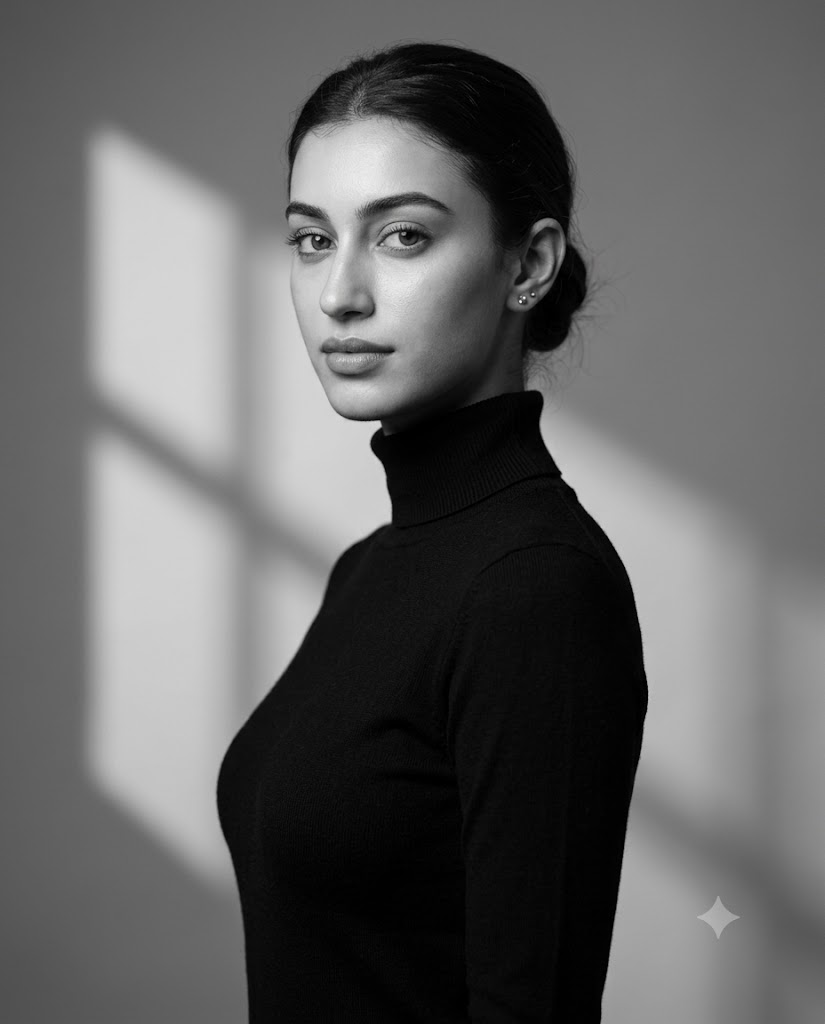
Use the uploaded reference image strictly as the only facial identity reference, preserving the exact facial structure, proportions, skin texture, eye shape, nose, lips, hairstyle, and overall likeness with no beautification or alteration. Create a hyper-realistic black-and-white studio portrait in a 4:5 aspect ratio, captured as a waist-up composition with the subject positioned slightly angled in a three-quarter profile facing left while gently turning the head toward the camera. Maintain a calm, poised, and confident expression with a neutral gaze directed at the viewer, upright posture, relaxed shoulders, and an elongated neck. The subject wears a fitted black high-neck turtleneck sweater with subtle visible fabric texture, hair neatly tied back into a clean low bun, and minimal styling featuring only small stud earrings. Illuminate the scene with high-contrast cinematic studio lighting, using a strong directional key light from the left side, smooth shadow falloff across the right side of the face and torso, and a soft fill light to preserve facial detail without crushing blacks. Add a subtle geometric window-light shadow pattern on the background. Use a minimalist soft gray studio backdrop with a gentle gradient and soft shadow shapes, keeping the environment clean, elegant, and distraction-free. Preserve ultra-realistic skin detail with visible pores, natural highlights, crisp eyes, detailed lips, and realistic fabric rendering. Shot with an 85mm lens at f/2.0, featuring shallow depth of field, razor-sharp subject focus, soft background blur, high dynamic range, studio-grade clarity, 8K resolution, and strict monochrome grading. Style should evoke timeless editorial fashion photography—minimalist, refined, cinematic, and sophisticated. Negative Prompt: cartoon, CGI, illustration, stylized art, plastic skin, excessive smoothing, blur, distortion, low detail, extra limbs, incorrect anatomy, cropped head, color tones, sepia, warm tint, blue tint, harsh shadows covering eyes, overexposure, oversharpening, AI artifacts, text, watermark, logo.
The Cinematic Black & White Studio Portrait Prompt is designed to create an ultra-realistic editorial-style image that captures the essence of classic fashion photography. Inspired by luxury magazine covers, fine-art portraiture, and high-end studio campaigns, this prompt combines dramatic lighting, refined styling, and premium photographic quality to produce an image that feels both contemporary and timeless.
One of the most important elements of this prompt is facial identity preservation. The uploaded reference image is used strictly as the only facial reference, ensuring that the final portrait maintains the subject's true facial structure, proportions, skin texture, and natural appearance. Rather than changing the identity, the prompt elevates the image through professional studio techniques and cinematic monochrome grading.
The combination of a fitted black turtleneck, clean low bun hairstyle, geometric shadow patterns, and carefully controlled lighting creates a sophisticated editorial aesthetic. Every element contributes to a portrait that feels polished, elegant, and visually compelling.
Whether you are creating content for social media, professional portfolios, fashion editorials, personal branding, or artistic projects, this portrait style offers a premium and highly professional result.
How To Use Photo Editing?
Photo editing is a crucial step in transforming a generated portrait into a truly professional black-and-white masterpiece. Even the best AI-generated images benefit from subtle refinements that enhance realism, improve tonal balance, and strengthen the cinematic atmosphere.
The first step is evaluating facial accuracy. Compare the generated image with the reference photograph to ensure that facial proportions, skin tone translation, hairstyle, and expression remain authentic.
After verifying identity, focus on enhancing monochrome depth and contrast.
Key editing areas include:
- Skin texture refinement
- Lighting enhancement
- Shadow control
- Tonal balancing
- Background cleanup
- Eye detail enhancement
- Fabric texture improvement
- Monochrome grading
Black and white photography depends heavily on tonal separation. Every shade of gray contributes to the visual impact of the image. Therefore, editing should prioritize depth and dimension rather than excessive sharpness or artificial effects.
Avoid over-smoothing the skin or increasing contrast excessively. Professional monochrome portraits maintain subtle detail within highlights and shadows.
The goal is elegance and realism, not dramatic over-processing.
Tools You Can Use For Prompt Copy and Create Photo
1. ChatGPT
ChatGPT is excellent for creating detailed prompts that accurately describe lighting, wardrobe, composition, and artistic style.
2. Midjourney
Midjourney is ideal for producing cinematic and artistic monochrome portraits with strong visual storytelling.
3. Flux AI
Flux AI performs exceptionally well for realistic facial identity preservation and photorealistic rendering.
4. Leonardo AI
Leonardo AI provides strong control over lighting, facial consistency, and studio portrait generation.
5. Adobe Photoshop
Photoshop remains the industry-standard software for portrait editing.
Useful adjustments include:
- Skin refinement
- Shadow enhancement
- Background cleanup
- Texture control
- Dodge and burn techniques
6. Adobe Lightroom
Lightroom is particularly useful for monochrome editing.
Features include:
- Black and white conversion
- Contrast control
- Exposure correction
- Highlight recovery
- Shadow balancing
7. Canva
Canva helps transform portraits into professional social media posts, portfolio presentations, and promotional graphics.
8. Topaz Photo AI
Topaz Photo AI can improve image clarity, upscale resolution, and enhance fine details while preserving realistic textures.
Combining multiple tools often produces the highest-quality final result.
How To Edit Photo?
Step 1: Generate the Portrait
Begin by generating the image using your preferred AI platform.
Carefully review:
- Face accuracy
- Pose consistency
- Outfit details
- Lighting quality
- Background composition
Step 2: Verify Identity Preservation
Compare the generated image with the uploaded reference photo.
Ensure:
- Eye shape remains accurate
- Nose structure is preserved
- Jawline matches
- Hairline remains consistent
- Facial proportions stay natural
Identity preservation should always be the highest priority.
Step 3: Convert to Professional Monochrome
If necessary, convert the portrait into black and white using professional editing software.
Focus on:
- Deep blacks
- Clean midtones
- Smooth highlight transitions
- Natural grayscale separation
Avoid flat grayscale conversions.
Step 4: Enhance Skin Texture
Professional portraits maintain realistic skin details.
Preserve:
- Natural pores
- Fine facial texture
- Authentic highlights
- Soft skin transitions
Avoid plastic-looking skin.
Step 5: Refine Lighting
The cinematic effect comes primarily from lighting.
Enhance:
- Key light direction
- Facial contours
- Neck definition
- Shadow depth
Keep transitions smooth and realistic.
Step 6: Strengthen Background Shadows
The geometric window-light pattern is a major visual feature.
Refine:
- Shadow shape
- Shadow intensity
- Background gradients
- Light falloff
Maintain subtlety for a sophisticated look.
Step 7: Improve Clothing Texture
The black turtleneck contributes significantly to the portrait's elegance.
Enhance:
- Knit texture
- Fabric folds
- Collar structure
- Material realism
Avoid oversharpening.
Step 8: Focus on Eyes
The eyes are often the emotional center of a portrait.
Adjust:
- Clarity
- Catchlights
- Sharpness
- Contrast
Keep the enhancement natural.
Step 9: Final Tonal Balancing
Review the overall image.
Balance:
- Highlights
- Midtones
- Shadows
- Contrast
- Dynamic range
Ensure that details remain visible throughout the tonal spectrum.
Step 10: Export at High Resolution
Save the final portrait in professional formats:
- JPEG for online use
- PNG for maximum quality
- TIFF for professional printing
For premium results, export at 4K or 8K resolution.
Conclusion
The Cinematic Black & White Studio Portrait Prompt offers a perfect blend of elegance, realism, and timeless editorial style. By combining identity preservation, refined wardrobe styling, dramatic monochrome lighting, and professional studio composition, this prompt creates portraits that feel both artistic and authentic.
The fitted black turtleneck, controlled geometric shadows, soft studio background, and cinematic lighting work together to produce an image that captures attention without relying on color. Instead, the portrait tells its story through expression, texture, contrast, and form.
Whether used for fashion editorials, professional portfolios, personal branding, fine-art projects, or social media content, this prompt provides a powerful foundation for creating premium monochrome portraits. When combined with thoughtful editing and high-quality AI generation tools, the result is a sophisticated black-and-white image that remains visually striking for years to come.