Introduction
Lifestyle photography is one of the most popular photography genres because it captures people in natural environments while telling a visual story. Unlike traditional studio portraits, lifestyle portraits focus on authentic moments, relaxed poses, and real-world settings that help create emotional connections. Among the most visually striking trends today is the Ultra-Realistic Tropical Boardwalk Lifestyle Portrait, a style that combines cinematic outdoor photography with breathtaking tropical scenery.
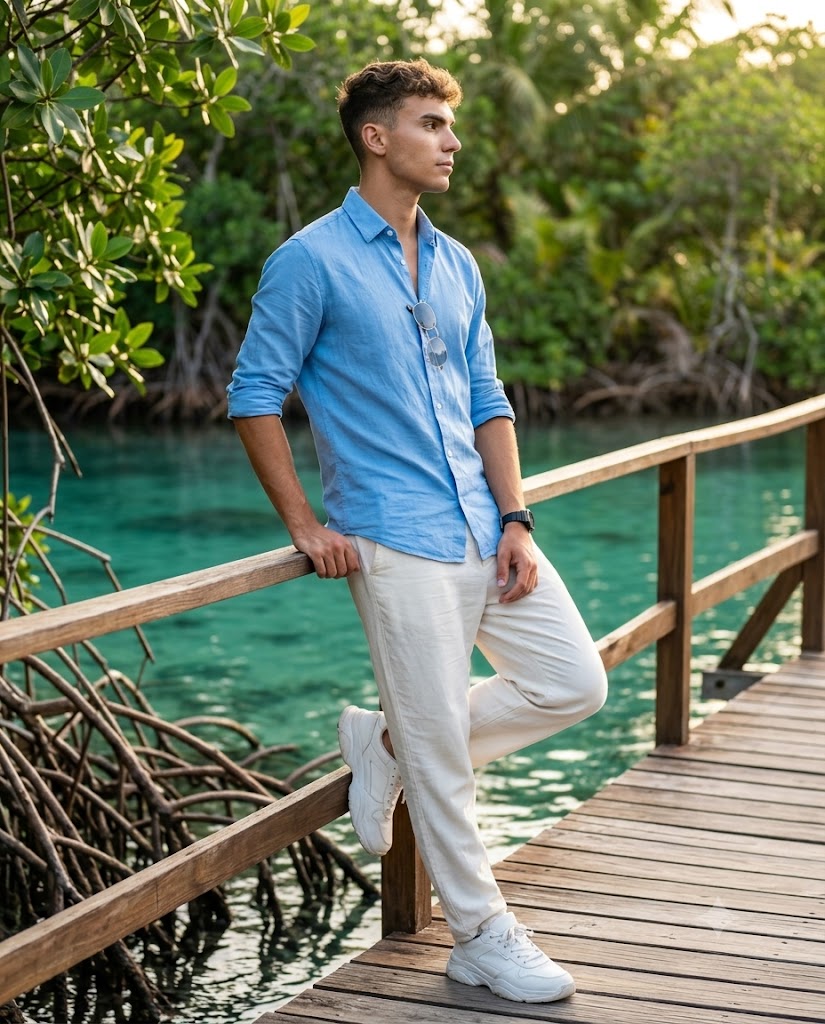
Create an ultra-realistic full-body lifestyle portrait in a 4:5 vertical aspect ratio. Use the uploaded image strictly as the ONLY face reference. Composition & Camera: Full-body shot, head-to-toe visible with no cropping. Subject positioned slightly off-center, leaning casually against a wooden railing on a narrow boardwalk. Shot at eye level with an 85mm lens look, shallow depth of field for strong subject-background separation. Pose & Expression: Relaxed leaning pose with one leg slightly bent and foot resting against the wooden plank. One arm resting on the railing, the other relaxed near the waist. Head turned sideways (away from camera) with a soft, thoughtful expression. Natural posture, effortless and candid. Outfit & Styling: Light sky-blue button-up shirt with sleeves rolled up to forearms. Off-white loose trousers with a soft, breathable texture. Clean chunky white sneakers. Accessories include a black Casio-style sports watch and frameless sunglasses subtly hanging from the shirt. Environment & Background: A tropical mangrove setting with clear, shallow turquoise water visible beneath the wooden boardwalk. Detailed mangrove roots emerging through the water. Background softly blurred but still recognizable, with lush green foliage and natural depth. Lighting & Mood: Warm golden-hour sunlight coming from the side/back, creating soft highlights on the face and rim lighting along the edges. Gentle shadows, natural skin tones, and a cinematic glow. Light reflects subtly off the water surface. Technical Details: Ultra-realistic photography, 8K resolution, high dynamic range, natural skin texture with visible pores. No CGI, no artificial smoothing. Sharp focus on subject, soft bokeh background.
This portrait style places the subject within a beautiful natural environment, often featuring turquoise water, wooden boardwalks, lush mangroves, warm sunlight, and soft natural colors. The result feels like a frame from a luxury travel magazine or a high-end lifestyle campaign. The focus is not only on the person but also on the atmosphere surrounding them.
With modern AI image-generation technology, creators can now produce stunning tropical portraits while preserving facial identity, natural skin texture, and realistic environmental details. These portraits often feature professional DSLR-quality depth of field, cinematic lighting, and premium color grading that enhance the overall visual appeal.
Whether you are creating travel content, personal portraits, social media posts, fashion imagery, or portfolio work, the Ultra-Realistic Tropical Boardwalk Lifestyle Portrait offers a timeless and sophisticated aesthetic that feels both adventurous and elegant.
How To Use Photo Editing?
Photo editing plays a major role in transforming a good portrait into an exceptional one. Even when using advanced AI image generators, editing helps refine details, improve realism, and create a cohesive visual style.
The process typically starts with a high-quality reference image. AI systems use the reference photo to preserve the subject’s facial structure, skin tone, hairstyle, and overall identity. Once the image is generated, editing tools can be used to enhance the final result.
Photo editing can help with:
- Improving facial detail
- Enhancing skin texture
- Balancing exposure
- Refining colors
- Strengthening depth of field
- Improving background atmosphere
- Enhancing lighting effects
- Correcting image imperfections
- Refining clothing textures
- Creating cinematic color grading
One of the most important goals is maintaining realism. Lifestyle portraits should look natural rather than heavily retouched. Visible skin texture, natural shadows, realistic lighting, and authentic environmental details help create a believable final image.
Professional editing allows photographers and creators to elevate their portraits while preserving the genuine character of the scene.
Tools You Can Use For Prompt Copy and Create Photo
Several powerful AI and editing tools can help create ultra-realistic tropical boardwalk lifestyle portraits.
1. ChatGPT
ChatGPT is one of the best tools for generating detailed image prompts. Users can describe environments, poses, lighting, outfits, and camera settings to create professional-quality prompts for AI image generators.
2. Flux AI
Flux AI is known for producing highly realistic portraits with accurate facial details, natural skin textures, and impressive environmental realism.
3. Midjourney
Midjourney excels at cinematic compositions and artistic storytelling. It is particularly effective for outdoor lifestyle photography and travel-inspired scenes.
4. Leonardo AI
Leonardo AI offers strong realism, facial consistency, and high-quality image generation suitable for portrait projects.
5. Adobe Photoshop
Photoshop remains the industry standard for image editing and retouching. It allows users to refine generated images, improve lighting, and enhance realism.
6. Canva
Canva is useful for creating social media graphics, photo layouts, and presentation-ready content.
7. Ideogram
Ideogram helps generate realistic visual compositions and can assist with creating aesthetically balanced imagery.
8. Google Gemini
Gemini can support prompt development, creative brainstorming, and image-generation planning.
Many professionals combine multiple tools within their workflow. For example, ChatGPT can create the prompt, Flux AI can generate the image, and Photoshop can perform final refinements.
How To Edit Photo?
Creating an Ultra-Realistic Tropical Boardwalk Lifestyle Portrait requires careful attention to both technical quality and visual storytelling.
Step 1: Select a High-Quality Reference Image
Choose a clear image with visible facial features, natural lighting, and sufficient detail. A strong reference image helps maintain identity accuracy.
Step 2: Create a Detailed Prompt
A successful prompt should include:
- Identity preservation instructions
- Clothing details
- Pose descriptions
- Environmental elements
- Lighting conditions
- Camera specifications
- Composition guidelines
- Color palette preferences
- Realism settings
- Mood and atmosphere
Detailed prompts generally produce more accurate and visually appealing results.
Step 3: Generate Multiple Variations
AI systems often produce different interpretations of the same prompt. Generate several versions and compare them carefully before selecting the best result.
Step 4: Verify Identity Consistency
Carefully compare the generated image with the original reference photo.
Check:
- Face shape
- Eye structure
- Skin tone
- Hairstyle
- Smile
- Facial proportions
Maintaining identity consistency is essential for realistic portraits.
Step 5: Enhance Environmental Realism
The tropical environment is a major part of the image.
Refine:
- Mangrove roots
- Water reflections
- Boardwalk textures
- Green foliage
- Natural depth
- Atmospheric perspective
These details strengthen the storytelling aspect of the portrait.
Step 6: Improve Lighting
Golden-hour lighting is one of the defining characteristics of this style.
Focus on:
- Warm highlights
- Soft rim lighting
- Gentle shadows
- Balanced exposure
- Natural skin tones
Avoid overly dramatic lighting effects that reduce realism.
Step 7: Refine Clothing and Accessories
Enhance details such as:
- Shirt fabric texture
- Natural folds
- Watch details
- Sunglasses reflections
- Shoe texture
- Clothing fit
These small details contribute significantly to overall image quality.
Step 8: Apply Cinematic Color Grading
Tropical lifestyle portraits often benefit from:
- Warm golden highlights
- Soft teal water tones
- Natural greens
- Balanced contrast
- Slight desaturation
- Rich but realistic colors
This creates a premium editorial appearance.
Step 9: Strengthen Depth of Field
A shallow depth of field helps isolate the subject from the background.
Maintain:
- Sharp focus on the subject
- Soft background blur
- Smooth bokeh
- Natural perspective
This creates the professional 85mm DSLR portrait look.
Step 10: Export in High Resolution
Save the final image in 4K or 8K quality to preserve every detail. High-resolution exports ensure excellent results for printing, portfolios, and social media content.
Conclusion
The Ultra-Realistic Tropical Boardwalk Lifestyle Portrait Prompt combines luxury travel aesthetics, professional photography techniques, and advanced AI image generation to create visually stunning portraits. By blending tropical scenery, cinematic lighting, realistic skin textures, and natural poses, creators can produce images that feel both authentic and aspirational.
What makes this style particularly appealing is its ability to tell a story. The wooden boardwalk, turquoise water, mangrove landscape, and golden-hour sunlight create an atmosphere of relaxation, exploration, and elegance. Combined with accurate facial preservation and thoughtful composition, the final image becomes much more than a portrait—it becomes a memorable visual experience.
With the right prompt, high-quality reference image, and careful editing process, anyone can create breathtaking tropical lifestyle portraits that rival professional travel photography. As AI technology continues to evolve, this style will remain a favorite among photographers, content creators, and digital artists looking to capture the beauty of nature and the personality of their subjects in a single cinematic frame.