Introduction
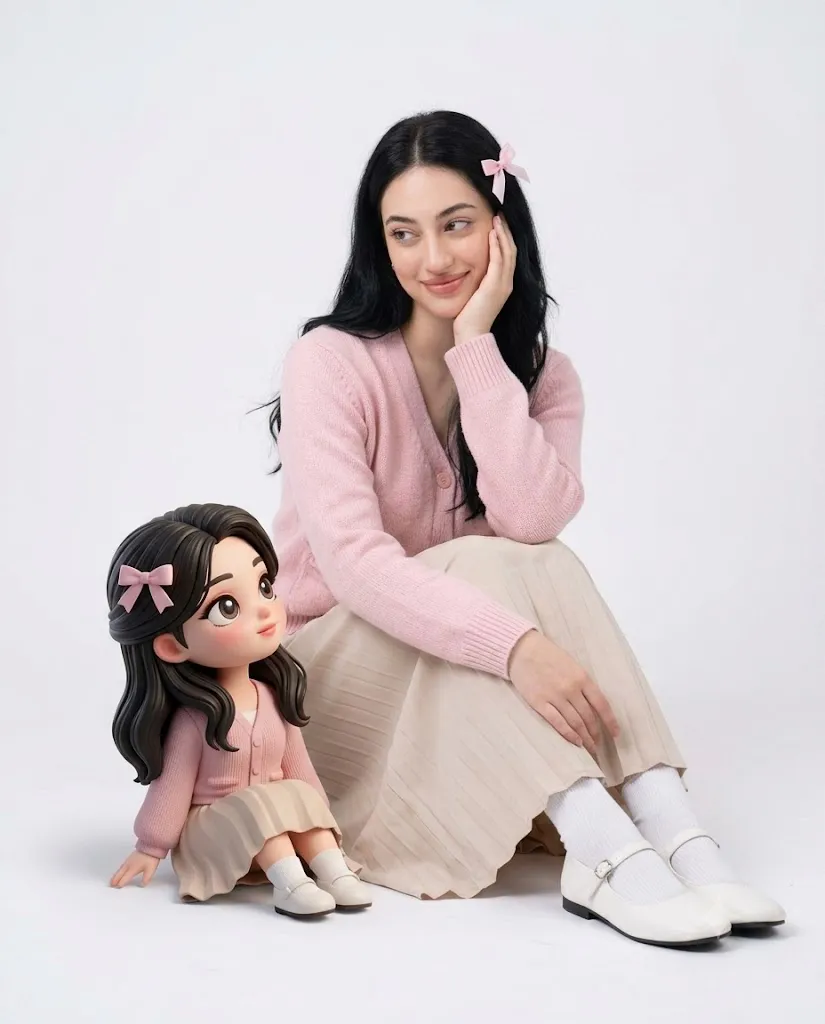
The Studio Portrait with Chibi Companion Prompt combines elegant fashion portrait photography with the playful charm of a premium 3D chibi character. The result is a heartwarming editorial-style image where a realistic subject and an animated miniature version of themselves interact naturally in a clean, high-key studio environment. This concept blends realism and stylized character design while maintaining a polished, professional aesthetic.
"Studio Portrait with Chibi Companion Prompt"
Use the uploaded image only for the female subject's identity. Preserve her facial features, hairstyle, skin tone, apparent age, facial maturity, and body proportions exactly. Create a vertical 4:5 photorealistic studio portrait on a seamless white background. The subject sits gracefully with one knee bent and the other leg extending toward the camera. One hand gently rests against her cheek while the other relaxes naturally across her knee. She wears a pastel pink knitted cardigan, beige pleated skirt, white socks, white Mary Jane shoes, and a small pink ribbon in her hair. Place a premium 3D chibi version of the subject beside her, wearing matching clothing and hairstyle. The doll should interact naturally with the subject through eye contact, warm smiles, and affectionate body language. Use soft high-key studio lighting, realistic skin texture, crisp fabric detail, subtle natural shadows, premium editorial quality, and 8K resolution. No text or watermark.
A defining feature of this prompt is strict identity preservation. The uploaded reference image is used only for the female subject's identity, including her facial features, hairstyle, skin tone, age appearance, body proportions, and overall likeness. The AI should not beautify, age, de-age, or alter her facial maturity. Her appearance must remain faithful to the reference while adapting naturally to the new studio pose and outfit.
The composition is designed as a vertical 4:5 portrait, ideal for magazine covers, social media posts, fashion editorials, portfolio photography, and premium prints. The subject sits gracefully on a seamless white studio floor with a relaxed, visually pleasing pose. One knee is raised while the other leg extends toward the camera, creating subtle foreground depth. One hand gently supports her cheek while the other rests naturally across her lap or knee, producing an elegant yet approachable posture.
The wardrobe contributes significantly to the soft aesthetic. A pastel pink knitted cardigan paired with a flowing beige pleated skirt creates a timeless feminine look. White socks, classic white Mary Jane shoes, and a delicate pink ribbon clipped into her hair complete the styling without overwhelming the portrait.
The highlight of the composition is the premium 3D chibi companion positioned beside the subject near her knee. Rather than acting as a separate object, the doll should clearly resemble the subject with matching facial characteristics, hairstyle, outfit colors, and age impression. The interaction between them should feel genuine. Eye contact, smiles, and body language should communicate warmth and affection, making the doll appear like a magical miniature version of the subject.
Soft diffused studio lighting, realistic skin textures, finely detailed hair strands, crisp clothing folds, and minimal composition ensure the portrait maintains a premium editorial appearance suitable for modern fashion campaigns and creative storytelling.
How To Use Photo Editing?
Professional editing refines the image while preserving realism and strengthening the emotional connection between the subject and the chibi companion.
Begin by adjusting exposure to create bright, clean white backgrounds without losing detail in clothing or skin.
Balance the white balance carefully to maintain soft neutral tones while preserving natural skin color.
Enhance realistic skin texture rather than applying excessive smoothing. Small natural pores should remain visible.
Increase clarity in knitted fabric, pleated skirt folds, and individual hair strands.
Refine the chibi character with slightly brighter highlights and cleaner edges while ensuring it blends naturally into the realistic environment.
Maintain gentle shadows beneath both the subject and the doll to preserve realism and grounding.
Finish the portrait using subtle cinematic color grading with soft pastel tones that emphasize warmth and innocence.
Tools You Can Use For Prompt Copy and Create Photo
Several AI platforms and editing applications can help produce high-quality studio portraits.
AI Image Generation Tools
ChatGPT
Useful for creating highly detailed prompts with accurate descriptions for lighting, composition, wardrobe, and identity preservation.
Midjourney
Excellent for premium editorial artwork with beautiful stylized aesthetics.
Leonardo AI
Produces realistic portraits while supporting detailed character generation.
Ideogram
Suitable for fashion-style compositions and stylized portrait concepts.
Adobe Firefly
Offers AI image generation integrated with Adobe Creative Cloud.
Professional Editing Software
Adobe Photoshop
Perfect for portrait retouching, compositing, and detailed finishing.
Adobe Lightroom
Excellent for exposure correction, color grading, and studio lighting adjustments.
Capture One
Provides exceptional skin-tone rendering and advanced color management.
Affinity Photo
Offers professional portrait editing tools at an affordable price.
Snapseed
Ideal for mobile adjustments including brightness, contrast, warmth, and detail enhancement
How To Edit Photo?
Step 1: Upload the Reference Image
Use one high-quality reference image showing the subject clearly.
Step 2: Generate the Base Portrait
Create the full composition while preserving the exact facial identity.
Step 3: Balance Exposure
Maintain bright white backgrounds while protecting clothing detail.
Step 4: Preserve Natural Skin
Enhance realism without over-smoothing facial textures.
Step 5: Refine Hair
Increase definition in individual hair strands and natural shine.
Step 6: Improve Clothing Details
Sharpen knitted textures, pleats, socks, and shoes while maintaining realistic fabric appearance.
Step 7: Enhance the Chibi Companion
Increase clarity, color harmony, and smooth animation styling without making it appear disconnected from the scene.
Step 8: Adjust Shadows
Create soft contact shadows beneath both the subject and doll to improve realism.
Step 9: Apply Gentle Color Grading
Use subtle pastel tones while maintaining natural skin color.
Step 10: Verify Identity Preservation
Compare the portrait carefully against the uploaded reference to confirm accurate facial consistency.
Step 11: Remove Artifacts
Eliminate unwanted distortions while preserving authentic textures.
Step 12: Export the Final Image
Save the portrait as PNG or TIFF for maximum quality suitable for print and digital platforms.
Conclusion
The Studio Portrait with Chibi Companion Prompt creates a charming combination of realistic portrait photography and premium animated character design. By placing a lifelike subject beside a carefully designed miniature version of herself, the image tells a gentle visual story filled with warmth, personality, and playful elegance.
The minimalist white studio setting ensures the viewer's attention remains focused entirely on the interaction between the subject and her chibi companion. Soft pastel clothing, high-key lighting, realistic skin textures, and balanced composition create an editorial-quality image that feels both fashionable and emotionally engaging.
Achieving excellent results requires careful prompt writing, accurate identity preservation, realistic lighting, detailed wardrobe rendering, and thoughtful post-processing. Every refinement—from hair strands and fabric textures to facial consistency and subtle shadow placement—contributes to a polished final portrait.
Whether you are creating portfolio artwork, magazine-style fashion images, social media content, creative branding, or collectible character portraits, the Studio Portrait with Chibi Companion Prompt provides an excellent foundation for producing premium-quality images that beautifully combine realism with imagination.