Introduction
Comic book covers have long been celebrated for their bold colors, dynamic compositions, and unforgettable heroes. They capture confidence, personality, and storytelling within a single frame. The Semi-Realistic Comic Cover Hero Portrait Prompt blends modern AI image generation with classic comic-book aesthetics to produce a portrait that feels both cinematic and artistic. Instead of creating a fully animated cartoon, this prompt combines realistic facial features with stylized comic illustration techniques, resulting in a hybrid portrait that is expressive, dramatic, and visually striking.
"Semi-Realistic Comic Cover Hero Portrait Prompt"
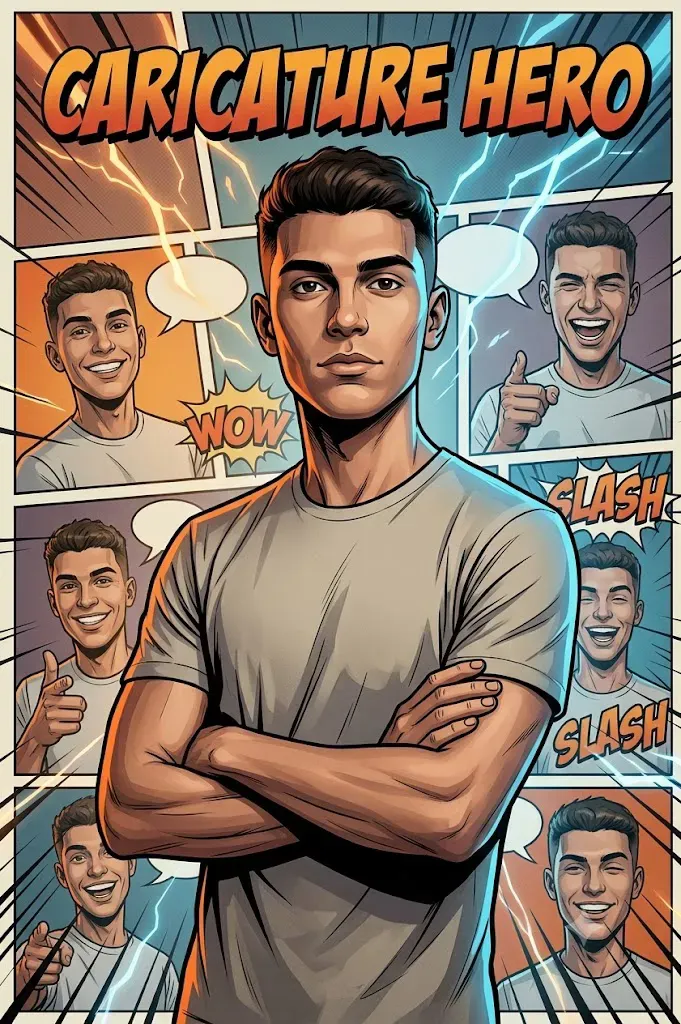
Create a semi-realistic comic cover portrait using the uploaded image strictly as the facial identity reference. Preserve the face exactly without alteration. Show the subject standing confidently in a centered half-body composition with a calm yet heroic expression. Behind the subject, arrange multiple stylized comic panels featuring the same character smiling, pointing, laughing, and winking. Include subtle comic speech bubbles containing words like 'WOW' and 'SLASH'. Apply cinematic dual-tone lighting with warm orange highlights and cool blue shadows. Use muted comic-inspired colors, dramatic contrast, dynamic action lines, premium graphic novel cover composition, ultra-detailed textures, photorealistic facial rendering, shallow depth of field, editorial-quality artwork, and 8K resolution.
The concept begins with preserving the uploaded face exactly as it appears in the reference image. Facial structure, eye shape, skin tone, hairstyle around the face, and expression should remain recognizable without beautification or distortion. Only the artistic environment, lighting, costume styling, and comic-inspired background are transformed.
The main portrait presents the subject standing confidently in a centered half-body composition with a calm yet heroic expression. Behind the subject, multiple comic panels display alternate versions of the same character smiling, pointing, laughing, and winking. These supporting panels create the impression of a graphic novel cover while reinforcing the personality of the central character.
Action words such as "WOW" and "SLASH" appear inside subtle comic speech bubbles, adding energy without overwhelming the composition. Dynamic lines radiate behind the figure, enhancing movement and visual excitement.
Lighting is one of the defining characteristics of this style. A cinematic orange-and-blue dual-light setup creates depth, contrast, and an unmistakable blockbuster atmosphere. The warm highlights and cool shadows sculpt the subject while preserving realistic skin texture.
Unlike exaggerated caricatures that dramatically distort facial proportions, this prompt aims for a semi-realistic interpretation. Facial identity remains authentic while only subtle stylistic exaggerations enhance expression and presence. The result resembles premium comic cover artwork suitable for posters, profile images, editorial illustrations, or collectible prints.
Whether you're a digital artist, AI creator, or comic enthusiast, this prompt provides a perfect balance between realism and imaginative illustration.
How To Use Photo Editing?
Once the AI-generated portrait is complete, careful photo editing can enhance the comic-book appearance without sacrificing realism. The goal is to strengthen the visual storytelling while preserving the subject's recognizable identity.
Begin by adjusting the contrast. Comic-inspired artwork benefits from bold separation between highlights and shadows, but avoid crushing dark areas completely. The face should remain fully detailed and naturally illuminated.
Next, enhance the cinematic orange-and-blue lighting. Warm highlights should appear on one side of the face while cooler blue tones subtly shape the opposite side. This complementary color combination creates dramatic visual depth.
Increase local clarity selectively around the eyes, hair, clothing, and facial contours. Avoid excessive sharpening on the skin, as natural texture contributes to realism.
The comic panels in the background should remain slightly softer than the central portrait. This creates visual hierarchy and keeps attention focused on the main subject.
Introduce subtle halftone textures only where appropriate. Rather than covering the entire portrait, light comic-inspired textures can be applied to the background or speech bubbles for added authenticity.
Dynamic lines and action effects should remain clean and crisp. Their purpose is to support movement rather than dominate the composition.
Maintain realistic skin tones despite the stylized lighting. Over-saturated colors can make the portrait appear artificial, while balanced grading preserves the semi-realistic aesthetic.
Finally, ensure the composition remains balanced. Speech bubbles, comic panels, and typography should complement the portrait without distracting from the central figure.
Tools You Can Use For Prompt Copy and Create Photo
Producing professional comic-inspired portraits requires high-quality AI generation together with capable editing software.
AI Image Generation Tools
ChatGPT
ChatGPT is ideal for writing detailed prompts that describe facial preservation, lighting, background elements, comic styling, and composition with precision.
Midjourney
Midjourney creates artistic cinematic imagery with impressive color grading and stylized illustrations.
Leonardo AI
Leonardo AI specializes in detailed portraits while maintaining excellent facial consistency.
Ideogram
Ideogram performs well for poster-style compositions and graphic designs containing typography.
Adobe Firefly
Adobe Firefly integrates AI image generation with professional design workflows and editing tools.
Photo Editing Software
Adobe Photoshop
Perfect for adding comic panels, speech bubbles, typography, lighting effects, and color grading.
Adobe Lightroom
Useful for exposure adjustments, cinematic color grading, and tonal refinement.
Affinity Photo
Offers professional editing capabilities suitable for comic-inspired artwork.
Clip Studio Paint
Excellent for adding comic effects, action lines, and stylized graphic elements.
Snapseed
Provides quick mobile adjustments for lighting, clarity, and color enhancement.
How To Edit Photo?
Step 1: Generate the Base Portrait
Create the initial portrait while preserving the uploaded facial identity exactly.
Step 2: Balance Exposure
Ensure the subject remains brighter than the background while preserving natural facial details.
Step 3: Apply Dual-Tone Lighting
Introduce complementary orange and blue lighting to create cinematic depth.
Step 4: Refine Skin Texture
Maintain realistic skin pores and natural facial characteristics without heavy smoothing.
Step 5: Build the Comic Background
Arrange supporting comic panels behind the main portrait with balanced spacing.
Step 6: Add Action Typography
Place subtle words such as "WOW" and "SLASH" inside clean comic speech bubbles.
Step 7: Enhance Dynamic Lines
Use graphic motion lines to reinforce the heroic composition without overwhelming the subject.
Step 8: Improve Color Harmony
Balance muted comic colors while keeping skin tones realistic and consistent.
Step 9: Refine Shadows
Strengthen shadow depth to increase contrast while preserving facial visibility.
Step 10: Sharpen Important Details
Apply selective sharpening to the eyes, clothing, and hair while keeping the background slightly softer.
Step 11: Final Composition Check
Ensure the portrait remains centered with comic elements supporting rather than distracting from the main subject.
Step 12: Export the Artwork
Save the final image in high-resolution PNG or TIFF format for printing, posters, or digital publishing.
Conclusion
The Semi-Realistic Comic Cover Hero Portrait Prompt combines the excitement of superhero comics with the realism of modern portrait photography. By preserving the subject's authentic facial identity while introducing cinematic lighting, stylized comic panels, and graphic storytelling elements, the prompt creates artwork that feels dynamic, premium, and memorable.
The balanced combination of realistic rendering and comic-inspired design makes this style suitable for profile images, posters, social media artwork, gaming avatars, personal branding, and creative portfolios. Every detail—from the confident pose and dramatic lighting to the expressive background panels—contributes to the impression of a professional graphic novel cover.
Today's AI image-generation technology allows creators to explore imaginative visual concepts with remarkable realism. When combined with thoughtful prompt writing and careful post-processing, it becomes possible to produce portraits that are both technically impressive and artistically expressive.
Whether you're designing a superhero-inspired profile, creating collectible-style artwork, or simply experimenting with modern AI creativity, the Semi-Realistic Comic Cover Hero Portrait Prompt provides an engaging way to transform an ordinary portrait into a bold visual story that captures confidence, personality, and cinematic style.