Introduction
Paris has long been recognized as the fashion capital of the world, inspiring photographers, designers, and digital artists with its timeless elegance and sophisticated street style. The Parisian Street Style Fashion Editorial Portrait Prompt captures the essence of luxury fashion by combining classic Parisian architecture, editorial posing, and cinematic photography into a single stunning image.
"Parisian Street Style Fashion Editorial Portrait Prompt"
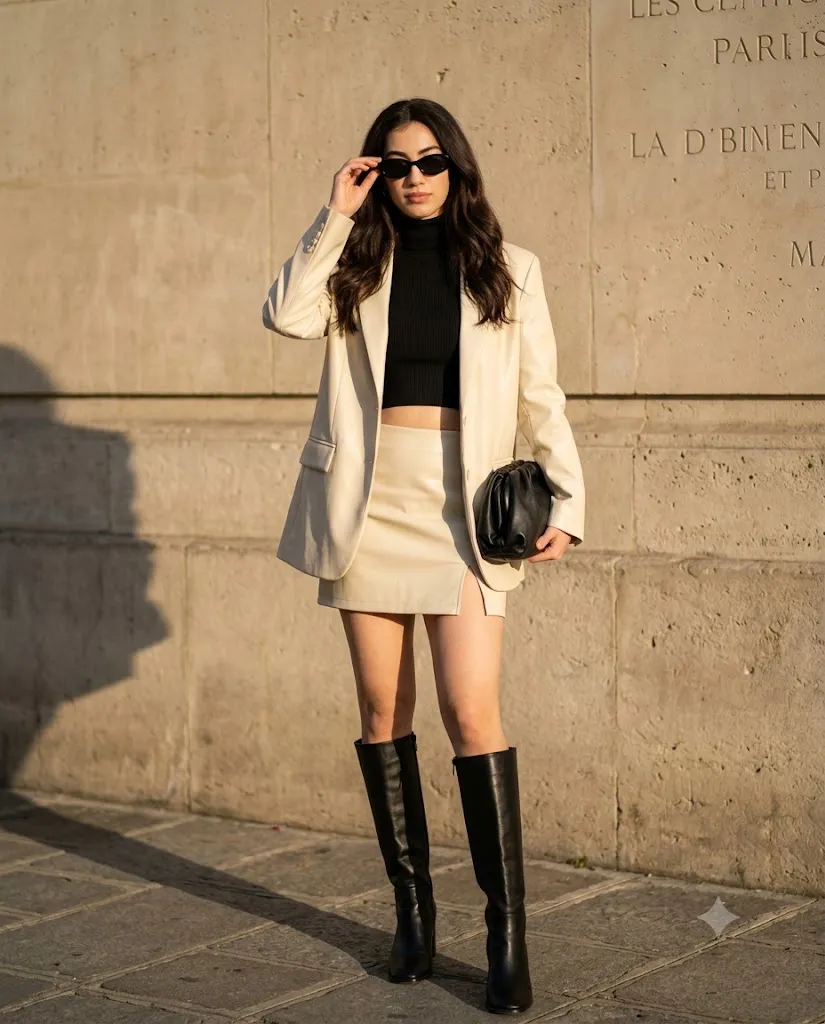
Use the provided face reference image with high facial fidelity. Generate a full-body fashion editorial portrait of a confident young woman standing against a textured Parisian stone wall on a cobblestone street. She wears an oversized cream leather blazer over a black ribbed turtleneck crop top, paired with a cream leather mini skirt featuring a subtle side slit and sleek knee-high black leather boots. She adjusts her oval black sunglasses with one hand while holding a soft black leather pouch bag in the other. Her long brunette hair falls in loose voluminous waves. Warm golden-hour sunlight enters from the left, creating strong cinematic shadows and luxurious contrast. Neutral cream, black, and stone tones dominate the composition. Fashion editorial photography, ultra-realistic, shallow depth of field, cinematic lighting, premium magazine quality, 4:5 aspect ratio, full body visible with no cropping.
This prompt features a confident model standing against a textured beige stone wall on a charming Parisian street. Wearing an oversized cream leather blazer over a black ribbed turtleneck crop top, paired with a cream leather mini skirt and knee-high black leather boots, the outfit perfectly blends modern luxury with effortless street fashion. Oval black sunglasses and a soft leather pouch bag complete the sophisticated editorial look.
Golden-hour sunlight casts dramatic shadows across the stone wall, while the neutral color palette of cream, black, and natural stone creates an elegant visual balance. The result is an ultra-realistic fashion portrait that resembles the cover of a luxury fashion magazine.
Whether you're creating AI-generated fashion portraits, social media content, or portfolio images, this prompt delivers a professional editorial aesthetic with realistic lighting, high detail, and cinematic depth.
How To Use Photo Editing?
Once your AI portrait has been generated, photo editing helps refine the image and elevate it to magazine-quality standards. Even the best AI-generated images benefit from professional adjustments that improve lighting, colors, textures, and overall realism.
Begin by adjusting the exposure to create a balanced image while maintaining the dramatic contrast produced by golden-hour lighting. Increase contrast slightly to enhance the luxurious editorial feel, but avoid crushing the shadows.
Fine-tune the white balance by adding warm golden tones to complement the natural sunlight. Adjust highlights carefully to preserve details in the cream leather outfit while keeping the stone wall rich in texture.
Selective masking can be used to brighten the subject's face while subtly darkening the background, ensuring that the model remains the focal point. Increase texture and clarity on the leather blazer, boots, and accessories to emphasize premium fashion materials.
Finally, apply a subtle vignette and a touch of cinematic color grading to complete the luxury editorial appearance.
Tools You Can Use For Prompt Copy and Create Photo
Several AI image generators are capable of producing high-quality fashion editorials using detailed prompts like this one. Below are some of the most popular options.
1. ChatGPT Image Generation
ChatGPT can generate highly realistic fashion portraits with excellent prompt understanding. It produces natural lighting, detailed clothing textures, and cinematic compositions.
2. Midjourney
Midjourney excels at editorial fashion photography, luxury styling, artistic lighting, and realistic urban environments, making it one of the best choices for street-style portraits.
3. Flux AI
Flux AI creates ultra-realistic portraits with outstanding facial detail, natural skin texture, and high-quality fashion rendering.
4. Leonardo AI
Leonardo AI provides advanced prompt controls and customizable image generation, allowing creators to achieve professional editorial results with ease.
5. Google Gemini
Google Gemini offers AI-powered image generation capable of producing realistic portraits with balanced lighting and detailed fashion elements.
6. Adobe Firefly
Adobe Firefly integrates seamlessly with Adobe Creative Cloud, making it ideal for creators who want to combine AI generation with professional editing.
7. Ideogram AI
Ideogram AI delivers clean, realistic portraits and accurately follows detailed fashion prompts, making it a great option for editorial photography.
How To Edit Photo?
Creating a luxury editorial portrait becomes easy when you follow these simple editing steps.
Step 1: Copy the Prompt
Copy the complete AI prompt and paste it into your preferred AI image generator such as ChatGPT, Midjourney, Flux AI, Leonardo AI, or Google Gemini.
Step 2: Generate the Image
Select the highest available quality (HD or 4K) and generate the portrait. If necessary, regenerate until the pose, facial expression, lighting, and outfit match your vision.
Step 3: Download the Image
Save the generated image in the highest available resolution to preserve maximum detail for editing.
Step 4: Open in a Photo Editing App
Import the image into Adobe Lightroom, Adobe Photoshop, Snapseed, PicsArt, or Canva for post-processing.
Step 5: Adjust Lighting and Colors
Increase exposure slightly, lower highlights, deepen shadows, and add subtle contrast. Apply warm golden-hour color grading to enhance the luxurious Parisian atmosphere.
Step 6: Enhance Fashion Details
Increase texture and clarity on the leather blazer, boots, handbag, and hair while maintaining natural skin texture.
Step 7: Apply Cinematic Effects
Add a soft vignette, gentle sharpening, and subtle color grading. If desired, introduce a small amount of film grain for an authentic editorial appearance.
Step 8: Export the Final Image
Export the portrait in high-resolution JPG or PNG format. Your Parisian fashion editorial portrait is now ready for Instagram, Pinterest, websites, blogs, or professional portfolios.
Conclusion
The Parisian Street Style Fashion Editorial Portrait Prompt perfectly combines luxury fashion, timeless architecture, and cinematic photography into one elegant composition. Inspired by modern European street style, this prompt creates magazine-quality portraits that showcase confidence, sophistication, and effortless elegance.
Whether you're an AI artist, fashion enthusiast, photographer, or content creator, this prompt provides everything needed to produce visually stunning editorial portraits. By combining a detailed AI prompt with thoughtful photo editing, you can achieve professional-quality images suitable for social media, digital portfolios, fashion campaigns, and creative projects.
Experiment with different poses, lighting angles, accessories, and color grading styles to personalize your results while maintaining the iconic Parisian editorial aesthetic. The combination of luxury styling, natural golden-hour lighting, and cinematic composition ensures every portrait feels timeless and captivating.