Introduction
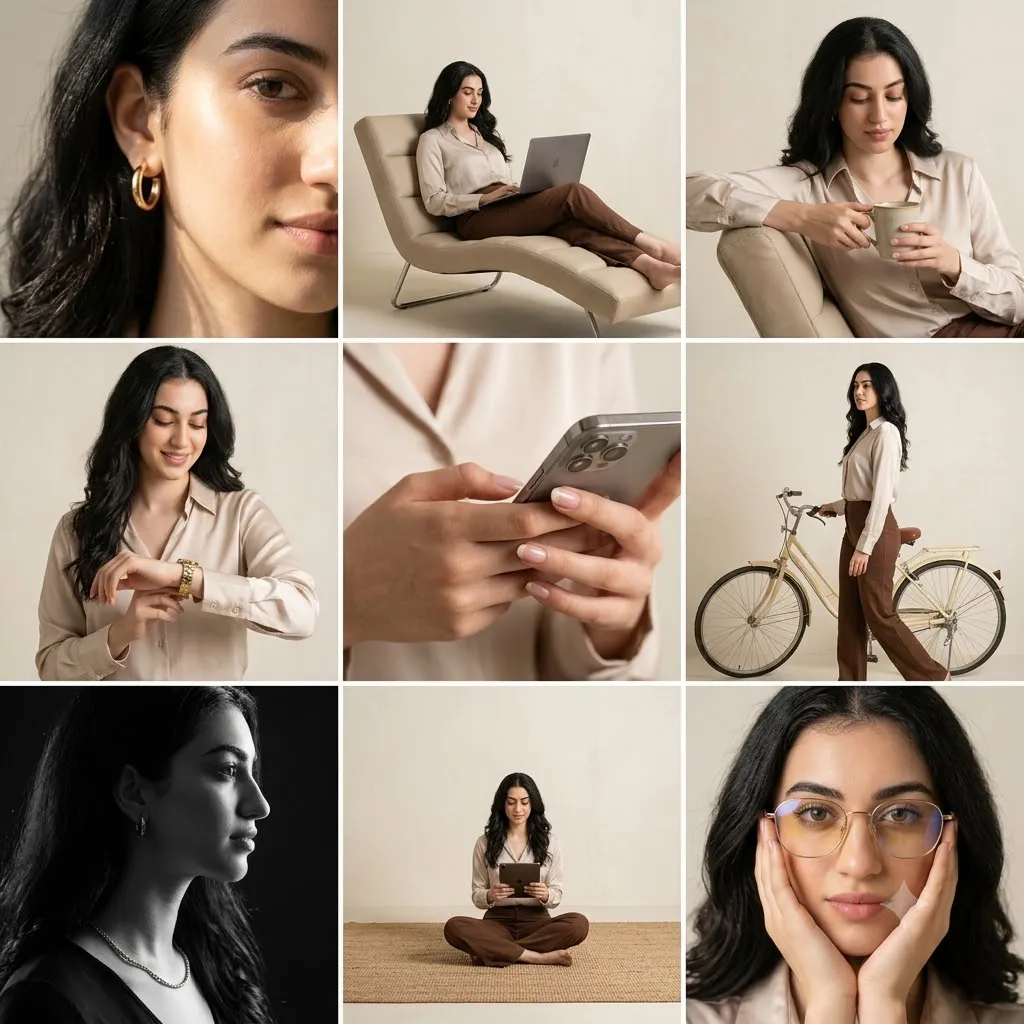
The Minimal Editorial 3×3 Studio Portrait Grid Prompt is designed to recreate the polished look of a professional fashion contact sheet often seen in luxury magazines, model portfolios, and commercial lifestyle campaigns. Instead of producing a single image, this prompt creates a beautifully organized 3×3 photo grid, showcasing nine unique studio photographs that highlight different poses, camera angles, expressions, and compositions while maintaining a consistent editorial style.
"Minimal Editorial 3×3 Studio Portrait Grid Prompt"
Create a professional editorial 3×3 studio portrait grid using the uploaded image strictly as the facial identity reference. Preserve the exact facial features, skin tone, proportions, and hairstyle without alteration. Dress the subject in a cream silk blouse, camel high-waisted trousers, gold hoop earrings, and minimal bracelets. Place the subject inside a clean cream-colored studio with large softbox lighting from the left, reflector from the right, and a subtle top rim light. Produce nine unique photographs including close-ups, full-body portraits, lifestyle poses, black-and-white profile, smartphone detail, seated compositions, walking pose, and expressive editorial portraits. Simulate DSLR photography using 35mm, 50mm, and 85mm lenses with realistic depth of field, warm color grading, soft contrast, premium textures, RAW-quality realism, and 8K resolution.
This prompt emphasizes identity preservation. The uploaded reference image should be used strictly as the facial reference, preserving the exact facial structure, skin tone, hairstyle, eye shape, lips, nose, and overall proportions without beautification or modification. Every frame in the grid should clearly represent the same individual from different perspectives.
The wardrobe follows a timeless minimalist aesthetic. A smooth cream silk blouse pairs elegantly with camel high-waisted trousers, while simple gold hoop earrings and delicate bracelets add understated sophistication. The neutral color palette allows lighting, textures, and expressions to become the primary visual focus.
The studio environment is intentionally clean and uncluttered. A warm cream or beige backdrop creates a luxurious atmosphere without distracting from the subject. Large softbox lighting placed at the left-front provides flattering illumination, while a reflector on the opposite side softens shadows. A subtle rim light from above adds gentle separation between the subject and the background.
Each of the nine photographs explores a different editorial composition—from an extreme facial close-up to a full-body seated portrait, smartphone detail shot, black-and-white profile, relaxed lifestyle pose, and creative interaction with props such as a lounge chair, laptop, coffee mug, bicycle, and tablet. Together they tell a complete visual story while maintaining consistency in lighting, styling, and mood.
The photographs simulate images captured in RAW format using professional DSLR cameras with focal lengths ranging from 35mm to 85mm. Warm color grading, soft contrast, realistic textures, and shallow depth of field create a luxurious editorial appearance suitable for magazine layouts, creative portfolios, fashion campaigns, and social media branding.
How To Use Photo Editing?
Once the AI-generated grid has been created, careful editing helps unify all nine images into a cohesive editorial collection.
Begin by balancing exposure across every frame. Since the images belong to one contact sheet, brightness and contrast should remain consistent throughout the entire grid.
Adjust white balance to maintain warm cream tones while preserving realistic skin color. The silk blouse should appear soft and luminous without becoming overly bright, while camel trousers should retain their natural earthy warmth.
Enhance the texture of silk, leather accessories, metallic jewelry, and hair using selective clarity. Avoid sharpening skin excessively, as editorial portraits look best when skin remains natural.
Refine shadows carefully. The softbox should create flattering directional light while the reflector keeps shadow areas smooth and subtle.
Apply identical color grading to every image. Consistency is essential for creating the impression of a professionally photographed editorial series rather than unrelated individual portraits.
If desired, introduce a small amount of realistic grain to emulate high-end fashion photography while maintaining excellent detail and resolution.
Tools You Can Use For Prompt Copy and Create Photo
Professional editorial portrait grids can be produced by combining advanced AI image-generation tools with professional editing software.
AI Image Generation Tools
ChatGPT
ChatGPT is excellent for writing detailed prompts describing wardrobe, lighting, camera settings, identity preservation, and studio composition.
Midjourney
Midjourney creates artistic editorial portraits with premium lighting and fashion styling.
Leonardo AI
Leonardo AI produces highly realistic portrait photography while maintaining facial consistency across multiple images.
Ideogram
Ideogram is useful for editorial layouts, magazine covers, and contact-sheet-style compositions.
Adobe Firefly
Adobe Firefly integrates AI-powered image generation into professional creative workflows.
Photo Editing Software
Adobe Photoshop
Ideal for advanced retouching, background cleanup, grid assembly, and detailed finishing.
Adobe Lightroom
Perfect for consistent exposure, white balance, and color grading across all nine photographs.
Capture One
Offers industry-leading color rendering and portrait editing tools for fashion photographers.
Affinity Photo
Provides professional retouching capabilities with excellent value.
Snapseed
A practical mobile editing application for quick tonal and color adjustments.
How To Edit Photo?
Step 1: Generate the Complete Grid
Create all nine editorial portraits while preserving identical facial identity.
Step 2: Balance Exposure
Maintain consistent brightness across every photograph.
Step 3: Refine Skin Tone
Preserve realistic complexion without heavy smoothing or beautification.
Step 4: Enhance Clothing Texture
Bring out the soft sheen of silk and the natural folds of the trousers.
Step 5: Improve Jewelry Details
Increase clarity on gold earrings, bracelets, watches, and necklaces while maintaining realism.
Step 6: Match Color Grading
Apply identical warm editorial tones throughout the complete photo grid.
Step 7: Sharpen Important Areas
Focus sharpening on the eyes, hair, accessories, and clothing while leaving skin natural.
Step 8: Refine Background
Keep the cream studio background clean, minimal, and evenly lit.
Step 9: Preserve Depth of Field
Ensure each lens simulation maintains realistic background separation appropriate to its aperture.
Step 10: Organize the Grid
Align spacing, margins, and image proportions carefully to create a balanced editorial layout.
Step 11: Remove Minor Distractions
Clean temporary imperfections while preserving authentic facial features and textures.
Step 12: Export in High Resolution
Save the final portrait grid as PNG or TIFF to preserve maximum quality for digital publishing, print portfolios, and magazine presentations.
Conclusion
The Minimal Editorial 3×3 Studio Portrait Grid Prompt transforms a standard portrait into a complete editorial story by combining nine professionally styled images within one elegant layout. Each frame highlights a different pose, composition, and expression while maintaining a consistent fashion identity, lighting setup, and visual language.
The neutral wardrobe, cream studio background, carefully controlled lighting, and refined editorial styling produce timeless portraits suitable for fashion portfolios, commercial branding, social media campaigns, and magazine publications. By emphasizing realistic textures, natural facial identity, and subtle luxury, the prompt creates imagery that feels both modern and enduring.
Modern AI image-generation technology makes it possible to produce sophisticated editorial layouts with remarkable efficiency, but achieving premium results still depends on a carefully written prompt and thoughtful post-processing. Maintaining consistent exposure, color grading, skin tones, and composition across all nine photographs is essential for creating a believable professional contact sheet.
Whether you are building a model portfolio, creating marketing materials, developing editorial fashion content, or exploring AI-assisted photography, the Minimal Editorial 3×3 Studio Portrait Grid Prompt provides a versatile framework for producing polished, cohesive, and visually compelling studio imagery that reflects the quality of a luxury fashion publication.