Introduction
The Lime Daisy Saree Alley Portrait Prompt is a beautiful blend of traditional Indian fashion and modern lifestyle photography. It combines the elegance of a floral saree with the charm of a narrow heritage-style alleyway, creating a portrait that feels authentic, cinematic, and timeless. Inspired by editorial fashion magazines and travel photography, this prompt emphasizes natural beauty, realistic lighting, and carefully balanced composition.
"Lime Daisy Saree Alley Portrait Prompt"
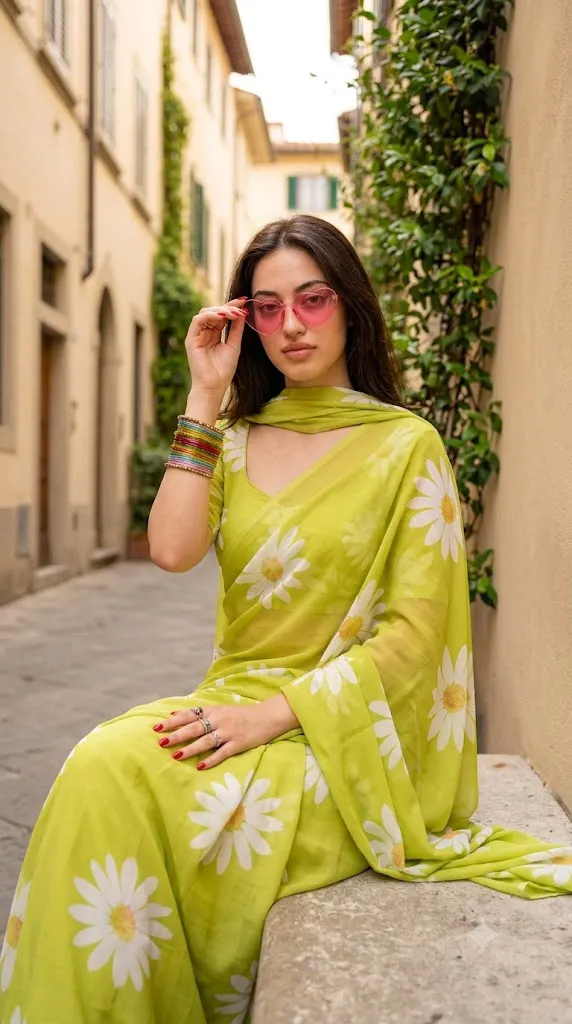
Create a photorealistic portrait using the uploaded image strictly as the facial identity reference. Preserve the exact facial structure, skin tone, hairstyle, eyes, eyebrows, nose, lips, jawline, and facial proportions without beautification. Remove the earrings while keeping the face unchanged. Dress the subject in a lime green saree with large white daisy patterns and a matching dupatta. Add pink heart-shaped sunglasses, colorful bangles on the right wrist, rings on the left hand, and glossy red nail polish. Position the subject sitting naturally on a stone bench inside a narrow alley featuring beige buildings and subtle greenery. The right hand adjusts the sunglasses while the left hand rests on the lap. Capture the portrait using a professional DSLR with an 85mm portrait lens, warm natural lighting, realistic skin texture, shallow depth of field, cinematic color grading, fine analog film grain, and ultra-detailed 8K quality. No text or watermark.
The primary objective of this prompt is to generate a highly photorealistic portrait while preserving the subject's original identity. If an uploaded reference image is used, the face must remain 100% identical. Every facial feature—including the eyes, eyebrows, nose, lips, jawline, hairstyle around the face, facial proportions, and natural skin tone—should remain unchanged. The AI should not beautify, reshape, or modify the face in any way. The only requested facial adjustment is the removal of earrings, while keeping every other facial characteristic exactly the same.
The wardrobe brings a fresh, youthful appearance. The subject wears a vibrant lime green saree decorated with large white daisy patterns, paired with a matching dupatta that flows naturally over the shoulder. The floral design creates a cheerful contrast against the warm neutral colors of the surrounding buildings.
Accessories introduce playful elegance without overpowering the portrait. Pink heart-shaped sunglasses, colorful bangles on the right wrist, rings on the left hand, and glossy red nail polish add personality while maintaining a sophisticated editorial style.
The environment plays an equally important role. A quiet stone bench positioned inside a narrow alley lined with beige buildings and subtle greenery creates a calm, intimate atmosphere. Soft natural daylight gently illuminates the subject while producing warm shadows that enhance realism.
The chosen pose feels spontaneous and relaxed. The right hand gently adjusts the sunglasses while the left hand rests naturally on the lap, giving the portrait a candid lifestyle feeling rather than a heavily posed appearance.
Captured using a professional DSLR or mirrorless camera with a portrait lens, the final image should feature realistic skin texture, sharp details, natural color rendering, shallow depth of field, and cinematic editorial quality suitable for fashion campaigns, travel magazines, cultural editorials, and social media content.
How To Use Photo Editing?
Professional editing helps transform an already beautiful AI-generated portrait into a polished editorial image while maintaining realism.
Start by balancing exposure carefully. Soft daylight should illuminate the subject naturally without losing detail in the bright saree or surrounding buildings.
Adjust white balance toward warm natural sunlight to create a welcoming atmosphere while preserving accurate skin tones.
Maintain realistic skin texture throughout the editing process. Light retouching may reduce temporary imperfections, but natural pores and facial details should remain visible.
Since the prompt specifically requests removing earrings, carefully erase them while preserving the natural contours of the ears and surrounding hair.
Increase local clarity around the floral patterns of the saree, colorful bangles, sunglasses, and stone textures.
Enhance the greenery subtly without making colors appear oversaturated.
Finish the portrait with gentle cinematic color grading and fine analog-inspired film grain for an elegant editorial appearance.
Tools You Can Use For Prompt Copy and Create Photo
Modern AI generators and professional editing applications simplify the creation of realistic fashion portraits.
AI Image Generation Tools
ChatGPT
Ideal for writing highly detailed prompts describing identity preservation, clothing, accessories, lighting, and environmental elements.
Midjourney
Excellent for cinematic editorial portraits and artistic fashion photography.
Leonardo AI
Produces highly realistic faces with excellent texture and environmental detail.
Ideogram
Useful for lifestyle and editorial portrait generation.
Adobe Firefly
Integrates AI generation with Adobe Creative Cloud for seamless workflows.
Professional Editing Software
Adobe Photoshop
Perfect for removing earrings, refining lighting, and enhancing portrait details.
Adobe Lightroom
Excellent for color grading, exposure correction, and cinematic finishing.
Capture One
Offers exceptional skin-tone rendering and professional color management.
Affinity Photo
Provides advanced editing features for portrait refinement.
Snapseed
Useful for mobile editing with intuitive controls for lighting, warmth, and detail.
How To Edit Photo?
Step 1: Generate the Base Portrait
Create the complete alleyway scene while preserving the uploaded facial identity exactly.
Step 2: Remove Earrings
Carefully eliminate the earrings without affecting facial proportions or hair placement.
Step 3: Balance Exposure
Maintain detail throughout the bright saree, skin, and surrounding architecture.
Step 4: Preserve Natural Skin
Retain realistic skin texture with minimal retouching.
Step 5: Refine Hair
Enhance individual hair strands while preserving natural movement and shine.
Step 6: Improve Clothing Texture
Increase clarity within the floral saree patterns and flowing dupatta.
Step 7: Enhance Accessories
Refine the heart-shaped sunglasses, colorful bangles, rings, and nail polish while maintaining realism.
Step 8: Apply Cinematic Color Grading
Balance warm alley lighting with vibrant greens and neutral architectural tones.
Step 9: Add Fine Film Grain
Introduce subtle analog-inspired grain to reinforce the editorial aesthetic.
Step 10: Verify Facial Consistency
Ensure the face remains identical to the uploaded reference image with only the earrings removed.
Step 11: Final Refinements
Remove unwanted artifacts while maintaining realistic lighting transitions and environmental depth.
Step 12: Export in High Resolution
Save the completed portrait as PNG or TIFF to preserve maximum quality for fashion editorials, portfolios, social media, or print.
Conclusion
The Lime Daisy Saree Alley Portrait Prompt beautifully combines traditional fashion, contemporary styling, and cinematic lifestyle photography into a highly realistic editorial portrait. The vibrant floral saree, playful accessories, warm alleyway setting, and natural pose create an image filled with personality while maintaining elegance and authenticity.
The prompt places strong emphasis on complete facial identity preservation, ensuring that every recognizable facial feature remains exactly the same as the uploaded reference image. The only requested facial adjustment—removing the earrings—is performed without altering the subject's appearance in any other way.
Every visual element, from the warm natural lighting and textured stone bench to the floral saree, beige architecture, subtle greenery, and realistic accessories, contributes to a timeless composition suitable for cultural editorials, fashion magazines, travel campaigns, and lifestyle photography.
Although AI image generation can produce remarkable results, exceptional portraits still rely on carefully written prompts and thoughtful post-processing. Preserving facial identity, refining lighting, balancing colors, maintaining realistic skin texture, and enhancing environmental details all play a vital role in producing a convincing final image.
Whether your goal is creating editorial fashion photography, traditional cultural portraits, travel-inspired content, or elegant social media imagery, the Lime Daisy Saree Alley Portrait Prompt provides a refined foundation for producing photorealistic portraits that feel both contemporary and timeless.