Introduction
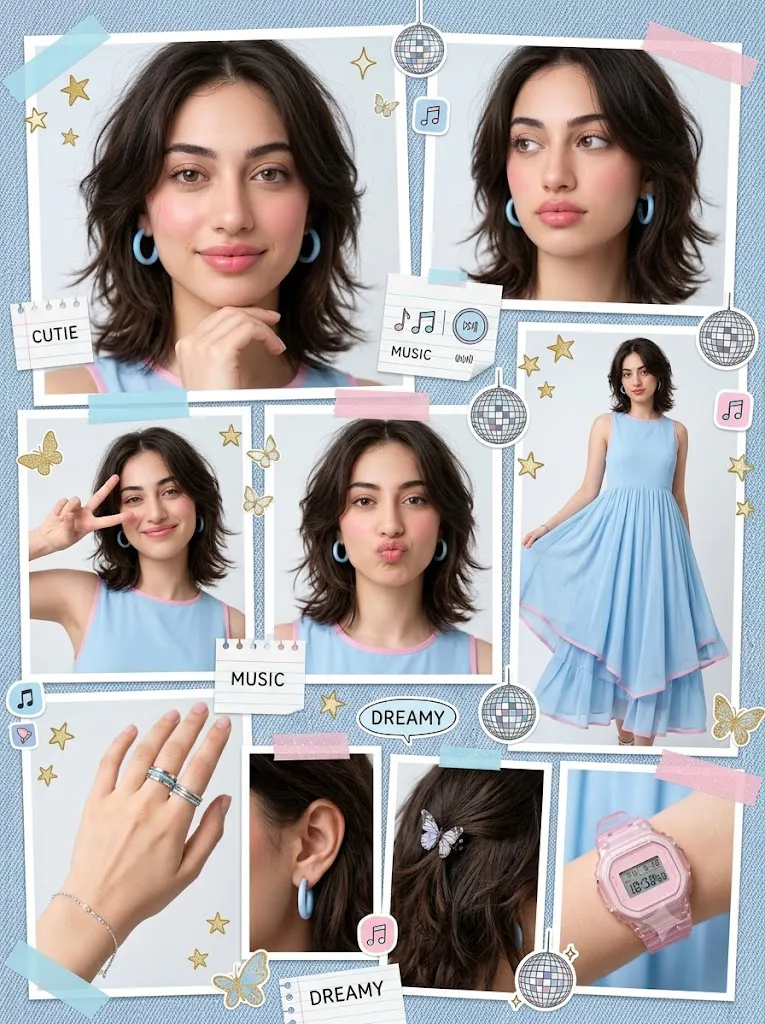
The Kawaii Blue Scrapbook Aesthetic Portrait Collage style is one of the most popular trends in AI-generated digital art, combining the charm of Japanese kawaii culture with modern scrapbook layouts and fashion editorial design. Inspired by pastel aesthetics, Korean fashion photography, cute stationery, and Y2K creative journals, this portrait style transforms an ordinary photo into a vibrant collage filled with personality, decorative elements, and playful storytelling.
"Kawaii Blue Scrapbook Aesthetic Portrait Collage Prompt"
Using the uploaded portrait as the exact facial identity reference, preserve the same face, hairstyle, expression, and natural appearance throughout the entire artwork. Create a kawaii scrapbook-inspired portrait collage featuring multiple poses, including a full-body fashion portrait, close-up facial expressions, profile views, hand details, and playful gestures. Style the subject with pastel blue fashion, delicate silver accessories, and soft natural makeup while maintaining realistic skin texture and detailed hair strands. Design the background using blue scrapbook paper textures, handwritten notes, denim patterns, glitter accents, gold stars, butterflies, music icons, flowers, hearts, doodles, and colorful decorative stickers. Apply soft studio lighting, clean editorial composition, pastel blue-and-white color grading, ultra-realistic facial details, premium magazine layout, 8K quality, crisp textures, and a dreamy kawaii aesthetic.
Unlike a traditional portrait, a scrapbook collage presents multiple versions of the same subject within one artistic composition. Full-body poses, close-up portraits, profile shots, hand details, and expressive facial poses are arranged together using a carefully balanced editorial layout. Decorative stickers, doodles, handwritten notes, glitter effects, denim textures, stars, butterflies, music icons, and pastel graphics create a youthful and cheerful atmosphere.
One of the key strengths of AI image generation is its ability to preserve the facial identity of the reference image while placing the same person into multiple poses and compositions. This allows creators to design magazine-inspired profile pages, aesthetic mood boards, social media graphics, digital journals, and creative portfolios without needing multiple professional photoshoots.
The signature blue color palette gives this design a calm, dreamy, and refreshing feeling. Soft baby blue, pastel white, silver accents, and subtle pink details work together to create a clean and elegant composition. Combined with soft studio lighting and realistic skin textures, the final artwork appears both artistic and professional.
Whether you are an AI artist, digital designer, content creator, fashion blogger, or social media influencer, mastering this prompt style will help you create eye-catching visual content that stands out across multiple platforms.
How To Use Photo Editing?
Although AI generates the collage automatically, professional photo editing helps refine every detail and improves the overall presentation.
Step 1: Choose a High-Quality Reference Photo
Start with a sharp portrait that has natural lighting and clearly visible facial features. High-resolution images allow AI to maintain accurate facial identity throughout every collage element.
Step 2: Copy a Detailed Prompt
Use a professionally written prompt describing the hairstyle, clothing, accessories, background, decorative elements, color palette, expressions, and layout structure.
Step 3: Upload the Reference Image
Import the portrait into an AI image generator that supports face-reference or image-to-image generation.
Step 4: Generate Multiple Versions
Create several layout variations and compare facial consistency, composition, decorative balance, and color harmony.
Step 5: Select the Best Design
Choose the collage that best preserves the original face while maintaining a clean and visually balanced scrapbook layout.
Step 6: Apply Professional Editing
Use editing software to sharpen details, improve lighting, adjust colors, organize the composition, and polish the overall design.
Combining AI image generation with professional editing produces collages that resemble premium magazine layouts.
Tools You Can Use For Prompt Copy and Create Photo
The following tools are excellent for creating kawaii scrapbook portrait collages.
ChatGPT
Generate detailed prompts describing hairstyles, fashion styling, lighting, composition, stickers, backgrounds, and decorative elements.
Midjourney
Perfect for artistic scrapbook compositions featuring beautiful colors, stylish layouts, and creative illustrations.
Flux AI
Produces highly realistic portraits while preserving facial identity across multiple poses within a collage.
Stable Diffusion
Provides advanced customization using image-to-image workflows, ControlNet, and prompt refinement.
GPT Image
Useful for generating high-quality portrait collages directly from detailed prompts with impressive consistency.
Adobe Photoshop
Ideal for combining collage elements, refining portraits, cleaning imperfections, and enhancing textures.
Adobe Illustrator
Excellent for creating custom doodles, vector stickers, arrows, typography, and scrapbook graphics.
Canva
Perfect for designing complete scrapbook pages, magazine layouts, social media posts, posters, and printable journals.
Using AI together with professional editing software ensures polished, publication-quality results.
How To Edit Photo?
Professional editing transforms an AI-generated collage into a polished editorial masterpiece.
Organize the Composition
Adjust the spacing between portraits, stickers, and text elements to create a balanced and visually appealing layout.
Improve Color Harmony
Enhance pastel blue, white, silver, and pink tones while maintaining a soft, dreamy atmosphere.
Sharpen Portrait Details
Increase clarity around the eyes, lips, hair, accessories, and clothing while preserving natural skin texture.
Enhance Decorative Elements
Refine butterflies, flowers, stars, glitter, music icons, arrows, and doodles so they remain crisp and colorful.
Refine the Background
Maintain subtle paper textures and scrapbook layers without overwhelming the portraits.
Adjust Lighting
Use gentle brightness and balanced contrast to preserve the clean studio appearance.
Export in High Resolution
Save the finished collage in 4K or higher resolution for websites, portfolios, social media, posters, greeting cards, or professional printing.
Conclusion
The Kawaii Blue Scrapbook Aesthetic Portrait Collage style combines the playful charm of scrapbook art with the elegance of modern fashion photography and the creative possibilities of AI image generation. By preserving facial identity while incorporating multiple poses, decorative stickers, pastel colors, and editorial layouts, you can create visually engaging artwork that feels both personal and professionally designed.
The key to achieving exceptional results lies in writing detailed prompts, maintaining facial consistency, balancing decorative elements, and refining the final composition through professional editing. Every sticker, doodle, texture, and portrait should contribute to the overall story without creating unnecessary visual clutter.
As AI image generation technology continues to improve, experimenting with different kawaii themes, color palettes, accessories, and scrapbook designs will help you develop your own creative signature. With practice and imagination, you can consistently produce ultra-realistic portrait collages that combine fashion, illustration, and nostalgic scrapbook aesthetics into artwork that is both memorable and visually captivating.