Introduction
The High-Fashion Studio Four-Pose Editorial Portrait Prompt is designed to create a premium fashion editorial inspired by luxury magazines such as Vogue, Harper's Bazaar, and Elle. Instead of producing a single portrait, this concept generates a collection of four professionally composed studio photographs that showcase different emotions, poses, and expressions while maintaining a consistent fashion aesthetic.
"High-Fashion Studio Four-Pose Editorial Portrait Prompt"
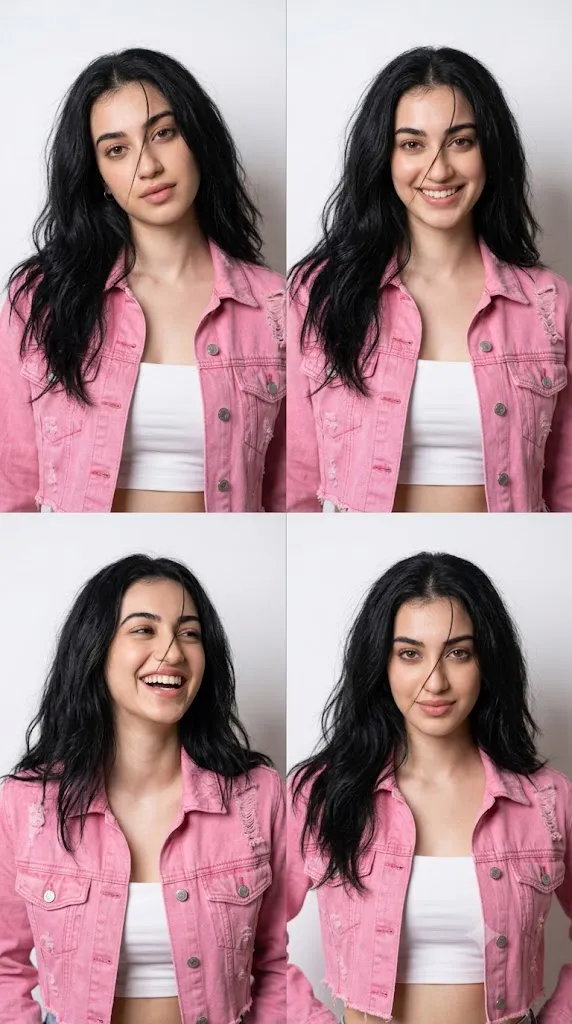
Create four ultra-realistic high-fashion studio portraits using the uploaded image strictly as the facial identity reference. Preserve the exact facial features, skin tone, and proportions without alteration. The subject has long, slightly messy black hair with one loose strand across the face. She wears a pink cropped denim jacket layered over a white tube top. Place her against a seamless white studio background with soft diffused lighting. Capture four unique poses and expressions: dreamy soft gaze, natural smile, candid laugh, and confident fierce editorial expression. Maintain realistic skin texture, subtle makeup, premium fashion styling, shallow depth of field, DSLR quality, Vogue-inspired composition, photorealistic details, and 8K resolution.
The portrait series uses the uploaded reference image strictly for facial identity. Every facial feature—including the face shape, eyes, nose, lips, skin tone, jawline, and natural proportions—should remain unchanged throughout all four images. The objective is to preserve the subject's recognizable appearance while introducing fashionable styling, elegant lighting, and editorial-quality composition.
The wardrobe combines a trendy pink cropped denim jacket layered over a clean white tube top, creating a youthful yet sophisticated look. Long, slightly messy black hair adds movement and realism, while a loose strand falling naturally across the face enhances elegance and cinematic appeal.
The four photographs each capture a unique mood. The first features a gentle, dreamy gaze toward the camera. The second presents a natural candid smile that feels spontaneous and authentic. The third captures a joyful laugh full of personality and energy. The final portrait introduces a confident, fierce editorial expression commonly seen in luxury fashion campaigns.
A seamless white studio background keeps attention focused entirely on the model. Soft diffused lighting creates flattering highlights, delicate shadows, and smooth transitions that reveal realistic skin texture without harsh contrast. Every image should resemble a professional studio photoshoot captured using a high-end DSLR camera with an 85mm portrait lens.
Whether you are creating AI-generated fashion content, portfolio images, editorial campaigns, or social media visuals, this prompt offers an elegant combination of realism, style, and storytelling.
How To Use Photo Editing?
After generating the portraits, careful editing helps elevate the images to true editorial quality. The goal is refinement rather than dramatic alteration.
Begin by adjusting exposure so that the white background remains clean and bright while preserving detail in the clothing and skin. Avoid clipping highlights or creating an overly flat appearance.
Refine the soft studio lighting by balancing highlights and shadows. Gentle light wrapping around the face enhances depth while maintaining a natural look.
Improve color balance to keep skin tones warm and realistic. The pink jacket should remain vibrant without becoming oversaturated, while the white tube top stays neutral and crisp.
Increase clarity selectively around the eyes, lips, hair, and clothing textures. Keep skin texture realistic by avoiding excessive smoothing or heavy beauty filters.
Retain individual hair strands, especially the loose strand across the face. These subtle imperfections contribute to the editorial style and create a more believable portrait.
Ensure all four images share consistent color grading, contrast, and lighting so they appear as part of one cohesive fashion series.
Finally, crop each frame consistently, leaving comfortable headroom and balanced spacing for a polished magazine layout.
Tools You Can Use For Prompt Copy and Create Photo
Professional fashion portraits are easiest to create using advanced AI image generators together with professional editing software.
AI Image Generation Tools
ChatGPT
ChatGPT is ideal for writing detailed prompts that specify facial preservation, wardrobe, lighting, camera settings, and editorial composition.
Midjourney
Midjourney excels at creating luxurious fashion imagery with cinematic lighting and elegant styling.
Leonardo AI
Leonardo AI produces highly realistic portraits while preserving excellent facial consistency.
Ideogram
Ideogram works well for editorial layouts, fashion posters, and magazine-style compositions.
Adobe Firefly
Adobe Firefly integrates AI image generation into professional creative workflows.
Photo Editing Software
Adobe Photoshop
Perfect for portrait retouching, background refinement, color grading, and layout adjustments.
Adobe Lightroom
Excellent for exposure balancing, white balance correction, and professional color grading.
Capture One
Provides exceptional skin-tone rendering and advanced color control.
Affinity Photo
Offers powerful editing features suitable for editorial portrait finishing.
Snapseed
A convenient mobile application for quick lighting and contrast adjustments.
How To Edit Photo?
Step 1: Generate the Base Portraits
Create all four portraits while preserving complete facial identity.
Step 2: Balance Exposure
Maintain a bright white background without losing detail in highlights.
Step 3: Refine Soft Lighting
Enhance gentle studio lighting with smooth shadow transitions.
Step 4: Improve Skin Tone
Preserve natural complexion while avoiding artificial color shifts.
Step 5: Enhance Hair Details
Keep realistic hair strands and natural movement throughout each portrait.
Step 6: Adjust Clothing Colors
Maintain accurate pink and white tones with realistic fabric textures.
Step 7: Sharpen Important Features
Apply selective sharpening to the eyes, lips, and hair while leaving skin natural.
Step 8: Match Color Grading
Ensure all four portraits share identical color balance and tonal consistency.
Step 9: Fine-Tune Contrast
Increase depth without creating harsh shadows or overly bright highlights.
Step 10: Final Composition Check
Verify balanced framing, consistent spacing, and harmonious pose variations.
Step 11: Remove Minor Distractions
Clean only temporary imperfections while preserving natural facial character.
Step 12: Export in High Resolution
Save the final images as PNG or TIFF files for maximum quality in print and digital media.
Conclusion
The High-Fashion Studio Four-Pose Editorial Portrait Prompt offers an elegant way to create a complete fashion story rather than a single portrait. By combining four distinct expressions with consistent styling, lighting, and composition, the prompt produces a professional editorial series suitable for portfolios, magazine layouts, social media campaigns, and fashion branding.
The seamless white background, soft diffused lighting, stylish wardrobe, and carefully preserved facial identity work together to create images that feel authentic, luxurious, and visually refined. Each pose highlights a different aspect of the model's personality—from dreamy calmness to confident intensity—adding depth and variety to the collection.
Modern AI image-generation technology makes it possible to produce studio-quality portraits with remarkable realism, but the quality of the final result still depends on a carefully written prompt and thoughtful post-processing. Paying attention to lighting, color harmony, skin texture, and consistent styling ensures that the finished portraits resemble a professional fashion photoshoot rather than a digitally generated image.
Whether you are building a fashion portfolio, designing editorial content, creating promotional material, or simply experimenting with AI creativity, the High-Fashion Studio Four-Pose Editorial Portrait Prompt provides a sophisticated foundation for producing timeless, high-quality fashion imagery.