Introduction
The Grand Gallery Couture Editorial Portrait Prompt is created for photographers, AI artists, fashion enthusiasts, and digital creators who want to produce luxurious, magazine-worthy portraits inspired by high-end couture campaigns. This style combines sophisticated fashion, elegant architecture, cinematic lighting, and photorealistic portraiture to create an image that feels like it belongs on the cover of a premium fashion publication. Inspired by luxury editorials from Vogue, Harper’s Bazaar, and Elle, this prompt transforms an ordinary portrait into an artistic masterpiece filled with elegance and timeless beauty.
"Grand Gallery Couture Editorial Portrait Prompt"
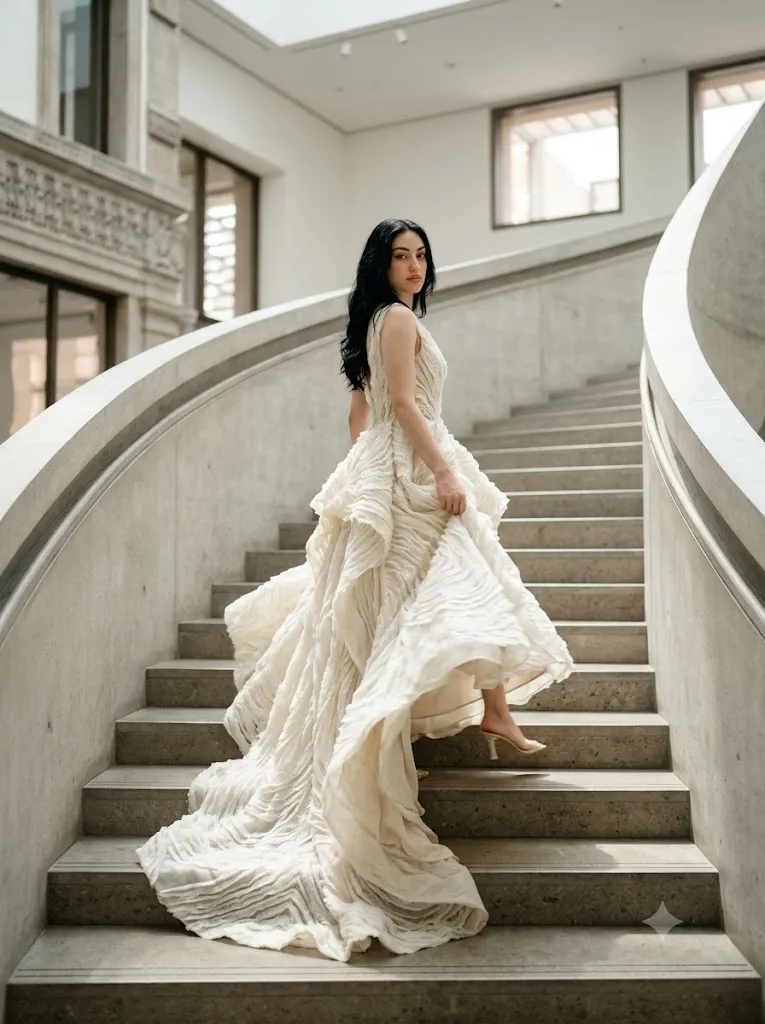
A bright natural daylight is already filling a monumental curved gallery staircase when the subject turns mid-step, a striking editorial fashion portrait opening with atmosphere before character. Every facial detail locked to the reference with the same features, same texture, same skin, same expression as the original uploaded photo preserved completely. A graceful young woman elegantly turns while descending a grand architectural staircase inside a bright gallery space flooded with clean natural light, wearing an elaborate flowing ivory couture gown with rich layered textures and dramatic movement inspired by Pinterest fashion trends for 2026, one foot placed slightly higher on the staircase creating a natural elegant weight shift while her gaze moves directly into the camera lens with quiet refined confidence and the gown fabric spills naturally across the steps behind her. Captured using a Fujifilm GFX100S medium format camera at 80mm portrait lens, f/2.2 aperture, ISO 100, shutter speed 1/1000s, medium format photography quality, global illumination, volumetric daylight through the gallery windows, realistic skin texture and subsurface scattering, tactile fabric detail, micro-textures throughout, cinematic color grading, Kodak Portra inspired warmth, high dynamic range, physically based rendering, photorealistic render, commercial fashion campaign quality, environmental storytelling, rule of thirds composition, authentic editorial styling, natural depth of field, ultra-detailed architecture in background. Clean high-fashion editorial energy, classy and platform-safe styling throughout, natural beauty, cinematic lighting, magazine-grade visual finish.
One of the most important elements of this prompt is accurate facial identity preservation. If you are using one or more uploaded reference images, every facial feature must remain completely unchanged. The AI should preserve facial proportions, skin tone, eye shape, eyebrows, nose, lips, hairstyle, facial contours, and natural expression exactly as shown in the reference. Beautification, reshaping, or artificial facial enhancements should be avoided so the portrait remains authentic.
The setting plays a major role in establishing the editorial atmosphere. Imagine a magnificent gallery hall with towering marble columns, polished stone flooring, oversized classical paintings, crystal chandeliers, and dramatic architectural symmetry. The luxurious surroundings elevate the subject while maintaining a refined, timeless aesthetic.
Fashion styling should reflect modern couture. Flowing gowns, tailored suits, structured silhouettes, premium fabrics, delicate embroidery, metallic accents, and tasteful accessories all contribute to the luxurious visual language. Every garment should complement the architecture rather than compete with it.
Lighting is equally important. Soft cinematic window light mixed with elegant chandelier illumination creates beautiful depth across the subject's face while emphasizing clothing textures and architectural details. Rich highlights and controlled shadows create a premium editorial mood without appearing artificial.
Captured with a professional DSLR or mirrorless camera using an 85mm portrait lens at a wide aperture, the final portrait displays creamy background separation, natural skin texture, cinematic color grading, and exceptional detail suitable for luxury fashion campaigns and editorial publications.
How To Use Photo Editing?
Professional editing enhances elegance while maintaining realism.
Start by balancing exposure carefully. Preserve details within bright architectural highlights while maintaining rich shadow information.
Adjust white balance toward neutral-warm tones to complement luxurious interior lighting while maintaining natural skin colors.
Retain realistic skin texture. Small blemishes may be softened, but natural pores and facial details should remain visible.
Enhance clothing fabrics by increasing local clarity around embroidery, folds, lace, velvet, satin, or silk textures.
Improve architectural contrast carefully so columns, paintings, and chandeliers remain detailed without overpowering the subject.
Finish the portrait with subtle cinematic color grading and delicate analog-inspired grain to create a timeless editorial finish.
Tools You Can Use For Prompt Copy and Create Photo
Modern AI tools and editing software make creating couture editorials much easier.
AI Image Generation Tools
ChatGPT
Perfect for writing detailed prompts describing wardrobe, architecture, lighting, camera settings, and facial identity preservation.
Midjourney
Excellent for luxurious editorial fashion portraits with artistic styling.
Leonardo AI
Produces realistic faces with detailed couture clothing and architectural environments.
Ideogram
Useful for premium lifestyle and fashion portrait concepts.
Adobe Firefly
Provides AI-powered image generation integrated with Adobe Creative Cloud.
Professional Editing Software
Adobe Photoshop
Ideal for detailed retouching, lighting enhancement, and luxury portrait finishing.
Adobe Lightroom
Excellent for exposure balancing, cinematic color grading, and global adjustments.
Capture One
Industry-leading software for professional color rendering and natural skin tones.
Affinity Photo
Offers powerful editing capabilities for portrait and environment refinement.
Snapseed
A convenient mobile editing application for brightness, warmth, contrast, and detail.
How To Edit Photo?
Step 1: Generate the Base Portrait
Create the complete couture scene while preserving facial identity exactly.
Step 2: Balance Exposure
Protect architectural highlights while maintaining shadow detail.
Step 3: Preserve Natural Skin
Maintain realistic skin texture with minimal retouching.
Step 4: Refine Hair
Enhance individual strands while preserving natural movement.
Step 5: Improve Fabric Details
Increase clarity within luxury clothing without creating unnatural sharpness.
Step 6: Enhance Architecture
Bring out details within marble, chandeliers, paintings, and decorative elements.
Step 7: Apply Cinematic Color Grading
Balance warm interior lighting with elegant neutral tones.
Step 8: Add Fine Film Grain
Introduce subtle analog-inspired grain for timeless editorial quality.
Step 9: Sharpen Important Features
Increase clarity around the eyes, clothing textures, jewelry, and architectural details while maintaining soft background separation.
Step 10: Verify Facial Consistency
Compare the final portrait carefully against the uploaded reference image to ensure complete facial accuracy.
Step 11: Final Refinements
Remove unwanted artifacts while preserving realistic lighting transitions and premium detail.
Step 12: Export in High Resolution
Save the completed portrait as PNG or TIFF for maximum quality suitable for magazines, luxury portfolios, print, and social media.
Conclusion
The Grand Gallery Couture Editorial Portrait Prompt combines timeless architecture, luxurious fashion, and cinematic portrait photography into a refined visual experience. Every detail—from accurate facial preservation and elegant couture styling to sophisticated gallery interiors and professional lighting—works together to produce portraits worthy of premium editorial publications.
Unlike ordinary portrait prompts, this style emphasizes storytelling through environment, fashion, and atmosphere while maintaining complete realism. Rich architectural details, balanced lighting, premium wardrobe textures, and authentic skin rendering create images that feel both artistic and believable.
Although modern AI tools can generate impressive luxury portraits, achieving truly professional results still depends on carefully written prompts and thoughtful post-processing. Maintaining authentic facial identity, refining color harmony, preserving realistic textures, and enhancing architectural depth all contribute to creating convincing editorial imagery.
Whether you are producing fashion campaigns, magazine covers, portfolio work, luxury branding, or elegant social media content, the Grand Gallery Couture Editorial Portrait Prompt offers a strong foundation for creating sophisticated, cinematic portraits with timeless visual appeal.