Introduction
The Golden Sunlit Window Editorial Portrait Prompt is designed to create a cinematic portrait that captures the warmth of natural sunlight, the elegance of editorial fashion photography, and the emotional depth of a quiet, reflective moment. Inspired by high-end magazine portraits and modern fine art photography, this prompt combines realistic lighting, authentic facial identity preservation, and luxurious color grading to produce a timeless image.
"Golden Sunlit Window Editorial Portrait Prompt"
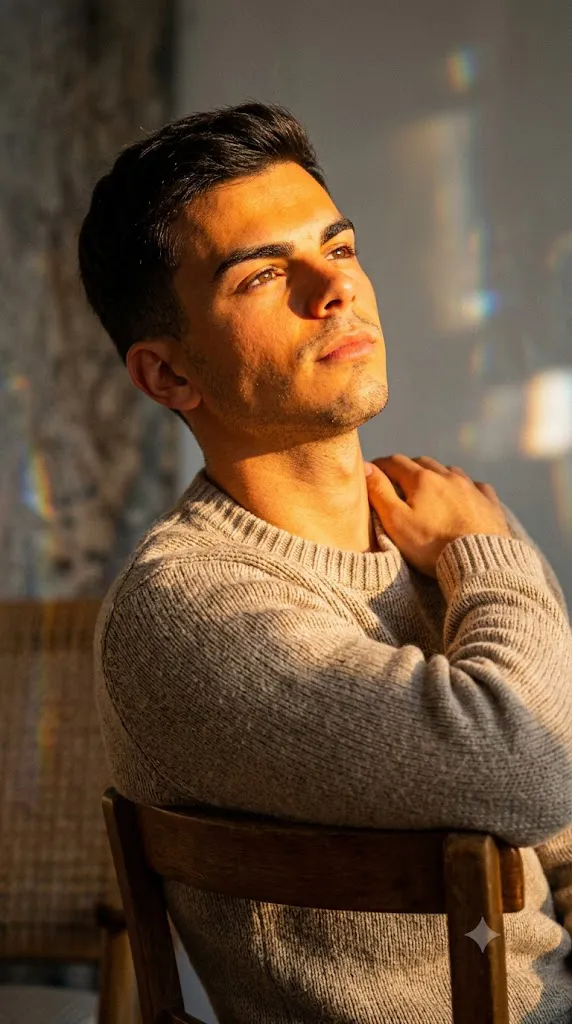
Create a photorealistic editorial portrait using the uploaded selfie strictly as the facial identity reference. Preserve the exact facial structure, skin tone, hairstyle, eyes, eyebrows, nose, lips, jawline, and proportions without beautification. Dress the subject in a beige knitwear sweater. Place the subject seated on a chair with the body facing away from the sunlight while naturally turning toward the light, resting one elbow on the chair back. Capture warm golden sunlight illuminating the face while cool shadows introduce brown and subtle blue tones. Include soft prism reflections on the wall caused by glass refraction, subtle glass filter effects, realistic skin texture, highly detailed hair, fine analog film grain, cinematic color grading, and ultra-detailed 8K quality. Capture using a professional mirrorless camera with a 50–250mm telephoto prime lens at approximately 10× optical zoom. No text or watermark.
One of the most important requirements of this prompt is 100% facial accuracy. When an uploaded selfie is used as the reference, every facial feature—including facial proportions, skin tone, hairstyle, eye shape, eyebrows, nose, lips, jawline, and overall identity—must remain exactly the same. No artificial beautification, reshaping, or identity modification should occur. The AI should only adapt the pose, environment, lighting, clothing, and composition to match the scene naturally.
The composition places the subject in a beautifully lit indoor environment where golden sunlight enters through a nearby window. The subject appears seated on a chair with the body facing away from the light source while turning gracefully toward the sunlight. One elbow rests comfortably on the chair's back, creating a relaxed editorial pose that feels natural rather than staged.
The warm sunlight illuminates the face with glowing orange and golden highlights while deep shadows introduce cool brown and subtle blue tones. This interplay between warm and cool light creates exceptional visual depth and gives the portrait a painterly appearance.
The wardrobe remains minimal yet sophisticated. A beige knitwear sweater introduces texture without distracting from the lighting. Fine fabric details remain crisp while complementing the warm color palette.
Professional camera settings elevate the portrait further. Captured using a mirrorless camera paired with a 50–250mm telephoto prime lens at approximately 10× optical zoom, the portrait benefits from natural compression, beautiful background separation, and highly detailed facial rendering.
Additional stylistic elements—including delicate glass prism reflections, soft film grain, subtle glass filter effects, and nostalgic cinematic grading—complete the editorial look while maintaining photorealistic quality suitable for luxury magazines and fashion campaigns.
How To Use Photo Editing?
Professional editing transforms an already strong portrait into an editorial-quality masterpiece while preserving realism.
Begin by balancing exposure carefully. Preserve detail within the bright sunlight while maintaining texture inside darker shadow regions.
Adjust white balance toward warm golden daylight without creating unnatural skin tones.
Maintain realistic skin texture. Temporary blemishes may be softened slightly, but pores and natural facial detail should remain visible.
Increase clarity around the knit sweater to emphasize its woven texture.
Refine individual hair strands while maintaining natural movement and softness.
Enhance the subtle prism reflections and delicate glass artifacts without overwhelming the portrait.
Complete the edit using refined cinematic color grading combined with fine analog-inspired film grain for a sophisticated editorial finish.
Tools You Can Use For Prompt Copy and Create Photo
Modern AI generators and professional editing software simplify the creation of cinematic editorial portraits.
AI Image Generation Tools
ChatGPT
Excellent for writing highly detailed prompts describing facial preservation, lighting, clothing, camera settings, and composition.
Midjourney
Produces stunning editorial portraits with cinematic lighting and artistic realism.
Leonardo AI
Creates highly realistic portraits while preserving facial consistency.
Ideogram
Suitable for realistic fashion photography concepts and portrait generation.
Adobe Firefly
Provides AI-powered image generation integrated with Adobe Creative Cloud.
Professional Editing Software
Adobe Photoshop
Ideal for portrait retouching, lighting refinement, prism effects, and detailed finishing.
Adobe Lightroom
Excellent for color grading, exposure balancing, and cinematic finishing.
Capture One
Offers industry-leading color management and realistic skin rendering.
Affinity Photo
Provides powerful editing capabilities for portrait enhancement.
Snapseed
Useful for mobile editing with practical controls for brightness, warmth, contrast, and sharpening.
How To Edit Photo?
Step 1: Upload the Reference Image
Provide a clear, high-resolution selfie showing the complete face with sufficient lighting.
Step 2: Generate the Base Portrait
Create the complete composition while preserving the uploaded facial identity exactly.
Step 3: Balance Exposure
Protect bright highlights while maintaining detail within darker shadow regions.
Step 4: Preserve Natural Skin
Maintain realistic facial texture while gently reducing temporary imperfections.
Step 5: Refine Hair
Increase detail around individual strands while preserving natural softness.
Step 6: Enhance Clothing Texture
Improve the woven appearance of the beige knitwear without oversharpening.
Step 7: Improve Light Transitions
Refine the transition between warm highlights and cool shadows for greater depth.
Step 8: Add Glass Effects
Introduce subtle prism reflections and soft glass artifacts to reinforce the dreamy aesthetic.
Step 9: Apply Cinematic Color Grading
Balance golden sunlight with cool shadow tones while preserving natural skin colors.
Step 10: Add Fine Film Grain
Apply subtle analog-inspired grain to create a nostalgic editorial appearance.
Step 11: Verify Facial Accuracy
Compare the portrait carefully against the uploaded reference image to ensure complete facial consistency.
Step 12: Export in High Resolution
Save the final image as PNG or TIFF to preserve maximum quality for portfolios, magazine publications, fine art printing, or premium social media content.
Conclusion
The Golden Sunlit Window Editorial Portrait Prompt combines elegant fashion styling, authentic facial preservation, cinematic lighting, and luxurious editorial aesthetics into a refined portrait that feels both timeless and emotionally expressive.
By emphasizing complete facial identity preservation alongside realistic skin textures, dramatic golden sunlight, sophisticated camera techniques, detailed knitwear textures, and subtle prism reflections, this prompt creates portraits suitable for fashion editorials, beauty campaigns, artistic portfolios, and premium branding.
Although AI image generation can produce remarkable images quickly, achieving professional-quality results still depends on careful prompt writing and thoughtful post-processing. Accurate identity preservation, realistic lighting, balanced color grading, refined textures, and natural environmental integration all contribute to a believable final portrait.
Whether your goal is creating editorial fashion imagery, luxury personal branding, cinematic portfolio work, or artistic social media content, the Golden Sunlit Window Editorial Portrait Prompt provides a powerful foundation for producing elegant, photorealistic portraits filled with warmth, sophistication, and visual storytelling.