Introduction
The Enchanted Cottagecore Meadow Portrait Prompt combines the peaceful beauty of nature with timeless countryside aesthetics to create a magical, storybook-inspired portrait. Drawing inspiration from cottagecore fashion, fairytale landscapes, and cinematic photography, this prompt transforms a simple portrait into a dreamy visual narrative filled with warmth, elegance, and serenity
"Enchanted Cottagecore Meadow Portrait Prompt"
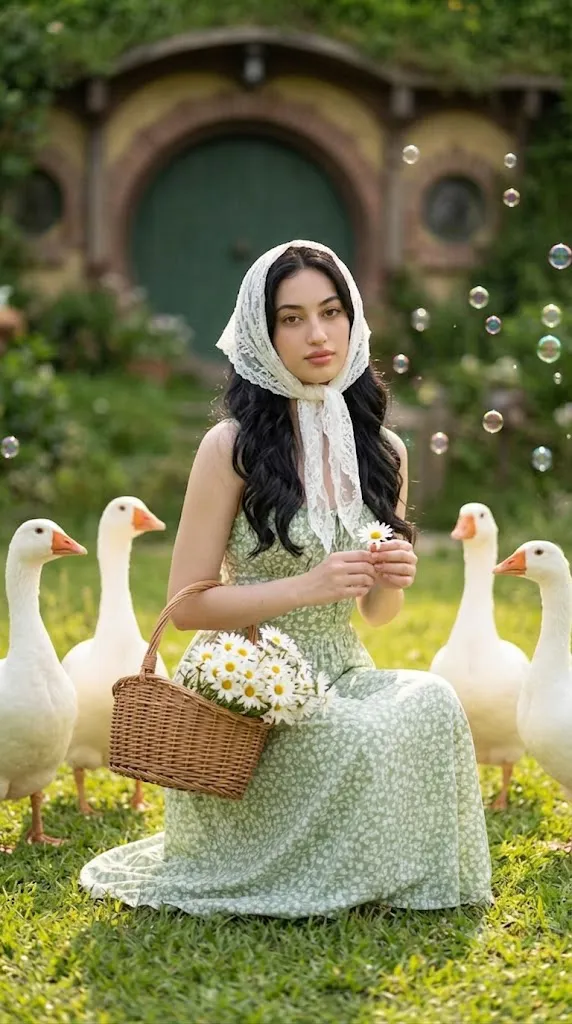
Create a photorealistic portrait using the uploaded reference image strictly for facial identity. Preserve the face exactly as shown without any alterations. A young woman kneels gracefully in a lush summer meadow filled with countless white daisies. She wears a flowing light green cotton maxi dress with delicate white floral patterns and a pure white lace headscarf framing her face. In one hand she gently holds a rustic woven basket overflowing with freshly picked white flowers, while the other hand delicately cradles a single daisy. Four adorable white geese with bright orange beaks stand naturally around her. Behind her sits a charming Hobbit-style cottage featuring a round green door surrounded by lush foliage. Floating soap bubbles sparkle throughout the air beneath warm natural sunlight. Cinematic photography, 85mm lens, shallow depth of field, ultra-realistic textures, natural skin tones, soft summer lighting, storybook atmosphere, premium editorial quality, 8K resolution.
At the heart of this concept is a young woman whose facial identity remains completely faithful to the uploaded reference image. Her facial structure, skin tone, eyes, nose, lips, hairstyle around the face, and natural expression remain unchanged, ensuring authentic identity preservation. Rather than altering facial features, the transformation focuses on wardrobe, environment, lighting, and mood.
The subject wears a flowing light green cotton maxi dress decorated with delicate white floral prints that perfectly harmonize with the surrounding meadow. A graceful white lace headscarf frames her face, adding vintage charm while reinforcing the soft cottagecore aesthetic. Kneeling gently among countless blooming daisies, she holds a rustic woven basket overflowing with freshly picked white flowers, while a single daisy rests delicately in her hand.
The surrounding landscape creates the enchanting atmosphere. Four friendly white geese stand nearby, shimmering soap bubbles drift across the air, and a charming Hobbit-style house with its signature round green door quietly nestles among lush greenery. Warm natural sunlight bathes the entire scene, creating soft shadows, vibrant colors, and an inviting summer mood.
Unlike dramatic fantasy artwork, this prompt emphasizes realism. Every flower petal, blade of grass, feather, and fabric fold appears naturally detailed while maintaining an ethereal storybook quality. The result feels like a still frame from a magical countryside film rather than a digitally created illustration.
Whether you're creating AI artwork, editorial portraits, fantasy-inspired photography, or social media content, this prompt offers an ideal balance between photorealism and imaginative storytelling.
How To Use Photo Editing?
Photo editing helps refine the generated image while preserving its natural appearance. Since the goal is realism rather than heavy stylization, every adjustment should enhance existing details instead of introducing artificial effects.
Begin by balancing the exposure. Bright summer meadows naturally contain strong highlights, but the subject's face should remain evenly illuminated without harsh shadows or blown-out areas. Gentle highlight recovery can preserve detail in white flowers and the lace headscarf.
Next, adjust the color temperature. A slightly warm white balance recreates the comforting feeling of a peaceful summer afternoon. Greens should remain vibrant yet natural, while skin tones stay soft and realistic.
Color grading should emphasize gentle pastel hues. Slightly desaturating extremely vivid greens while enhancing warm yellows and soft floral colors creates a cinematic countryside appearance.
Refine the depth of field carefully. The subject should remain perfectly sharp while the distant meadow, flowers, and Hobbit house transition into smooth, creamy background blur. This naturally directs attention toward the portrait.
Enhance texture selectively. Increase detail in the woven basket, cotton dress fabric, lace headscarf, flower petals, and goose feathers without making the image appear overly sharpened.
Maintain authentic skin texture throughout editing. Avoid aggressive smoothing or beauty filters. Natural pores, subtle skin variations, and realistic facial detail contribute significantly to photorealism.
Finally, introduce a subtle cinematic glow around sunlit areas. Soft bloom on the bubbles, flowers, and sunlight filtering through the meadow enhances the magical atmosphere while maintaining realism.
Tools You Can Use For Prompt Copy and Create Photo
High-quality AI portrait creation begins with choosing the right tools for prompt generation, image creation, and editing.
AI Image Generation Tools
ChatGPT
ChatGPT helps create detailed prompts describing facial preservation, wardrobe, environment, lighting, composition, and storytelling with remarkable precision.
Midjourney
Midjourney excels at producing artistic yet highly detailed fantasy landscapes and editorial portraits.
Leonardo AI
Leonardo AI creates realistic human portraits with excellent facial consistency and natural environmental rendering.
Ideogram
Ideogram works well for clean compositions and detailed lifestyle portrait concepts.
Adobe Firefly
Adobe Firefly combines AI image generation with professional creative workflows for polished results.
Photo Editing Software
Adobe Photoshop
Photoshop remains the industry standard for advanced retouching, color grading, compositing, and environmental refinements.
Adobe Lightroom
Lightroom offers powerful tools for adjusting exposure, white balance, color harmony, and cinematic tones.
Capture One
Capture One provides exceptional skin-tone rendering and precise color management for portrait photography.
Affinity Photo
Affinity Photo is an excellent alternative for professional editing with comprehensive creative tools.
Snapseed
Snapseed offers convenient mobile editing with professional-quality controls for lighting, contrast, and color adjustments.
How To Edit Photo?
Step 1: Generate the Base Portrait
Create the initial image using your preferred AI image generator while maintaining complete facial fidelity.
Step 2: Balance Exposure
Adjust brightness so the subject remains naturally illuminated while preserving detail throughout the meadow.
Step 3: Refine Color Temperature
Apply a warm summer color balance that enhances the peaceful countryside atmosphere.
Step 4: Improve Texture
Increase detail in flowers, basket weaving, dress fabric, lace, and feathers while preserving softness.
Step 5: Enhance Background Depth
Maintain gentle background blur without losing recognizable environmental elements.
Step 6: Apply Cinematic Color Grading
Use soft greens, creamy whites, warm yellows, and natural skin tones for a harmonious palette.
Step 7: Refine Lighting
Enhance sunlight gently while preserving realistic shadows and dimensionality.
Step 8: Preserve Facial Identity
Avoid altering facial proportions, expression, or natural skin characteristics.
Step 9: Add Subtle Atmosphere
Introduce delicate bloom around sunlight and bubbles to reinforce the magical mood.
Step 10: Fine-Tune Composition
Ensure balanced spacing between the subject, geese, flowers, and background cottage.
Step 11: Final Sharpening
Apply selective sharpening to the face and foreground details while keeping the background smooth.
Step 12: Export the Final Image
Save the completed portrait in PNG, TIFF, or high-quality JPEG format to retain maximum detail.
Conclusion
The Enchanted Cottagecore Meadow Portrait Prompt beautifully captures the romance of rural landscapes, timeless fashion, and fairytale storytelling within a highly realistic photographic style. Rather than relying on dramatic fantasy elements alone, it creates enchantment through subtle details, natural lighting, and emotional atmosphere.
The harmonious combination of wildflowers, friendly geese, a charming countryside cottage, and flowing vintage-inspired clothing produces an image that feels peaceful, nostalgic, and inviting. Preserving the exact facial identity ensures authenticity while allowing the surrounding environment to transport the viewer into a magical world.
Modern AI image-generation technology makes creating this style more accessible than ever, but achieving exceptional results still depends on carefully written prompts, thoughtful composition, and refined post-processing. Attention to lighting, color harmony, textures, and natural depth elevates the final portrait from a simple image into an immersive visual story.
Whether used for fantasy-inspired editorials, personal portfolios, creative projects, or social media, the Enchanted Cottagecore Meadow Portrait Prompt offers a timeless aesthetic that celebrates nature, elegance, and imagination. By combining photorealism with whimsical storytelling, creators can produce portraits that feel both emotionally meaningful and visually unforgettable.