Introduction
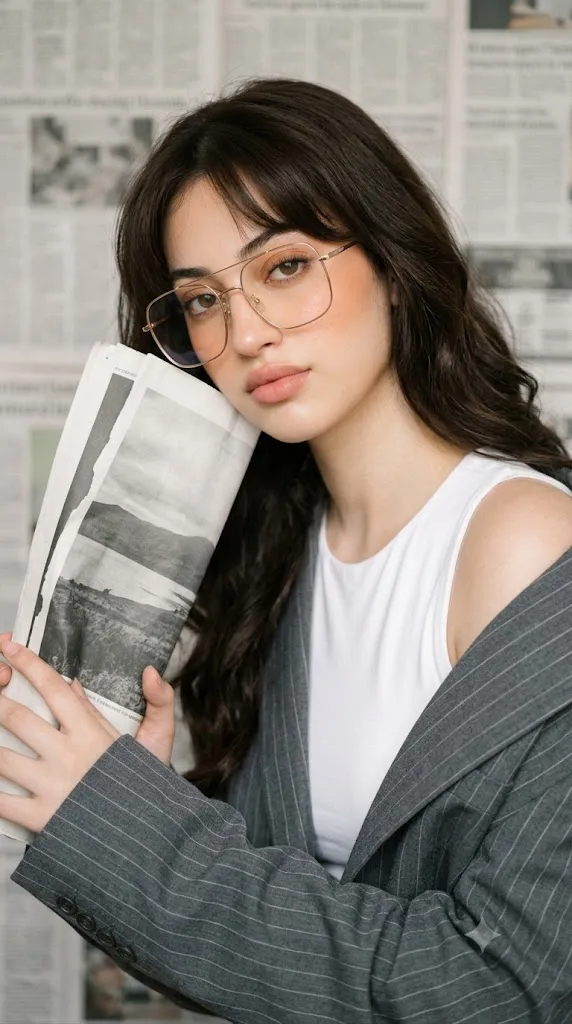
The Dreamy Editorial Newspaper Portrait Prompt is a sophisticated portrait concept inspired by modern fashion magazines, luxury beauty campaigns, and minimalist editorial photography. It combines elegant styling, soft natural lighting, delicate makeup, and carefully balanced composition to produce an image that feels timeless, artistic, and emotionally engaging. Rather than relying on dramatic effects, this prompt emphasizes subtle beauty, refined fashion, and authentic facial expression.
"Dreamy Editorial Newspaper Portrait Prompt"
Create a photorealistic editorial portrait using the uploaded image strictly as the facial identity reference. Preserve the exact facial structure, skin tone, hairstyle, eyes, eyebrows, nose, lips, jawline, and proportions without beautification. Dress the subject in a white sleeveless top with a gray pinstripe oversized blazer draped casually over one shoulder. Style the hair in long dark brown waves with layered bangs. Add thin gold-rimmed square glasses. Position the subject close to the camera holding a folded black-and-white landscape print gently against the face with a soft thoughtful expression. Use scattered newspapers as a textured minimalist background. Illuminate the portrait with soft diffused lighting, warm highlights, subtle desaturated shadows, shallow depth of field, realistic skin texture, cinematic editorial color grading, fine analog film grain, and ultra-detailed 8K quality. No text or watermark.
A defining feature of this portrait style is its commitment to complete facial identity preservation. When using an uploaded reference image, every facial characteristic—including skin tone, facial proportions, eye shape, eyebrows, nose, lips, jawline, hairstyle, and overall identity—should remain exactly the same. The AI should never beautify, reshape, or reinterpret the subject’s appearance. Only the styling, wardrobe, pose, background, and lighting should be transformed while preserving the person's natural identity.
The wardrobe reflects contemporary editorial fashion. A clean white sleeveless top paired with a relaxed gray pinstripe oversized blazer creates a sophisticated yet effortless appearance. Thin gold-rimmed square glasses introduce an intellectual and chic element that complements the minimalist styling.
Hair and makeup are intentionally understated. Long dark brown hair styled in soft natural waves with layered bangs gently frames the face, while luminous porcelain skin, peach blush, subtle warm eyeshadow, lightly defined brows, and soft pink matte lips enhance natural beauty without appearing overly dramatic.
One of the most distinctive visual elements is the folded black-and-white landscape print held gently against the face. This simple prop creates intimacy and storytelling while adding visual interest to the composition. Behind the subject, scattered newspapers introduce texture and depth without distracting from the portrait itself.
Soft neutral color grading, warm highlights, subtle desaturated shadows, and shallow depth of field complete the editorial atmosphere, making the final portrait suitable for magazine covers, fashion campaigns, beauty portfolios, or luxury social media branding.
How To Use Photo Editing?
Professional editing transforms the generated image into a polished editorial portrait while maintaining realism.
Begin by correcting exposure to preserve smooth highlights and balanced shadows. The portrait should appear bright without losing facial detail.
Adjust white balance toward soft warm daylight. Neutral tones should dominate while preserving realistic skin color.
Maintain natural skin texture. Although editorial beauty portraits often feature smooth skin, realistic pores and subtle texture should remain visible.
Enhance eye clarity gently without over-sharpening. The glasses should remain crystal clear with realistic reflections.
Increase local contrast slightly around the hair and blazer to emphasize texture while maintaining softness throughout the image.
Refine the newspaper background by balancing detail and blur so it supports the portrait rather than competing with it.
Finish with subtle cinematic color grading and fine film-inspired grain for a premium editorial appearance.
Tools You Can Use For Prompt Copy and Create Photo
Modern AI generators and professional editing applications make creating editorial portraits both efficient and accessible.
AI Image Generation Tools
ChatGPT
Useful for writing highly detailed prompts covering facial identity preservation, fashion styling, camera settings, composition, and lighting.
Midjourney
Excellent for artistic fashion editorials with elegant lighting and cinematic composition.
Leonardo AI
Produces highly realistic faces, clothing textures, and editorial-quality portraits.
Ideogram
Suitable for editorial photography and lifestyle portrait generation.
Adobe Firefly
Offers AI image generation integrated into the Adobe Creative Cloud ecosystem.
Photo Editing Software
Adobe Photoshop
Ideal for advanced portrait retouching, skin refinement, clothing enhancement, and composition adjustments.
Adobe Lightroom
Perfect for color grading, exposure correction, and cinematic finishing.
Capture One
Provides exceptional skin-tone rendering and professional color management.
Affinity Photo
Offers advanced editing capabilities suitable for editorial portrait refinement.
Snapseed
A powerful mobile editing application with practical tools for brightness, warmth, sharpening, and contrast adjustments.
How To Edit Photo?
Step 1: Generate the Base Portrait
Create the portrait while preserving the uploaded facial identity exactly.
Step 2: Balance Exposure
Maintain soft highlights while preserving detail throughout the face and clothing.
Step 3: Preserve Natural Skin
Keep realistic skin texture while gently smoothing only minor imperfections.
Step 4: Refine Makeup
Enhance blush, lip color, brows, and eye definition subtly without creating an artificial appearance.
Step 5: Improve Hair Detail
Increase clarity around individual strands while preserving natural softness.
Step 6: Enhance Clothing Texture
Sharpen the blazer and top slightly to emphasize premium fabric quality.
Step 7: Refine Background
Maintain newspaper texture while allowing gentle background blur to separate the subject naturally.
Step 8: Apply Cinematic Color Grading
Balance warm highlights with neutral shadows to produce an elegant magazine aesthetic.
Step 9: Add Fine Film Grain
Introduce subtle analog-inspired grain for timeless editorial character.
Step 10: Verify Facial Consistency
Ensure every facial feature matches the uploaded reference photograph perfectly.
Step 11: Final Refinements
Remove artifacts while preserving realistic lighting transitions and fine textures.
Step 12: Export in High Resolution
Save the completed portrait as PNG or TIFF to preserve maximum quality for portfolios, magazines, fashion campaigns, or print publications.
Conclusion
The Dreamy Editorial Newspaper Portrait Prompt celebrates elegance through simplicity. Every visual element—from the oversized blazer and gold-rimmed glasses to the folded landscape print and newspaper backdrop—works together to create a sophisticated portrait that feels artistic without becoming overly complex.
Complete facial identity preservation remains the foundation of this prompt. Rather than changing the subject's appearance, AI enhances the surrounding environment, fashion styling, lighting, and composition to produce a polished editorial photograph while maintaining authentic individuality.
The combination of soft natural lighting, refined beauty makeup, shallow depth of field, subtle film grain, and balanced neutral color grading creates an image suitable for luxury magazines, fashion campaigns, beauty portfolios, and premium personal branding. The result is a portrait that communicates confidence, intelligence, creativity, and timeless style.
Although AI technology can generate remarkable images quickly, achieving truly professional editorial portraits still requires thoughtful prompt writing and careful post-processing. Maintaining realistic skin, preserving facial identity, balancing lighting, refining textures, and applying subtle cinematic grading all contribute to the final polished result.
Whether you're creating content for fashion editorials, magazine covers, beauty campaigns, lifestyle branding, or elegant social media portfolios, the Dreamy Editorial Newspaper Portrait Prompt provides an excellent foundation for producing refined, photorealistic portraits with artistic sophistication and lasting visual appeal.